
1. Important Safety Instructions
Read all instructions before using this appliance. Failure to follow these instructions may result in injury or damage to the product.
- Consult a physician before starting any exercise program, especially if you have pre-existing medical conditions.
- Use the elliptical on a stable, level surface. Ensure adequate space around the unit.
- Keep children and pets away from the elliptical during operation.
- Do not operate the elliptical if it has a damaged cord or plug, or if it is not working properly.
- Do not place hands or feet near moving parts.
- Ensure the power cord is not pinched or damaged.
- The maximum weight recommendation for this device is 500 pounds.
- Always wear appropriate footwear when using the elliptical.
- Stop exercising immediately if you feel faint, dizzy, or experience pain.
2. Product Overview
The FOUSAE Under Desk Elliptical MC57A is designed to provide a low-impact leg exercise experience while sitting. It features adjustable speed levels, dual motion directions, and convenient control options.
Components:
- Main Elliptical Unit with Pedals
- LED Display Screen
- Remote Control
- Power Cord
- Non-Slip Mat
- Detachable Pedal Straps
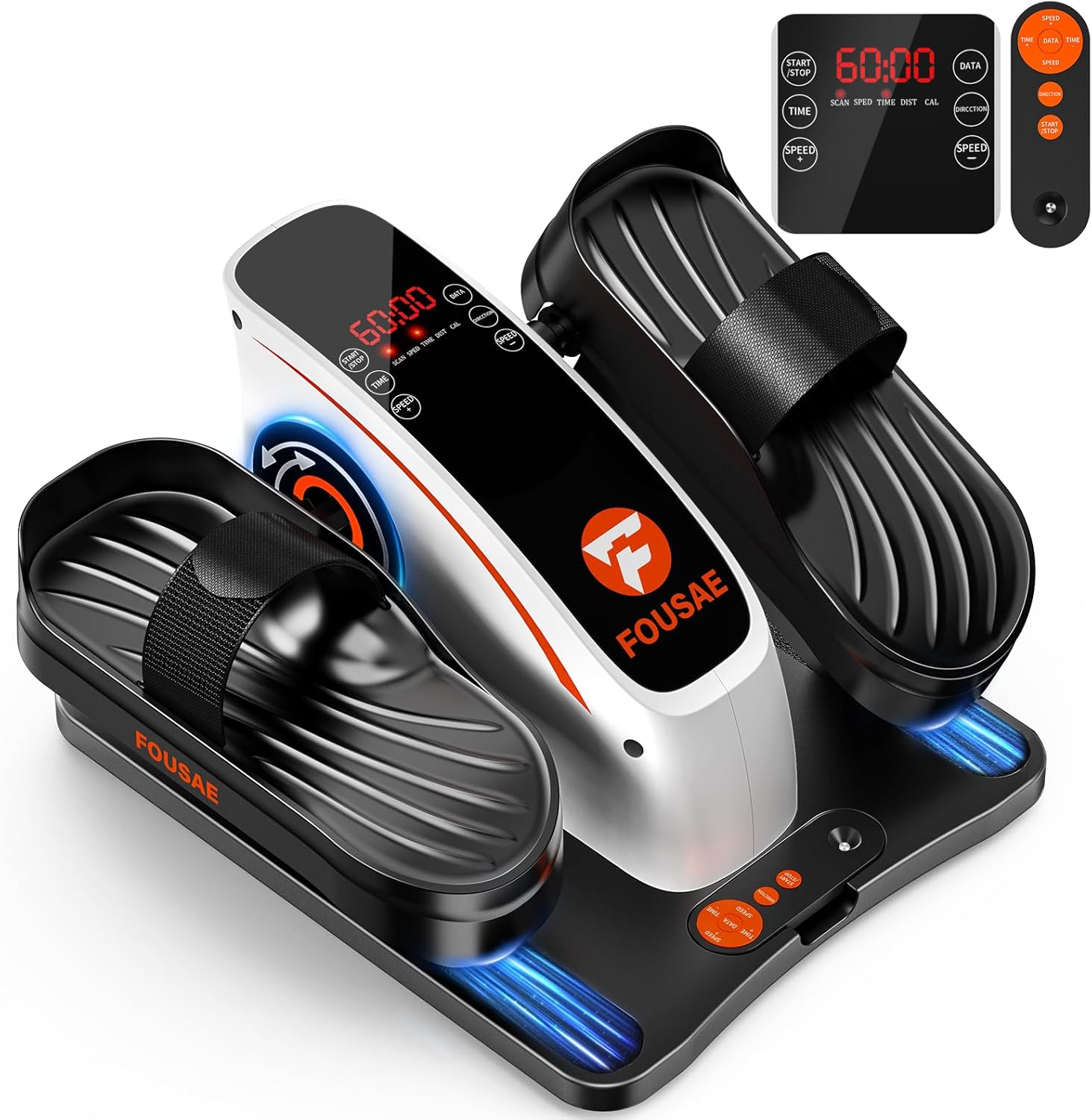
Figure 2.1: Main components of the FOUSAE Under Desk Elliptical MC57A.

Figure 2.2: Detailed view of the elliptical's features including massage pedals, adjustable straps, and hidden handle.
3. Setup Instructions
The FOUSAE Under Desk Elliptical MC57A comes 100% pre-assembled. No additional assembly is required.
- Unpacking: Carefully remove the elliptical from its packaging.
- Placement: Place the elliptical on a flat, stable surface. For optimal stability and floor protection, place the included non-slip mat underneath the unit.
- Power Connection: Connect the power cord to the elliptical's power input port and then plug it into a standard electrical outlet.
- Remote Control: Ensure the remote control has a working battery. If not, replace the battery as needed.

Figure 3.1: Package contents and pre-assembled status.
4. Operating Instructions
The elliptical can be controlled via the integrated touch screen or the remote control.
4.1 Powering On/Off
- To power on, press the START/STOP button on the touch screen or remote.
- To power off, press the START/STOP button again.
4.2 Adjusting Speed and Time
The elliptical offers 15 adjustable speed levels and time settings from 0-60 minutes (in 5-minute increments).
- Use the SPEED + and SPEED - buttons on the touch screen or remote to adjust the speed.
- Use the TIME button to set the desired workout duration.
- Speed Levels Guide:
- Levels 0-5: Warm-up or rehabilitation.
- Levels 5-10: Circuits or activation.
- Levels 10-15: Muscle strengthening or calorie burning.

Figure 4.1: Speed level recommendations for various exercise intensities.
4.3 Forward and Reverse Motion
The elliptical supports both forward and reverse pedaling directions.
- Press the DIRECTION button on the touch screen or remote to switch between forward and reverse motion.
- Forward Motion: Primarily targets thighs, glutes, and calves, enhancing leg endurance.
- Reverse Motion: Focuses on hamstrings, knees, and ankles, improving joint flexibility and balance.

Figure 4.2: Benefits of forward and reverse pedaling.
4.4 Using the Remote Control
The remote control allows for convenient adjustment of settings without bending down.
- Point the remote directly at the elliptical's display panel within 6.5 feet for optimal response.
- Buttons on the remote include: START/STOP, TIME, SPEED +, SPEED -, DIRECTION, and DATA.

Figure 4.3: Remote and touch controls for the elliptical.
4.5 Display Information
The LED display tracks the following metrics:
- Speed: Current operating speed.
- Distance: Estimated distance covered.
- Time: Elapsed workout time.
- Calories: Estimated calories burned.
- Press the DATA button to cycle through these metrics.
5. Maintenance
Regular maintenance ensures the longevity and optimal performance of your elliptical.
- Cleaning: Wipe down the unit with a soft, damp cloth after each use. Avoid abrasive cleaners or solvents.
- Storage: Store the elliptical in a cool, dry place away from direct sunlight and extreme temperatures. The built-in handle facilitates easy movement and storage.
- Power Cord: Periodically inspect the power cord for any signs of damage. If damaged, discontinue use and contact customer support.
- Pedal Straps: The pedal straps are detachable for cleaning or replacement. Ensure they are securely fastened before each use.

Figure 5.1: Built-in handle for easy portability and storage.
6. Troubleshooting
| Problem | Possible Cause | Solution |
|---|---|---|
| Elliptical does not power on. | Power cord not securely plugged in. No power from outlet. | Ensure power cord is fully inserted into the unit and wall outlet. Test the outlet with another device. |
| Remote control is unresponsive. | Remote battery is low or dead. Remote not pointed correctly. | Replace the remote control battery. Ensure the remote is pointed directly at the elliptical's display panel. |
| Unusual noise during operation. | Loose components. Unit not on a level surface. | Check for any loose parts and tighten if necessary. Ensure the unit is on a flat, stable surface, using the non-slip mat. |
| Pedals feel stiff or inconsistent. | Debris caught in mechanism. | Inspect the pedal mechanism for any obstructions and remove them. |
If you encounter issues not listed here or if problems persist, please contact FOUSAE customer support.
7. Product Specifications
| Feature | Detail |
|---|---|
| Model Name | MC57A |
| Brand | FOUSAE |
| Product Dimensions (D x W x H) | 16.3" x 13" x 10.4" |
| Material | Alloy Steel |
| Resistance Mechanism | Magnetic |
| Maximum Weight Recommendation | 500 Pounds |
| Maximum Stride Length | 15 Inches |
| Item Weight | 6.5 Kilograms |
| Number of Resistance Levels | 15 |
| Motor Power | 80W (Ultra-quiet, <15 dB) |
| Control Options | Touch Screen, Remote Control |
| Included Components | Elliptical, Non-Slip Mat, Power Cord, Remote Control, User Manual |

Figure 7.1: Motor and performance specifications.
8. Warranty and Support
8.1 Warranty Information
All FOUSAE products come with a 12-month warranty from the date of purchase. This warranty covers manufacturing defects and issues arising from normal use.
Please retain your proof of purchase for warranty claims.
8.2 Customer Support
For any questions, concerns, or warranty claims, please contact FOUSAE customer support. We provide 24/7 customer support to assist you.
Contact information is typically found on the product packaging or the official FOUSAE website.

Figure 8.1: FOUSAE Customer Support details.