
CubePilot Here4 Multiband RTK GNSS
Here4 Multiband RTK GNSS User Manual
Model: Here4 Multiband RTK GNSS | Brand: CubePilot
1. Product Overview
Here 4 is a professional High Precision Dual-band RTK Navigation module. It supports multiple GNSS options such as BeiDou, Galileo, GLONASS, GPS, QZSS. The Here 4 utilizes advanced algorithms and multi-frequency DGNSS signals to quickly achieve an RTK Fix within seconds. This results in highly reliable positioning at an accuracy within centimeters. The Here 4 goes beyond being a simple GNSS module. It combines flight control and navigation functionalities into a single device. With 8 PWM or BDSHOT outputs, an RCIN, Hotshoe, and camera trigger, it offers a self-contained solution for accurate mapping and precise control capabilities.
Key features include:
- Equipped with u-blox F9P, a professional high precision Dual-band RTK navigation module.
- Powerful processing performance provided by a built-in STM32H7 chip. It offers real-time processing and data optimization, and Unmanned Industry standard AP_Periph Firmware.
- Here 4 uses multi-frequency DGNSS signals with advanced algorithms. This allows fast convergence to an RTK Fix, achieving more reliable and stable centimeter level positioning.
- The Here 4 module is 16 x 68mm and 60g.
- Built-in LED multiple display modes for notification or navigation signals. Display modes can be selected according to specific scenarios via parameters or onboard Lua Scripting.
- CAN FD, real time, and high transmission rate.
- Built-in IMU. Through future firmware updates, Here 4 can achieve tightly coupled DGNSS-INS-fusing solutions.
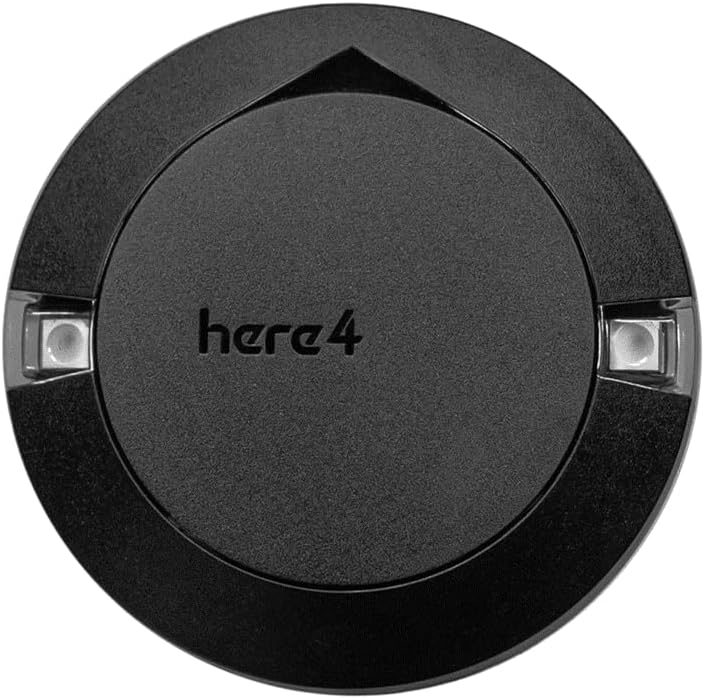
Figure 1: Top-down view of the Here4 Multiband RTK GNSS module. This image displays the compact, circular design of the device, featuring a matte black finish with the product name "here4" subtly embossed on its surface. Two transparent sections on the sides reveal integrated LED indicators, suggesting status or operational feedback.

Figure 2: Feature highlights of the Here4 module. This diagram visually explains the core capabilities, including its high-precision positioning, powerful internal processing (STM32H7 chip), integrated flight control and navigation functions, and support for future expansion and customization via DroneCAN FD communication.
2. Setup and Installation
Proper setup is crucial for optimal performance of the Here4 Multiband RTK GNSS module. Follow these general guidelines for installation and initial configuration.
2.1 Mounting Considerations
- Mount the Here4 module in a location with a clear, unobstructed view of the sky to ensure maximum satellite visibility.
- Avoid mounting near sources of electromagnetic interference (EMI), such as motors, ESCs, or high-current wires, as this can degrade GNSS performance.
- Ensure the module is securely fastened to prevent movement during operation, which could affect positioning accuracy.
- The module is designed for panel mounting. Utilize appropriate hardware to secure it firmly.
2.2 Electrical Connection
- Connect the Here4 module to your flight controller or host system using the provided CAN cable. The Here4 utilizes CAN FD for communication.
- Ensure correct polarity when connecting power. Refer to your flight controller's documentation for specific CAN port pinouts.
- The module integrates flight control and navigation functionalities, including 8 PWM or BDSHOT outputs, RCIN, Hotshoe, and camera trigger. Connect these as required by your specific application.
2.3 Initial Configuration
- After physical installation, connect your flight controller to a ground control station (GCS) software (e.g., Mission Planner, QGroundControl).
- Verify that the Here4 module is recognized by the flight controller and GCS.
- Configure GNSS settings within the GCS, including enabling RTK if a base station is used, and setting appropriate coordinate systems.
- Perform a compass calibration if the module's built-in compass is utilized.
3. Operating Instructions
Operating the Here4 module involves monitoring its status and ensuring it acquires a reliable GNSS fix for accurate positioning.
3.1 Power On and Satellite Acquisition
- Once powered on, the Here4 module will begin searching for GNSS satellites.
- The built-in LEDs will indicate the module's status. Refer to the LED indicator section for specific patterns and their meanings.
- For a cold start, satellite acquisition may take up to 25 seconds. Aided start is 2 seconds, and hot start is 2 seconds.
3.2 RTK Fix and Accuracy
- For centimeter-level accuracy, an RTK (Real-Time Kinematic) fix is required. This involves receiving correction data from a base station.
- The module uses multi-frequency DGNSS signals and advanced algorithms to achieve a fast RTK fix, typically within 10 seconds.
- Monitor the RTK status in your GCS. A "RTK Fixed" status indicates the highest level of positioning accuracy.
3.3 LED Indicators
The Here4 module features built-in LEDs that provide visual feedback on its operational status. Display modes can be customized via parameters or Lua Scripting.
- Solid Green: RTK Fixed.
- Flashing Green: RTK Float.
- Solid Blue: 3D GPS Fix.
- Flashing Blue: No GPS Fix / Searching for satellites.
- Solid Red: Error or initialization issue.
4. Maintenance
The Here4 module is designed for durability, but proper maintenance can extend its lifespan and ensure consistent performance.
4.1 Cleaning
- Gently wipe the exterior of the module with a soft, dry, lint-free cloth.
- Do not use harsh chemicals, solvents, or abrasive cleaners, as these can damage the casing or internal components.
- Ensure no dust or debris accumulates around the LED indicators or connection ports.
4.2 Storage
- When not in use, store the module in a cool, dry place, away from direct sunlight and extreme temperatures.
- Protect the module from physical shock and vibration during storage and transport.
4.3 Firmware Updates
- Periodically check the CubePilot official website or relevant community forums for firmware updates.
- Firmware updates can introduce new features, improve performance, or address known issues.
- Follow the manufacturer's instructions carefully when performing firmware updates to avoid damaging the device.
5. Troubleshooting
This section provides solutions to common issues you might encounter with your Here4 Multiband RTK GNSS module.
5.1 No GNSS Fix / Long Acquisition Time
- Check Sky View: Ensure the module has a clear, unobstructed view of the sky. Obstacles like buildings, trees, or dense foliage can block satellite signals.
- Interference: Move the module away from potential sources of electromagnetic interference (e.g., motors, power lines, other electronic devices).
- Connection: Verify that the CAN cable is securely connected to both the Here4 module and the flight controller/host system.
- Power: Confirm the module is receiving adequate power.
5.2 Inaccurate Positioning / No RTK Fix
- RTK Base Station: Ensure your RTK base station is operational, correctly configured, and transmitting correction data.
- Correction Data Link: Verify the communication link between the base station and the Here4 module (via the flight controller) is stable.
- Antenna Placement: Confirm the Here4 module's antenna is not obstructed or too close to metallic objects that could reflect signals.
- Firmware: Ensure both the Here4 module and your flight controller have the latest compatible firmware.
5.3 Module Not Detected by GCS
- CAN Bus Configuration: Check the CAN bus settings on your flight controller to ensure it's enabled and correctly configured for the Here4 module.
- Wiring: Double-check all wiring connections, especially the CAN H and CAN L lines.
- Power Cycle: Try power cycling the entire system (flight controller and Here4 module).
6. Specifications
Detailed technical specifications for the Here4 Multiband RTK GNSS module.
| Feature | Specification |
|---|---|
| GNSS module | NEO-F9P |
| Processor | STM32H7 |
| IMU sensor | ICM42688+RM3100 |
| Barometer | MS5611 |
| Communication Protocol | DroneCAN 8Mbit/s |
| Receiver type | Dual-band GNSS high precision receiver |
| GNSS systems | GPS, GLONASS, Galileo and BeiDou + SBAS and QZSS |
| Satellite bands | B1I, B2a, E1B/C, E5a, L1C/A, L1OF, L5 |
| Maximum GNSS systems | 4 |
| Navigation update rate (RTK) | up to 20 Hz |
| Positioning accuracy | 0.01 m + 1 ppm CEP |
| Maximum speed | 500 m/s |
| Convergence time (RTK) | < 10 sec |
| Acquisition | Cold starts 25s Aided start 2s Hot start 2s |
| Sensitivity | Tracking & Navigation: -167 dBm Cold starts: -148 dBm Hot starts: -157 dBm Reacquisition: -160 dBm |
| Antenna | Dual band antenna |
| Protocols | NMEA, UBX binary, RTCM 3.3, SPARTN 2.0.1 |
| Anti-spoofing | Advanced anti-spoofing algorithms |
| Item Weight | 7 ounces |
| Product Dimensions | 0.63 x 0.63 x 0.63 inches |
| Country of Origin | Taiwan |
| Mounting Type | Panel Mount |
| Display Type | LED |
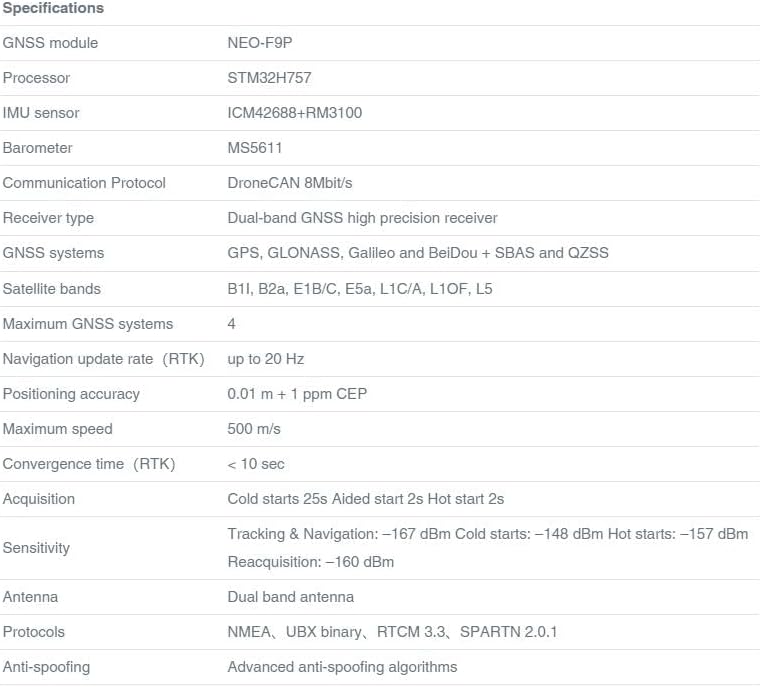
Figure 3: Visual representation of the Here4 module's specifications. This image presents a detailed table outlining various technical parameters such as GNSS module type, processor, IMU sensor, communication protocol, receiver type, supported GNSS systems, satellite bands, and performance metrics like positioning accuracy and convergence time.
7. Warranty and Support
For warranty information and technical support, please refer to the official CubePilot website or contact their customer service directly.
- Manufacturer: CubePilot
- Official Website: www.cubepilot.org (Example link, actual link might vary)
- Customer Service: Refer to the official website for contact details and support resources.
Please retain your proof of purchase for any warranty claims.
Ask a question about this manual
Ask about setup, troubleshooting, compatibility, parts, safety, or missing instructions. Manuals+ will review the question and use this page’s manual context to help answer it.