
1. Important Safety Information
Read all instructions before using the PoolCandy Splash Runner Pro 2.0 Motorized Pool Lounger. Failure to follow these safety guidelines may result in injury or damage to the product.
- This product is designed for use by teens and adults. It is not a life-saving device. Always supervise children around water.
- Do not exceed the maximum weight capacity of 350 pounds (approximately 158 kg).
- Ensure propellers are securely shielded behind the safety grill before operation. Keep hands, hair, and loose clothing away from propellers.
- Use only in calm water environments such as pools or lakes. Avoid use in strong currents or open ocean.
- Do not operate the lounger under the influence of alcohol or drugs.
- Always remove batteries when the lounger is not in use or during storage to prevent corrosion and damage.
- Keep batteries away from water during installation and removal.

2. Package Contents
Verify that all components are present before assembly:
- 1 x Motorized Pool Lounger (inflatable float body)
- 2 x Motor Units with Joysticks
Note: 16 D-Cell batteries are required for operation and are not included.
3. Setup and Assembly
The Splash Runner Pro 2.0 features simple, tool-free assembly.
3.1. Inflation
- Unfold the lounger on a clean, flat surface.
- Locate the air valves on the lounger.
- Inflate each chamber using an air pump (not included) until firm but not overinflated. Ensure all wrinkles are smoothed out.
- Securely close all air valves.
3.2. Battery Installation
- Locate the battery compartments on the underside of each motor unit.
- Open the battery compartment cover.
- Insert 8 D-Cell batteries into each motor unit, ensuring correct polarity (+/-). A total of 16 D-Cell batteries are required.
- Securely close the battery compartment covers to ensure a watertight seal.
3.3. Motor Unit Attachment
- Align each motor unit with the designated openings on the sides of the lounger.
- Insert the motor units firmly into place. Ensure they are securely seated and the propellers are facing downwards.
4. Operating Instructions
Once assembled and inflated, the Splash Runner Pro 2.0 is ready for use in water.
4.1. Entering the Lounger
Carefully enter the lounger in shallow water. Ensure your weight is evenly distributed.
4.2. Powering On and Movement
- Locate the power buttons on each joystick. Press to activate the motors.
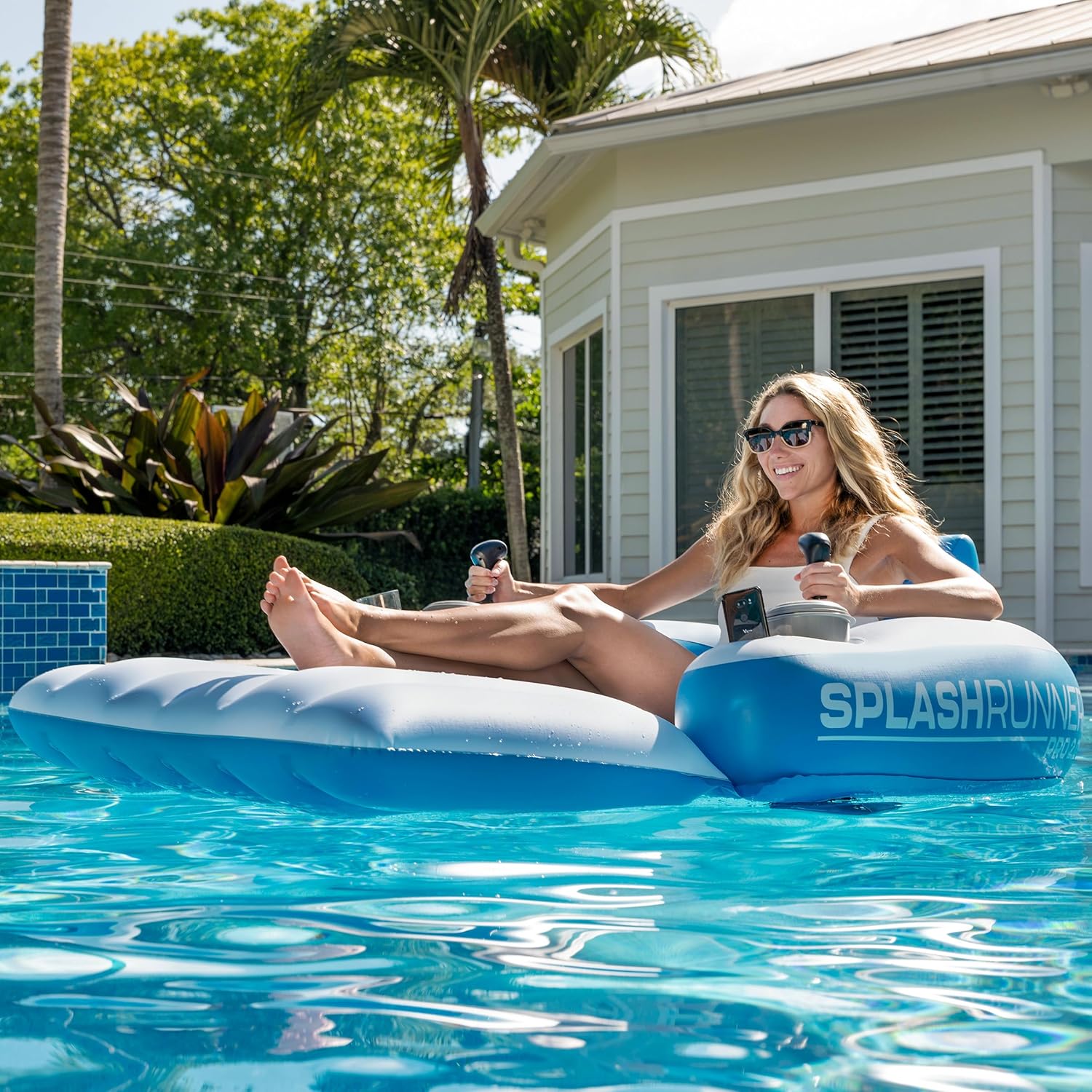
- Use the dual joysticks to control movement. Pushing both joysticks forward will move the lounger forward. Pulling both back will move it backward.
- To turn, push one joystick forward and pull the other back, or push one forward while the other is neutral. Experiment with the controls for 360-degree movement.
- Release the joysticks to stop movement.
4.3. Integrated Features
- Backrest and Lower-Back Support: Position yourself comfortably against the integrated backrest for relaxation.
- Cupholder: Use the built-in cupholder to keep beverages secure.
- Phone Holder: The phone holder is designed to fit most waterproof devices. Ensure your device is waterproof before placing it in the holder.

4.4. Official Product Video
5. Care and Maintenance
5.1. Cleaning
- After each use, rinse the lounger with fresh water to remove chlorine or salt residue.
- Wipe down with a soft cloth and mild soap if necessary.
- Ensure the lounger is completely dry before deflating and storing.
5.2. Storage
- Deflate the lounger completely.
- Remove all 16 D-Cell batteries from the motor units before long-term storage.
- Store the lounger and motor units in a cool, dry place away from direct sunlight and extreme temperatures.
- Avoid placing heavy objects on the deflated lounger.
6. Troubleshooting
If you encounter issues with your Splash Runner Pro 2.0, refer to the following common problems and solutions:
| Problem | Possible Cause | Solution |
|---|---|---|
| Lounger does not move or moves slowly. | Low or dead batteries; incorrect battery installation; motor unit not properly seated. | Replace all 16 D-Cell batteries with fresh ones, ensuring correct polarity. Check that motor units are firmly attached. |
| One motor unit is not working. | Batteries in that unit are dead or incorrectly installed; motor unit malfunction. | Check and replace batteries in the affected motor unit. Ensure battery compartment cover is sealed. If problem persists, contact customer support. |
| Difficulty steering or 360-degree movement. | Unfamiliarity with controls; uneven weight distribution. | Practice using the joysticks in calm water. Adjust your position on the lounger for better balance. |
| Lounger is losing air. | Air valve not properly closed; puncture. | Ensure all air valves are securely closed. Inspect the lounger for punctures and repair with a patch kit (not included) if found. |
7. Specifications
- Model Number: PC4225SR-F
- Dimensions (Inflated): 66" L x 43" W (167.6 cm L x 109.2 cm W)
- Material: Premium 0.35mm PVC
- Weight Capacity: 350 pounds (158 kg)
- Motor Power: Dual 66-watt motors
- Power Source: 16 x D-Cell batteries (not included)
- Item Weight: 12 pounds (5.4 kg)
- Age Range: Teen, Adult
8. Warranty Information
The PoolCandy Splash Runner Pro 2.0 Motorized Pool Lounger comes with a one-year warranty provided by B&D Group. This warranty covers manufacturing defects under normal use. Please retain your proof of purchase for warranty claims.
For detailed warranty terms and conditions, please refer to the documentation included with your product or contact customer support.
9. Customer Support
For any questions, troubleshooting assistance, or warranty claims, please contact B&D Group, the manufacturer of the PoolCandy Splash Runner Pro 2.0.
Contact information can typically be found on the product packaging or their official website.


