
Introduction
This manual provides essential instructions for the safe operation, setup, and maintenance of your Ameta Morpho Drone. Please read this manual thoroughly before operating the drone to ensure proper function and to prevent damage or injury.
Safety Guidelines
Adhering to these safety guidelines is crucial for a safe and enjoyable flight experience:
- Age Recommendation: Recommended for users aged 14 and above. Younger children should operate under adult supervision.
- Flight Environment: Fly in open, unobstructed areas, away from people, animals, buildings, and power lines. Avoid flying in strong winds or adverse weather conditions.
- Pre-Flight Check: Always ensure the drone and remote control batteries are fully charged and propellers are securely attached and undamaged.
- Propeller Safety: Keep hands, face, and loose clothing away from rotating propellers. The drone features propeller guards for enhanced safety.
- Battery Safety: Use only the provided batteries and charging cables. Do not overcharge or puncture batteries. Discontinue use if batteries show signs of damage or swelling.
- Water and Moisture: Do not expose the drone or remote control to water or moisture.
- Respect Privacy: When using the camera, be mindful of privacy laws and personal space.
Package Contents
Verify that all items listed below are included in your package:
- Ameta Morpho Drone
- Remote Control
- Lithium Ion Batteries (2 included)
- USB Charging Cable
- Spare Propellers (4 pieces)
- Carrying Bag
- User Manual (This document)

Image: Ameta Morpho Drone and its accessories, including the drone with LED lights, remote control with phone holder, two batteries, and four spare propellers.
Component Identification
Ameta Morpho Drone
Familiarize yourself with the key components of your drone:
- Propellers: Four rotating blades for lift and movement. Protected by full propeller guards.
- LED Lights: 32 built-in RGB LED lights on all four frames, offering 6 different lighting modes.
- 1080P HD FPV Camera: Located at the front, manually adjustable for capturing photos and videos.
- Battery Compartment: Located on the underside for battery insertion.
- Optical Flow Sensor: On the underside for stable hovering.

Image: Detailed view of the drone's camera and propeller protection.
Remote Control
Understand the functions of the remote control buttons and joysticks:
- Left Joystick: Controls altitude (up/down) and rotation (left/right).
- Right Joystick: Controls forward/backward and left/right movement.
- One-Key Takeoff/Landing Button: Initiates automatic takeoff or landing.
- Speed Switch Button: Toggles between different speed modes.
- Headless Mode Button: Activates headless mode for simplified orientation.
- Photo/Video Button: Captures images or starts/stops video recording.
- Phone Holder: Adjustable holder for mounting a smartphone to view FPV feed.
Setup
1. Battery Charging and Installation
- Charge Drone Batteries: Connect the drone batteries to the USB charging cable and plug into a USB power source (e.g., computer, USB wall adapter). The indicator light will show charging status and turn off when fully charged. Charging time is approximately 60-90 minutes per battery.
- Install Drone Battery: Insert a fully charged battery into the battery compartment on the underside of the drone until it clicks into place.
- Install Remote Control Batteries: The remote control uses internal rechargeable batteries. Ensure it is charged using its dedicated USB port if applicable, or insert 3 AAA batteries (not included) if it uses disposable ones (check remote control manual for specifics).
2. Propeller Installation (If Required)
The drone comes with propeller guards pre-installed. If propellers need replacement:
- Identify the correct propeller for each motor (marked A or B).
- Align the propeller with the motor shaft and press down firmly until it is secure.
- Ensure all propellers rotate freely without obstruction.
3. App Download and Connection
- Download the App: Scan the QR code in the quick start guide or search for the "Ameta Drone" app on the App Store (iOS) or Google Play Store (Android).
- Power On Drone: Press and hold the power button on the drone until the LED lights illuminate.
- Connect to Wi-Fi: On your smartphone, go to Wi-Fi settings and connect to the drone's Wi-Fi network (e.g., "Ameta-XXXXXX").
- Launch App: Open the Ameta Drone app. The live FPV feed should appear, indicating a successful connection.
Operating Instructions
1. Pairing the Drone and Remote Control
- Place the drone on a flat, level surface.
- Power on the drone. The drone's indicator lights will flash.
- Power on the remote control.
- Push the left joystick up to its maximum position, then pull it down to its minimum position. The drone's lights will stop flashing and remain solid, indicating successful pairing.
2. Basic Flight Controls
Before your first flight, ensure you are in an open area free from obstacles.
- One-Key Takeoff/Landing: Press the One-Key Takeoff/Landing button on the remote control. The drone will automatically ascend to a stable altitude or descend and land gently.
- Altitude Hold: The drone features an altitude hold function, allowing it to hover stably at a set height without continuous throttle input.
- Headless Mode: Press the Headless Mode button. In this mode, the drone's orientation is relative to the pilot, making it easier to control regardless of which way the drone is facing.
- Speed Adjustment: Press the Speed Switch button to cycle through different speed modes (e.g., low, medium, high) suitable for various skill levels.

Image: Demonstrates the drone's user-friendly features for beginners.
3. Camera Operation (Photo & Video)
With the app connected, you can capture aerial footage:
- Take Photo: Press the Photo/Video button on the remote control once, or tap the photo icon in the app.
- Record Video: Press and hold the Photo/Video button on the remote control, or tap the video icon in the app to start recording. Press again to stop.
- FPV View: The live feed from the 1080P HD camera will be displayed on your connected smartphone.

Image: Illustrates the drone's camera capabilities for capturing photos and videos.
4. LED Light Modes
The Morpho drone features 32 LED lights with 6 exciting display modes:
- One-Click Color Change: Use the dedicated button on the remote or app to cycle through different LED colors.
- Lighting Modes: Explore the 6 pre-programmed lighting modes for dynamic visual effects during flight.
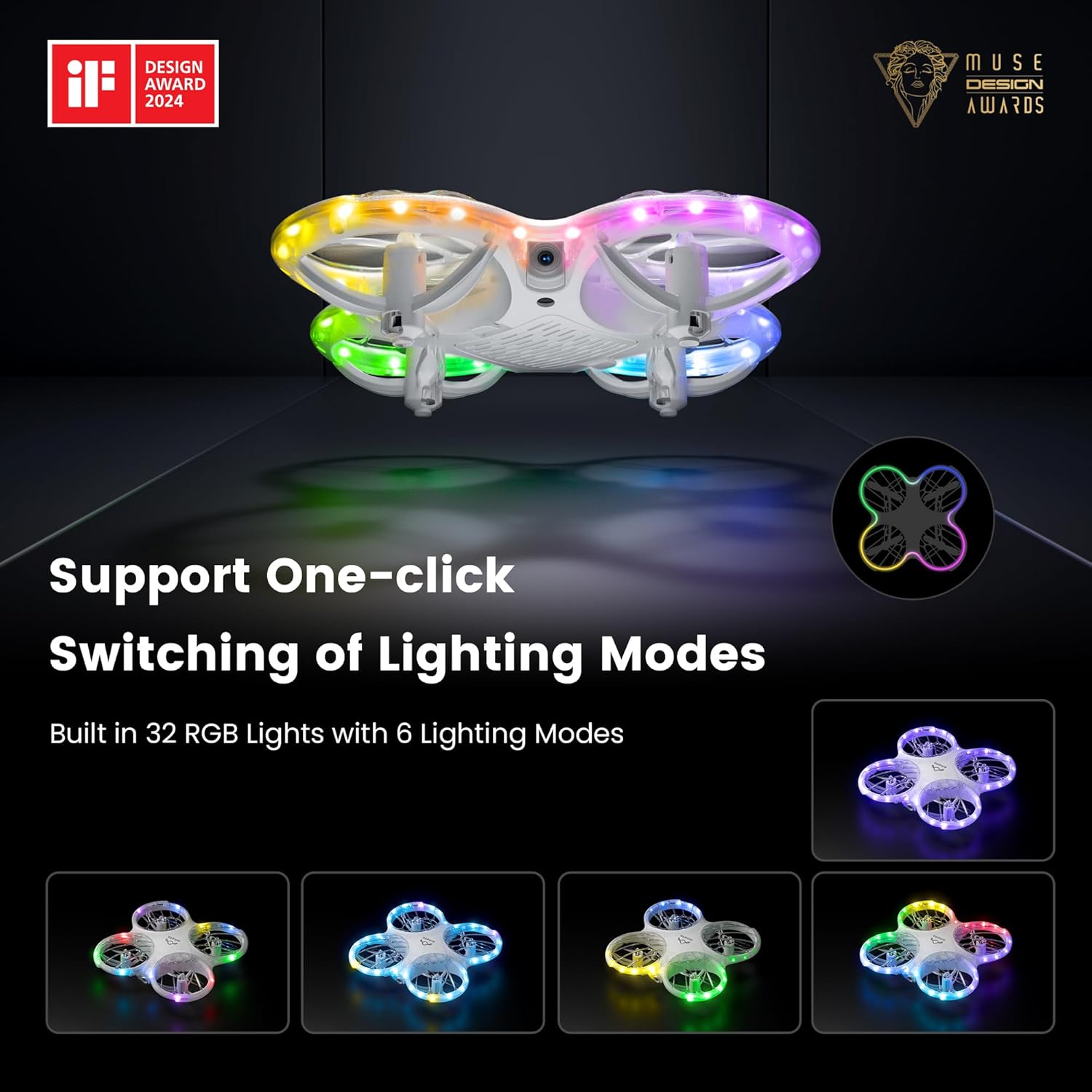
Image: Displays the drone's customizable LED lighting features.
5. STEM Programming
Engage with the drone's STEM capabilities through the dedicated app module:
- Open the Ameta Drone app and navigate to the STEM module.
- Drag and drop desired flying building blocks (commands) into the programming interface.
- Press the start button within the app, and the drone will execute the programmed flight sequence.

Image: Illustrates the STEM programming feature for customizing flight patterns.
6. Advanced Operating Tricks
Once comfortable with basic flight, try these advanced maneuvers:
- 3D Flips: Press the 3D Flip button (refer to remote control diagram in quick start guide) and move the right joystick in any direction to perform a 360-degree flip.
- Circle Fly: Activate the Circle Fly function (refer to app or remote instructions) to make the drone fly in a circular path.
- Auto-Rotation: Utilize the auto-rotation feature for dynamic aerial displays.

Image: Shows the drone executing 3D flips and circular flight patterns.
7. Optical Flow Positioning
The drone is equipped with an optical flow sensor on its underside to enhance stability and allow for more precise hovering, especially in indoor environments. For optimal performance, ensure the drone is flown over textured surfaces with adequate lighting.

Image: Demonstrates the drone's stable hovering capability using optical flow positioning.
Image: Illustrates the drone's feature for recording and sharing flight actions.
Maintenance
- Cleaning: Use a soft, dry cloth to clean the drone and remote control. Do not use solvents or harsh chemicals.
- Propeller Inspection: Regularly check propellers for damage (cracks, bends). Replace damaged propellers immediately using the provided spare parts.
- Storage: Store the drone and accessories in a cool, dry place, away from direct sunlight and extreme temperatures. Remove batteries from the remote control if storing for extended periods.
- Battery Care: Do not store batteries fully charged or completely depleted for long periods. Charge them to about 50-60% for optimal long-term storage.
Troubleshooting
| Problem | Possible Cause | Solution |
|---|---|---|
| Drone does not respond to remote control. | Not paired; low battery; interference. | Re-pair the drone and remote. Charge batteries. Move to an area with less interference. |
| Drone drifts during flight. | Not calibrated; uneven surface at takeoff; damaged propeller. | Perform gyroscope calibration (refer to quick start guide). Take off from a flat surface. Check and replace damaged propellers. |
| FPV feed is unstable or disconnected. | Weak Wi-Fi signal; too far from drone; app issue. | Ensure strong Wi-Fi connection. Fly closer to the drone. Restart the app and drone. |
| Drone crashes frequently. | Pilot inexperience; strong winds; damaged components. | Practice in low-speed mode. Avoid flying in windy conditions. Inspect drone for damage and replace parts as needed. |
| LED lights not working correctly. | Software glitch; physical damage. | Restart the drone. If problem persists, contact customer support. |
Specifications
- Brand: Ameta
- Model Name: DR-ATM10B (Morpho)
- Dimensions: 5.28"L x 5.43"W x 1.34"H
- Item Weight: 72 Grams (2.54 ounces)
- Color: White
- Material: Plastic
- Camera: 1080P HD FPV Camera
- Video Capture Resolution: 720p
- Connectivity Technology: Wi-Fi (for FPV), Bluetooth (for remote control)
- Remote Control Technology: Bluetooth
- Batteries: 2 x Lithium Ion batteries (included)
- Flight Time: Approximately 9 minutes per battery (18 minutes total with 2 batteries)
- Special Features: 360 Degree Flip, First Person View (FPV), Lightweight, Long Battery Life, Speed Adjustment, LED Lights (32 RGB with 6 modes), Propeller Full Protect, STEM Toys, One-Key Takeoff/Landing, Headless Mode, Altitude Hold.
- Skill Level: All
- UPC: 850063710022
Warranty and Support
For warranty information, technical support, or service inquiries, please refer to the contact details provided on the product packaging or the official Ameta website. Keep your purchase receipt as proof of purchase for warranty claims.
Manufacturer: Ameta


