
1. Introduction
Thank you for choosing the XIAOVV 4G LTE Solar Outdoor Security Camera. This manual provides essential information for the proper installation, operation, and maintenance of your device. Please read it carefully before use and retain it for future reference. This camera is designed for outdoor surveillance, offering reliable monitoring with 4G LTE connectivity and solar power.
2. Product Overview
The XIAOVV P5plus is a robust outdoor security camera featuring a solar panel for continuous power and 4G LTE connectivity for remote access without relying on Wi-Fi. It offers high-definition imaging, advanced night vision, and intelligent security functions.
Key Features:
- 4G LTE Connectivity: Supports 4G bands B1/B3/B5/B38/B39/B40/B41 for remote access in areas without Wi-Fi.
- Solar Powered: Integrated solar panel provides continuous power, ensuring 365 days of uninterrupted monitoring.
- 5MP HD Imaging & 1080p Video: Captures clear 5-megapixel still images and records 1080p high-definition video.
- Color Night Vision: Advanced Starlight color night vision ensures clear, detailed footage even in low-light conditions.
- 360° Monitoring: Dual-lens design allows for comprehensive 360-degree coverage without blind spots, with PTZ (Pan-Tilt-Zoom) capabilities.
- Smart Security Functions: AI-based person detection, dual PIR and radar alarms, automatic motion detection, and two-way audio communication.
- Local & Cloud Storage: Supports up to 128GB Micro SDHC card for local storage and optional cloud storage.
- H.265 Compression: Efficient video compression for longer storage times and stable recordings.
- Weatherproof Design: IP66 rated for outdoor use, protecting against dust and powerful water jets.
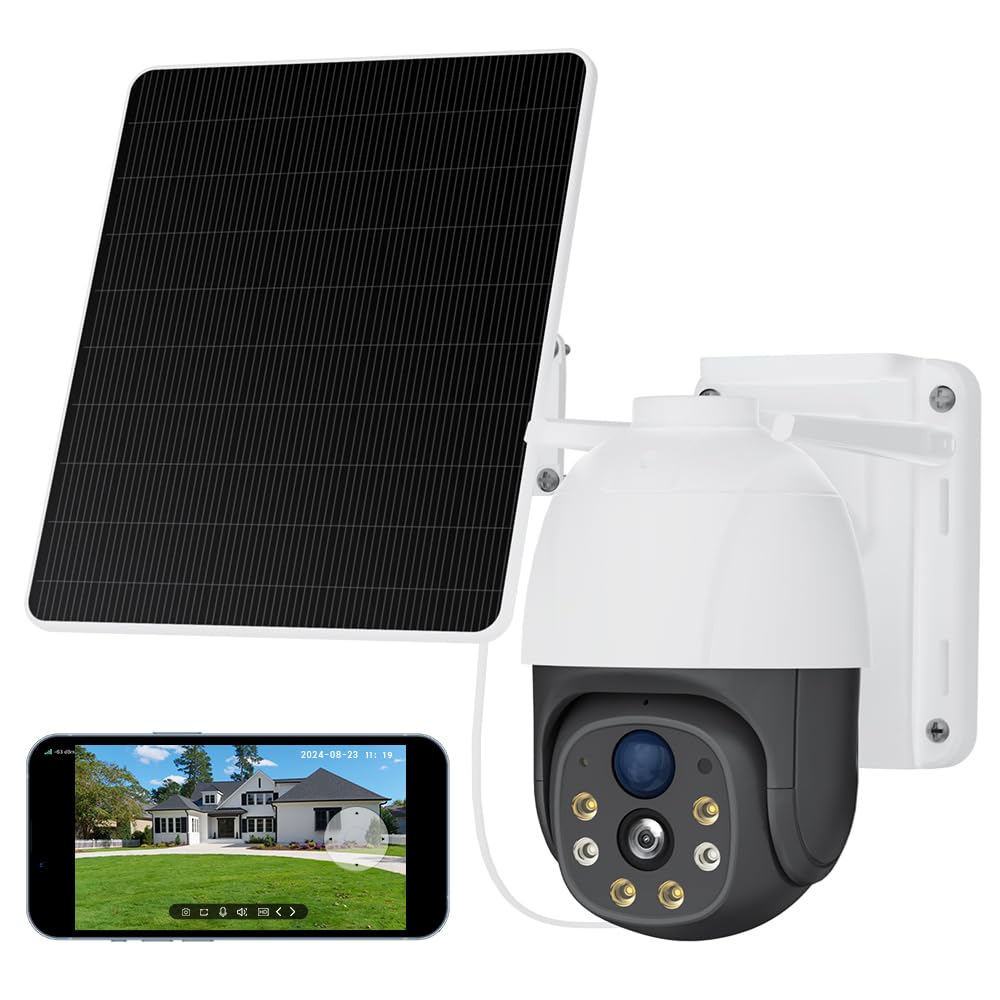
Image 2.1: The XIAOVV 4G LTE Solar Outdoor Security Camera, showcasing its solar panel and various features like 4G LTE signal, full color night vision, AI intelligence, IP65 waterproof rating, device sharing, 2-way audio, HD 1080P, siren, PIR motion detection, and 8000mAh battery capacity.

Image 2.2: A visual representation of the camera's 2K Starlight Color Night Vision, showing a building at night with clear, illuminated details, contrasting with a standard black and white night vision view.
3. Setup
3.1 Package Contents
- XIAOVV Solar Camera (1)
- Mounting Bracket and Screws
- User Manual
3.2 Inserting SIM Card and Micro SD Card
- Locate the SIM card and Micro SD card slot on the camera, usually protected by a rubber cover.
- Carefully open the cover.
- Insert a valid 4G LTE SIM card (not included) into the SIM card slot with the correct orientation. Ensure it clicks into place.
- Insert a Micro SDHC card (up to 128GB, not included) into the Micro SD card slot with the correct orientation.
- Close the rubber cover firmly to ensure IP66 weatherproofing.
3.3 Camera Mounting
- Choose a suitable outdoor location with good 4G signal reception and direct sunlight exposure for the solar panel.
- Use the provided mounting bracket and screws to securely attach the camera to a wall or pole.
- Adjust the angle of the solar panel to maximize sun exposure throughout the day.
- Ensure the camera has a clear line of sight to the area you wish to monitor.

Image 3.1: The XIAOVV camera with its solar panel, shown installed in diverse outdoor settings such as a pasture, fish pond, orchard, construction site, and backyard, illustrating its versatility for different surveillance needs.
3.4 App Download and Pairing
- Download the XIAOVV app from your smartphone's app store (iOS or Android).
- Register for a new account or log in if you already have one.
- Follow the in-app instructions to add your new camera. This typically involves scanning a QR code on the camera or manually entering its device ID.
- Ensure the camera is powered on and the 4G SIM card is active during the pairing process.
4. Operating Instructions
4.1 Live View
Open the XIAOVV app and select your camera from the device list to access the live video feed. You can view real-time footage from your monitored area.
4.2 PTZ Control
Utilize the on-screen controls in the live view to pan (rotate horizontally), tilt (rotate vertically), and digitally zoom the camera to adjust your viewing angle and focus on specific areas.
4.3 Two-Way Audio
Tap the microphone icon in the app to speak through the camera's speaker, and listen to audio from the camera's microphone. This allows for real-time communication with visitors or to deter intruders.
4.4 Recording and Playback
- Manual Recording: Tap the record button in the live view to start or stop manual video recording.
- Event Recording: The camera automatically records when motion is detected, based on your settings.
- Playback: Access recorded footage via the 'Playback' or 'History' section in the app. You can filter by date and event.
4.5 Motion Detection and Alerts
Configure motion detection sensitivity, detection zones, and alert preferences (e.g., push notifications, siren activation) within the app settings. The camera uses AI-based person detection, PIR, and radar for accurate alerts.

Image 4.1: A visual representation of the AI Automatic Tracking feature, showing a father and child playing in a park with a tracking box following their movement, indicating the camera's ability to automatically follow targets.
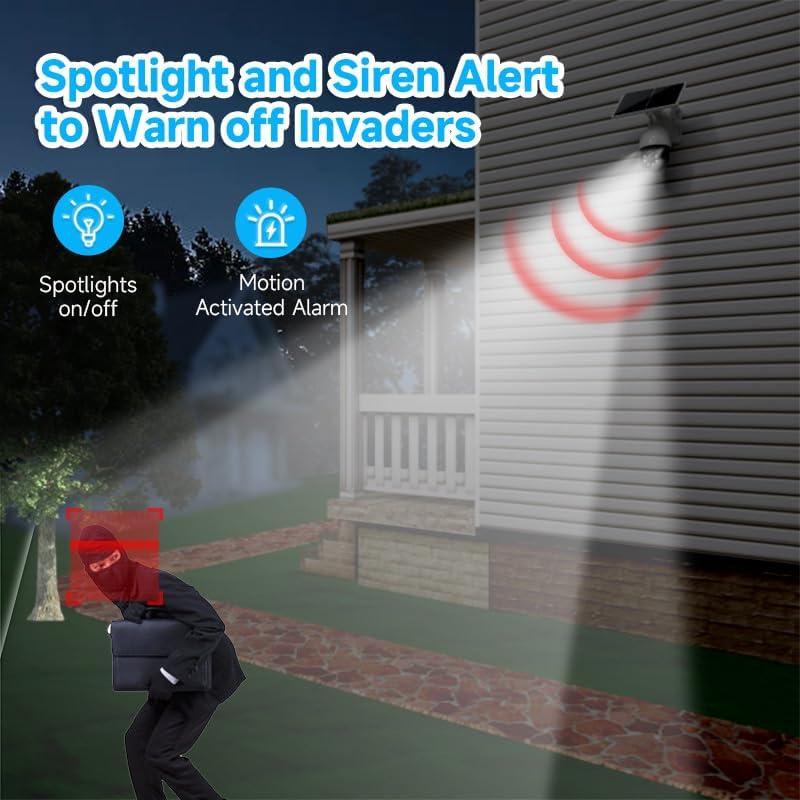
Image 4.2: The camera's spotlight and siren alert system activated at night, illuminating a detected intruder and emitting a warning sound, demonstrating its active deterrence capabilities.
5. Maintenance
5.1 Cleaning
- Regularly clean the camera lens and solar panel with a soft, damp cloth to ensure optimal performance. Avoid abrasive cleaners.
- Ensure the solar panel is free from dirt, dust, leaves, or snow to maintain efficient charging.
5.2 Firmware Updates
Check the XIAOVV app periodically for available firmware updates. Keeping your camera's firmware up-to-date ensures optimal performance, security, and access to new features.
5.3 Storage Management
If using a Micro SD card, regularly review and back up important footage. You can configure the camera to overwrite older footage automatically when the card is full. For cloud storage, manage your subscription and stored data through the app.

Image 5.1: A graph illustrating the benefits of H.265 Video Coding Technology compared to H.264, showing significant savings in storage space and broadband usage, leading to faster loading and smoother playback of videos.
6. Troubleshooting
6.1 Camera Not Connecting to 4G
- Ensure the SIM card is correctly inserted and active with a data plan.
- Check 4G signal strength at the camera's location using your smartphone.
- Restart the camera by pressing the reset button or power cycling it.
- Verify that the camera's 4G bands are compatible with your network provider.
6.2 Poor Image Quality
- Clean the camera lens to remove any dirt or smudges.
- Ensure there are no obstructions in front of the lens.
- Check your 4G signal strength; a weak signal can affect streaming quality.
6.3 Battery Not Charging
- Ensure the solar panel is clean and receives direct sunlight for several hours daily.
- Check the connection between the solar panel and the camera.
- Verify that the camera is placed in an area with sufficient sunlight.
6.4 Motion Detection Not Working
- Check motion detection settings in the app; ensure it's enabled and sensitivity is adjusted.
- Verify that the detection zones are correctly configured.
- Ensure there are no physical obstructions blocking the camera's view or PIR sensor.
7. Specifications
| Feature | Specification |
|---|---|
| Model Name | XIAOVV-P5PLUS-EU4G |
| Connectivity | 4G LTE (B1/B3/B5/B38/B39/B40/B41) |
| Power Supply | Solar Powered (Integrated Solar Panel) |
| Image Resolution | 5 MP (Stills) |
| Video Resolution | 1080p (AVI format) |
| Night Vision | Starlight Color Night Vision, 15 Meters Range |
| Viewing Angle | 360 Degrees (PTZ) |
| Special Features | Two-way audio, Local recording, AI Person Detection, PIR/Radar Alarms, HD Resolution, PTZ Technology |
| Storage | Micro SDHC (up to 128 GB), Optional Cloud Storage |
| Compression | H.265 |
| Weatherproof Rating | IP66 |
| Control Method | Smartphone App (XIAOVV App) |
| Dimensions | 20 x 20 x 22 cm |
8. Warranty and Support
This XIAOVV product comes with a standard manufacturer's warranty. Please refer to the warranty card included in your package or visit the official XIAOVV website for detailed warranty terms and conditions.
For technical support, troubleshooting assistance, or any product-related inquiries, please contact XIAOVV customer service through the contact information provided on their official website or within the XIAOVV app.


