
QCY C30S
QCY Crossky C30S Open-Ear Earbuds User Manual
Model: C30S
1. Introduction
Thank you for choosing the QCY Crossky C30S Open-Ear Earbuds. This manual provides essential information for setting up, operating, and maintaining your new earbuds. Please read it carefully before use to ensure optimal performance and longevity of your device.
2. Package Contents
Verify that all items are present in your package:
- QCY Crossky C30S Earbuds (Left and Right)
- Charging Case
- USB Type-C Charging Cable
- User Manual

Image: Contents of the QCY Crossky C30S package: earbuds, charging case, Type-C charging cable, and instruction manual.
3. Product Overview
The QCY Crossky C30S earbuds feature an open-ear design for comfort and situational awareness. They incorporate advanced audio technology for a superior listening experience.

Image: QCY Crossky C30S Open-Ear Earbuds and Charging Case.
Key Features:
- 10.8mm Dual Magnetic Driver: Delivers powerful bass and clear,立体 sound.
- Hi-Res Audio & LDAC Support: For high-resolution audio quality (LDAC supported on Android devices only).
- Ergonomic Z-Type Ear Clip Design: Lightweight (under 5g per earbud) and comfortable for extended wear.
- Directional Sound Technology 3.0: Reduces sound leakage by up to 99.5%.
- Extended Battery Life: Up to 40 hours of total playback with the charging case.
- Rapid Charging: 10 minutes of charge provides approximately 1 hour of music playback.
- Bluetooth 6.0: Enhanced communication stability and transfer speed, with a low-latency mode for gaming and video.
- Multipoint Connection: Connects to two devices simultaneously (e.g., smartphone and PC).
- IPX5 Waterproof: Resistant to sweat and light rain.
- QCY App Support: Customize EQ settings, touch controls, and access additional features.

Image: Comparison of QCY C30S and C30 models, highlighting key improvements.
4. Setup
4.1 Initial Charging
Before first use, fully charge the earbuds and the charging case. Place the earbuds into the charging case and connect the Type-C cable to a power source. The indicator light on the case will show charging status.
4.2 Pairing with a Device
- Open the charging case. The earbuds will automatically enter pairing mode (indicator lights will flash).
- On your device (smartphone, tablet, PC), enable Bluetooth.
- Search for "QCY Crossky C30S" in the list of available Bluetooth devices and select it to connect.
- Once connected, the indicator lights on the earbuds will turn off or show a steady light, depending on the model.
For subsequent use, the earbuds will automatically connect to the last paired device when removed from the case.
5. Wearing Instructions
The QCY Crossky C30S earbuds are designed for a secure and comfortable fit. Follow these steps for proper wearing:
- Hold the earbud with one hand and gently clip it onto your ear, similar to an ear cuff.
- Adjust the earbud so that the sound hole is directed towards your ear canal.
The smaller part of the Crossky C30S is the front, and the larger part is the back. Ensure correct orientation.

Image: Correct wearing method for QCY Crossky C30S earbuds.
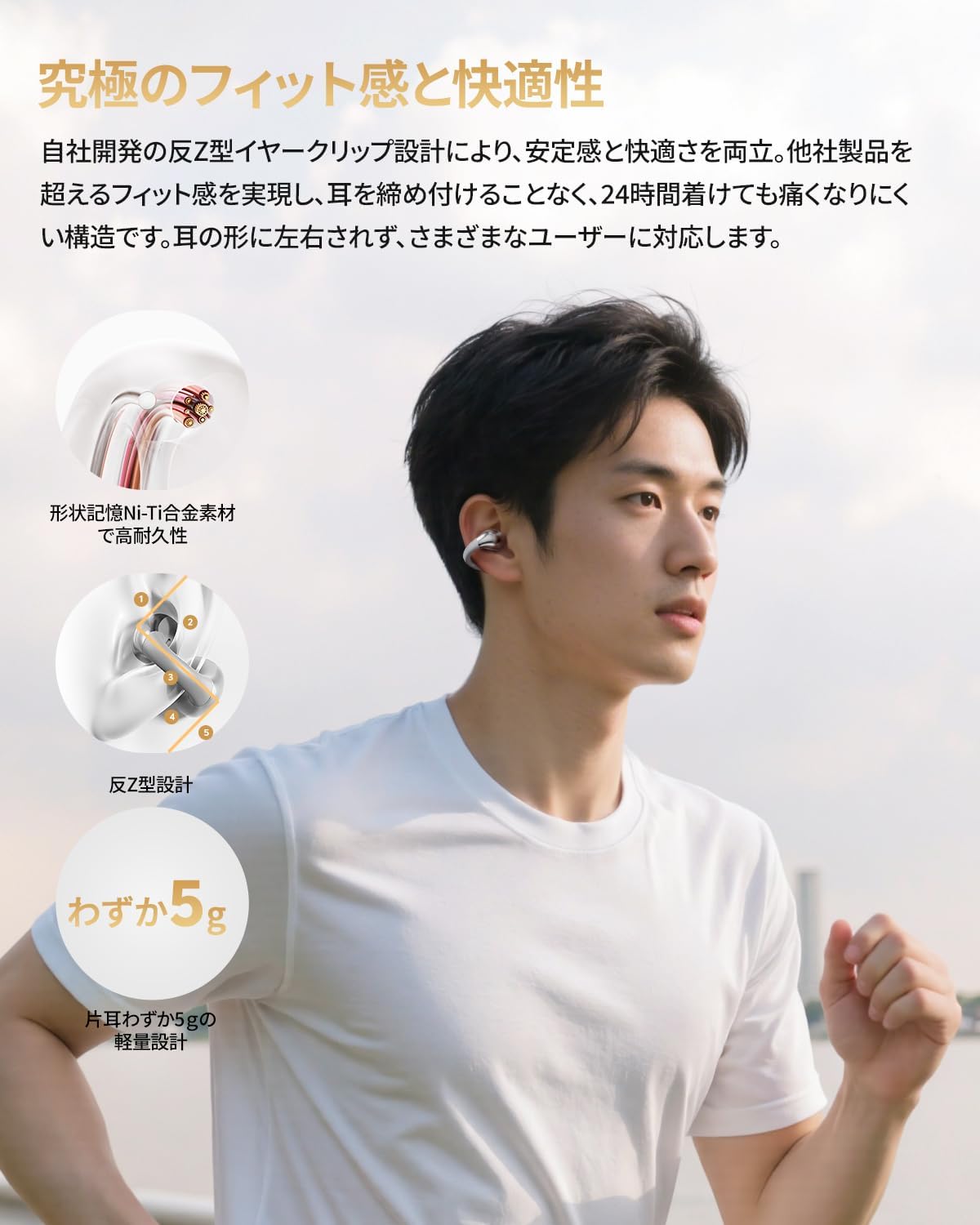
Image: Person wearing the earbuds, showcasing the ergonomic design.
6. Operating Instructions
6.1 Touch Controls
The QCY Crossky C30S earbuds feature intuitive touch controls. The functions can be customized via the QCY app.
- Play/Pause: Double-tap L/R earbud.
- Next Track: Triple-tap R earbud.
- Voice Assistant: Triple-tap L earbud.
- Answer/End Call: Double-tap L/R earbud.
- Reject Call: Press and hold L/R earbud for 1.5 seconds.
- Activate App Function: Single-tap L/R earbud (customizable).

Image: Touch control functions.
6.2 QCY App
Download the official QCY app to unlock full customization options and features for your Crossky C30S earbuds. The app allows you to:
- View battery levels.
- Adjust EQ settings for personalized sound.
- Customize touch control functions.
- Activate low-latency game mode.
- Find your earbuds.
- Enable sleep mode.

Image: QCY App interface and features.
6.3 Multipoint Connection
The earbuds support multipoint connection, allowing them to be simultaneously connected to two Bluetooth devices (e.g., a smartphone and a laptop). This enables seamless switching between music playback on one device and calls on another.

Image: Multipoint connection with a smartphone and laptop.
7. Advanced Features
7.1 High-Fidelity Audio
Equipped with a 10.8mm dual magnetic driver, the Crossky C30S delivers rich bass and clear, detailed sound. Support for Hi-Res Audio and LDAC codec ensures a high-quality listening experience, comparable to CD sources.

Image: 10.8mm Dual Magnetic Driver with Hi-Res Audio and LDAC support.
7.2 Sound Leakage Prevention
The proprietary Directional Sound Technology 3.0 significantly reduces sound leakage by up to 99.5%. This allows you to enjoy your audio privately, even in quiet environments like libraries or offices, without disturbing others.

Image: Sound leakage prevention in action.
7.3 Long Battery Life & Fast Charging
With a 460mAh battery in the charging case, the earbuds offer up to 40 hours of total playback. A quick 10-minute charge provides approximately 1 hour of music playback, ensuring your music is always ready when you are.

Image: Battery life and fast charging capabilities.
7.4 IPX5 Waterproof Rating
The earbuds are rated IPX5 waterproof, making them resistant to sweat and splashes. This makes them suitable for workouts, commuting in light rain, and other active scenarios.

Image: IPX5 waterproof feature.
8. Maintenance
To ensure the longevity and optimal performance of your QCY Crossky C30S earbuds, follow these maintenance guidelines:
- Cleaning: Regularly wipe the earbuds and charging case with a soft, dry, lint-free cloth. Do not use abrasive cleaners or solvents.
- Storage: When not in use, store the earbuds in their charging case to protect them from dust and damage. Keep them in a cool, dry place away from extreme temperatures.
- Charging Contacts: If you experience charging issues, gently clean the charging contacts on both the earbuds and the case with a cotton swab lightly dampened with rubbing alcohol. Ensure they are completely dry before placing the earbuds back in the case.
- Avoid Water Exposure: While IPX5 rated, avoid submerging the earbuds in water or exposing them to strong jets of water. Dry them thoroughly if they get wet.
9. Troubleshooting
If you encounter issues with your earbuds, try the following solutions:
9.1 No Sound or Intermittent Connection
- Ensure the earbuds are charged.
- Make sure Bluetooth is enabled on your device and the earbuds are paired.
- Move the earbuds closer to your device and away from potential interference sources (e.g., Wi-Fi routers, other Bluetooth devices).
- Try resetting the earbuds (refer to the QCY app or manufacturer's website for specific reset instructions).
9.2 Earbuds Not Charging
- Ensure the charging cable is securely connected to both the case and the power source.
- Check if the charging contacts on the earbuds and case are clean and free of debris.
- Try a different charging cable or power adapter.
9.3 Touch Controls Not Responding
- Ensure your fingers are clean and dry when using touch controls.
- Check the QCY app to ensure touch controls are enabled and configured as desired.
- Restart the earbuds by placing them in the case and then taking them out again.
If these steps do not resolve the issue, please contact QCY customer support.
10. Specifications
| Feature | Detail |
|---|---|
| Model Name | Crossky C30S |
| Manufacturer Model Number | BH24QT33A |
| Brand | QCY |
| Connectivity Technology | Wireless (Bluetooth 6.0) |
| Supported Devices | Windows/Macbook Air/Pro PCs, Smartphones (Galaxy, Huawei, Xiaomi, OPPO, Xperia, Nexus, ASUS, Fujitsu, iPhone) |
| Water Resistance Level | IPX5 (Waterproof) |
| Control Method | Touch |
| Package Dimensions | 12.6 x 8.5 x 3.8 cm |
| Item Weight | 110 g |
| Included Components | Cable, Instruction Manual |
11. Warranty and Support
11.1 Manufacturer's Warranty
The QCY Crossky C30S earbuds come with a 1-year manufacturer's warranty from the date of purchase. This warranty covers defects in materials and workmanship under normal use. It does not cover damage caused by misuse, accidents, unauthorized modifications, or normal wear and tear.
11.2 Customer Support
For technical assistance, warranty claims, or any questions regarding your QCY Crossky C30S earbuds, please contact QCY customer support through the retailer where you purchased the product or visit the official QCY website for contact information.
Please retain your proof of purchase for warranty service.