
VILTROX 16mm-1.8 Z
VILTROX AF 16mm F1.8 Z Lens User Manual
Model: 16mm-1.8 Z
Brand: VILTROX
Introduction
The Viltrox AF 16mm F1.8 Z lens is a full-frame wide-angle autofocus prime lens designed for Nikon Z-mount cameras. It offers exceptional image quality and versatile performance for various photographic applications, from expansive landscapes to detailed architectural shots.
Key features include:
- Wide-Angle Perspective: With a 16mm focal length and 105.6° angle of view, it's ideal for capturing broad scenes, cityscapes, interiors, and astrophotography.
- Exceptional Image Quality: Features a complex optical design with 15 elements in 12 groups, including 4 ED glass and 3 aspherical lenses, ensuring sharpness, high contrast, and minimal distortion.
- Large Aperture: The f/1.8 aperture provides excellent low-light performance and allows for beautiful shallow depth of field with smooth bokeh.
- LCD Display & Customizable Button: An integrated LCD screen shows aperture and focus distance, while the Fn1 button offers customizable functions for enhanced shooting efficiency.
- Fast & Silent Autofocus: Equipped with an SMT stepping motor for quick, accurate, and quiet autofocus, suitable for both still photography and video recording. It also supports AF/MF switching.
- Durable & Weather-Sealed Design: Constructed with a precision metal structure and weather-sealed to protect against dust and moisture, ensuring reliability in challenging conditions.
- Advanced Eye & Face Recognition: Supports precise eye and face recognition for sharp focus, even in low light.
Product Overview

The Viltrox AF 16mm F1.8 Z lens shown with its included lens hood, front cap, rear cap, and storage bag.

Close-up views highlighting the lens's LCD information screen, 550g all-metal lightweight body, 77mm filter caliber, Type-C firmware upgrade interface, and stepless aperture ring.

Illustration of the dual Fn buttons (Fn1 and Fn2) for customizable functions, the aperture ring toggle switch, and the AF/MF switching toggle on the lens body.

Diagram showing the internal optical structure of the lens (15 elements in 12 groups, including 3 aspherical and 4 ED lenses) and its MTF (Modulation Transfer Function) curves, indicating optical performance.
Setup
- Unpacking: Carefully remove the lens and all accessories from the packaging. Verify that all items listed in the "What's in the Box" section are present.
- Attaching the Lens:
- Remove the rear lens cap and the camera body cap.
- Align the mounting index (white dot) on the lens with the corresponding index on your Nikon Z-mount camera body.
- Gently insert the lens into the camera mount and rotate it clockwise until it clicks into place. Do not force the lens.
- Attaching the Lens Hood: Align the lens hood with the front of the lens and rotate it until it locks securely. The lens hood helps to prevent flare and protect the front element.
- Initial Power On: Turn on your camera. The lens should be recognized automatically.
Operating Instructions
Autofocus (AF) / Manual Focus (MF) Switching
The lens features an AF/MF switch for seamless transition between autofocus and manual focus modes.
- AF Mode: Slide the switch to "AF". The lens will use the camera's autofocus system. The SMT stepping motor ensures fast and quiet focusing.
- MF Mode: Slide the switch to "MF". Rotate the focus ring on the lens to manually adjust focus.
Aperture Control
The lens offers both electronic aperture control via the camera and a physical stepless aperture ring.
- Camera Control: Ensure the aperture ring toggle switch on the lens is set to the "ON" position (or "A" for Auto). You can then control the aperture directly from your camera body.
- Manual Aperture Ring: Slide the aperture ring toggle switch to the "OFF" position (or a specific f-stop value). You can then rotate the aperture ring on the lens to adjust the aperture. The stepless design allows for smooth aperture changes, beneficial for video recording.
LCD Display
The integrated LCD display provides real-time information about the lens settings.
- The display shows the current aperture value and focus distance.
- This feature is particularly useful in low-light conditions or when precise focus information is needed.
Customizable Fn Buttons (Fn1 & Fn2)
The lens is equipped with two customizable function buttons.
- Fn1 Button: In AF mode, a short press can be customized for various camera functions (e.g., focus hold, depth-of-field preview). Refer to your camera's manual for customization options.
- Fn2 Button: In MF mode, a long press saves the current focus point. You can save two focus points (A and B) and switch between them with a short press. This is useful for precise, repeatable focus shifts.
Firmware Upgrades
The lens features a Type-C USB port for firmware upgrades. Visit the VILTROX official website for the latest firmware and instructions to ensure optimal performance and compatibility.
Maintenance
- Cleaning the Lens: Use a soft, lint-free cloth specifically designed for optical surfaces. For stubborn smudges, use a lens cleaning solution applied to the cloth, not directly to the lens.
- Dust and Moisture: While the lens is weather-sealed, avoid exposing it to excessive dust, dirt, or moisture. If it gets wet, wipe it dry immediately.
- Storage: When not in use, store the lens with both front and rear caps attached in a dry, cool place, away from direct sunlight and extreme temperatures. Consider using a desiccant to prevent mold growth in humid environments.
- Handling: Always handle the lens by its barrel, not by the front element or lens hood. Avoid dropping or subjecting the lens to strong impacts.
Troubleshooting
| Problem | Possible Cause | Solution |
|---|---|---|
| Lens not recognized by camera | Improper mounting; dirty contacts | Re-mount the lens securely. Clean the lens and camera contacts with a clean, dry cloth. |
| Autofocus not working | AF/MF switch in MF position; camera settings; insufficient light | Ensure AF/MF switch is set to AF. Check camera's focus mode settings. Provide adequate lighting or switch to manual focus. |
| Images are blurry/soft | Incorrect focus; camera shake; dirty lens element | Verify focus. Use a faster shutter speed or tripod. Clean the lens elements. |
| Aperture not changing | Aperture ring toggle switch in wrong position | Ensure the aperture ring toggle switch is set to "ON" (or "A") for camera control, or "OFF" for manual ring control. |
If the problem persists after trying these solutions, please contact VILTROX customer support.
Specifications
| Feature | Detail |
|---|---|
| Focal Length | 16mm |
| Maximum Aperture | f/1.8 |
| Minimum Aperture | f/16 |
| Lens Mount | Nikon Z |
| Format Compatibility | Full-Frame |
| Angle of View | 105.6° |
| Optical Design | 15 Elements in 12 Groups (4 ED, 3 Aspherical) |
| Diaphragm Blades | 9 |
| Autofocus Motor | STM Stepping Motor |
| Minimum Focus Distance | 0.27m (0.89 ft) |
| Filter Size | 77mm |
| Dimensions (Approx.) | 10.5 x 8.5 x 8.5 cm (4.13 x 3.35 x 3.35 inches) |
| Weight (Approx.) | 550g (1.21 lbs) |
| Build Material | Precision Metal Structure |
| Weather Sealing | Yes |
| Firmware Upgrade Port | USB Type-C |
| Compatible Cameras | Nikon Zfc, Z50, Z30, Z5, Z6, Z7, Z8, Z9, Z6 Mark II, Z7 Mark II, etc. |
What's in the Box
- 1 x VILTROX AF 16mm F1.8 Z Lens Body
- 1 x Lens Hood
- 1 x Front Lens Cap
- 1 x Rear Lens Cap
- 1 x Storage Bag
- 1 x User Manual (this document)
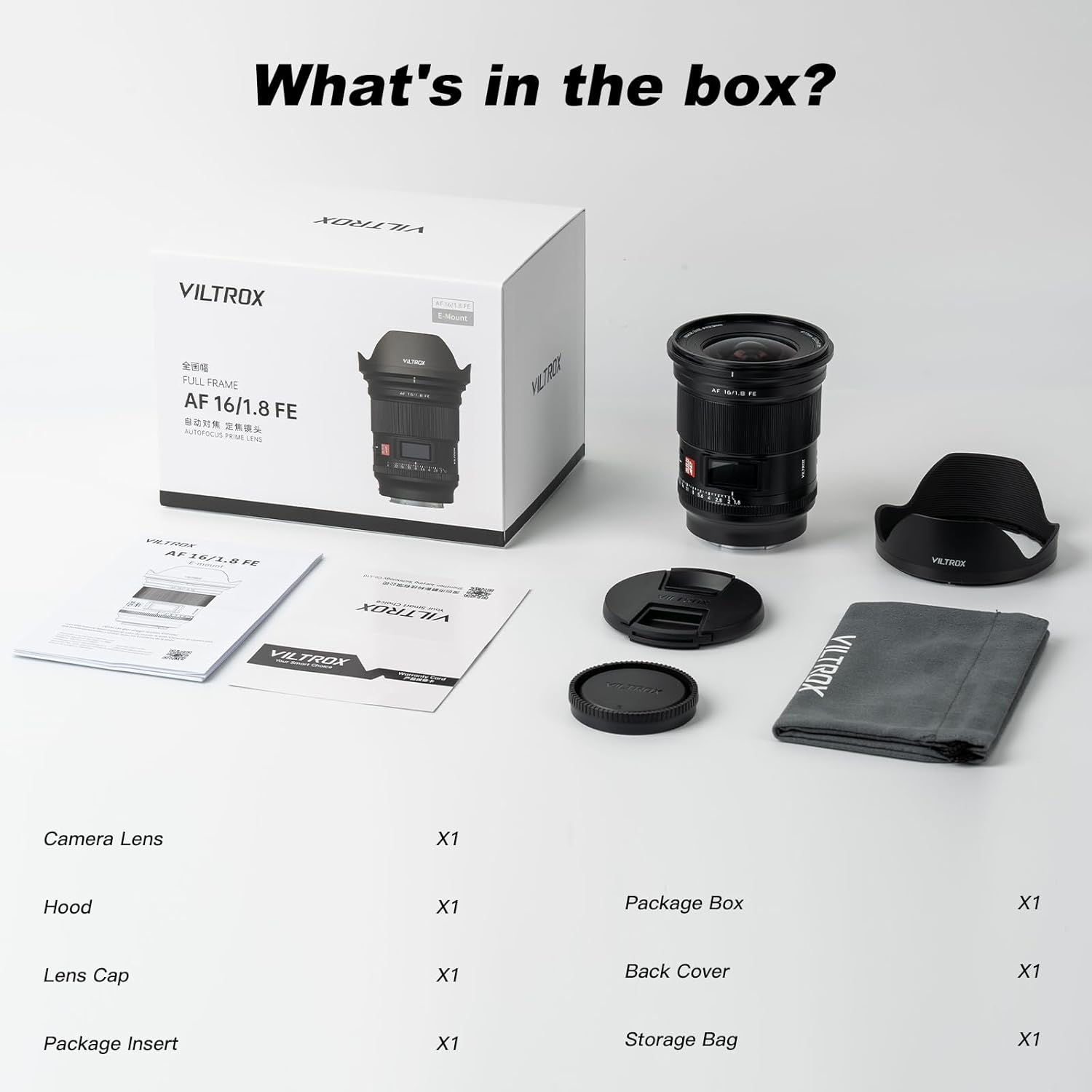
Visual representation of the items included in the product packaging.
Warranty and Support
VILTROX is committed to providing high-quality products and excellent customer service.
- Warranty: This product comes with an eight-year warranty when purchased from an official authorized dealer like PhoZoom US. Please retain your proof of purchase for warranty claims.
- Customer Support: If you encounter any issues during use or have questions about your VILTROX AF 16mm F1.8 Z lens, please feel free to contact VILTROX customer support. Contact information can typically be found on the VILTROX official website or through your point of purchase.
Related documents16mm-1.8 Z


Ask a question about this manual
Ask about setup, troubleshooting, compatibility, parts, safety, or missing instructions. Manuals+ will review the question and use this page’s manual context to help answer it.