
1. Introduction
This manual provides detailed instructions for the installation, operation, and maintenance of your Bio Bidet BB1200 Elongated Smart Bidet. The BB1200 offers a personalized and hygienic bathroom experience with features such as warm water wash, a heated seat, a warm air dryer, and control via a wireless remote or the Bemis Living App. Please read this manual thoroughly before installation and use to ensure proper function and safety.

Figure 1: Bio Bidet BB1200 Smart Bidet with remote and app interface.
2. Safety Information
Observe the following safety precautions to reduce the risk of electric shock, fire, or injury:
- Ensure the bidet is connected to a Ground Fault Circuit Interrupter (GFCI) outlet.
- Do not immerse the unit in water or spray water directly onto electrical components.
- Unplug the unit before cleaning or performing any maintenance.
- Do not allow children or individuals with reduced physical, sensory, or mental capabilities to operate the bidet without supervision.
- Avoid using abrasive cleaners or harsh chemicals on the bidet surface.
3. Package Contents
Verify that all components are present before beginning installation:
- BB1200 Bidet Seat
- Wireless Remote Control
- Remote Wall Mount
- 3 AAA Batteries (for remote)
- T-Valve
- Bidet Hose
- Catch Plate
- Top Mount Anchors
- Bolts and Bolt Guides
- Installation Components
4. Setup & Installation
The Bio Bidet BB1200 is designed for easy DIY installation. No plumber is typically required. Follow these steps:
- Turn off the water shut-off valve: Locate the water supply valve behind your toilet and turn it clockwise until the water flow stops. Flush the toilet to drain the tank.
- Remove your existing toilet seat: Unscrew the bolts holding your current toilet seat in place and remove the seat and lid.
- Install the catch plate and slide the bidet seat on: Position the catch plate over the toilet bowl holes, insert the top mount anchors, bolts, and bolt guides. Tighten securely. Slide the BB1200 bidet seat onto the catch plate until it clicks into place.
- Connect the toilet and bidet hoses: Install the T-Valve at the toilet's water supply connection. Connect the toilet hose to the T-Valve and the bidet hose from the T-Valve to the bidet unit. Ensure all connections are hand-tightened, then use a wrench for a final quarter-turn to prevent leaks.
- Plug the power cord into a GFCI outlet: Connect the bidet's power cord to a nearby GFCI (Ground Fault Circuit Interrupter) electrical outlet.
- Turn on the water shut-off valve: Slowly turn the water shut-off valve counter-clockwise to restore water supply. Check for any leaks.
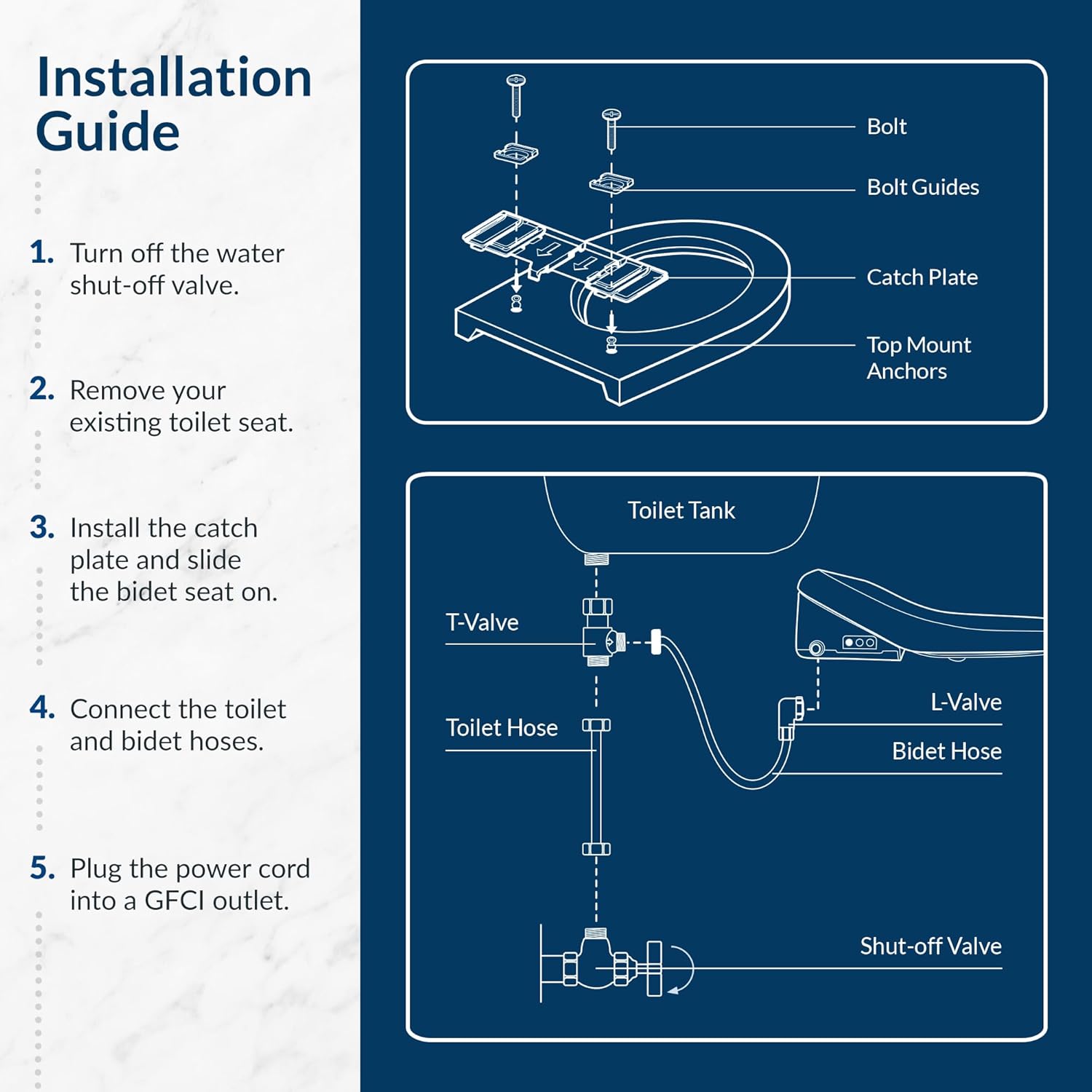
Figure 2: Visual guide for Bio Bidet BB1200 installation steps.
5. Operating Instructions
The BB1200 can be controlled via the included wireless remote or the Bemis Living App.
5.1 Core Functions
- Heated Seat: Enjoy adjustable warmth for comfort. The seat temperature can be set to your preference.
- Warm Water Wash: Provides unlimited warm water for a thorough cleanse. Adjust water temperature and pressure. Options include Rear Wash, Front Wash, and Turbo Wash.
- Warm Air Dryer: Reduces the need for toilet paper by providing a gentle warm air dry. Dryer temperature and pressure are adjustable.
- Nozzle Position: Adjust the nozzle's position for optimal cleaning.
- Self-Cleaning Nozzle: The stainless steel nozzle rinses itself before and after each use for hygiene.
- Night Light: A built-in night light illuminates the bowl, making nighttime use convenient without disrupting sleep.
- Eco Mode: Activates energy-saving settings.
- Smart Seat Sensor: Features only activate when a user is seated.
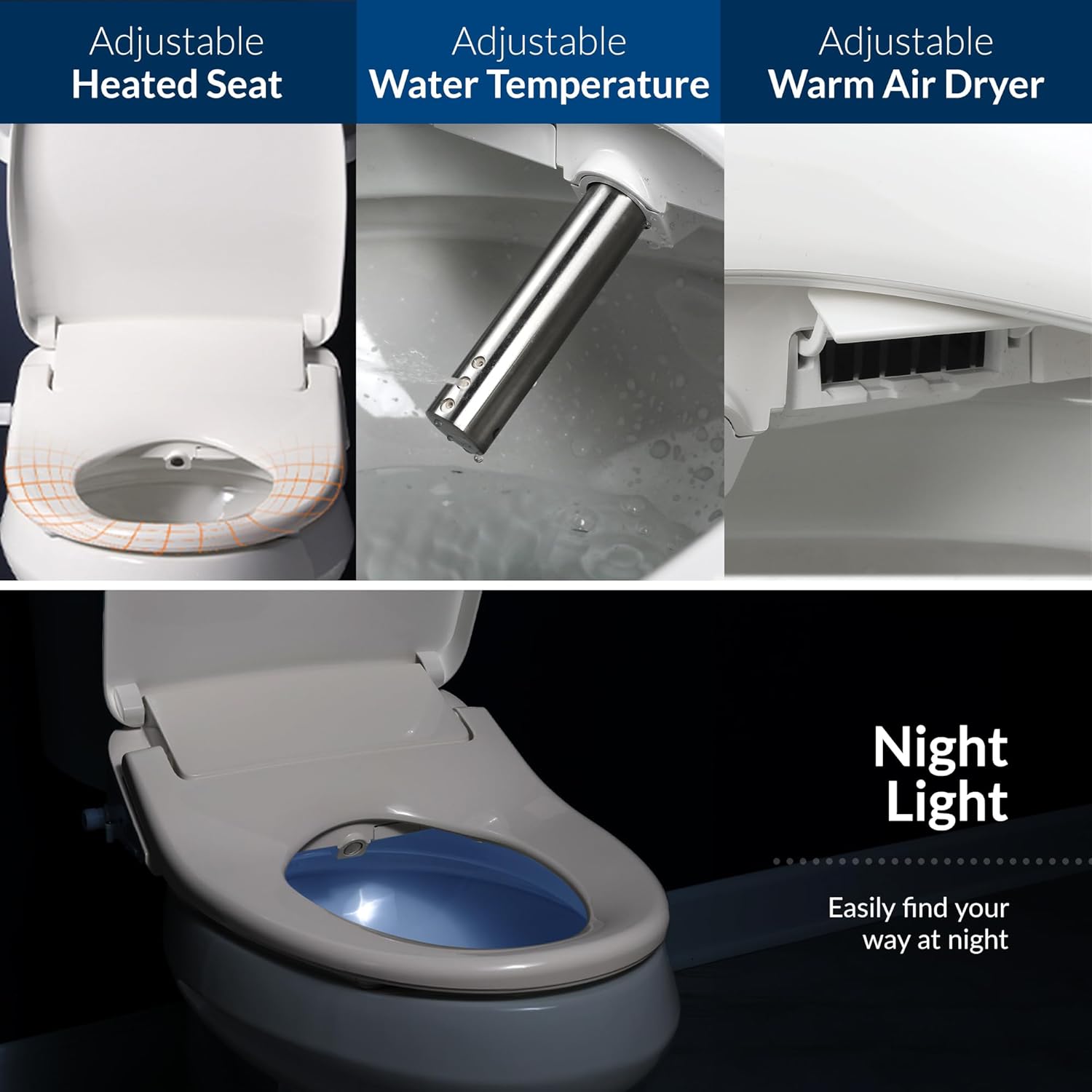
Figure 3: Key comfort and cleaning features of the BB1200.
5.2 Using the Wireless Remote Control
The wireless remote allows direct control of all bidet functions. Mount it to a nearby wall for easy access.
- Wash Functions: Buttons for Rear Wash, Front Wash, and Turbo Wash.
- Dry Function: Button to activate the warm air dryer.
- Stop: Button to stop all active functions.
- Temperature/Pressure Adjustment: Buttons to increase or decrease water temperature, seat temperature, and dryer pressure.
- Nozzle Position: Buttons to adjust the nozzle forward or backward.
- Nozzle Cleaning: Button to initiate the self-cleaning cycle.
- Eco Mode: Button to activate/deactivate energy-saving mode.
- User Presets (USER 1/USER 2): Buttons to activate personalized settings saved in the app.
5.3 Using the Bemis Living App
The Bemis Living App provides advanced control and customization options for your BB1200. Download it from the App Store or Google Play.
- Pairing: Follow the in-app instructions to pair your smartphone with the BB1200 bidet.
- Customization: Adjust water temperature, seat temperature, dryer temperature, water pressure, and nozzle position with precision sliders.
- User Presets: Create and save personalized wash settings (e.g., specific wash type, duration, temperatures, pressures) for multiple users. These can be activated directly from the app or via the remote control.
- Remote Control Alternative: The app serves as a full-featured alternative to the physical remote.
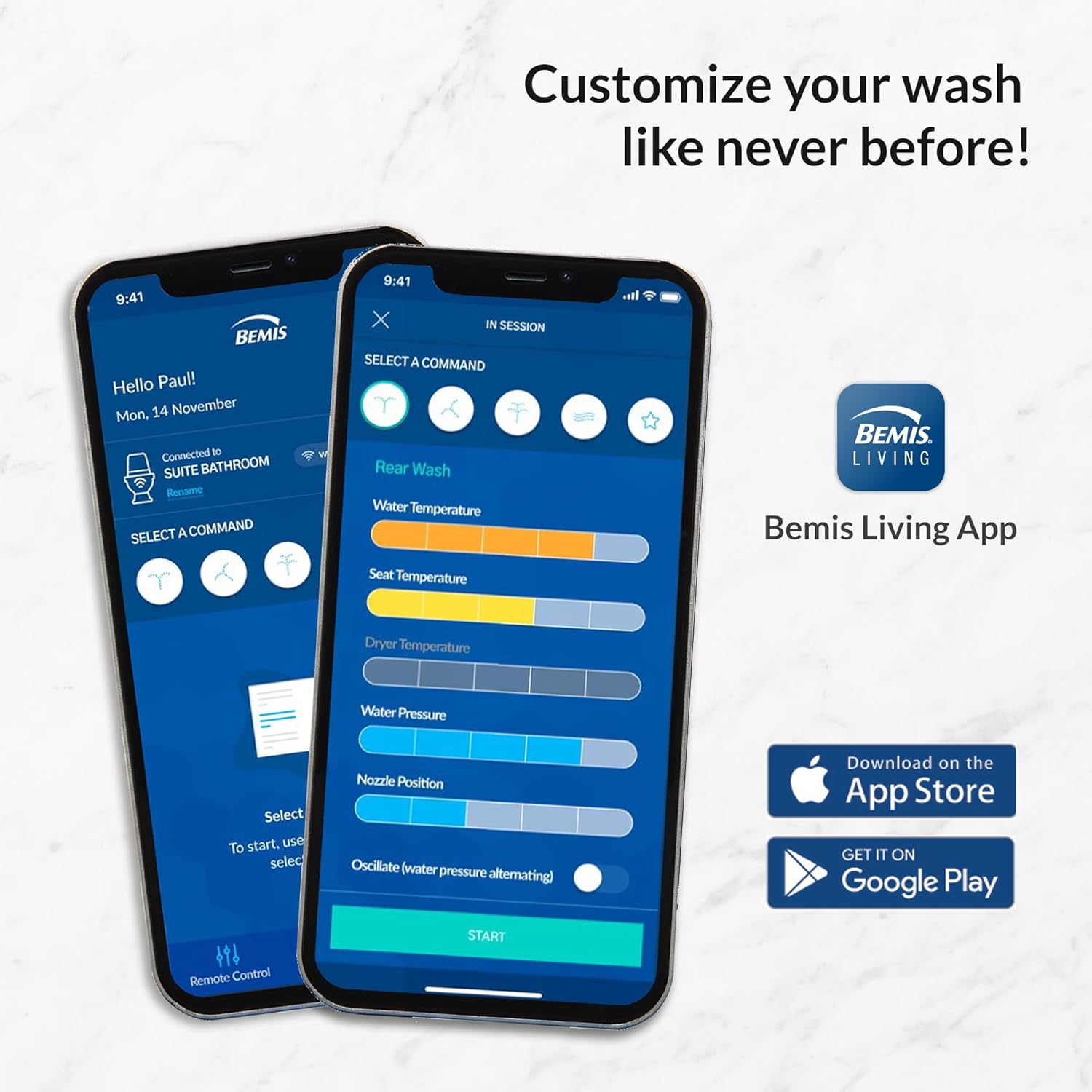
Figure 4: Bemis Living App for personalized bidet control.
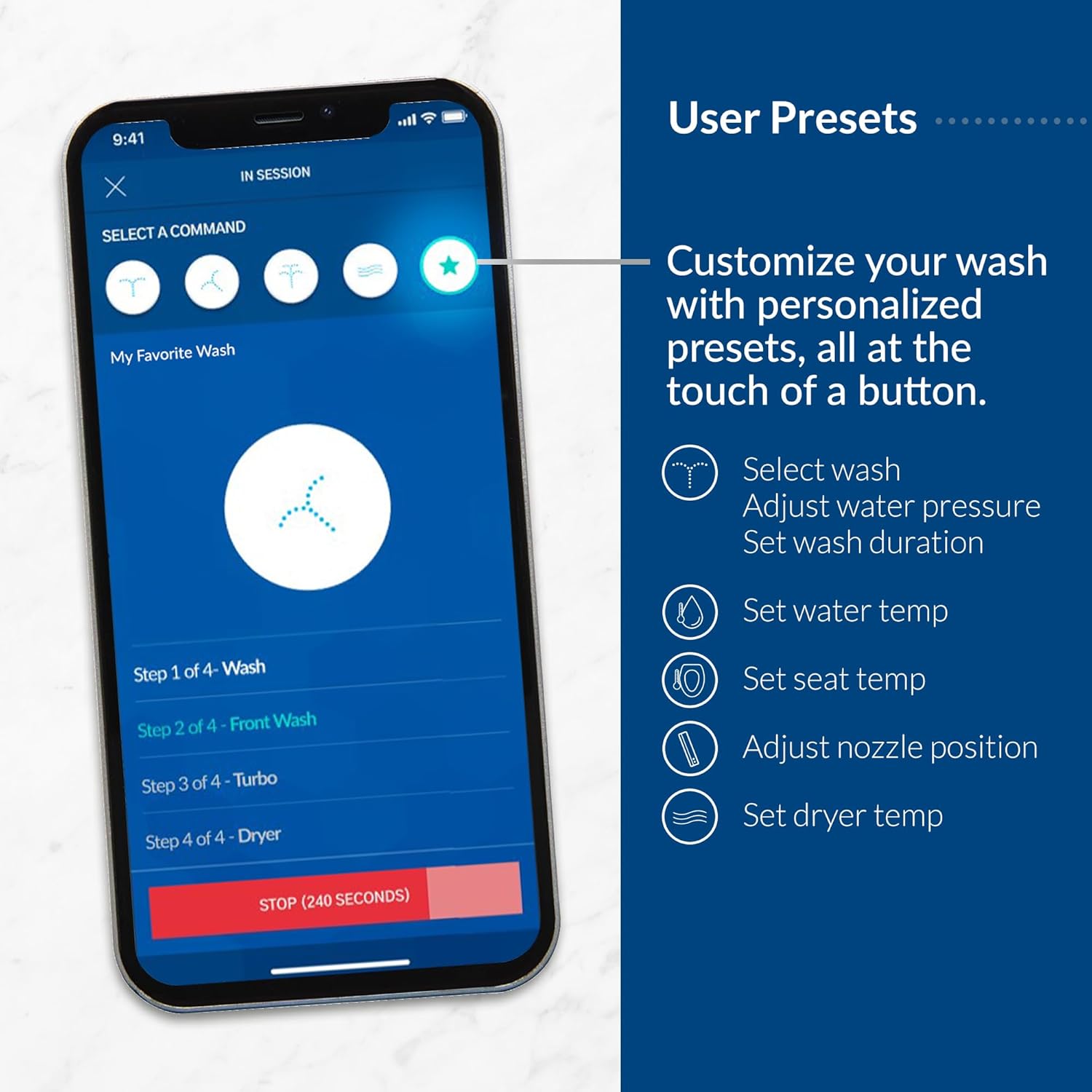
Figure 5: Customizing user presets in the Bemis Living App.
6. Maintenance
Regular maintenance ensures the longevity and hygienic operation of your Bio Bidet BB1200.
6.1 Cleaning the Nozzle
The BB1200 features a self-cleaning nozzle. To manually clean the nozzle:
- Press the 'Nozzle Cleaning' button on the remote or in the app. The nozzle will extend.
- Gently wipe the nozzle with a soft cloth or brush and mild soap. Do not use harsh chemicals.
- Press 'Stop' to retract the nozzle.
6.2 Cleaning the Bidet Unit
The bidet seat is made of easy-to-clean plastic.
- Unplug the bidet from the electrical outlet before cleaning.
- Wipe the exterior surfaces with a soft, damp cloth and a mild, non-abrasive cleaner.
- Do not spray water directly onto the unit.
- For thorough cleaning, the bidet seat can be easily removed from the catch plate by pressing the release button.
6.3 Water Filter Maintenance
While the BB1200 typically does not require frequent filter changes, inspect the mesh filter at the T-valve connection periodically. Clean any accumulated debris to ensure optimal water flow.
7. Troubleshooting
If you encounter issues with your Bio Bidet BB1200, refer to the following common troubleshooting steps:
| Problem | Possible Cause | Solution |
|---|---|---|
| No water spray | Water supply valve closed; Bidet hose kinked; Filter clogged; Seat sensor not activated. | Open water supply valve; Straighten hose; Clean filter; Ensure you are seated properly. |
| No warm water | Heater off; Water temperature setting too low; Power issue. | Check water temperature setting; Ensure unit is powered on; Verify power connection. |
| Heated seat not working | Seat heater off; Temperature setting too low; Seat sensor not activated. | Check seat temperature setting; Ensure you are seated properly. |
| Remote control not responding | Dead batteries; Remote out of range; Interference. | Replace AAA batteries; Move closer to the bidet; Reduce electronic interference. |
| App connectivity issues | Bluetooth/Wi-Fi off; App not updated; Bidet not in pairing mode. | Ensure Bluetooth/Wi-Fi is on; Update app; Refer to app for pairing instructions. |
| Water leakage | Loose connections; Damaged hose/seal. | Tighten all connections; Inspect hoses and seals for damage and replace if necessary. |
If the problem persists after attempting these solutions, please contact Bio Bidet customer support.
8. Specifications
| Feature | Detail |
|---|---|
| Model Number | BB1200 |
| Shape | Elongated (Oval) |
| Color | White |
| Material | Plastic, Stainless Steel (Nozzle) |
| Product Dimensions | 20.47"L x 18.11"W |
| Item Weight | 11 Pounds |
| Power Source | Electric (requires GFCI outlet) |
| Remote Batteries | 3 AAA batteries (included) |
| Control Method | Wireless Remote, Bemis Living App |
| Features | Warm Water Wash, Heated Seat, Warm Air Dryer, Night Light, Self-Cleaning Nozzle, User Presets, Slow-Close Lid, Smart Seat Sensor |
| UPC | 850040813357 |
9. Warranty & Support
The Bio Bidet BB1200 is backed by a 1-year full warranty. This warranty covers defects in materials and workmanship under normal use.
For technical assistance, troubleshooting, or warranty claims, please contact the Bio Bidet support team. Their U.S.-based customer support is available to assist you.
Contact Information:
- Refer to the Bio Bidet official website for the most current contact details.
- Have your model number (BB1200) and purchase date available when contacting support.


