
eKids B18
eKids Wireless Earbuds with Microphone (Mario)
Model: B18
Introduction
Thank you for choosing the eKids Wireless Earbuds. These Bluetooth earbuds, featuring a fun Mario design, are perfect for streaming audio, making calls, and enjoying entertainment at school, home, or while traveling. This manual provides detailed instructions to help you get the most out of your new earbuds.

Image: The eKids Mario Wireless Earbuds, nestled in their vibrant red charging case. The case is open, revealing the white earbuds adorned with iconic Mario mushroom designs, ready for use.
Setup
Package Contents
Ensure all items are present in the package:
- eKids Mario Wireless Earbuds (Left and Right)
- Charging Case
- USB-C Charging Cable
- Additional Ear Cushions (Small, Medium, Large)

Image: A comprehensive diagram illustrating the components included with the eKids Mario Wireless Earbuds, including the earbuds themselves, the charging case, the USB-C charging cable, and various sizes of ear cushions for a customized fit.
Charging the Earbuds and Case
Before first use, fully charge the earbuds and charging case. The case provides up to 2.5x extra charges, extending total music playtime to 22 hours.
- Place both earbuds into the charging case. Ensure they are properly seated.
- Connect the supplied USB-C charging cable to the charging port on the case and the other end to a USB power source (e.g., computer USB port, wall adapter).
- The indicator light on the case will show charging status. Refer to the indicator light guide for details (usually solid or blinking during charge, off when full).
- A full charge for the carrying case takes approximately 55 hours.
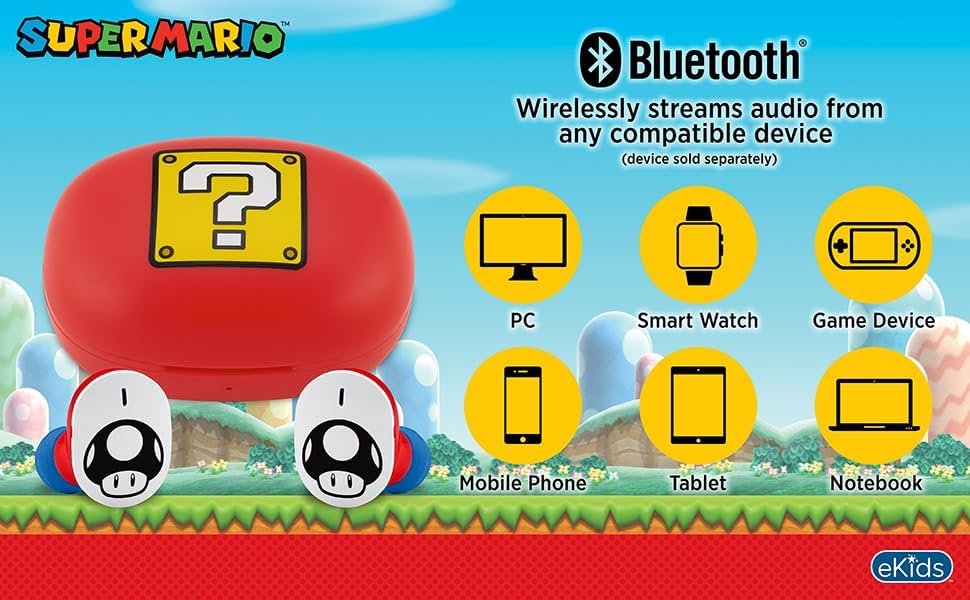
Image: A close-up top view of the red Mario-themed charging case, featuring the distinctive yellow question block design. This image highlights the compact and portable nature of the charging case.
Bluetooth Pairing
Pair your earbuds with any Bluetooth-enabled device such as smartphones, tablets, or computers.
- Ensure the earbuds are charged and placed in the charging case.
- Open the charging case. The earbuds will automatically enter pairing mode (indicator lights may flash).
- On your device, go to Bluetooth settings and turn Bluetooth ON.
- Search for available devices. Select "eKids Mario Earbuds" or a similar name from the list.
- Once connected, the earbuds will indicate successful pairing (e.g., a tone or steady light).
- The earbuds will automatically reconnect to the last paired device when removed from the case, if Bluetooth is enabled on the device.

Image: A visual representation of the eKids Mario Wireless Earbuds' Bluetooth compatibility, demonstrating their ability to wirelessly stream audio from a wide range of devices including PCs, smartwatches, gaming devices, mobile phones, tablets, and notebooks.
Fitting the Earbuds
For optimal sound quality and comfort, choose the correct size of ear cushions.
- The earbuds come with small, medium, and large rubber ear cushions.
- Try each size to find the one that provides a secure yet comfortable fit in your ear canal.
- A good fit helps with passive noise isolation and bass response.

Image: A young individual wearing the eKids Mario Wireless Earbuds, illustrating how the earbuds fit comfortably in the ear, ensuring a pleasant listening experience.
Operating Instructions
Touch Controls
The eKids Mario Earbuds feature touch controls for easy management of audio and calls.
| Action | Function |
|---|---|
| Single Tap (Left or Right Earbud) | Play/Pause Audio, Answer/End Call |
| Double Tap (Right Earbud) | Next Track |
| Double Tap (Left Earbud) | Previous Track |
| Triple Tap (Left or Right Earbud) | Activate Voice Assistant |
| Press and Hold (2 seconds) | Reject Call |
Note: Specific touch control functions may vary slightly depending on your connected device and its operating system.
Making and Receiving Calls
The built-in microphone allows for clear communication.
- Answering a Call: Single tap either earbud.
- Ending a Call: Single tap either earbud during a call.
- Rejecting a Call: Press and hold either earbud for 2 seconds.
- Making a Call: Initiate the call from your connected device. Audio will automatically route to the earbuds.

Image: A child engaged with a smartphone, wearing the eKids Mario Wireless Earbuds, illustrating their use for entertainment or communication.
Maintenance
Cleaning
Regular cleaning helps maintain sound quality and hygiene.
- Gently wipe the earbuds and charging case with a soft, dry, lint-free cloth.
- Do not use abrasive cleaners, alcohol, or chemical solvents.
- Remove ear cushions and clean them separately with mild soap and water if necessary, ensuring they are completely dry before reattaching.
- Avoid getting moisture into any openings. The earbuds are not water resistant.
Storage
When not in use, store the earbuds in their charging case to protect them and keep them charged.
- Store in a cool, dry place away from extreme temperatures and direct sunlight.
- Avoid dropping or subjecting the earbuds and case to strong impacts.
Troubleshooting
If you encounter issues, try the following solutions:
| Problem | Possible Solution |
|---|---|
| Earbuds not pairing |
|
| No sound from earbuds |
|
| One earbud not working |
|
| Charging case not charging |
|
Specifications
| Feature | Detail |
|---|---|
| Model Name | B18 |
| Connectivity Technology | Wireless (Bluetooth) |
| Bluetooth Version | 5.0 |
| Battery Life (Earbuds + Case) | Up to 22 Hours Total Playtime |
| Charging Case Battery Charging Time | Approx. 55 Hours |
| Control Type | Touch Control |
| Frequency Range | 20Hz - 20,000Hz |
| Impedance | 32 Ohm |
| Ear Placement | In Ear |
| Material | Plastic |
| Item Weight | 2.39 ounces |
| Manufacturer | KIDdesigns |
| UPC | 092298960326 |
Warranty and Support
Warranty Information
eKids products are designed for quality and reliability. For specific warranty details, please refer to the warranty card included with your product or visit the official eKids website.
Customer Support
For further assistance, technical support, or inquiries, please visit the eKids Brand Store on Amazon or contact eKids customer service through their official channels.
Related documentsB18


Ask a question about this manual
Ask about setup, troubleshooting, compatibility, parts, safety, or missing instructions. Manuals+ will review the question and use this page’s manual context to help answer it.