
Product Overview
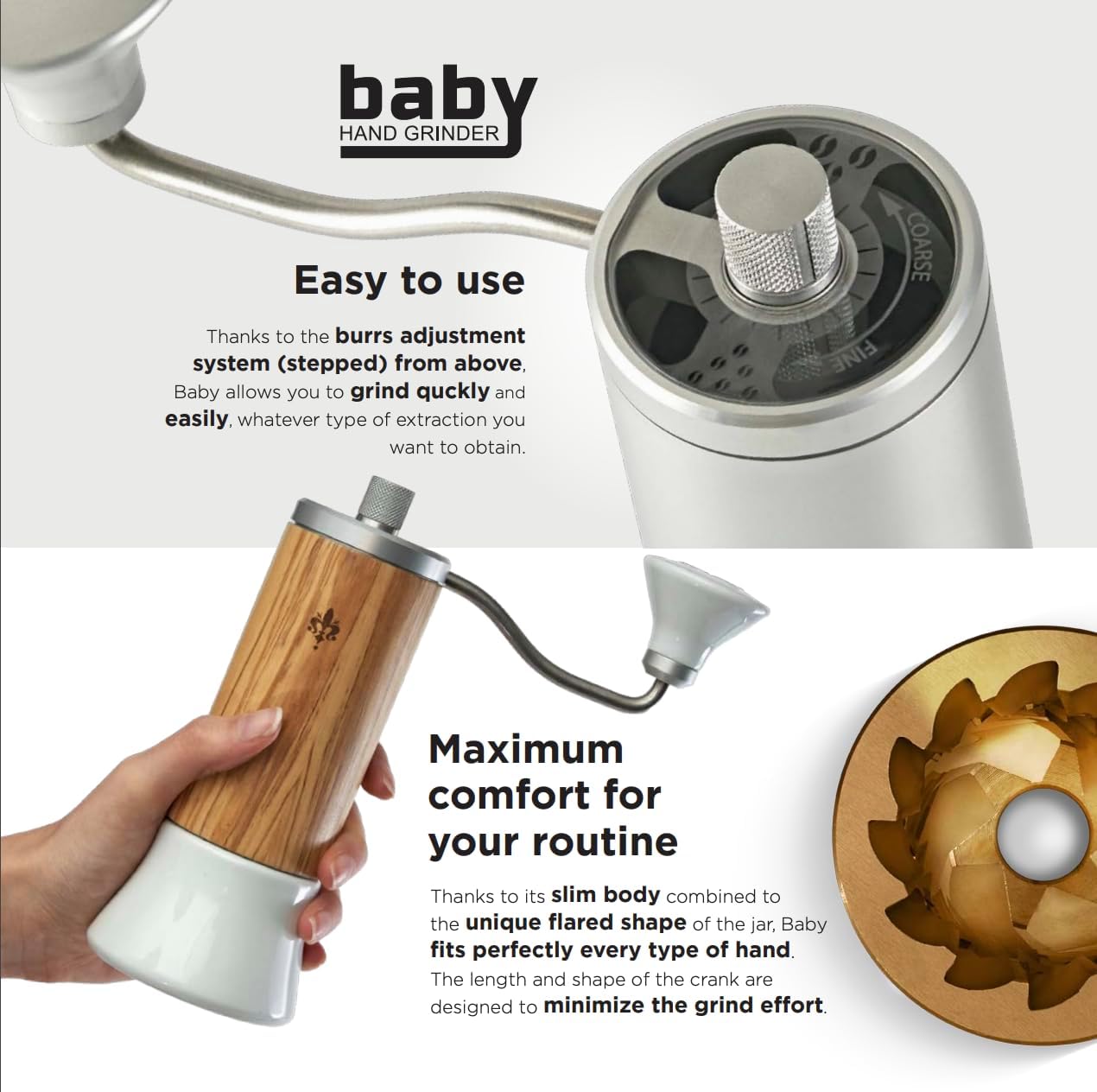
The Eureka Baby is Eureka's first manual coffee grinder, designed for coffee enthusiasts seeking precision and portability. It features 48mm conical burrs with a specific Espresso & Brew design, ensuring excellent and uniform results across various extraction methods. The burrs are treated with Eureka's exclusive "Gold Energy" technology, extending their lifespan by approximately 50% compared to traditional hardened steel burrs.
Key Features
- Stylish and Technologically Advanced: A hand-operated coffee grinder combining sleek design with innovative features.
- Enhanced Burr Durability: Equipped with 48mm conical burrs treated with "Gold Energy" technology for increased lifespan and consistent grinding.
- Versatile Brewing Compatibility: Suitable for a range of brewing methods, from espresso to pour-over.
- Precise Grind Adjustment: Features a stepped burr adjustment system for quick and accurate grind size tuning.
- Ease of Use and Ergonomic Design: Slim and ergonomic design with an intelligently designed crank arm and flared jar for comfortable and efficient operation.
- Portability and Freshness: Easily disassembled and transported, with near-zero grind retention for fresh, flavorful coffee on the go.
1. Setup and Initial Assembly
Follow these steps to unbox and assemble your Eureka Baby Manual Coffee Grinder:
- Carefully remove all components from the packaging. Ensure all parts are present: the grinder body, crank handle, grind adjustment dial, and glass catch cup.
- Attach the glass catch cup to the bottom of the grinder body by screwing it clockwise until secure.
- Insert the crank handle onto the top shaft of the grinder.

Video: Unboxing and Assembly Guide
Video 1: This video demonstrates the unboxing process and initial assembly steps for the Eureka Baby Manual Coffee Grinder, including attaching the glass catch cup and crank handle.
2. Operating Instructions
Grind Adjustment
The Eureka Baby features a stepped grind adjustment system located at the top of the grinder. To adjust the grind size:
- Hold the grinder body firmly.
- Rotate the adjustment dial clockwise for a finer grind or counter-clockwise for a coarser grind. The dial is clearly marked with 'FINE' and 'COARSE' indicators.
- Refer to the grind size chart (available via QR code on packaging) for recommended settings for different brewing methods.

Grinding Coffee
To grind your coffee beans:
- Unscrew the glass catch cup from the grinder body.
- Remove the top cover/crank assembly.
- Fill the glass catch cup with whole coffee beans. Do not exceed 40g.
- Reverse the grinder body and place it onto the filled glass catch cup. Turn the body upside down so the beans flow into the grinding chamber.
- Insert the top cover/crank assembly into the top part of the body. Hold the grinding adjustment dial with one hand and use the other hand to move the cover left and right until it perfectly matches with the grinder body.
- Screw the glass catch cup back onto the body.
- Hold the grinder firmly and turn the crank handle clockwise to begin grinding. Continue until all beans are ground.
- Unscrew the glass catch cup to access your freshly ground coffee.


3. Maintenance
Cleaning and Care
Regular cleaning ensures optimal performance and longevity of your grinder:
- Unscrew the glass catch cup and remove the crank handle and top cover.
- Carefully unscrew the grind adjustment dial completely until the inner burr and shaft can be removed from the grinder body.
- Use a soft brush (a dedicated coffee grinder brush is recommended) to clean any residual coffee grounds from the burrs, shaft, and inside the grinder body.
- Wipe down the exterior of the grinder body and glass catch cup with a damp cloth. Do not use abrasive cleaners or immerse the grinder body in water.
- Reassemble the grinder by reversing the disassembly steps. Ensure all parts are securely fastened.

4. Troubleshooting Common Issues
- Inconsistent Grind: Ensure the burrs are clean and free of old coffee grounds. Check that the grind adjustment dial is securely set and has not shifted during grinding.
- Difficulty Grinding: If the crank is hard to turn, the grind setting might be too fine for the beans. Adjust to a coarser setting. Ensure the beans are not oily, which can clog the burrs.
- Static Electricity with Grounds: A common issue with coffee grinders. Lightly misting the beans with a few drops of water before grinding (RDT method) can help reduce static.
- Grinder Not Assembling Correctly: Double-check that all components are aligned properly and that no grounds are obstructing the threads or burr seating.
If you encounter persistent issues, please refer to the customer support section for contact information.
5. Product Specifications
| Brand | Eureka |
| Model Number | Baby grinder |
| Color | Anodized |
| Material | Aluminum |
| Item Weight | 2.1 Pounds |
| Product Dimensions | 11.8"L x 9.6"W x 5.5"H |
| Burr Type | 48mm Conical Burrs with "Gold Energy" Treatment |
6. Warranty and Customer Support
For warranty information, product registration, or technical support, please refer to the official Eureka website or contact your retailer. You can also scan the QR code provided on the product packaging for exclusive content and direct access to support resources.
Please retain your proof of purchase for any warranty claims.


