
1. Introduction
Thank you for choosing the CaDA C51304W Red Blade Sport Car building kit. This manual provides detailed instructions for assembling, operating, and maintaining your model. Please read this manual thoroughly before beginning assembly to ensure a smooth and enjoyable experience.
This kit allows you to construct a highly detailed 1:14 scale Red Blade Sport Car model with 405 pieces. The finished model features functional elements and can be controlled via a 2.4GHz remote control or a smartphone application.

Figure 1.1: Assembled CaDA C51304W Red Blade Sport Car. This image showcases the completed Red Blade Sport Car model from a front-angle perspective, highlighting its sleek design and red color.

Figure 1.2: Rear View of the Assembled Sport Car. This image provides a view of the rear of the CaDA Red Blade Sport Car, showing its detailed taillights and exhaust design.
2. Safety Information
WARNING: CHOKING HAZARD - Small Parts. Not for children under 3 years. Recommended for ages 6 and up.
- Always supervise children during assembly and operation.
- Keep all packaging materials away from children to prevent suffocation.
- Do not put parts in mouth.
- Dispose of batteries properly according to local regulations.
- Refer to the safety instructions printed on the product packaging for additional warnings.
3. Package Contents
Verify that all components are present before starting assembly.
- CaDA Building Block Kit (405 pieces)
- Illustrated Instruction Manual
- Smart Power Module (Chassis with integrated motors and battery compartment)
- 2.4GHz Remote Control (Batteries not included)
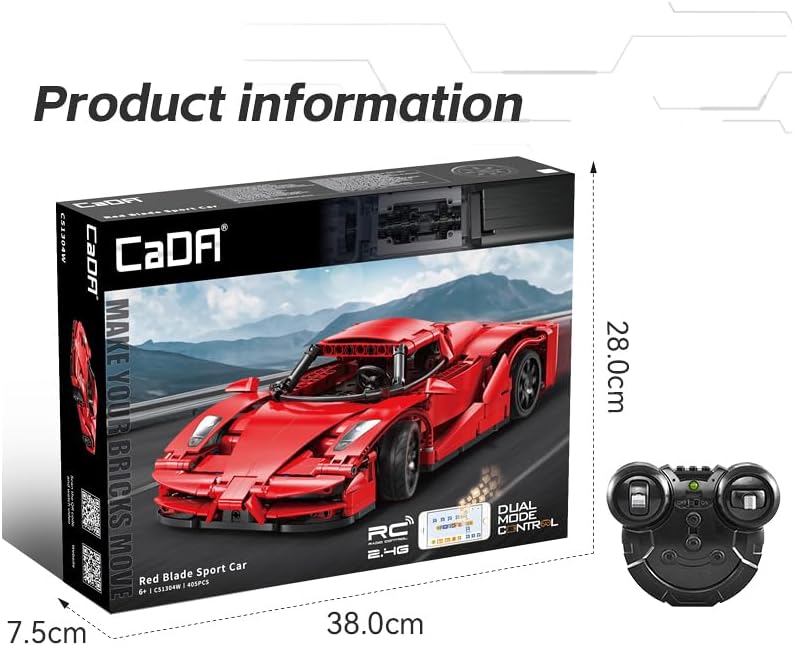
Figure 3.1: Product Packaging and Included Remote Control. This image displays the product box, showing the assembled Red Blade Sport Car model, and the separate 2.4GHz remote control unit. The box also indicates the piece count and dual-mode control.
4. Setup and Assembly
No glue or special tools are required for assembly. The model is designed for plug-in construction.
4.1. Battery Installation
- Remote Control: Insert 2 x 1.5V AA batteries (not included) into the remote control's battery compartment. Ensure correct polarity.
- Vehicle: The Smart Power Module (chassis) contains a built-in 3.7V 500mAh rechargeable battery. Charge the vehicle battery using the provided USB charging cable (if included, otherwise use a standard micro-USB cable) before first use. Refer to the Smart Power Module's specific instructions for charging details.
4.2. Model Assembly
Follow the step-by-step illustrated instructions provided in the manual included with your kit. Each step clearly shows which pieces to use and how to connect them.

Figure 4.1: Building and Play. This image illustrates the hands-on assembly process, showing individual building blocks being connected to form the model. The partially assembled car is visible in the background.

Figure 4.2: Smart Power Module. This image highlights the Smart Power Module, which forms the base chassis of the vehicle, including wheels and internal components. An inset shows the steering trim adjustment.
The assembly process involves connecting the 405 building blocks to create the detailed Red Blade Sport Car. Pay close attention to the orientation of pieces as shown in the diagrams.
5. Operating Instructions
The CaDA C51304W Red Blade Sport Car can be controlled using either the included 2.4GHz remote control or a dedicated smartphone application.
5.1. Remote Control Operation
- Ensure both the vehicle and remote control have sufficient battery power.
- Turn on the vehicle's power switch (located on the Smart Power Module).
- Turn on the remote control. The remote and vehicle should automatically pair.
- Use the joysticks/buttons on the remote control to steer and accelerate the vehicle. Refer to the remote control's diagram in the included manual for specific button functions.
- If the vehicle does not drive straight, use the steering trim adjustment on the Smart Power Module (refer to Figure 4.2) to fine-tune the steering.
5.2. Smartphone App Control (Bluetooth Connectivity)
- App Download: Scan the QR code provided in the product packaging or search for "CaDA Smart+" in your device's app store.
- System Requirements: iOS system version 13.0 or above, Android system version 8.0 or above.
- Connection:
- Ensure Bluetooth is enabled on your smartphone.
- Turn on the vehicle's power switch.
- Open the CaDA Smart+ app. The app will guide you through connecting to the vehicle via Bluetooth.
- Control Interface: The app features a drag-and-drop control interface, allowing for intuitive control and programming of the vehicle's movements.
- Compatibility Note: Some phones may not be compatible with the application. It is highly advised to test the app before constructing the model if app control is a primary feature for you.

Figure 5.1: Dual Control Options. This image illustrates both the Bluetooth connectivity for smartphone app control (left) and the 2.4GHz remote control (right) for operating the CaDA Red Blade Sport Car.

Figure 5.2: App Control Interface. This image shows the CaDA Smart+ app interface on a smartphone, demonstrating the drag-and-drop programming environment for controlling the Red Blade Sport Car model.
6. Maintenance
- Cleaning: Wipe the model with a soft, dry cloth. Do not use water or cleaning solutions, as this may damage electronic components.
- Storage: Store the model in a cool, dry place away from direct sunlight and extreme temperatures.
- Battery Care: If the model will not be used for an extended period, remove the AA batteries from the remote control to prevent leakage. Ensure the vehicle's internal battery is fully charged before long-term storage.
- Part Integrity: Periodically check for any loose or damaged parts. Reattach or replace as necessary.
7. Troubleshooting
| Problem | Possible Cause | Solution |
|---|---|---|
| Vehicle does not respond to remote/app. | Low batteries in remote or vehicle; Vehicle/remote not powered on; Not paired. | Replace/charge batteries; Ensure power switches are ON; Re-pair remote/app with vehicle. |
| Vehicle drives crooked. | Steering trim needs adjustment. | Adjust the steering trim on the Smart Power Module. |
| App cannot connect to vehicle. | Bluetooth off; App/OS version incompatible; Vehicle not powered on. | Ensure Bluetooth is on; Check app/OS compatibility; Power on vehicle; Restart app/phone. |
| Missing or damaged parts. | Manufacturing defect; Accidental loss/damage. | Contact CaDA customer support for replacement parts. |
8. Specifications

Figure 8.1: Product Dimensions and Key Specifications. This image provides a visual representation of the assembled model's dimensions (length, width, height) and a summary table of its technical specifications.
| Feature | Detail |
|---|---|
| Product Name | Red Blade Sport Car |
| Model Number | C51304W |
| Brand | CaDA |
| Number of Pieces | 405 |
| Recommended Age | 6+ Years |
| Material | Plastic |
| Vehicle Battery | 3.7V 500mAh (Rechargeable, integrated) |
| Remote Control Battery | 2 x 1.5V AA Batteries (Not included) |
| RC Distance | Up to 25 meters |
| Vehicle Speed | Approx. 5.5 km/h |
| Product Dimensions (L x W x H) | Approx. 32.0 cm x 16.0 cm x 8.0 cm |
| Product Weight | 1 Kilogram |
| Control Modes | 2.4GHz Remote Control, Bluetooth App Control |
Note: All data and product parameters are obtained by CaDA Lab for reference only and are subject to the material received by customers. CaDA Bricks reserves the right of final interpretation.
9. Warranty and Support
CaDA products are manufactured to high quality standards. For warranty information, please refer to the documentation included with your purchase or visit the official CaDA website. If you encounter any issues or require assistance with assembly or operation, please contact CaDA customer support.
Customer Support: Please visit the official CaDA website for contact information, FAQs, and additional resources. You may also contact the retailer where you purchased this product.
Replacement Parts: In case of missing or damaged parts, please contact CaDA customer support with your product model number (C51304W) and details of the required parts.