
1. Introduction
This manual provides essential information for setting up, operating, and maintaining your UMIDIGI G6 5G smartphone. Please read it carefully to ensure optimal performance and longevity of your device.
2. Package Contents
Upon unboxing your UMIDIGI G6 5G, please verify that all the following items are included:
- UMIDIGI G6 5G Smartphone
- Power Adapter
- USB Type-C Cable
- SIM Tray Ejector Tool
- Protective Case (may vary by region)
- Pre-applied Screen Protector (may vary by region)
3. Device Overview
The UMIDIGI G6 5G is a feature-rich smartphone designed for modern communication and entertainment. Key components and features are highlighted below.

Image: UMIDIGI G6 5G smartphone highlighting key features.
3.1. Physical Components
- Display: 6.57-inch 90Hz Eye-Care Large Display with 1616x720 resolution.
- Cameras: 50MP Ultra-Clear Main Camera, 8MP Front Camera, 5MP Infrared Night Vision Camera.
- Ports: USB Type-C for charging and data transfer, 3.5mm headphone jack.
- Buttons: Power button, Volume buttons, Express Key.
- SIM Tray: Supports Dual SIM cards.

Image: Back of the UMIDIGI G6 5G phone with camera and labels.
3.2. Internal Specifications
- Processor: MediaTek Dimensity 6100+ Octa-core processor (TSMC 6nm process).
- Memory: 12GB RAM (6GB physical + 6GB virtual) and 128GB internal storage, expandable up to 1TB via microSD card.
- Battery: 5000mAh Lithium Polymer battery with 10W charging.
- Operating System: Android 13.0.
- Connectivity: 5G, 4G, 3G, 2G, Bluetooth 5.3, Wi-Fi, NFC.
- Navigation: GPS, Glonass, Beidou, Galileo.

Image: MediaTek Dimensity 6100+ processor and memory configuration.
4. Setup
4.1. Inserting SIM Cards and MicroSD Card
- Locate the SIM card tray on the side of your phone.
- Insert the SIM tray ejector tool into the small hole next to the tray and push gently until the tray pops out.
- Place your Nano-SIM card(s) and/or microSD card into the designated slots on the tray. Ensure the gold contacts face downwards.
- Carefully reinsert the tray into the phone until it clicks into place.
Note: If you experience network connectivity issues after inserting the SIM card, navigate to your phone's settings, disable the SIM card slot, and then re-enable it. This may be required after each phone reboot for some carriers.
4.2. Initial Power On and Setup
- Press and hold the Power button until the UMIDIGI logo appears.
- Follow the on-screen prompts to select your language, connect to Wi-Fi, and set up your Google account.
- You can also set up biometric security features like Face Recognition during this process.
5. Operating the Device
5.1. Basic Navigation
The UMIDIGI G6 5G runs on Android 13.0, offering an intuitive user experience. Use gestures or on-screen navigation buttons to move between apps, access settings, and manage notifications.

Image: Android 13 interface on UMIDIGI G6 5G.
5.2. Security Features
- Face Recognition: Unlock your phone using your face. Set this up in Settings > Security > Face Unlock.
- Dual Unlock: Refers to multiple unlocking methods available, including face recognition and potentially a fingerprint sensor (if available on your model).
5.3. Express Key
The Express Key is a customizable physical button that can be assigned to quickly launch an app or function. Configure its action in Settings > Smart Assistant > Express Key.
5.4. NFC Functionality
The UMIDIGI G6 5G supports NFC (Near Field Communication) for contactless payments and quick data sharing. Ensure NFC is enabled in Settings > Connected devices > Connection preferences > NFC. Hold your phone near a compatible NFC reader to initiate transactions or data transfer.
5.5. GPS Navigation
Utilize the built-in GPS, Glonass, Beidou, and Galileo systems for accurate location tracking and navigation with compatible map applications.
6. Camera Features
The UMIDIGI G6 5G is equipped with a versatile camera system to capture your moments.
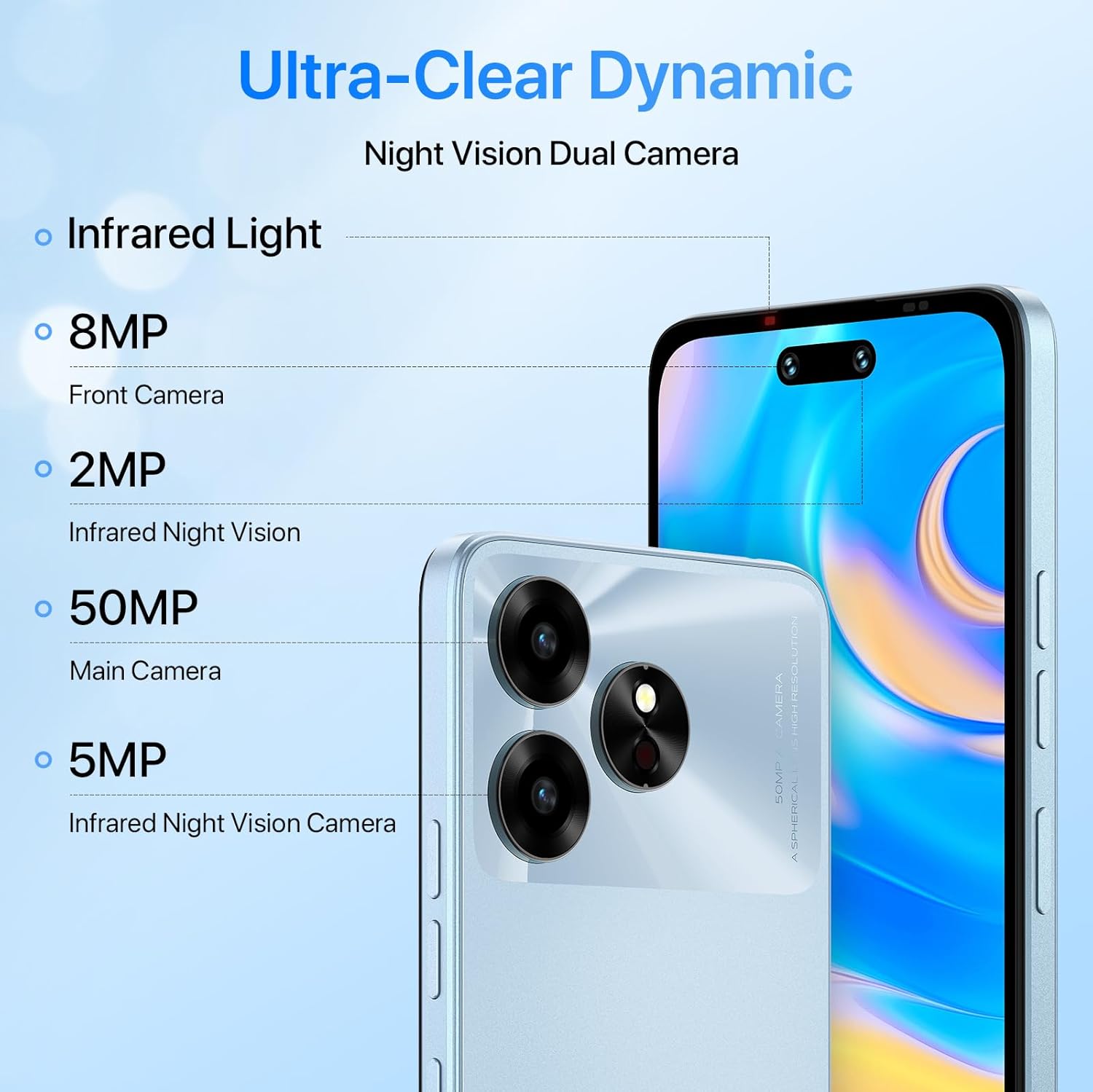
Image: UMIDIGI G6 5G camera specifications.
6.1. Camera Specifications
- Main Camera: 50 Megapixels (MP) Ultra-Clear.
- Front Camera: 8 Megapixels (MP).
- Infrared Night Vision Camera: 5 Megapixels (MP).
6.2. Shooting Modes
The camera application offers various modes to enhance your photography:
- HD Mode: For high-definition photos.
- Video Mode: For recording videos up to 1080p at 30fps.
- Time-Lapse Mode: To capture sequences over time.
- Super Night Mode: For improved low-light photography.

Image: Camera modes available on the UMIDIGI G6 5G.
7. Battery Management
The UMIDIGI G6 5G is equipped with a 5000mAh battery for extended usage.

Image: UMIDIGI G6 5G 5000mAh battery.
- Charging: Use the provided 10W power adapter and USB Type-C cable for charging.
- Battery Life: The 5000mAh battery provides up to 20 hours of talk time. Actual battery life may vary based on usage patterns and network conditions.
- Optimization: To extend battery life, reduce screen brightness, close unused applications, and limit background data usage.
8. Connectivity
Your UMIDIGI G6 5G supports a wide range of connectivity options.

Image: UMIDIGI G6 5G Dual 5G & Global Bands support.
- Cellular Networks: Supports 2G GSM, 3G WCDMA, 4G LTE (TDD & FDD), and 5G SA/NSA across various global bands.
- Wi-Fi: Connect to wireless networks for internet access.
- Bluetooth 5.3: For connecting wireless accessories like headphones and speakers.
- NFC: For contactless payments and data exchange.
- 3.5mm Audio Jack: For wired headphones.
9. Maintenance
9.1. Cleaning Your Device
Use a soft, lint-free cloth to clean the screen and body of your phone. Avoid using harsh chemicals or abrasive materials.
9.2. Water Resistance
The UMIDIGI G6 5G is rated as waterproof. However, to ensure optimal performance and durability, avoid prolonged immersion in seawater or exposure to high-pressure water jets.
9.3. Software Updates
Regularly check for and install software updates to ensure your device has the latest features, security patches, and performance improvements. You can find updates in Settings > System > System update.
10. Troubleshooting
If you encounter issues with your UMIDIGI G6 5G, refer to the following common solutions:
- No Network Connection: If your SIM card is not detected or you cannot connect to the network, try disabling and re-enabling the SIM card in Settings > Network & internet > SIM cards. Ensure your SIM card is correctly inserted.
- MMS Sending/Receiving Issues: Verify your APN settings are correct for your carrier. These can usually be found on your carrier's support website.
- Device Freezing/Unresponsive: Press and hold the Power button for about 10-15 seconds to force a restart.
- Poor Battery Life: Review Section 7 for battery optimization tips.
- General Performance Issues: Clear cache of problematic apps, restart your device, or consider a factory reset (Settings > System > Reset options > Erase all data (factory reset)) as a last resort. Note: A factory reset will erase all data on your phone. Back up important information before proceeding.
11. Specifications
Detailed technical specifications for the UMIDIGI G6 5G:
| Feature | Specification |
|---|---|
| Model Name | UMIDIGI G6 5G |
| Operating System | Android 13.0 |
| Processor | MediaTek Dimensity 6100+ (Octa-core) |
| Memory (RAM) | 12 GB (6GB physical + 6GB virtual) |
| Storage (ROM) | 128 GB (expandable up to 1 TB) |
| Screen Size | 6.57 Inches |
| Display Resolution | 1616 x 720 (HD+) |
| Refresh Rate | 90 Hz |
| Main Camera | 50 MP |
| Front Camera | 8 MP |
| Infrared Night Vision Camera | 5 MP |
| Battery Capacity | 5000 mAh |
| Charging | 10W Type-C USB |
| Connectivity | 5G, 4G, 3G, 2G, Bluetooth 5.3, Wi-Fi, NFC |
| Navigation | GPS, Glonass, Beidou, Galileo |
| Dimensions | 16 x 7 x 0.8 cm |
| Weight | 200 g |
| SIM Card Slot Count | Dual SIM (Nano) |
| Headphones Jack | 3.5 mm |
| Biometric Security | Face Recognition |
| Water Resistance Level | Waterproof |
12. Warranty and Support
For warranty information and customer support, please refer to the warranty card included in your product packaging or visit the official UMIDIGI website. You can also contact UMIDIGI customer service for assistance with any issues not covered in this manual.
UMIDIGI Official Website: www.umidigi.com

