
AODK L Shaped Standing Desk
AODK Electric L Shaped Standing Desk User Manual
Model: L Shaped Standing Desk (B0D47BL4DJ)
Brand: AODK
Introduction
Welcome to the user manual for your AODK Electric L Shaped Standing Desk. This manual provides essential information for the safe and efficient use of your new desk. Please read it thoroughly before assembly and operation.

This image displays the AODK Electric L Shaped Standing Desk, showcasing its spacious L-shaped design, integrated monitor stand, and power outlets. The desk is set up with dual monitors, a laptop, and various office supplies, highlighting its functionality and aesthetic appeal in a modern workspace.
Important Safety Instructions
For your safety and to prevent damage to the product, please adhere to the following guidelines:
- Ensure the desk is securely fastened to the wall for stability.
- Do not exceed the maximum weight capacity of 176 lbs (80 kg) for the tabletop and 33 lbs (15 kg) for each shelf.
- Keep children and pets away from the desk during height adjustment.
- Do not place liquids directly on the desk surface without protective coasters.
- Disconnect power before cleaning or maintenance.
- Use only the provided power adapter and cables.
- Avoid placing hands or objects near moving parts during operation.
Package Contents
Please verify that all components are present before beginning assembly.
- L-Shaped Desktop Panels (Main and Side)
- Electric Lifting Columns (Legs)
- Monitor Stand Components
- Control Panel with Memory Presets
- Power Outlet Unit (3 AC, 1 USB, 1 Type-C)
- Power Adapter and Cable
- Assembly Hardware (screws, bolts, tools)
- Instruction Manual

This image illustrates the various parts included with the AODK Electric L Shaped Standing Desk, laid out to show the main desktop sections, electric legs, monitor stand, and the integrated power outlet unit, along with the necessary assembly hardware.
Setup
Follow these steps carefully for proper assembly. It is recommended to have two people for assembly.
Step 1: Unpack and Identify Parts
Lay out all components and hardware. Refer to the parts list to ensure everything is accounted for.
Step 2: Assemble the Desk Frame
Attach the electric lifting columns to the main desktop panels using the provided screws. Ensure all connections are secure.
Step 3: Install the Monitor Shelf
Secure the monitor shelf components to the desktop as indicated in the diagrams.

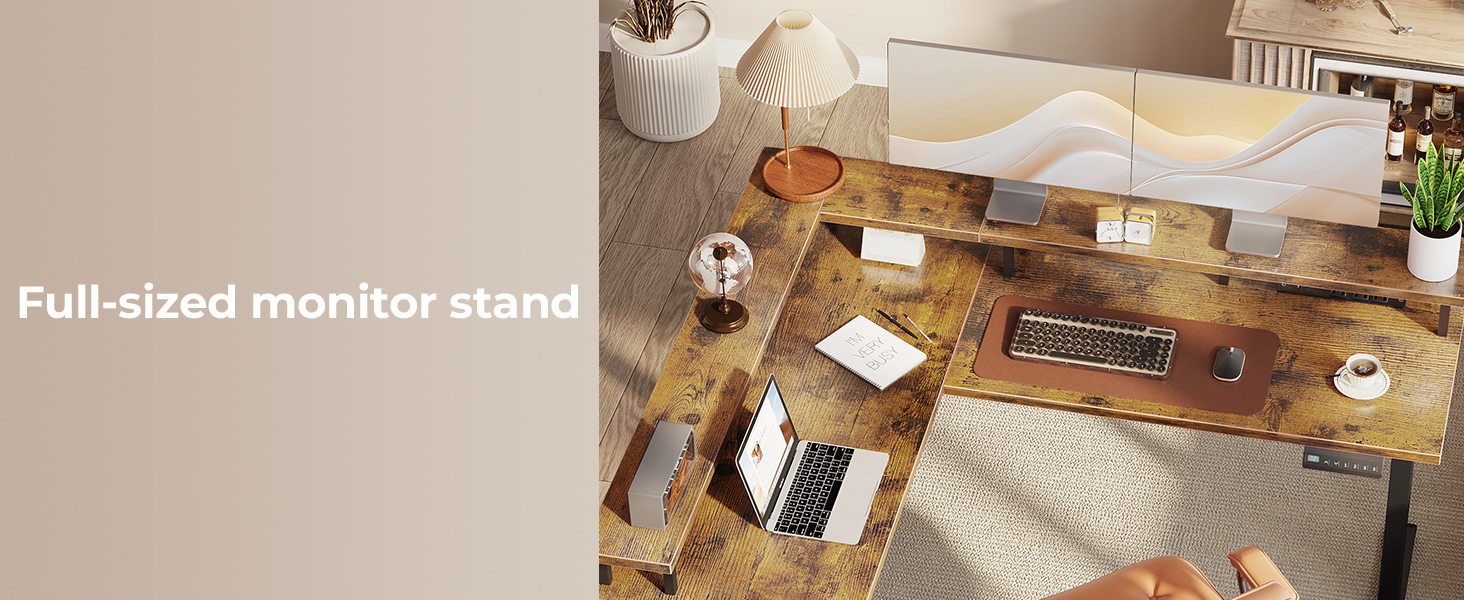
This image provides a detailed view of the large-sized monitor shelf integrated into the AODK L Shaped Standing Desk, highlighting its elevated design for ergonomic monitor placement and additional storage space underneath.
Step 4: Connect the Control Panel and Power Unit
Connect the control panel and the power outlet unit to the desk's motor system. Ensure all cables are properly routed and secured to prevent tangling.

A close-up view of the built-in power strip on the AODK Electric L Shaped Standing Desk, featuring three AC outlets, one USB-A port, and one USB-C port, designed for convenient device charging and cable management.
Step 5: Reversible L-Shape Configuration
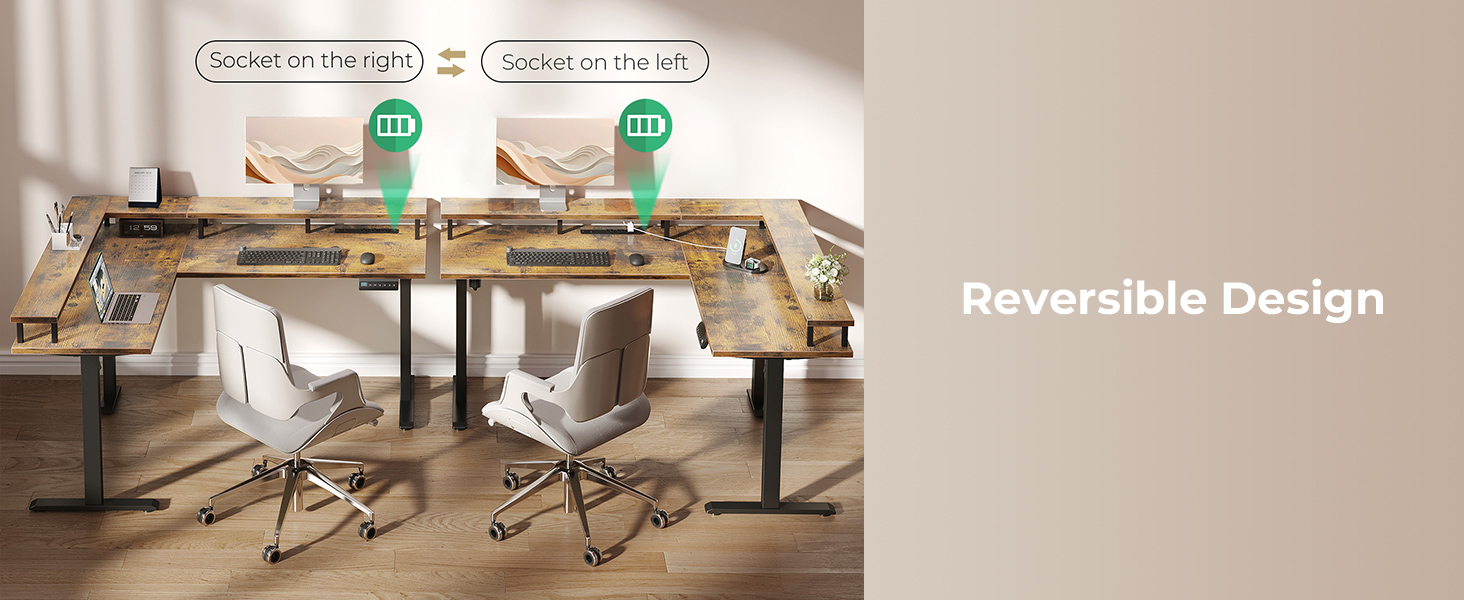
The desk can be configured with the shorter L-section on either the left or right side to suit your space. Decide on your preferred orientation before finalizing the desktop panel attachment.

This diagram visually explains how the AODK L Shaped Standing Desk can be assembled with the L-section on either the left or right side, demonstrating its flexible and reversible design to fit various room layouts.
Step 6: Final Placement and Cable Management
Position the desk in its desired location. Use the included cable management accessories to organize wires for a tidy workspace.

This image provides a detailed dimensional drawing of the AODK L Shaped Standing Desk, including measurements for length, width, height, and monitor shelf dimensions, crucial for planning workspace layout.
Operating Instructions
Height Adjustment
The desk's height can be adjusted electrically from 28.3 inches to 47.2 inches.
- Use the Up and Down arrow buttons on the control panel to manually adjust the height.
- The LED screen displays the current height.

This image shows the AODK L Shaped Standing Desk at its minimum (28.3 inches) and maximum (47.2 inches) height settings, illustrating the full range of electric height adjustment for both sitting and standing positions.
Memory Presets
The control panel features three programmable memory presets to save your preferred sitting and standing heights.
- Adjust the desk to your desired height.
- Press the "S" button, then press one of the numbered buttons (1, 2, or 3) to save the current height to that preset.
- To recall a saved height, simply press the corresponding numbered button.
This image highlights the intuitive control panel of the AODK Electric L Shaped Standing Desk, showing the LED screen displaying height, and buttons for up/down adjustment, saving presets (S), and recalling three memory positions (1, 2, 3).
Power Outlets
The integrated power unit provides convenient access to charging for your devices.
- It includes 3 standard AC outlets, 1 USB-A port, and 1 USB-C port.
- Use these ports to power or charge laptops, phones, and other electronic devices.
A detailed image showcasing the built-in charging and cable management station on the AODK Electric L Shaped Standing Desk, featuring three AC outlets, one USB port, and one Type-C port, with a phone actively charging.
Maintenance
Regular maintenance will ensure the longevity and optimal performance of your desk.
- Cleaning: Wipe surfaces with a soft, damp cloth. Avoid abrasive cleaners or harsh chemicals.
- Motor Care: The motor is designed for smooth operation. Avoid overloading the desk or forcing it to move if obstructed.
- Cable Management: Periodically check and re-secure cables to prevent damage or entanglement.
- Fasteners: Occasionally check all screws and bolts to ensure they remain tight. Tighten if necessary, but do not overtighten to avoid stripping.
Troubleshooting
| Problem | Possible Cause | Solution |
|---|---|---|
| Desk does not move. | Power cable disconnected; Overload protection activated; Motor error. | Check power connections. Reduce weight on desk. Unplug for 10 minutes, then plug back in to reset. |
| Uneven height adjustment. | Obstruction; Uneven weight distribution. | Clear any obstructions. Redistribute weight evenly on the desktop. |
| Noise during adjustment. | Normal motor operation; Loose fasteners. | A slight hum is normal. Check and tighten all assembly fasteners. |
| Memory presets not working. | Incorrect saving procedure. | Refer to "Operating Instructions" to correctly save presets. |
If the problem persists, please contact AODK customer support for assistance.
Product Specifications
- Brand: AODK
- Model: L Shaped Standing Desk (B0D47BL4DJ)
- Product Dimensions: 47"D x 59"W x 31"H (L-shape configuration)
- Height Adjustment Range: 28.3" to 47.2"
- Weight Capacity (Tabletop): 176 lbs (80 kg)
- Weight Capacity (Monitor Shelf): 33 lbs (15 kg) per shelf
- Material: Engineered Wood (Top), Metal (Base)
- Color: Rustic Brown
- Power Outlets: 3 AC Outlets, 1 USB-A Port, 1 Type-C Port
- Motor Noise Level: 45-55 dB
- Assembly Required: Yes
Warranty and Support
AODK is committed to providing high-quality products and excellent customer service.
If you encounter any issues with your AODK Electric L Shaped Standing Desk, including damaged or missing parts, please contact our professional customer support team.
We aim to resolve all problems within 24 hours.
For support, please visit the AODK Store on Amazon or refer to the contact information provided in your purchase documentation.
Ask a question about this manual
Ask about setup, troubleshooting, compatibility, parts, safety, or missing instructions. Manuals+ will review the question and use this page’s manual context to help answer it.