
1. Introduction
This manual provides essential information for the proper installation, operation, and maintenance of your SEQURE SQESC 28120 120A 2-8S Brushless Speed Controller (ESC). Please read this manual thoroughly before using the product to ensure safe and efficient operation.
2. Key Features
- High Performance Processor: Utilizes a 32-bit STM32G071 processor with a working frequency up to 64MHz, supporting a maximum 128KHz PWM frequency.
- Efficient Heat Dissipation: Equipped with a high-power MOSFET and CNC metal radiator for effective heat dissipation under high current loads, ensuring stable and continuous operation.
- Versatile Signal Protocol Support: Automatically detects throttle signals upon power-on and supports Dshot (All), PWM, Oneshot, and Multishot protocols.
- Programmable Parameters: Features a visual programming parameter adjustment tool for motor timing, throttle calibration, current detection, motor steering, telemetry signal, and other settings.
- Integrated RGB LED: Onboard RGB LED color light settings allow for customized lighting.
- Comprehensive Protection: Includes low voltage protection, temperature protection, locked rotor protection, and current protection.
- Functionality: Supports forward, reverse, and brake functions.
3. Specifications
| Parameter | Value |
|---|---|
| Model | SQESC 28120 |
| Processor | STM32G071 |
| Input Voltage | DC 7V-33.6V (2-8S Lipo) |
| Continuous Current | 120A |
| Maximum Current | 150A |
| Supported Firmware | AM32 |
| Signal Protocols | Dshot (All), PWM, Oneshot, Multishot, etc. |
| Programmable Parameters | Yes (Motor timing, throttle calibration, current detection, motor steering, telemetry signal) |
| RGB LED Light | Yes |
| Functions | Forward, Reverse, Brake |
| Weight | 0.76 oz (21.6g) |
| Dimensions (L*W*H) | 1.96 x 0.78 x 0.66 inches (50 x 20 x 17 mm) |
| Material | Metal, Plastic |
4. Product Overview
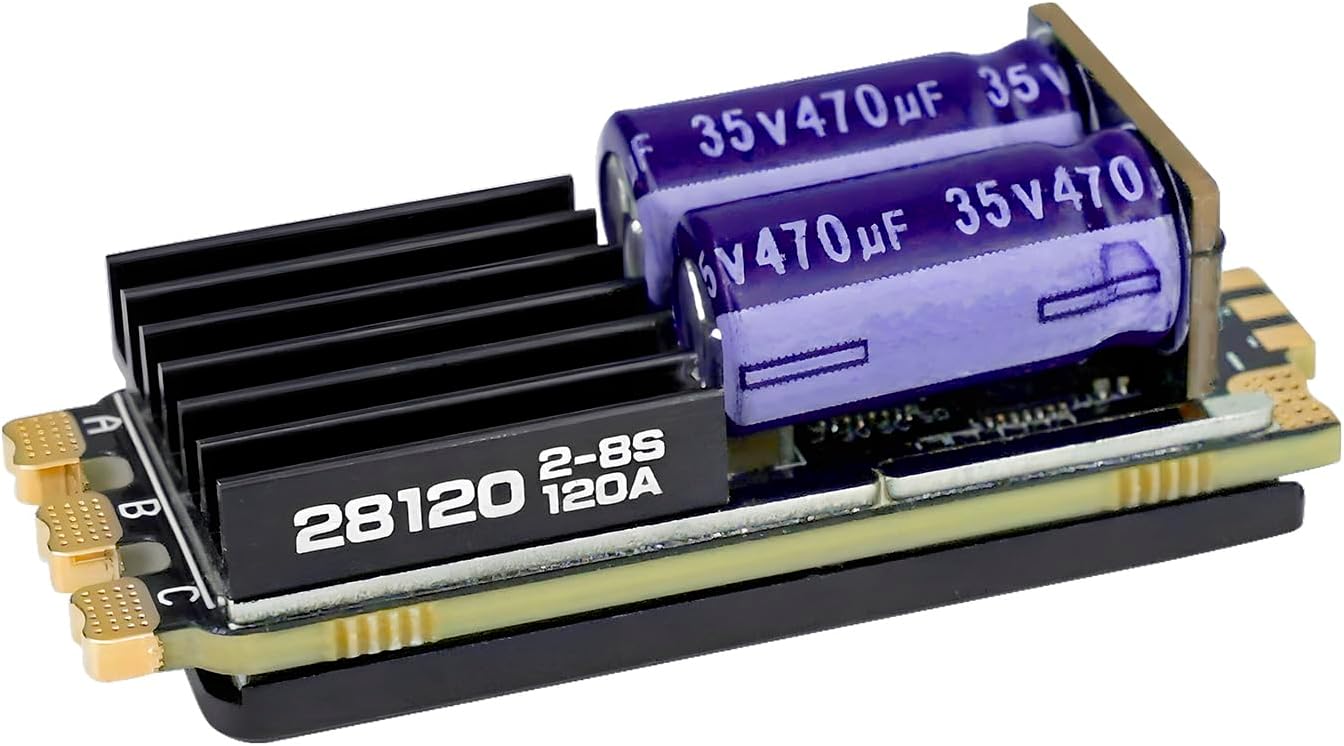




5. Wiring and Installation
Proper wiring is crucial for the safe and correct operation of your ESC. Refer to the diagram below for connection details.
- Connect the three motor wires to the ESC's A, B, and C terminals. Ensure secure connections.
- Connect the ESC's signal wire (S) to the throttle channel of your receiver.
- Connect the telemetry signal wire (T) to the appropriate telemetry port on your receiver, if supported.
- Connect the battery to the main power input wires (red for positive, black for negative). Verify correct polarity before powering on.
- Securely mount the ESC in your RC vehicle, ensuring adequate airflow for cooling.
6. Operating Instructions
6.1 Initial Setup and Calibration
- Throttle Calibration: Perform throttle range calibration according to your radio system's instructions. This ensures the ESC correctly interprets your transmitter's throttle signals.
- Motor Direction: After initial setup, check the motor's rotation direction. If incorrect, adjust the motor steering setting via the programming tool or by swapping any two of the three motor wires.
6.2 Parameter Adjustment via App
The SQESC 28120 supports visual programming parameter adjustment using a dedicated app. This allows for fine-tuning various settings such as motor timing, acceleration, brake force, and more.
- Download and install the appropriate app (e.g., XC-Link or RTR-Link, if applicable) on your smartphone.
- Connect the ESC to its power supply and remote control.
- Open the app and follow the instructions to connect to the ESC via Bluetooth.
- Navigate to the parameter settings and adjust values as needed. Remember to save changes and reboot the ESC for settings to take effect.
7. Application Scenarios
The SEQURE SQESC 28120 is designed for a wide range of remote-controlled applications requiring robust and programmable speed control.
8. Safety Information
No specific safety warnings were provided beyond the general product safety features. Always observe the following general safety guidelines when operating RC electronic components:
- Ensure all connections are secure and insulated to prevent short circuits.
- Always use batteries within the specified voltage range (2-8S Lipo).
- Avoid operating the ESC in wet conditions unless explicitly stated as waterproof.
- Keep the ESC clear of debris and ensure proper ventilation to prevent overheating.
- Disconnect the battery from the ESC when not in use.
- Adult supervision is recommended for users under 16 years of age.
9. Troubleshooting
- No output after power-on: Check all power connections, battery voltage, and receiver signal connection. Ensure the throttle is calibrated correctly.
- Motor not spinning or erratic behavior: Verify motor wiring, ensure the motor is not jammed, and check for correct throttle calibration. Re-check parameter settings via the app.
- Overheating: Ensure adequate airflow around the ESC. Reduce load or consider a larger heat sink if persistent. Check for short circuits in motor or battery connections.
- ESC not responding to app: Ensure Bluetooth is enabled on your device and the ESC. Confirm the app is up-to-date and the ESC is powered on.
10. Maintenance
- Regularly inspect all wires and connectors for signs of wear or damage.
- Keep the ESC clean and free from dust, dirt, and moisture.
- Store the ESC in a dry, cool environment when not in use.
11. Warranty and Support
For warranty information and technical support, please refer to the official SEQURE website or contact your retailer. Keep your proof of purchase for any warranty claims.


