
1. Introduction
This user manual provides essential information for the safe and efficient operation, maintenance, and troubleshooting of your advwin Under Desk Treadmill. Please read this manual thoroughly before using the product and retain it for future reference.
The advwin Under Desk Treadmill is designed to provide a convenient way to incorporate walking and light exercise into your daily routine, whether at home or in an office environment. Its foldable design allows for easy storage, and the 5-degree incline feature offers an enhanced lower body workout.
2. Important Safety Information
To reduce the risk of serious injury, read all important precautions and instructions in this manual before using the treadmill. advwin assumes no responsibility for personal injury or property damage sustained by or through the use of this product.
- Always place the treadmill on a level surface.
- Keep children and pets away from the treadmill during operation.
- Wear appropriate athletic footwear. Do not operate the treadmill barefoot.
- Ensure the safety key is properly attached before starting the treadmill.
- Do not use the treadmill if it is damaged or malfunctioning. Contact customer support immediately.
- Consult a physician before beginning any exercise program.
- Do not attempt to service the treadmill yourself. Refer all servicing to qualified personnel.
- Unplug the treadmill from the power outlet when not in use or before cleaning.
3. Package Contents
Carefully unpack your advwin Under Desk Treadmill and verify that all components are present and undamaged. If any parts are missing or damaged, please contact customer service.
- 1 x advwin Under Desk Treadmill
- 1 x User Manual
- 1 x Safety Key
- 1 x Power Cord
- 1 x Lubricant
- 1 x Remote Control
4. Setup and Assembly
The advwin Under Desk Treadmill comes largely pre-assembled. Follow these steps for initial setup:
- Unpacking: Remove the treadmill and all accessories from the packaging.
- Placement: Choose a flat, stable surface for the treadmill. Ensure there is adequate clear space around the unit for safe operation (at least 2 feet behind and 1 foot on each side).
- Unfolding (if applicable): If the treadmill is in its folded position, gently unfold it until it locks into place. Refer to the specific folding mechanism instructions if provided separately.
- Power Connection: Connect the power cord to the treadmill's power input port, then plug the other end into a grounded electrical outlet.
- Safety Key: Attach the safety key to the designated slot on the treadmill's console. The treadmill will not operate without the safety key in place. Clip the other end of the safety key to your clothing for emergency stops.
5. Operating Instructions
Your advwin Under Desk Treadmill is controlled via the included remote control and features an LED display for tracking your workout data.
5.1 Remote Control Functions
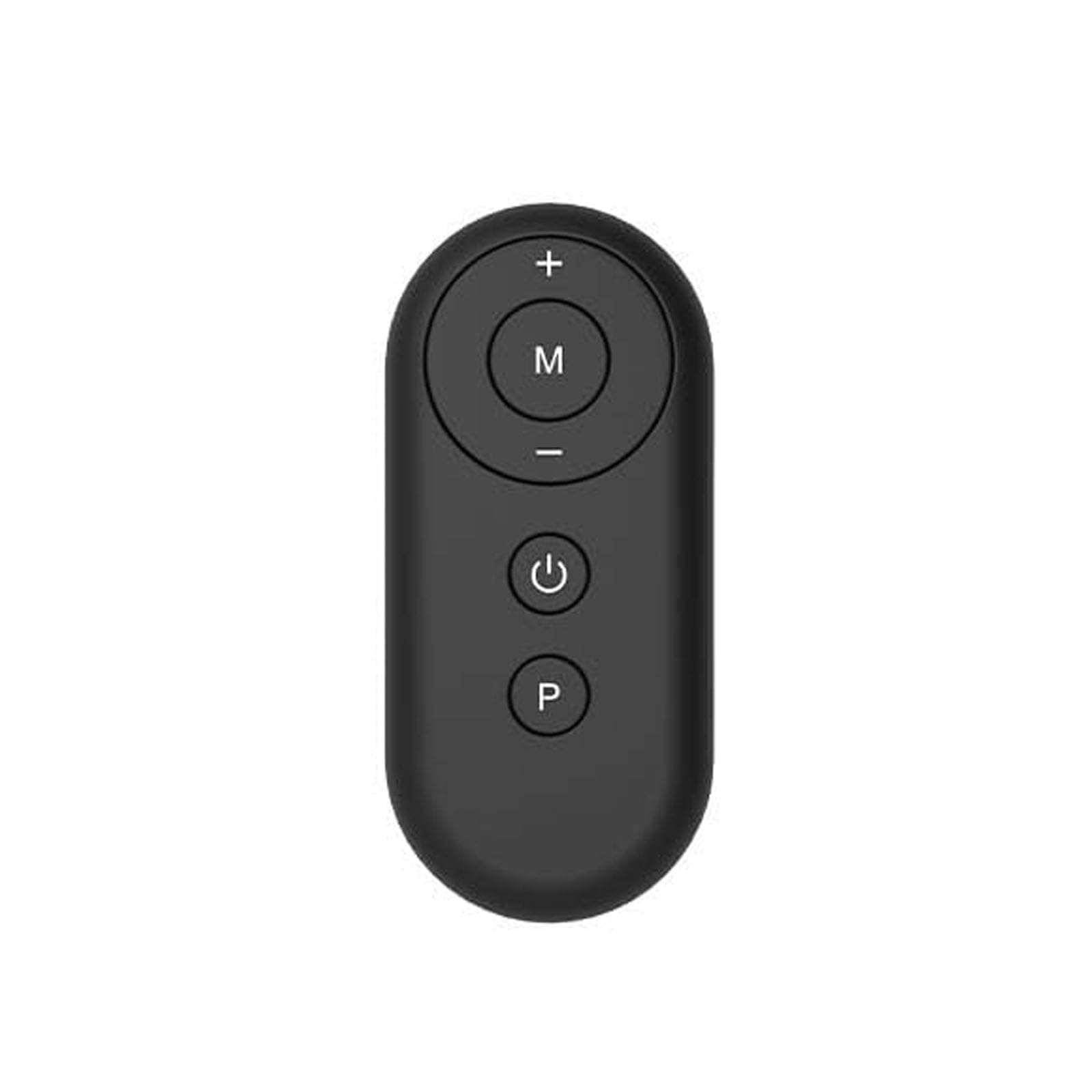
Figure 1: advwin Treadmill Remote Control
The remote control is your primary interface for operating the treadmill. It features several buttons for controlling speed, mode, and power:
- Power Button (⏻): Press to turn the treadmill ON or OFF.
- Speed Up Button (+): Increases the walking speed.
- Speed Down Button (-): Decreases the walking speed.
- Mode Button (M): Cycles through different workout modes, including manual mode and 12 pre-set HIIT modes.
- Program Button (P): Selects specific pre-set programs within the chosen mode.
5.2 Starting a Workout
- Ensure the treadmill is plugged in and the safety key is attached.
- Press the Power Button on the remote control. The LED display will illuminate.
- Step onto the treadmill belt carefully.
- Use the Speed Up (+) or Speed Down (-) buttons to adjust your desired walking speed. Start at a low speed and gradually increase.
- To select a workout mode or program, press the Mode (M) or Program (P) button and follow the prompts on the LED display.
5.3 LED Display
The integrated LED display provides real-time feedback on your workout. It typically shows:
- Time: Duration of your workout.
- Distance: Total distance walked.
- Speed: Current walking speed (Miles per Hour).
- Calories: Estimated calories burned.
5.4 Incline Feature
This treadmill features a fixed 5-degree incline to enhance your lower body workout. This incline is not adjustable during operation.
5.5 Folding and Storage
To fold the treadmill for storage:
- Ensure the treadmill is turned off and unplugged.
- Carefully lift the rear of the treadmill until it folds into its compact position. The mechanism is designed for easy folding and space-saving storage.
- Store the treadmill in a dry, safe place away from direct sunlight and extreme temperatures.
6. Maintenance
Regular maintenance ensures the longevity and optimal performance of your treadmill.
- Cleaning: Wipe down the treadmill surfaces with a damp cloth after each use. Do not use abrasive cleaners or solvents.
- Belt Lubrication: The walking belt requires periodic lubrication to reduce friction and extend its lifespan. Use the provided lubricant or a silicone-based treadmill lubricant. Refer to the lubricant's instructions for frequency (typically every 3-6 months depending on usage).
- Belt Tension and Alignment: Check the walking belt tension and alignment periodically. If the belt slips or drifts to one side, refer to the troubleshooting section or contact customer support for adjustment instructions.
- General Inspection: Regularly inspect all nuts, bolts, and moving parts for tightness and wear. Tighten any loose fasteners.
7. Troubleshooting
If you encounter issues with your advwin Under Desk Treadmill, refer to the following common problems and solutions:
| Problem | Possible Cause | Solution |
|---|---|---|
| Treadmill does not start. | Not plugged in; Safety key not in place; Power switch off; Remote control battery low. | Ensure power cord is securely plugged in; Insert safety key fully; Turn on power switch; Replace remote control battery. |
| Walking belt slips. | Belt too loose; Insufficient lubrication. | Adjust belt tension (refer to specific instructions or contact support); Lubricate the walking belt. |
| Unusual noise during operation. | Loose parts; Lack of lubrication; Belt misalignment. | Check and tighten all bolts and screws; Lubricate the belt; Adjust belt alignment. |
| LED display not working. | Loose connection; Power issue. | Check all cable connections; Ensure power supply is stable. |
If the problem persists after attempting these solutions, please contact advwin customer support.
8. Specifications
| Feature | Detail |
|---|---|
| Brand | advwin |
| Model Name | Treadmill |
| Maximum Speed | 6.2 Miles per Hour |
| Display Type | LED |
| Maximum Weight Recommendation | 240 Pounds |
| Product Dimensions (D x W x H) | 37"D x 21.5"W x 39.8"H |
| Material | Acrylonitrile Butadiene Styrene (ABS), Polyvinyl Chloride (PVC) |
| Special Feature | Foldable, Portable, 5° Incline |
| Included Components | Lubricant, Remote Control, Treadmill, User Manual, Safety Key, Power Cord |
9. Warranty and Support
Warranty: The advwin Under Desk Treadmill comes with a 1-year warranty from the date of purchase. This warranty covers manufacturing defects and material flaws under normal use. It does not cover damage caused by misuse, accident, unauthorized modification, or failure to follow instructions in this manual.
Customer Support: For technical assistance, warranty claims, or to order replacement parts, please contact advwin customer support. Please have your product model and purchase date available when contacting support.
Contact information (placeholder - not provided in input):
- Website: Visit the advwin Store on Amazon
- Email: [Insert Customer Support Email Here]
- Phone: [Insert Customer Support Phone Number Here]

