
Introduction
This manual provides essential information for the safe and efficient use of your Candy RapidÓ Inverter Washer Dryer Combo. Please read these instructions carefully before installing and operating the appliance. Keep this manual for future reference.

Figure 1: Front view of the Candy RapidÓ Inverter Washer Dryer Combo. This image shows the appliance with its dark grey finish, large circular door, and control panel located at the top front.
Safety Information
Always follow basic safety precautions when using electrical appliances to reduce the risk of fire, electric shock, and injury to persons.
- Ensure the appliance is properly grounded.
- Do not allow children to play on or in the appliance.
- Keep packaging materials out of reach of children.
- Do not install or store the appliance where it will be exposed to the weather.
- Do not operate any appliance with a damaged cord or plug.
- Always unplug the appliance before cleaning or performing maintenance.
- Do not attempt to repair or replace any part of the appliance unless specifically recommended in this manual.
Setup and Installation
1. Unpacking
- Remove all packaging materials, including the polystyrene base and any inserts inside the drum.
- Remove the transport bolts located at the rear of the appliance. Keep these bolts for future transport.
- Cover the holes left by the transport bolts with the plastic caps provided.
2. Location and Leveling
- Place the appliance on a firm, flat floor.
- Adjust the feet to ensure the appliance is perfectly level. A level appliance reduces vibration and noise during operation.
3. Water Connection
- Connect the water inlet hose to a cold water tap with a 3/4" thread.
- Ensure the hose is securely tightened to prevent leaks.
- Do not reuse old inlet hoses. Always use the new hoses supplied with the appliance.
4. Drainage Connection
- Position the drain hose at a height between 60 cm and 100 cm from the floor.
- Ensure the drain hose is not kinked or obstructed.
5. Electrical Connection
- Connect the power plug to a properly grounded electrical outlet.
- Ensure the voltage and frequency match the specifications on the appliance's rating plate.
- Do not use extension cords or multiple adapters.
6. First Use
- Before the first wash, run a short cycle without laundry and detergent to clean the drum.
Operating Instructions
1. Control Panel Overview

Figure 2: Detailed view of the control panel. This image highlights the digital display showing temperature, spin speed, and program selection, along with various function buttons.
The control panel features a program selector dial, a digital display, and various function buttons for temperature, spin speed, delay start, and special options. Refer to the detailed diagram in your printed manual for specific button functions.
2. Loading Laundry
- Open the door and load laundry into the drum. Do not overload the machine; ensure there is enough space for clothes to tumble freely.
- For washing, the maximum capacity is 9kg. For drying, the maximum capacity is 6kg.
- Close the door firmly.
3. Adding Detergent
- Pull out the detergent dispenser drawer.
- Add detergent to the main wash compartment and fabric softener to the designated compartment.
- Refer to detergent packaging for recommended dosages.
- Push the dispenser drawer back in completely.
4. Selecting a Program

Figure 3: Program selector dial with various cycle options. This image shows the dial with icons for different fabric types and rapid wash times, indicating the machine's versatility.
Turn the program selector dial to choose the desired wash or wash & dry program. The machine offers 16 standard programs, including 9 rapid programs that complete in less than 1 hour. Additional programs are available via the Simply-Fi App.
- Rapid Programs: Utilize the 9 rapid programs for quick washing needs.
- Temperature and Spin Speed: Adjust these settings using the dedicated buttons if desired.
- Delay Start: Use the delay start function to postpone the cycle start by up to 24 hours.
5. Starting a Cycle
- Press the Start/Pause button to begin the selected program.
- The display will show the remaining time.
6. Using Drying Functions
- After a wash cycle, you can select a drying program.
- Ensure the load size is appropriate for drying (max 6kg).
- Choose the desired drying level (e.g., iron dry, cupboard dry) or time.
- Press the Start/Pause button to begin drying.
7. Special Features
Steam Function
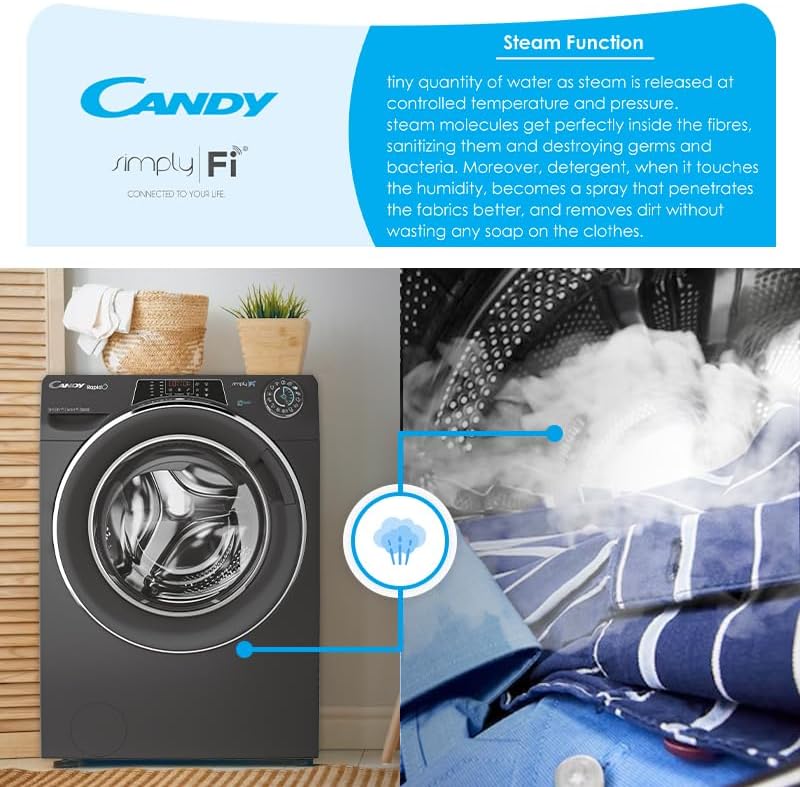
Figure 4: Visual representation of the steam function in action. This image shows steam being released into the drum, illustrating its sanitizing and wrinkle-reducing benefits.
The steam function helps to sanitize clothes, reduce wrinkles, and refresh garments. Select programs with steam options for enhanced fabric care.
Simply-Fi App (WiFi & Bluetooth Connectivity)
Connect your appliance to the Candy Simply-Fi App via WiFi or Bluetooth for advanced remote control and additional features:
- Snap & Wash: Take a photo of your laundry, and the app will suggest the best program, temperature, and spin speed.
- Access over 40 additional programs.
- Receive washing tips and support.
- Monitor cycle status and energy consumption.
Maintenance
Regular maintenance ensures optimal performance and extends the lifespan of your appliance. Always unplug the machine before performing any maintenance.
1. Cleaning the Detergent Dispenser
- Remove the dispenser drawer by pressing the release lever.
- Rinse it under running water to remove any detergent residue.
- Clean the housing of the dispenser drawer with a brush.
- Reinsert the drawer.
2. Cleaning the Filter
- Locate the filter at the bottom front of the appliance.
- Place a shallow container underneath to catch any water.
- Carefully unscrew the filter cover and remove the filter.
- Clean the filter under running water and remove any lint or debris.
- Reinsert the filter and screw the cover back on securely.
3. Cleaning the Drum
- Run a maintenance wash cycle (e.g., a hot wash with no laundry and a descaling agent) periodically to prevent odors and limescale buildup.
- Wipe the inside of the drum and the door seal after each use to prevent mold growth.
4. Exterior Cleaning
- Wipe the exterior surfaces with a soft, damp cloth.
- Do not use abrasive cleaners or solvents.
Troubleshooting
Before contacting customer service, please check the following common issues and solutions:
| Problem | Possible Cause | Solution |
|---|---|---|
| Appliance does not start | Power plug not inserted; door not closed; program not selected; Start/Pause button not pressed. | Check power connection; ensure door is firmly closed; select a program; press Start/Pause. |
| Water not filling | Water tap closed; inlet hose kinked; water supply cut off. | Open water tap; straighten hose; check household water supply. |
| Water not draining | Drain hose kinked or blocked; filter blocked. | Straighten drain hose; clean the filter (refer to Maintenance section). |
| Excessive vibration/noise | Transport bolts not removed; appliance not level; load unbalanced. | Remove transport bolts; adjust leveling feet; redistribute laundry in the drum. |
| Poor washing results | Incorrect detergent dosage; wrong program selected; overloading. | Adjust detergent amount; select appropriate program; reduce load size. |
Specifications
- Model Number: 31010249
- Washing Capacity: 9 kg
- Drying Capacity: 6 kg
- Energy Rating: B
- Motor Type: Inverter BPM motor
- Spin Speed: 1400 RPM
- Connectivity: WiFi + Bluetooth (Simply-Fi App compatible)
- Programs: 16 standard programs, 9 rapid programs, 40+ additional via app
- Special Features: Steam function, Snap & Wash, 6D LED Display
- Drum Material: Stainless Steel
- Noise Level: 80 dBA
- Item Weight: 70 kg
Warranty and Support
Warranty Information
This Candy RapidÓ Inverter Washer Dryer Combo comes with a 3 Year Warranty. Please retain your proof of purchase for warranty claims. The warranty covers manufacturing defects under normal household use. For full terms and conditions, refer to the warranty card included with your appliance or contact Candy customer service.
Customer Support
If you encounter issues that cannot be resolved using the troubleshooting guide, or for any service inquiries, please contact Candy customer support. Contact details can typically be found on the manufacturer's website or in the documentation provided with your appliance.


