1. Introduction
The Bolisila JK-B2A8S30P is an advanced Battery Management System (BMS) designed for 8-series (8S) LiFePO4 battery packs. It features active balancing technology to ensure optimal cell consistency, extend battery life, and enhance overall performance. This manual provides essential information for the safe and effective installation, operation, and maintenance of your BMS.

Image 1.1: The JK Smart BMS is suitable for a wide range of applications, including electric vehicles, energy storage systems, and portable power solutions.
2. Product Features
- Active Balance Technology: Real-time active energy transfer equalization using a supercapacitor as the medium, ensuring superior cell consistency and extending battery lifespan.
- High Balancing Current: Achieves 2A continuous active balancing current, significantly improving battery consistency and cruising range.
- Wide Voltage Range & Accuracy: Supports a single cell voltage range of 1V-5V with an equalization accuracy of 5mV.
- Comprehensive Protection: Integrates protection against over-charge, over-discharge, over-current, short circuit, and low-temperature charging cutoff.
- Smart Monitoring & Control: Features a dedicated mobile application (APP) for detailed BMS settings, real-time battery status display, and communication.
- High Efficiency: Enhances battery usage efficiency up to 99%.
- Scalability: Supports balanced cascading, making it suitable for battery packs with more than 24 cells (when multiple units are used).
- High Current Capability: Designed for LiFePO4 battery systems with up to 300A continuous discharge current and 600A peak discharge current.
3. Safety Information
Please read and understand all safety instructions before installing or operating the BMS. Failure to follow these instructions may result in electric shock, fire, or serious injury.
- Always wear appropriate personal protective equipment (PPE), including insulated gloves and eye protection, when working with batteries.
- Ensure all power sources are disconnected before installation or maintenance.
- Do not short-circuit battery terminals or BMS connections.
- Install the BMS in a well-ventilated area, away from flammable materials.
- Verify correct wiring polarity before applying power. Incorrect wiring can damage the BMS and battery.
- Keep the BMS away from water, moisture, and extreme temperatures.
- Only qualified personnel should perform installation and maintenance.
4. Package Contents
Upon opening the package, please verify that all components are present and undamaged:
- Bolisila JK-B2A8S30P BMS Module
- Balance Wires (for cell voltage detection)
- Temperature Sensors
- User Manual (this document)
If any items are missing or damaged, please contact your vendor immediately.
5. Setup and Installation
Proper installation is crucial for the safe and efficient operation of the BMS. Refer to the diagram below for connection points.
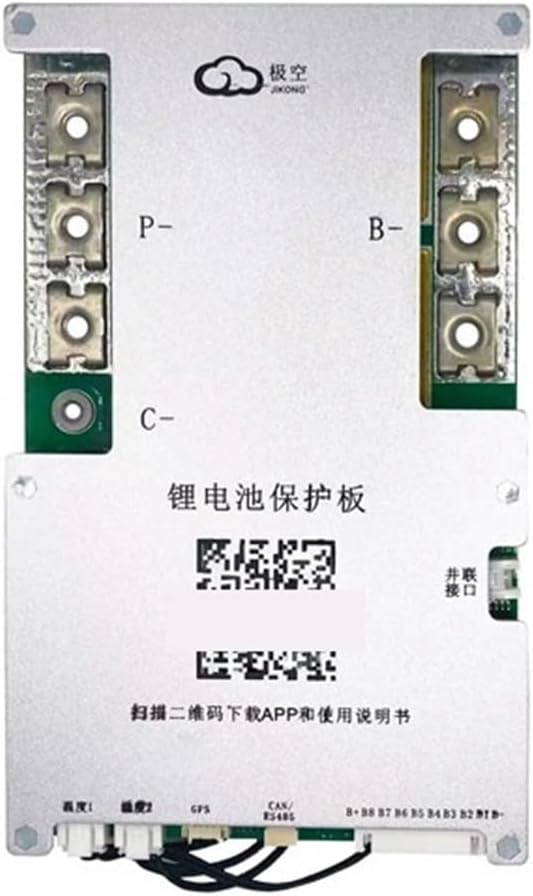
Image 5.1: Bolisila JK-B2A8S30P BMS Module Layout
5.1 Wiring Instructions
- Connect B- Terminal: Connect the main negative terminal of your 8S LiFePO4 battery pack to the B- terminal on the BMS. Ensure a secure, low-resistance connection.
- Connect P- Terminal: Connect the negative terminal of your load/inverter to the P- terminal on the BMS. This is the main discharge output.
- Connect C- Terminal: Connect the negative terminal of your charger to the C- terminal on the BMS. This is the main charge input.
- Connect Balance Wires: Carefully connect the balance wires from each cell of your 8S battery pack to the corresponding ports on the BMS. Start from B0 (main battery negative) and proceed sequentially to B8 (positive of the 8th cell). Double-check the order and polarity of each wire.
- Connect Temperature Sensors: Attach the provided temperature sensors to strategic locations on your battery pack to monitor cell temperatures. Connect them to the designated ports on the BMS.
- Optional Connections: If applicable, connect RS485 or CAN communication cables for external monitoring or control systems.
- Power On: After all connections are verified, connect the main positive terminal of the battery pack to your system. The BMS will power on.
5.2 Initial Setup via APP
Download the official Bolisila BMS APP from your smartphone's app store. Follow the in-app instructions to connect to your BMS via Bluetooth. The APP allows you to:
- Monitor real-time cell voltages, total voltage, current, and temperature.
- Adjust protection parameters (e.g., over-charge/discharge voltage, over-current limits).
- View historical data and error logs.
- Initiate or stop active balancing manually if needed.
6. Operating Instructions
Once installed and configured, the BMS operates automatically to protect and balance your battery pack.
6.1 Automatic Balancing
The JK-B2A8S30P BMS continuously monitors individual cell voltages. When a voltage difference is detected, the active balancing function engages to transfer energy from higher voltage cells to lower voltage cells, ensuring all cells remain within a tight voltage range. This process is automatic and helps maintain battery health and capacity.
6.2 Protection Functions
The BMS will automatically disconnect the battery from the load or charger if any of the following conditions are met:
- Over-charge: Individual cell voltage exceeds the set maximum.
- Over-discharge: Individual cell voltage drops below the set minimum.
- Over-current: Discharge or charge current exceeds the set limit.
- Short Circuit: A sudden, high current draw is detected.
- Low Temperature Charging: Battery temperature falls below the safe charging threshold.
After a protection event, the BMS will typically resume normal operation once the condition is resolved (e.g., removing the load, starting charging, or temperature returning to normal). Some protections may require manual reset via the APP.
7. Maintenance
Regular maintenance helps ensure the longevity and optimal performance of your battery system.
- Visual Inspection: Periodically inspect all wiring and connections for signs of corrosion, damage, or looseness.
- Cleanliness: Keep the BMS module clean and free from dust and debris. Do not use liquid cleaners directly on the module.
- Firmware Updates: Check the manufacturer's website or APP for any available firmware updates for your BMS.
- Battery Health Monitoring: Regularly use the APP to monitor battery cell voltages and overall health. Address any persistent imbalances or warnings promptly.
8. Troubleshooting
If you encounter issues with your BMS, refer to the following common troubleshooting steps:
- BMS Not Powering On: Check main battery connections (B-). Ensure the battery pack has sufficient voltage.
- No Charge/Discharge: Verify P- and C- connections. Check for active protection events via the APP (e.g., over-discharge protection).
- Cell Imbalance: Ensure all balance wires are correctly connected and not damaged. Allow the active balancing function time to work. If imbalance persists, check individual cell health.
- APP Connection Issues: Ensure Bluetooth is enabled on your device and the BMS is powered on. Try restarting both the APP and your device.
- Over-current Protection Tripping: Reduce the load or charging current. Ensure your system's current draw is within the BMS's specifications.
For persistent issues, consult the detailed troubleshooting guide in the APP or contact technical support.
9. Specifications
The following table details the technical specifications for the Bolisila JK-B2A8S30P BMS module:
| Feature | Specification |
|---|---|
| Model | JK-B2A8S30P |
| Supported Battery Type | LiFePO4 |
| Supported Cell Count | 8S (8 Series) |
| Active Balance Current | 2A |
| Continuous Discharge Current | 300A |
| Maximum Discharge Current (Peak) | 600A (2X continuous) |
| Single Cell Voltage Range | 1V - 5V |
| Equalization Accuracy | 5mV |
| Inner Resistance of Main Chip | 0.4mΩ |
| Communication Interface | Bluetooth (BT), RS485 (Optional), CAN (Optional) |
| Protection Functions | Over-charge, Over-discharge, Over-current, Short Circuit, Low Temperature Charging Cutoff |
| Dimensions (L×W×H) | 162 × 102 × 20 mm |
| Item Weight | Approximately 1.1 pounds (0.5 kg) |
| Manufacturer | Bolisila |
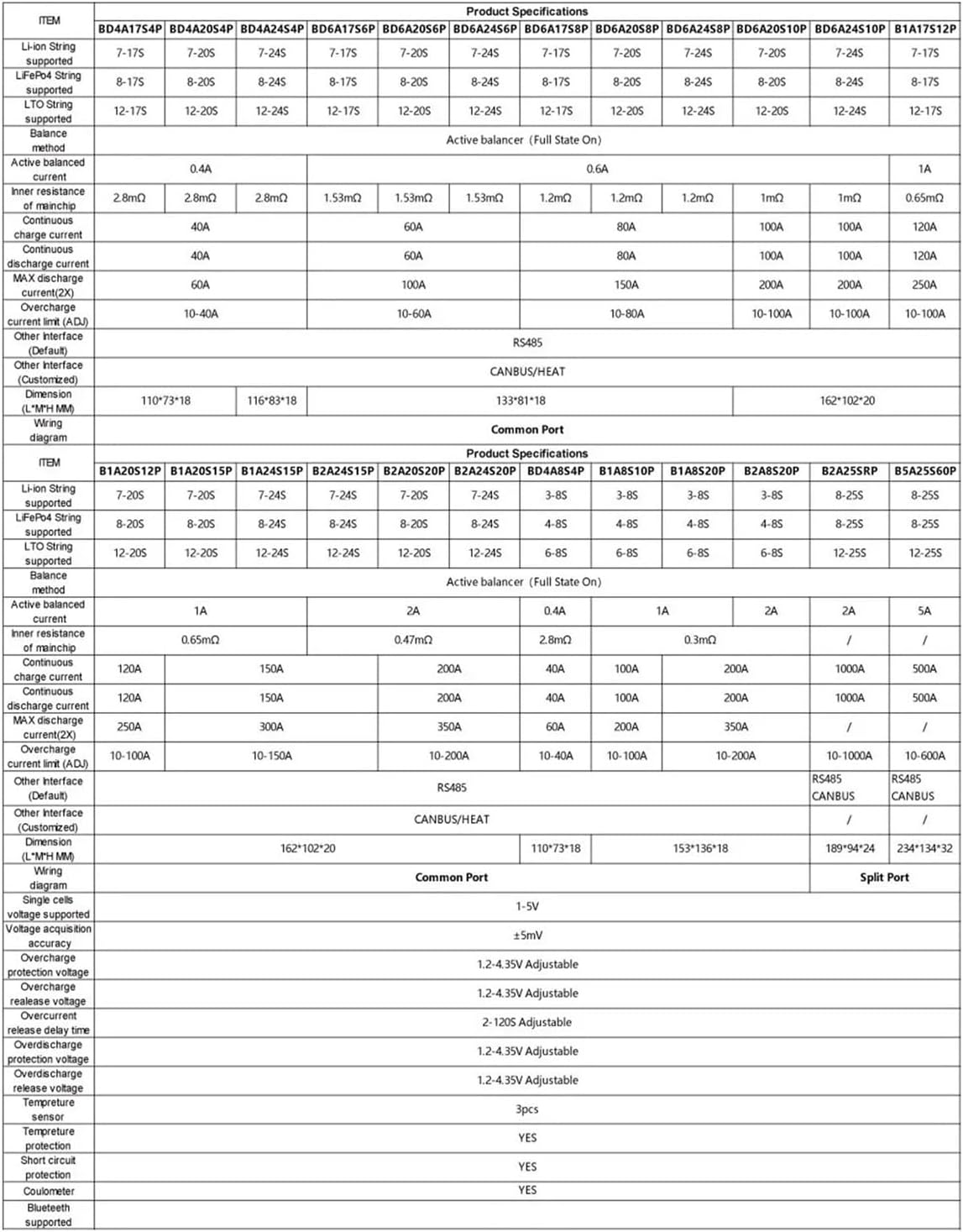
Image 9.1: Comprehensive Product Specification Table (Refer to JK-B2A8S30P row for specific model details)
10. Warranty and Support
Bolisila products are manufactured to high-quality standards. For warranty information, please refer to the terms and conditions provided at the time of purchase or contact your vendor. For technical support, troubleshooting assistance, or inquiries regarding product operation, please reach out to Bolisila customer service through the contact information provided on their official website or through your purchase platform.