
FUNMILY HYTGR7890754awr
FUNMILY HYTGR7890754awr Walking Pad Treadmill User Manual
Model: HYTGR7890754awr
Introduction
Thank you for choosing the FUNMILY HYTGR7890754awr Walking Pad Treadmill. This manual provides essential information for the safe and efficient operation, maintenance, and troubleshooting of your new walking pad. Please read this manual thoroughly before initial use and retain it for future reference.
Important Safety Instructions
WARNING: To reduce the risk of burns, fire, electric shock, or injury to persons, read all instructions before operating the treadmill.
- Always place the treadmill on a solid, level surface.
- Keep children and pets away from the treadmill during operation.
- Do not operate the treadmill if it has a damaged cord or plug, if it is not working properly, or if it has been dropped or damaged.
- Wear appropriate exercise clothing and athletic shoes.
- Do not use the treadmill outdoors or in areas with high humidity.
- Unplug the treadmill from the power outlet when not in use, before cleaning, and before performing any maintenance.
- The maximum user weight capacity for this treadmill is 300 lbs.
Product Overview
The FUNMILY HYTGR7890754awr Walking Pad Treadmill is designed for walking and light jogging, offering a compact and portable solution for home or office use. It features a powerful 2.5HP motor, an LED display, and a remote control for easy operation.
Components:
- Walking Belt
- Motor Cover
- LED Display Panel
- Remote Control
- Power Cord
- Transport Wheels

Image: The FUNMILY Walking Pad Treadmill showing its compact design, LED display, and the included remote control.
Setup Instructions
- Unpacking: Carefully remove the treadmill from its packaging. Retain all packaging materials until you are satisfied with the product.
- Placement: Place the treadmill on a flat, stable surface, ensuring there is at least 2 feet of clear space around the unit.
- Power Connection: Plug the power cord into a grounded 120V AC outlet. Ensure the power switch on the treadmill is in the OFF position before plugging it in.
- Remote Control Battery: Open the battery compartment on the remote control and insert the appropriate batteries (not included).

Image: The FUNMILY Walking Pad Treadmill showing its transport wheels for easy movement and storage.
Operating Instructions
Getting Started:
- Ensure the treadmill is properly plugged in and the power switch is ON.
- Stand on the side rails of the treadmill, not directly on the walking belt.
- Press the 'Start' button on the remote control. The treadmill will typically start at a low speed after a short countdown.
- Step onto the walking belt once it begins to move slowly.
Adjusting Speed:
- Use the 'Speed+' button on the remote control to increase the walking speed.
- Use the 'Speed-' button on the remote control to decrease the walking speed.
- The speed range is typically 0.5 MPH to 4.0 MPH.
Monitoring Your Workout:
The LED display will cycle through various metrics such as Time, Speed, Distance, and Calories Burned.

Image: Close-up of the FUNMILY Walking Pad Treadmill's LED display, illustrating how it tracks and shows workout data like time, speed, distance, and calories burned.

Image: The walking belt structure of the FUNMILY Walking Pad Treadmill, illustrating its multi-layer design for enhanced shock absorption and knee protection during use.
Stopping the Treadmill:
Press the 'Stop' button on the remote control to gradually bring the treadmill to a halt.
Maintenance
Cleaning:
- Always unplug the treadmill before cleaning.
- Wipe down the treadmill surfaces with a damp cloth. Do not use abrasive cleaners or solvents.
- Keep the area around the walking belt clean and free of dust and debris.
Lubrication:
Regular lubrication of the walking belt is essential for optimal performance and longevity. Refer to the specific lubrication instructions provided with your treadmill, typically every 3-6 months depending on usage.
Belt Adjustment:
If the walking belt becomes misaligned or too loose/tight, it may require adjustment. Consult the detailed instructions in the full user manual or contact customer support for guidance.
Troubleshooting
| Problem | Possible Cause | Solution |
|---|---|---|
| Treadmill does not power on. | Power cord not plugged in; Power switch off; Circuit breaker tripped. | Ensure power cord is securely plugged in; Turn power switch ON; Reset circuit breaker. |
| Walking belt stops unexpectedly. | Overload (exceeding weight capacity); Motor overheating; Loose connection. | Reduce user weight; Allow treadmill to cool down; Check power connections. If problem persists, contact support. |
| Remote control not working. | Dead batteries; Obstruction between remote and treadmill sensor. | Replace batteries; Ensure clear line of sight to treadmill sensor. |
Specifications
- Model: HYTGR7890754awr
- Motor: 2.5 Horsepower
- Speed Range: 0.5 - 4.0 Miles per Hour
- Weight Capacity: 300 lbs
- Product Dimensions: 114.3 x 50.8 x 11.43 cm (45 x 20 x 4.5 inches)
- Item Weight: 16.8 kg (37 lbs)
- Display Type: LED
- Frame Material: Alloy Steel
- Power Source: Corded Electric
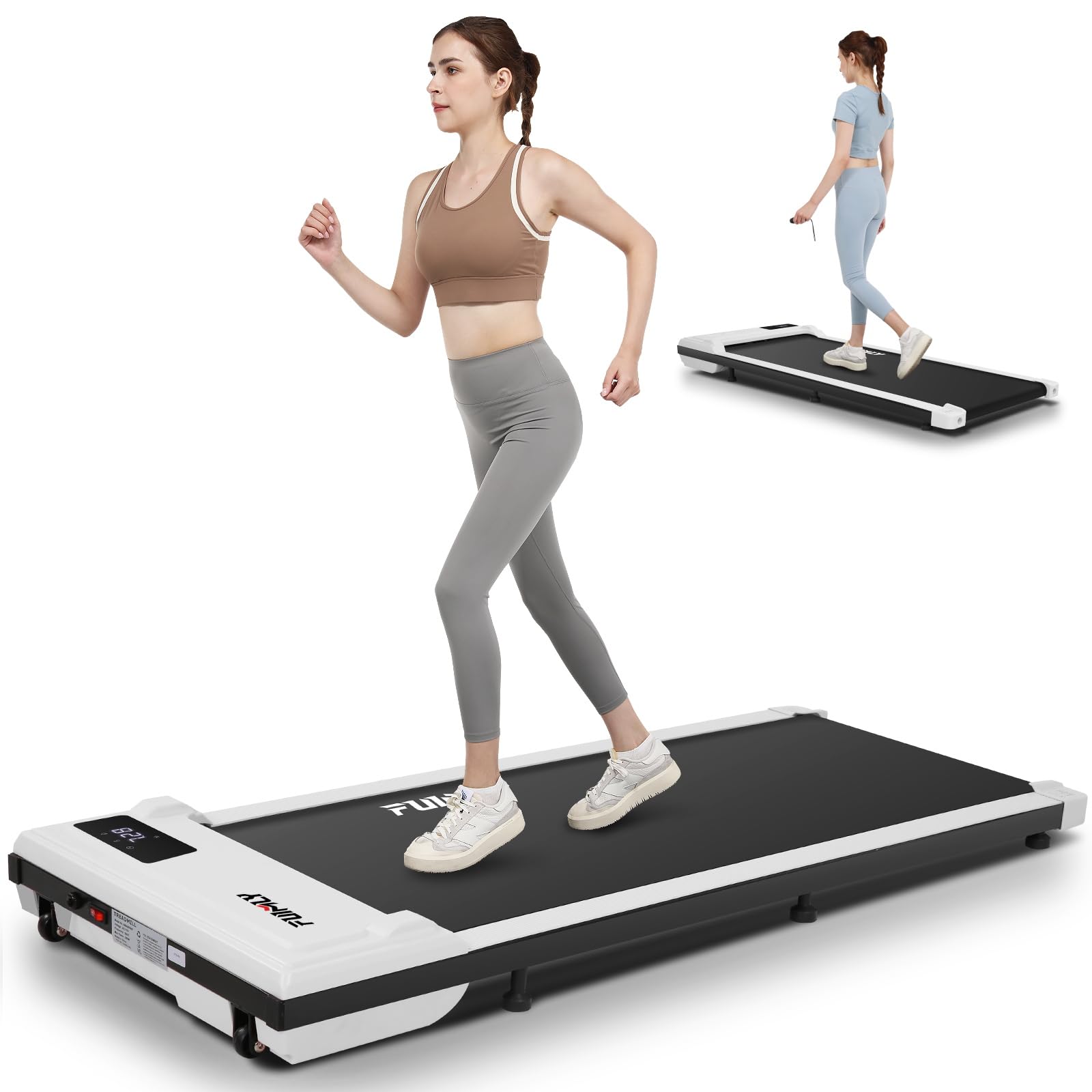
Image: Internal view of the FUNMILY Walking Pad Treadmill, highlighting the powerful and quiet 2.5HP motor.
Warranty and Customer Support
For warranty information, please refer to the warranty card included with your product or visit the official FUNMILY website. If you encounter any issues or have questions not covered in this manual, please contact FUNMILY customer support.
Contact Information:
- Website: www.funmily.com (Placeholder, actual website not provided)
- Email: support@funmily.com (Placeholder)
Ask a question about this manual
Ask about setup, troubleshooting, compatibility, parts, safety, or missing instructions. Manuals+ will review the question and use this page’s manual context to help answer it.