
Siglent SSA3032X
Siglent SSA3032X Spectrum Analyzer User Manual
Model: SSA3032X
Introduction
This manual provides comprehensive instructions for the operation, maintenance, and troubleshooting of the Siglent SSA3032X Spectrum Analyzer. The SSA3032X is designed for precise frequency analysis in various applications, including research and development, education, production, maintenance, and pre-compliance testing.
Key features include an all-digital IF technology, a frequency range from 9 kHz up to 3.2 GHz, and a low displayed average noise level.
Safety Information
Always observe the following safety precautions to prevent injury and damage to the instrument:
- Ensure the power supply voltage matches the instrument's requirements.
- Do not operate the instrument in wet or damp conditions.
- Do not open the instrument casing; refer servicing to qualified personnel.
- Use only specified accessories and cables.
Product Overview
The Siglent SSA3032X Spectrum Analyzer features a large, bright display and an intuitive user interface. It is equipped with various input/output ports for connectivity and measurement flexibility.

Figure 1: Front view of the Siglent SSA3032X Spectrum Analyzer, showing the display, control panel, and front-panel connectors.
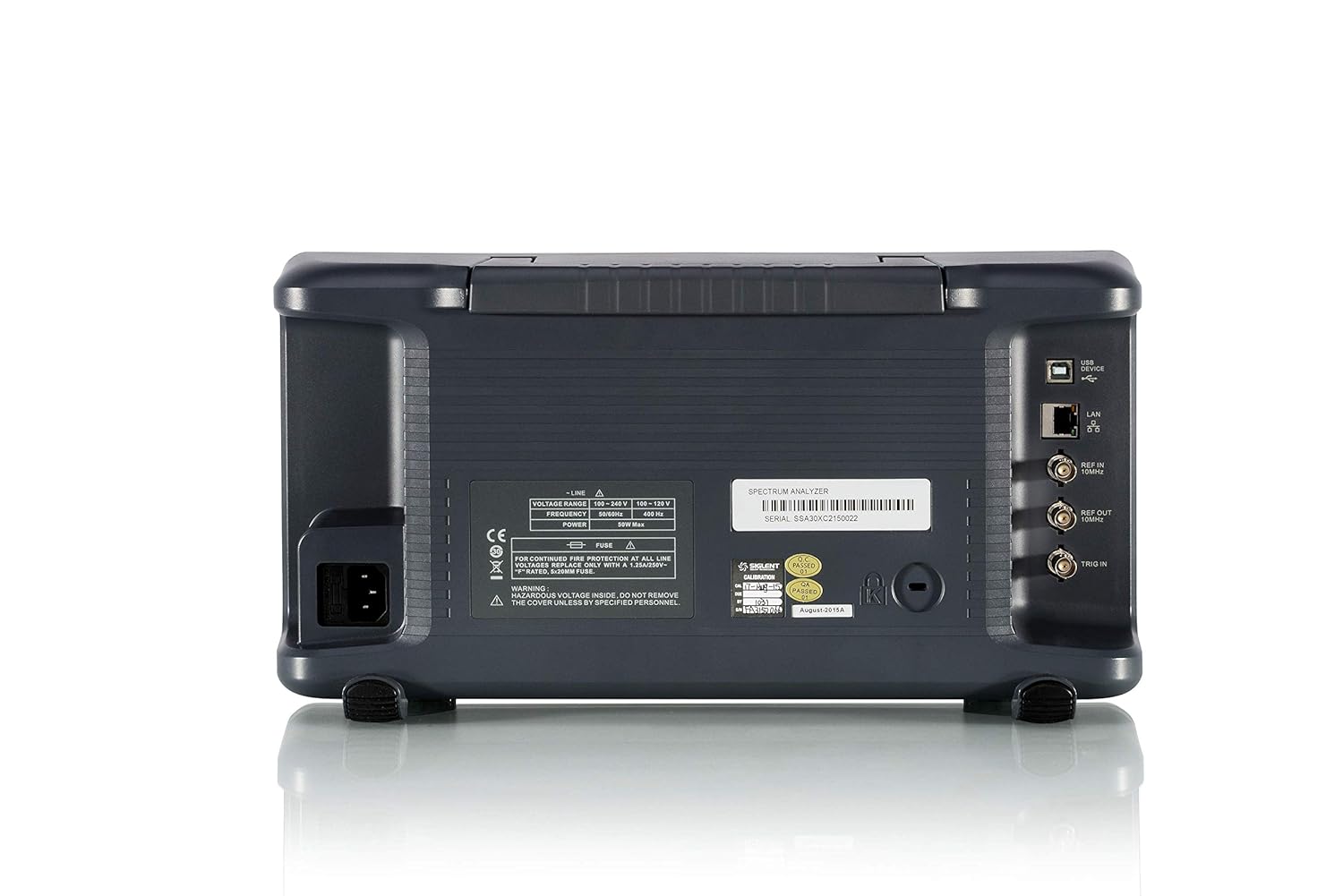
Figure 2: Rear view of the Siglent SSA3032X Spectrum Analyzer, highlighting the power input, USB, LAN, and RF output/input ports.
Key Features:
- All-Digital IF Technology
- Frequency Range from 9 kHz up to 3.2 GHz
- -161 dBm/Hz Displayed Average Noise Level (Typ.)
- -98 dBc/Hz @10 kHz Offset Phase Noise (1 GHz, Typ.)
- 1 Hz Minimum Resolution Bandwidth (RBW)
Setup
Unpacking and Inspection:
Upon receiving your SSA3032X, carefully inspect the packaging for any signs of damage. Open the box and verify that all standard accessories are present:
- Siglent SSA3032X Spectrum Analyzer Unit
- Quick Start Guide
- USB Cable
- Calibration Certificate
- Power Cord (region specific)
Power Connection:
- Connect the provided power cord to the AC power input on the rear panel of the instrument.
- Plug the other end of the power cord into a grounded AC power outlet. Ensure the voltage matches the instrument's rating (100-240V AC, 50/60Hz).
Initial Power On:
Press the power button located on the front panel. The instrument will perform a self-test and display the boot-up screen. Allow a few moments for the system to initialize.
Operating Instructions
Basic Measurement Setup:
To perform a basic spectrum measurement:
- Connect the signal source to the RF INPUT connector on the front panel.
- Press the Frequency button to set the center frequency and span.
- Press the Amplitude button to adjust the reference level and attenuation.
- Press the BW button to set the Resolution Bandwidth (RBW) and Video Bandwidth (VBW).
- Observe the spectrum trace on the display.

Figure 3: The SSA3032X display showing a typical spectrum measurement with signal peaks.
Using Markers:
Markers are used to precisely measure points on the spectrum trace.
- Press the Marker button.
- Use the navigation keys or rotary knob to move the marker to the desired point.
- The frequency and amplitude values at the marker's position will be displayed.
Measurement Functions:
The SSA3032X includes various automatic measurement functions:
- Channel Power: Measures the total power within a specified channel bandwidth.
- Adjacent Channel Power Ratio (ACPR): Measures the ratio of power in an adjacent channel to the power in the main channel.
- Occupied Bandwidth (OBW): Measures the bandwidth containing a specified percentage of the total power.

Figure 4: The SSA3032X performing an ACPR measurement, displaying main and adjacent channel power levels.
Connectivity:
The instrument supports USB and LAN connectivity for data transfer and remote control.
- USB: Connect to a PC for data logging or firmware updates.
- LAN: Connect to a network for remote control via SCPI commands or Siglent's EasySpectrum software.
Maintenance
Cleaning:
To maintain the instrument's appearance and functionality:
- Wipe the exterior surfaces with a soft, damp cloth.
- Do not use abrasive cleaners or solvents.
- Ensure no liquid enters the instrument.
Calibration:
Regular calibration is recommended to ensure measurement accuracy. Refer to the calibration certificate for recommended intervals. Calibration should be performed by qualified service personnel or an authorized Siglent service center.
Firmware Updates:
Periodically check the Siglent website for available firmware updates. Updates can improve performance, add new features, or resolve issues. Follow the instructions provided with the firmware package for safe installation.
Troubleshooting
| Problem | Possible Cause | Solution |
|---|---|---|
| Instrument does not power on. | Power cord not connected; Power outlet faulty; Internal fuse blown. | Check power cord connection; Test power outlet; Contact service for fuse replacement. |
| No signal displayed. | Input signal too low; RF input not connected; Incorrect frequency/amplitude settings. | Increase signal level; Verify RF input connection; Adjust frequency span and reference level. |
| Instrument freezes or becomes unresponsive. | Software error; Overload condition. | Restart the instrument; Reduce input signal level if overloaded. |
If the problem persists after attempting these solutions, please contact Siglent customer support.
Specifications
The following table outlines the key technical specifications for the Siglent SSA3032X Spectrum Analyzer:
| Parameter | Value |
|---|---|
| Frequency Range | 9 kHz to 3.2 GHz |
| Displayed Average Noise Level (DANL) | -161 dBm/Hz (Typ.) |
| Phase Noise (1 GHz, 10 kHz offset) | -98 dBc/Hz (Typ.) |
| Resolution Bandwidth (RBW) | 1 Hz to 1 MHz |
| Product Dimensions | 18 x 12 x 11 inches |
| Weight | 11.6 Pounds |
| Model Number | SSA3032X |
| Manufacturer | Siglent Technologies |
Warranty and Support
Warranty Information:
Siglent Technologies provides a standard warranty for the SSA3032X Spectrum Analyzer. Please refer to the warranty card included with your product or visit the official Siglent website for detailed terms and conditions.
Customer Support:
For technical assistance, troubleshooting, or service requests, please contact Siglent customer support through their official website or the contact information provided in your product documentation.
You can also visit the Siglent Store on Amazon for additional product information and resources.
Related Documents - SSA3032X
 |
SIGLENT SAP1000/SAP2500 Active Probe User Manual | Specifications & Operation Comprehensive user manual for SIGLENT SAP1000 and SAP2500 active probes. Covers safety instructions, setup, operation, accessories, mechanical dimensions, and detailed specifications for these high-impedance oscilloscope probes. |
 |
SIGLENT Product Catalog: Oscilloscopes, Generators, Analyzers & More Explore the comprehensive SIGLENT product catalog featuring advanced digital oscilloscopes, waveform generators, spectrum analyzers, DC power supplies, digital multimeters, and handheld oscilloscopes for all your test and measurement needs. |
 |
SIGLENT SVA1000X Series Spectrum & Vector Network Analyzer Datasheet Comprehensive datasheet for the SIGLENT SVA1000X Series Spectrum & Vector Network Analyzer, detailing features, specifications, design elements, operational modes, and ordering information for the SVA1015X model. Covers frequency range, noise level, phase noise, VNA capabilities, modulation analysis, and more. |
 |
SIGLENT SHN900A Series Vector Network Analyzer Data Sheet Detailed specifications, features, and performance data for the SIGLENT SHN900A Series Vector Network Analyzers, including models SHN914A, SHN920A, and SHN926A. Covers frequency range, calibration, measurements, design features, and technical specifications. |
 |
SIGLENT SHN900A Series Vector Network Analyzer Data Sheet Detailed data sheet for the SIGLENT SHN900A Series Vector Network Analyzers, covering models SHN914A, SHN920A, and SHN926A. Features include frequency range up to 26.5 GHz, multiple measurement modes, and comprehensive specifications. |
 |
SIGLENT Technologies Product Catalog Comprehensive catalog of SIGLENT Technologies electronic test and measurement instruments, including oscilloscopes, waveform generators, power supplies, multimeters, spectrum analyzers, and more. Explore the full range of SIGLENT's innovative solutions for your electronic testing needs. |
Ask a question about this manual
Ask about setup, troubleshooting, compatibility, parts, safety, or missing instructions. Manuals+ will review the question and use this page’s manual context to help answer it.