
1. Introduction
Thank you for choosing the FALCAM TreeRoot T00A4301 Quick Lock Travel Tripod Kit. This tripod is designed for photographers and videographers seeking extraordinary hardness, stability, and portability. Its carbon fiber construction, F38 Pro quick release system, and versatile ball head make it suitable for various shooting environments, from travel to professional outdoor recording. Please read this manual carefully before use to ensure proper operation and maintenance.
2. Safety Information
- Always ensure all locking mechanisms are securely fastened before mounting equipment or adjusting the tripod.
- Do not exceed the maximum load capacity of 20 kg (with low center column) or 10 kg (with high center column) to prevent damage to the tripod or attached equipment.
- Avoid exposing the tripod to extreme temperatures or corrosive substances.
- When operating in windy conditions, consider adding weight to the central hook for increased stability.
- Keep hands and fingers clear of moving parts during adjustment to prevent pinching.
- After use in sandy, dusty, or saltwater environments, clean the tripod thoroughly to prevent corrosion and ensure smooth operation.
3. Package Contents
Verify that all items are present in your package:
- FALCAM TreeRoot T00A4301 Tripod with F38 Pro Quick Release Ball Head
- F38 Quick Release Plate
- Carrying Bag
- Allen Keys for maintenance
- Replacement locking rings for leg segments
4. Components Overview
Familiarize yourself with the main components of your FALCAM TreeRoot tripod:
- Tripod Legs: Four-section carbon fiber legs with twist-lock mechanisms.
- Leg Angle Adjusters: Buttons at the top of each leg to set different leg angles.
- Center Column: Extendable and reversible column for height adjustment and low-angle shooting. Features a quick-release mechanism.
- Ball Head: Integrated F38 Pro quick release ball head with damping control, panoramic rotation, and level indicator.
- F38 Quick Release Plate: Compatible with Arca-Swiss systems for fast camera attachment.
- Accessory Mounts: F22 and 1/4-inch interfaces for attaching accessories.
- Central Hook: Located at the bottom of the center column for adding stability weight. Doubles as a flat-head tool and Allen key.
- Rubber Feet/Spikes: Convertible feet for various terrains.

Figure 4.1: The FALCAM TreeRoot T00A4301 Tripod in its fully extended configuration, showcasing its carbon fiber legs and central column.

Figure 4.2: The FALCAM TreeRoot T00A4301 Tripod folded to a compact 473mm, demonstrating its portability.
5. Setup
5.1 Unfolding the Tripod Legs
- Grasp the tripod head and gently pull the legs outwards until they click into their initial locked position.
- To adjust the leg angle, press the leg angle adjuster button at the top of each leg and move the leg to the desired position (e.g., wider for lower angles or increased stability).
- To extend the leg sections, twist the quick-lock rings on each leg section approximately 1/3 of a turn counter-clockwise to unlock. Pull the leg sections to the desired length, then twist the rings clockwise to lock them securely.

Figure 5.1: Illustrates the 1/3 quick-lock mechanism on the tripod legs for rapid deployment and adjustment.
5.2 Attaching Your Camera
- Ensure the F38 quick release plate is securely attached to the bottom of your camera or lens collar. The plate features anti-rotation teeth for added security.
- Align the F38 quick release plate with the F38 Pro quick release base on the tripod head.
- Press the plate firmly into the base until you hear a click, indicating it is securely locked. Verify by gently attempting to lift the camera.
- To remove the camera, press the release lever on the F38 Pro base and lift the camera.
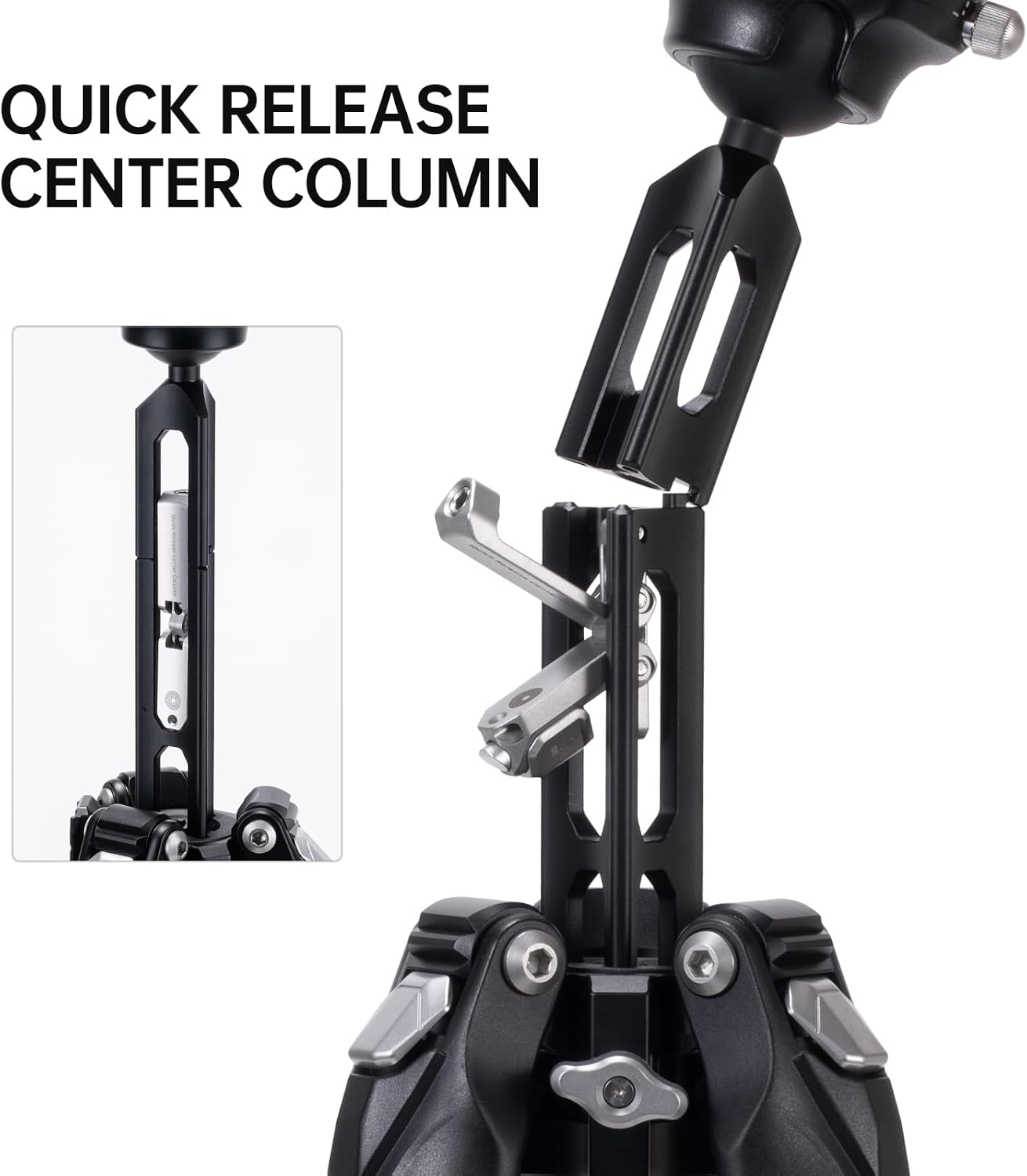
Figure 5.2: The F38 Pro quick release system, demonstrating compatibility with 90% of Arca-Swiss quick release plates for fast camera mounting.
6. Operating the Tripod
6.1 Adjusting Tripod Height
- Leg Extension: Extend the leg sections as described in Section 5.1.
- Center Column Extension: To extend the center column, unlock the central column quick release mechanism. Pull the column upwards to the desired height, then lock the mechanism.

Figure 6.1: Illustrates the maximum working height of 1552mm with the center column extended and 1305mm without the center column extended.
6.2 Low-Angle Shooting and Reversible Center Column
The quick-release center column allows for versatile low-angle shooting and macro photography.
- To remove the center column, unlock the quick release mechanism at the base of the column.
- Pull the entire center column assembly upwards and out of the tripod chassis.
- For extremely low angles, you can re-insert the center column upside down.
- Alternatively, the column can be partially removed to achieve a minimum height of 168mm.

Figure 6.2: The quick release center column mechanism, allowing for easy removal and reversal for low-angle shots.

Figure 6.3: The tripod configured for minimum height (168mm), ideal for macro and low-angle photography.
6.3 Using the Ball Head
- Ball Head Lock: Use the main locking knob to secure or release the ball head for tilting and panning.
- Damping Control: The ball head features a damping control knob to adjust the friction, allowing for smooth, controlled movements even when unlocked. This is particularly useful for videography.
- Panoramic Rotation: Unlock the panoramic base knob to rotate the camera 360 degrees independently of the ball head tilt. The base has degree markings for precise adjustments.
- Level Indicator: Use the integrated bubble level to ensure your camera is perfectly horizontal.
6.4 Using Accessory Mounts
The tripod includes F22 and 1/4-inch interfaces for attaching external accessories like monitors, microphones, or LED lights. Ensure accessories are securely fastened and do not exceed the tripod's stability limits.
7. Maintenance
- Cleaning: Wipe down the tripod with a soft, dry cloth after each use. For stubborn dirt, use a slightly damp cloth and mild soap, then dry thoroughly.
- Post-Saltwater Use: If used in saltwater environments, rinse the tripod thoroughly with fresh water and dry completely to prevent corrosion.
- Lubrication: Periodically check the leg locks and ball head for smooth operation. If necessary, apply a small amount of silicone-based lubricant to moving parts, avoiding excessive application.
- Storage: Store the tripod in its carrying bag in a cool, dry place away from direct sunlight and extreme temperatures.
- Replacement Parts: Use the provided Allen keys for minor adjustments. Replacement locking rings are included for future maintenance.
8. Troubleshooting
| Problem | Possible Cause | Solution |
|---|---|---|
| Tripod legs do not extend or retract smoothly. | Dirt, sand, or debris in leg sections; insufficient lubrication. | Clean leg sections thoroughly. Apply a small amount of silicone lubricant if necessary. Ensure quick-lock rings are fully unlocked. |
| Camera feels unstable on the ball head. | Quick release plate not fully locked; ball head locking knob loose; camera weight exceeds capacity. | Ensure the F38 quick release plate is clicked into place. Tighten the ball head locking knob. Verify camera weight is within the tripod's load capacity. |
| Center column is difficult to adjust or remove. | Quick release mechanism not fully disengaged; debris. | Ensure the central column quick release is completely unlocked. Clean any visible debris. |
| Tripod wobbles or lacks stability. | Leg sections not fully extended or locked; uneven ground; excessive load. | Ensure all leg sections are fully extended and twist-locked. Adjust leg angles for stability on uneven terrain. Reduce load if exceeding capacity. Consider using the central hook for added weight. |
9. Specifications
| Model Number | R141K-320P |
| Material | Carbon Fiber |
| Net Weight | 1.5 Kilograms |
| Maximum Load Capacity | 20 Kilograms (low center column), 10 Kilograms (high center column) |
| Folded Length | 473 mm (approx. 18.6 inches) |
| Maximum Height (with center column extended) | 1552 mm (approx. 61 inches) |
| Maximum Height (without center column extended) | 1305 mm (approx. 51.4 inches) |
| Minimum Height | 168 mm (approx. 6.6 inches) |
| Number of Leg Sections | 4 |
| Tripod Head Type | Ball Head (F38 Pro Quick Release) |
| Compatible Devices | Camera |

Figure 9.1: The net weight of the FALCAM TreeRoot T00A4301 Tripod is 1.5KG, highlighting its lightweight design.
10. Warranty and Support
FALCAM provides a manufacturer's warranty for this product. Please refer to the warranty card included in your package or visit the official FALCAM website for detailed warranty terms and conditions.
For technical support, troubleshooting assistance, or inquiries about replacement parts, please contact FALCAM customer service through their official website or the contact information provided with your purchase.
