
HCALORY TB2
Contents
HCALORY 12V Portable Diesel Heater User Manual
Model: TB2
Product Overview
The HCALORY 12V Portable Diesel Heater is an advanced, all-in-one heating solution designed for various applications including cars, trucks, RVs, and campers. This 2025 upgraded model features a compact toolbox design with a built-in 6L fuel tank, offering enhanced heating efficiency and smart control options. It is engineered for reliable operation in diverse environments, including high altitudes, and incorporates multiple safety features.

Image: The HCALORY 12V Portable Diesel Heater, showcasing its compact toolbox design, integrated control panel, and included accessories like the remote control and power adapter.
Important Safety Information
WARNING: This heater must be exhausted to the outdoors to prevent carbon monoxide (CO) poisoning. Carbon monoxide is a colorless, odorless gas that can be fatal if inhaled. Always ensure proper ventilation and exhaust routing when operating the heater.
- Ensure the heater is placed on a stable, non-combustible surface.
- Keep flammable materials at a safe distance from the heater and its exhaust.
- Regularly inspect the exhaust system for leaks or blockages.
- Do not operate the heater in enclosed, unventilated spaces without proper exhaust.
- Always use the correct fuel type (diesel) for this heater.
- Do not overfill the fuel tank.
- Disconnect power before performing any maintenance or cleaning.

Image: Visual representation of the multiple security protections integrated into the HCALORY diesel heater, highlighting its safety design.
What's in the Box
Upon unpacking, please verify that all components listed below are present:
- Diesel heater unit
- Remote switch
- User manual
- AC power supply
- Installation Accessories (e.g., exhaust pipe, air intake pipe, clamps, etc. - specific items may vary)
Setup Guide
1. Initial Inspection
Before first use, carefully inspect the unit for any shipping damage. It is recommended to inspect the internal fuel tank for any manufacturing debris. If found, remove the tank, wash it out, and allow it to dry completely before filling with fuel.
2. Power Options
The HCALORY diesel heater supports versatile power inputs:
- 12V/24V DC: Connect to a vehicle's battery or a compatible DC power source using the provided cables.
- 110V/220V AC: Use the included AC power supply to connect to a standard household electrical outlet.

Image: Depiction of the heater's compatibility with various power sources, including portable power stations, household outlets, and vehicle batteries.
3. Exhaust and Air Intake Setup
Proper exhaust ventilation is critical for safe operation. The heater's exhaust must be routed outdoors. While an expandable tube is provided, consider a longer, heat-resistant exhaust pipe and an adapter if mounting indoors to ensure the hot exhaust pipe does not contact combustible surfaces. The exhaust temperature can reach high levels, so proper insulation and clearance are essential.
4. Fueling the Unit
Fill the integrated 6L fuel tank with clean diesel fuel. Be aware that the fuel line is circuitous, and it may require a few priming cycles (pumping sessions) to draw fuel to the combustion chamber during the initial startup or after running out of fuel.
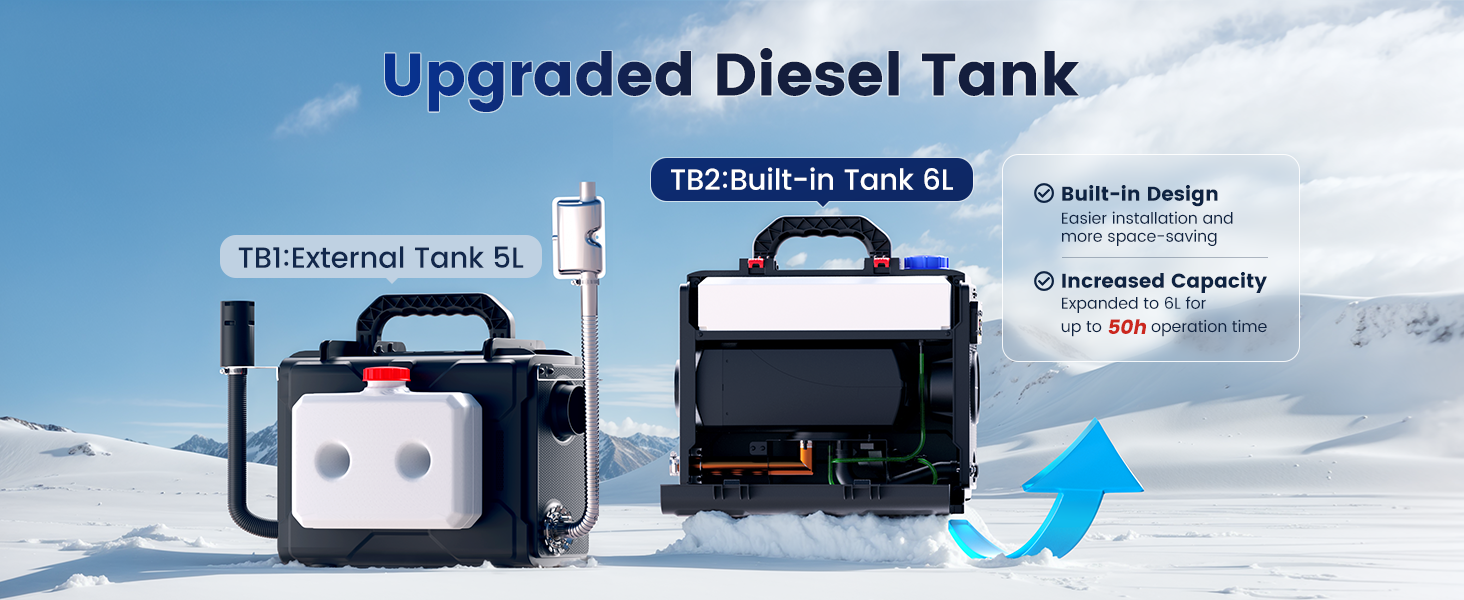
Image: Comparison illustrating the upgraded 6L built-in fuel tank of the TB2 model, offering extended operation time compared to previous versions.
5. Placement Considerations
The portable design allows for flexible placement. It can be used indoors (with proper exhaust) or outdoors. When placing, ensure adequate airflow around the unit and that the air intake and exhaust ports are unobstructed.

Image: The HCALORY heater in a high-altitude camping setting, illustrating its capability for smooth performance in such conditions.
Operating Instructions
1. Control Panel (LCD Monitor)
The integrated LCD monitor provides real-time information and allows for direct control of the heater's functions.

Image: Detailed view of the LCD control panel, labeling its various buttons and display elements for user interaction.
- Plus button: Increases values or navigates up.
- On/Off button: Powers the unit on or off.
- Minus button: Decreases values or navigates down.
- OK button: Confirms selections.
- Setup button: Accesses settings menu.
- Altitudes: Displays current altitude setting.
- Clock display: Shows current time.
- Power levels: Indicates heating power output.
- Display data, parameters: Shows various operational data.
- Main body shape: Visual representation of the unit.
2. Remote Control
A remote switch is included for convenient operation from a distance. Refer to the remote's specific instructions for pairing and function details.
3. Smart App Control
Manage your heater conveniently via the dedicated Bluetooth app. The app provides comprehensive control and monitoring features.
- Altitude Mode: Intelligently adjusts the ratio of air to diesel fuel for optimal combustion at high elevations (up to 20,000 ft).
- Real-time Temperature View: Monitor the current temperature.
- Timer Function: Set schedules for the heater to turn on and off automatically.
- Temperature Setting: Adjust the desired temperature for automatic control. The heater will modulate power or turn off to maintain the set temperature.
- Fan Mode: Control the fan speed.
- Gear Setting: Manually set the heating power level.
- Blowing Mode: Activates a fan-only mode for air circulation without heating.

Image: App interface demonstrating the altitude mode feature, which optimizes fuel-to-air ratio for high-elevation performance.

Image: App interface displaying the timer function, allowing users to schedule heating operation.

Image: App interface for setting the desired temperature, with a visual representation of heat radiating from an RV.

Image: App interface for adjusting the heater's gear (power) setting, showing heat output.

Image: App interface for activating the blowing mode, illustrating air circulation within a vehicle interior.
4. Heating Efficiency
The enhanced aluminum body design allows for rapid temperature increase (18-36°F) and reduces exhaust gas temperature (90-180°F), contributing to a comfortable environment and minimizing heat loss. Enlarged smoke vents improve combustion efficiency, reducing smoke and carbon buildup.

Image: An exploded view of the heater's internal structure, highlighting components and metrics related to its enhanced heating efficiency.
Maintenance
Regular maintenance ensures optimal performance and longevity of your HCALORY diesel heater.
- Fuel Tank Inspection: Periodically check the fuel tank for any sediment or debris. Clean as necessary to prevent fuel line blockages.
- Exhaust System: Inspect the exhaust pipe and connections regularly for any signs of damage, leaks, or carbon buildup. Ensure it remains unobstructed.
- Air Intake: Keep the air intake clear of dust, dirt, and other obstructions to ensure proper airflow for combustion.
- General Cleaning: Wipe down the exterior of the unit with a damp cloth. Do not use harsh chemicals or abrasive cleaners.
- Storage: If storing the heater for an extended period, ensure the fuel tank is either full to prevent condensation or completely drained.
Troubleshooting
This section provides common error codes and suggested solutions. If the issue persists, contact customer support.
| Error Code | Principle of Failure | Quick Processing Suggestions |
|---|---|---|
| E021 | The power voltage is too low | 1. The battery may need to be charged. 2. Replace with a battery that has a larger discharge power. |
| E022 | The power supply voltage is too high | The power supply voltage is too high, check the battery output voltage. |
| E023 | The power supply voltage is abnormal | The power supply voltage is abnormal, check the current battery voltage. |
| E031 | The Glow Plug is open-circuit | 1. Check if the glow plug's connection wire is disconnected. 2. Check if the glow plug's connection part is loose. 3. Give the glow plug positive and negative wires a brief loop to test if the spark plug is heating up. |
| E032 | The Glow Plug is short-circuited | The glow plug is damaged or the mainboard is faulty. |
| E041 | The oil pump wire is open circuit | 1. Check if the connection wires of the oil pump is disconnected. 2. Check if the connection wires of the oil pump is loose. |
| E042 | The oil pump is short-circuited | Check if the oil pump is blocked or not working. |
| E05 | High temperature alarm (Casing temperature >446°F) | 1. Check if the cold air intake is blocked. 2. Check if the hot air outlet pipe is bent. 3. Check if the fan is working properly. 4. Add gasket to the temperature sensor. |
| E061 | The motor wire is open circuit | Connect the positive and negative terminals of the battery to the motor interface, and check whether the motor is rotating. |
| E062 | The motor is short-circuited | The motor is damaged or the mainboard is faulty. |
| E063 | The Glow Plug wire is open-circuit | 1. Check if the impeller is stuck. 2. The gap between the magnet on the wind wheel and the Hall sensor on the controller is too large. |
| E07 | The communication between the mainboard and the control screen is abnormal | 1. Check if the connection part of the control screen is loose. 2. Check if the connection line (blue) of the control screen is open circuit. |
| E08 | The flame is extinguished | 1. Check whether there is a lack of oil, oil is low-temperature solidification, oil road blockage, oil pipe collapse, too many gas pockets in the oil pipe, oil pump stuck. 2. Check if the air intake and exhaust duct are unobstructed. 3. Check if the casing temperature sensor is fully in contact with the casing, and if the pressure spring is strong. |
| E091 | The wiring of the temperature sensor is disconnected | 1. Check if the wiring of the temperature sensor is disconnected. 2. Check if the connection part of the temperature sensor is loose. |
| E092 | The motor is short-circuited | The temperature sensor is damaged or the mainboard is faulty. |
| E10 | Unable to start, ignition failure | Unidentifiable comprehensive reasons. Please take videos and pictures, a thorough inspection of spark plugs, oil pump, combustion chamber, air duct, motor, fan, circuit may be needed. |
Specifications
| Feature | Detail |
|---|---|
| Brand | HCALORY |
| Model | TB2 |
| Item Weight | 24.8 pounds |
| Package Dimensions | 21.6 x 21 x 10.25 inches |
| Exterior Finish | Painted |
| Heating Method | Radiant |
| Special Features | Adjustable Temperature, Energy Efficient, Fast Heating, Overheat Protection, Portable |
| Voltage | 12 Volts (supports 12V/24V DC and 110V/220V AC) |
| Fuel Tank Capacity | 6 Liters |
| Altitude Operation | Max 20,000 ft (with APP control altitude mode) |
| Fuel Consumption Rate | 0.036-0.1 gallons per hour |
| Heating Area Coverage | 215 sq ft - 289 sq ft (approximate) |
Warranty and Support
For warranty information and technical support, please refer to the contact details provided in your product packaging or visit the official HCALORY website. Keep your purchase receipt as proof of purchase for any warranty claims.
Ask a question about this manual
Ask about setup, troubleshooting, compatibility, parts, safety, or missing instructions. Manuals+ will review the question and use this page’s manual context to help answer it.