
PALONE MWS-091
PALONE Bug Zapper Instruction Manual
Model: MWS-091
Introduction
Thank you for purchasing the PALONE Bug Zapper. This device is designed to effectively control mosquitoes, flies, moths, and other flying insects both indoors and outdoors. Featuring a powerful electric grid and UV light attraction, it provides a safe and chemical-free solution for pest control. This manual provides detailed instructions for setup, operation, maintenance, and troubleshooting to ensure optimal performance and longevity of your bug zapper.

The PALONE Bug Zapper, shown here with its packaging, is designed for effective insect control in various settings, including outdoor camping environments.
Safety Information
Please read all safety warnings and instructions carefully before using this product to prevent injury or damage. Keep this manual for future reference.
- Do not touch the internal electric grid with hands or conductive objects when the device is powered on.
- Keep out of reach of children and pets. The outer frame grid size is designed to prevent accidental contact, but supervision is always recommended.
- Do not use in areas where flammable liquids, gases, or explosive dust may be present.
- Do not immerse the device in water or other liquids. Avoid direct exposure to rain or heavy moisture.
- Unplug the device before cleaning or performing any maintenance.
- Do not attempt to repair or modify the device yourself. Contact qualified service personnel for repairs.
- Ensure the power source matches the device's requirements.

The bug zapper is designed with safety features, including a narrow outer grid, making it suitable for use in homes with children and pets, as depicted in a bedroom setting.
Package Contents
Please check the package contents upon opening to ensure all items are present and undamaged.
- PALONE Bug Zapper Unit
- USB Charging Cable
- Cleaning Brush
- Instruction Manual
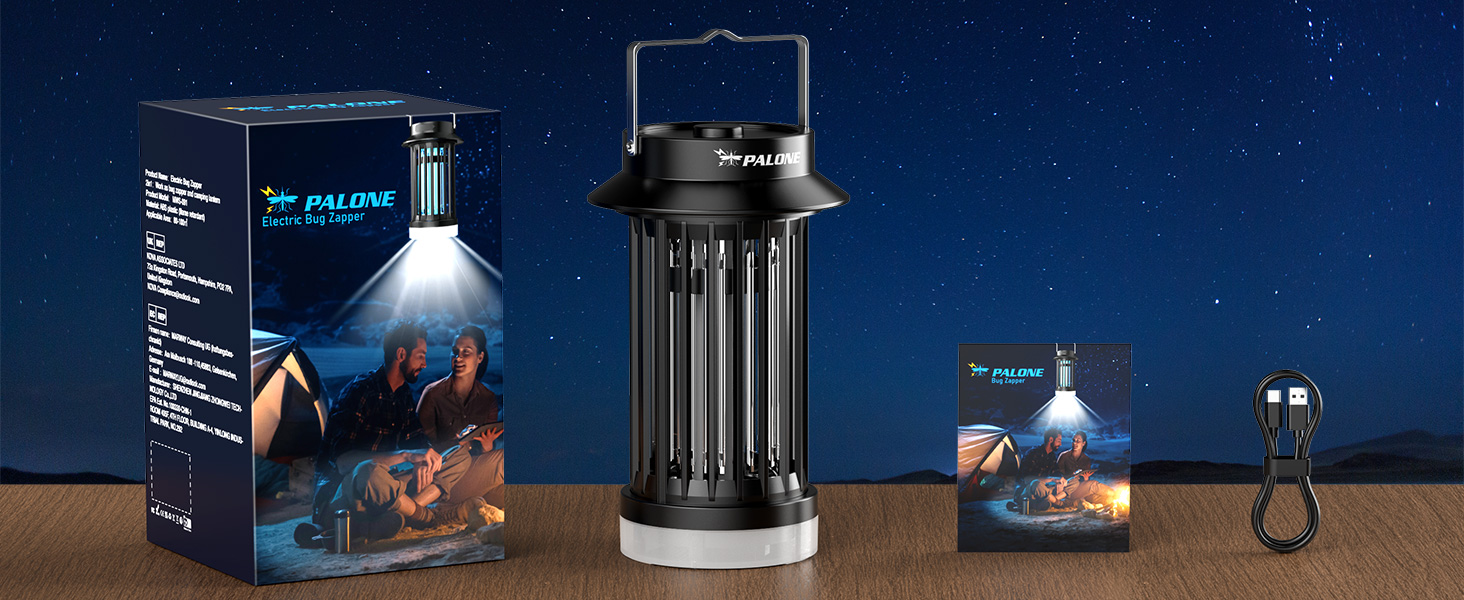
The complete package includes the PALONE Bug Zapper unit, its retail box, the instruction manual, and a USB charging cable for convenience.
Product Overview
Familiarize yourself with the components of your PALONE Bug Zapper.
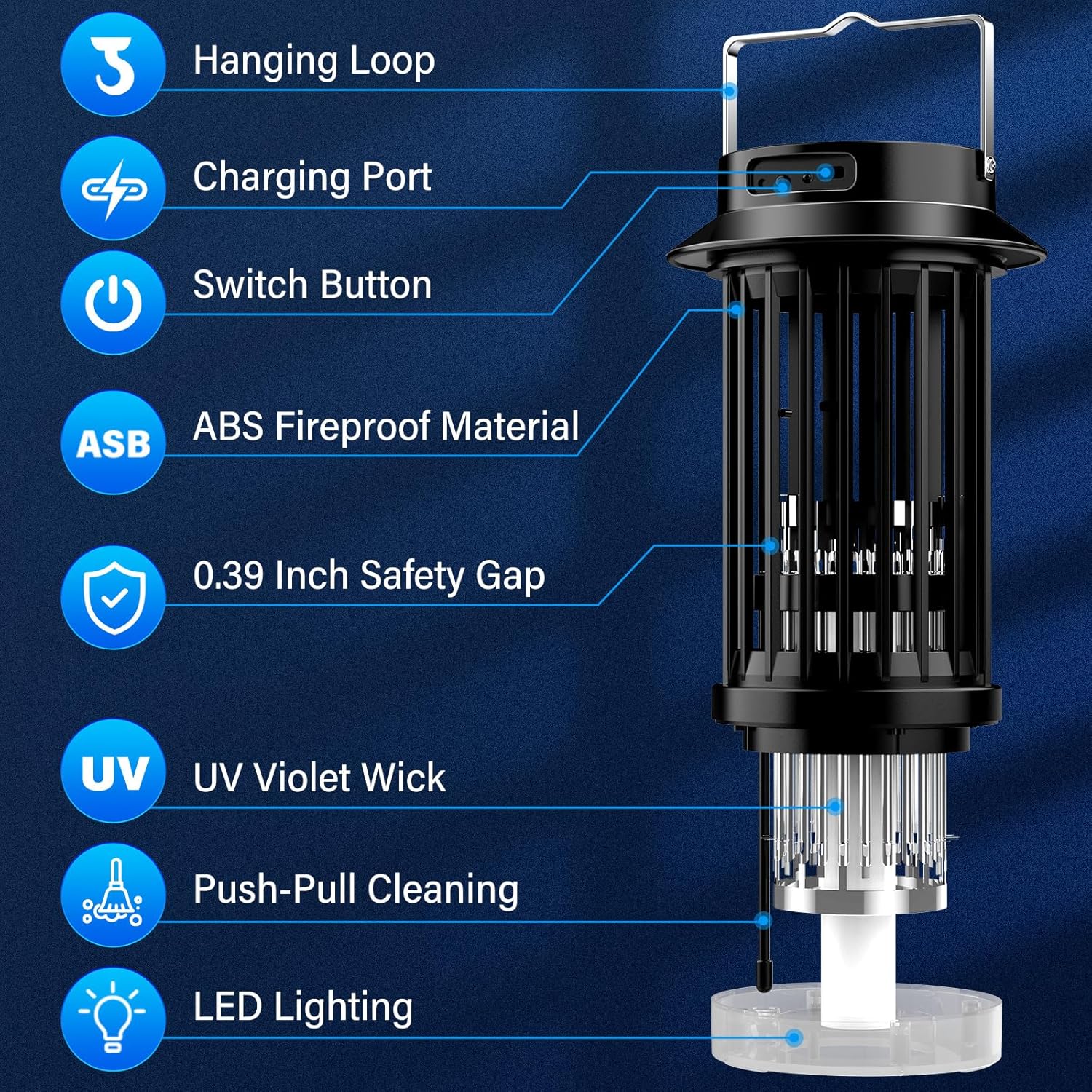
Detailed diagram illustrating the key components of the PALONE Bug Zapper, including the hanging loop, charging port, switch button, ABS fireproof material, 0.39 inch safety gap, UV violet wick, push-pull cleaning mechanism, and LED lighting.
- Hanging Loop: For easy portability and hanging.
- Charging Port: USB-C input for recharging the internal battery.
- Switch Button: Controls power and operating modes.
- ABS Fireproof Material: Durable and safe housing.
- 0.39 Inch Safety Gap: Narrow grid spacing to prevent accidental contact.
- UV Violet Wick: Emits UV light to attract insects.
- Push-Pull Cleaning: Removable tray for easy disposal of zapped insects.
- LED Lighting: Provides ambient light, usable as a lantern.

Visual representation of the bug zapper's core benefits: safety, chemical-free operation, instant kill capability, 360-degree bug attraction, non-toxic nature, and odorless performance.
Setup
- Unpacking: Carefully remove the bug zapper and all accessories from the packaging.
- Initial Charge: Before first use, fully charge the device using the provided USB charging cable. Connect the USB-C end to the zapper's charging port and the USB-A end to a compatible USB power adapter (not included), power bank, or computer USB port. The charging indicator light will show charging status (e.g., red for charging, green for full).
- Placement: For optimal performance, place the bug zapper in an area where insects are prevalent, away from direct sunlight or strong winds. For outdoor use, hang it using the integrated hanging loop. The effective coverage area is 80-100 square meters.
Operating Instructions
The PALONE Bug Zapper features multiple operating modes for versatile use.
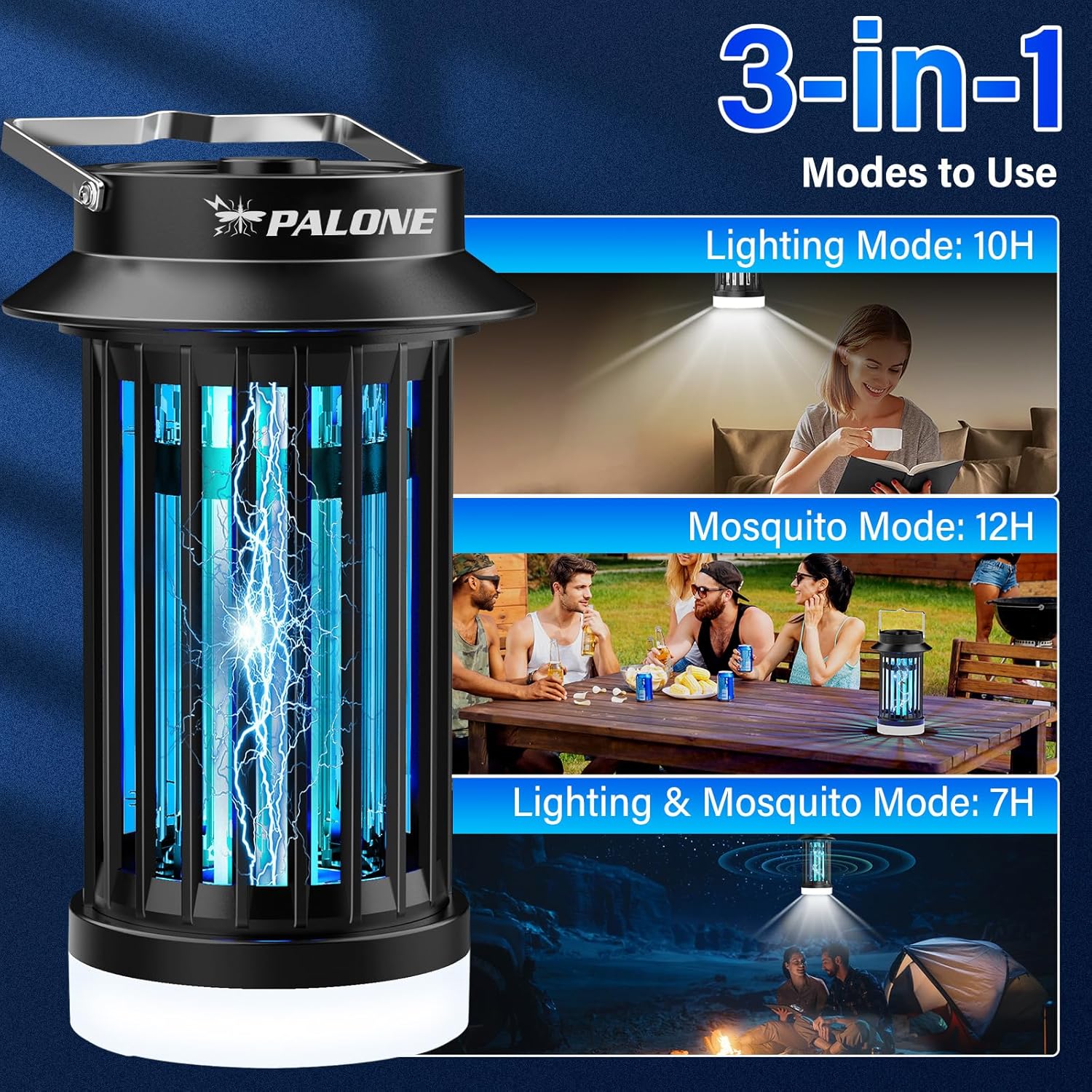
Visual guide to the three operational modes of the bug zapper: dedicated lighting, mosquito zapping, and a combination of both, along with their approximate battery durations.
- Power On/Off: Press the switch button once to turn on the device. Press and hold to turn off.
- Mode Selection:
- First Press: Activates the UV mosquito zapping mode. The blue UV lights will illuminate, and the electric grid will be active. (Approx. 12 hours battery life)
- Second Press: Activates the LED lighting mode. The white LED light at the bottom will turn on. (Approx. 10 hours battery life)
- Third Press: Activates both the UV mosquito zapping and LED lighting modes simultaneously. (Approx. 7 hours battery life)
- Fourth Press: Turns off the device.
- Optimal Use: For best mosquito zapping results, use the device in a dark environment. The UV light is most effective when it is the primary light source attracting insects.
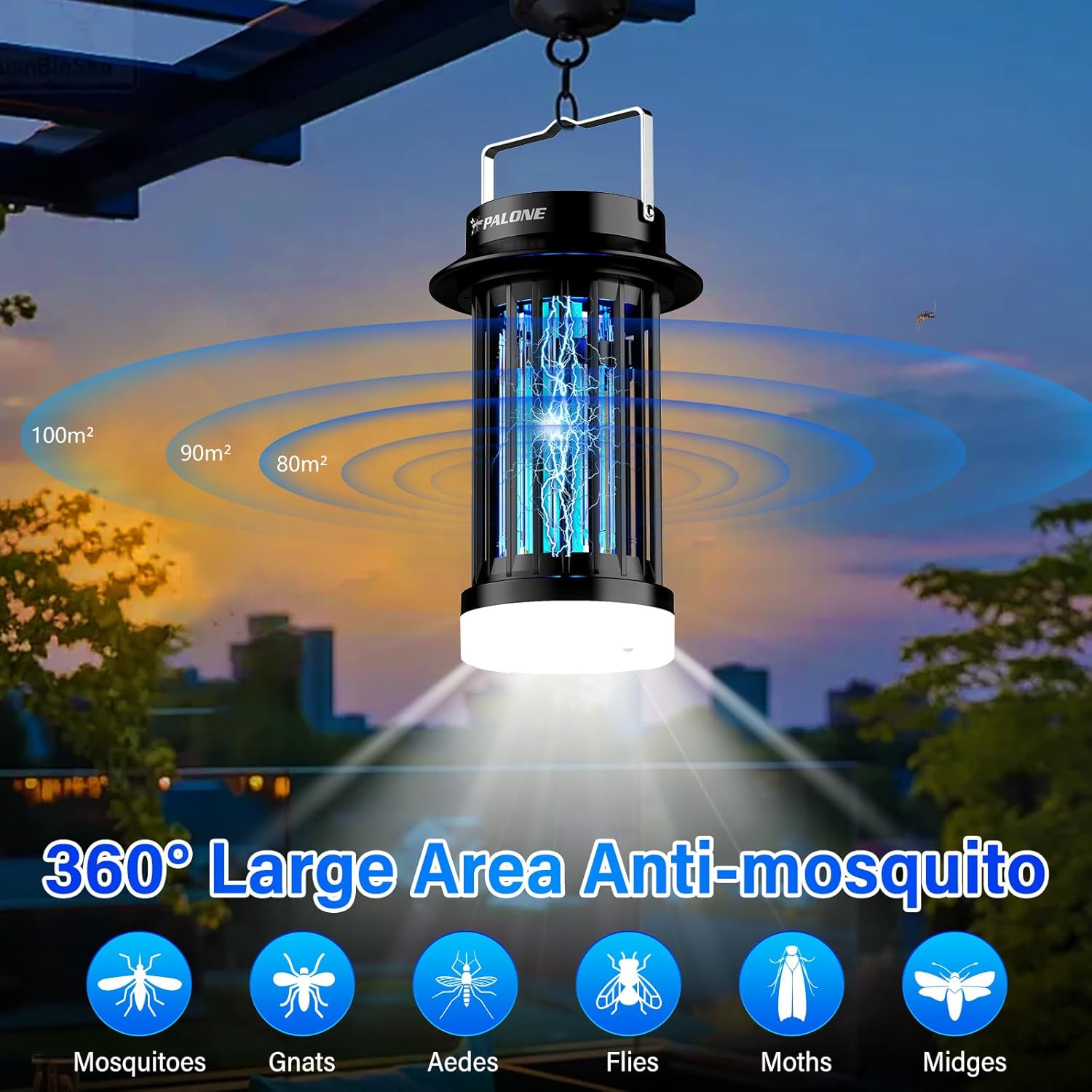
The bug zapper provides 360-degree coverage, effectively targeting a wide range of flying insects including mosquitoes, gnats, Aedes, flies, moths, and midges, suitable for large outdoor areas.
Maintenance
Regular cleaning ensures the efficiency and longevity of your bug zapper.
- Power Off: Always ensure the device is turned off and unplugged before cleaning.
- Emptying the Tray: The bottom tray can be easily removed for cleaning. Gently push and pull the bottom section to detach it.
- Cleaning the Grid: Use the provided cleaning brush to remove any dead insects from the electric grid. Do not use water or wet cloths on the grid.
- Wipe Exterior: Wipe the exterior of the device with a soft, dry cloth.
- Reassemble: Once clean, reattach the bottom tray securely.

Demonstration of the convenient push-pull cleaning feature, showing the device before and after removing accumulated insect debris from the collection tray.
Troubleshooting
| Problem | Possible Cause | Solution |
|---|---|---|
| Device not turning on. | Battery is low or depleted. | Charge the device fully using the USB cable. |
| Bug zapper not attracting insects. | Too much ambient light; device placed incorrectly. | Use in a darker environment. Reposition the zapper away from competing light sources. Ensure it's within the effective range (80-100 sq meters). |
| Insects are attracted but not zapped. | Electric grid is dirty or obstructed. | Clean the electric grid and collection tray using the provided brush. |
| Short battery life. | Device not fully charged; using combined mode frequently. | Ensure full charge before use. Combined mode (lighting + zapping) consumes more power. |
Specifications
- Model Number: MWS-091
- Brand: PALONE
- Product Dimensions: 5.31 x 8.66 x 5.31 inches
- Item Weight: 1.19 pounds
- Battery Capacity: 2600mAh
- Coverage Area: 80-100 square meters (approx. 860-1076 sq ft)
- Input: USB DC
- Color: Black
- Target Species: Mosquitoes, Flies, Moths, Gnats, Aedes, Midges
Warranty and Support
For warranty information and customer support, please refer to the warranty card included with your product or contact PALONE customer service directly. Keep your purchase receipt as proof of purchase.
For further assistance, you may visit the official PALONE store on Amazon: PALONE Store
Related documentsMWS-091

Ask a question about this manual
Ask about setup, troubleshooting, compatibility, parts, safety, or missing instructions. Manuals+ will review the question and use this page’s manual context to help answer it.