
Introduction
The DreamSky DS312 RGB Digital Alarm Clock is a compact, electric bedside clock designed for clear time display and ease of use. It features large, illuminated LED digits with adjustable brightness and multiple color options, making it suitable for various room settings. This manual provides comprehensive instructions for setting up and operating your new alarm clock.
Setup
- Power Connection: The clock operates via a corded electric connection using the included USB-C adapter. Connect the USB-C cable to the clock and the adapter to a power outlet.

Image showing the DreamSky DS312 RGB Digital Alarm Clock connected to a power outlet via its USB-C adapter. The display shows '12:35' with RGB digits. An inset shows two AAA batteries (not supplied) and a note that the display does not light up with battery alone.
- Battery Backup: Install 2 AAA batteries (not included) into the battery compartment. These batteries serve as a memory backup to retain time and alarm settings during a power outage. The clock display will not light up, and the alarm will not sound when operating on battery power alone.
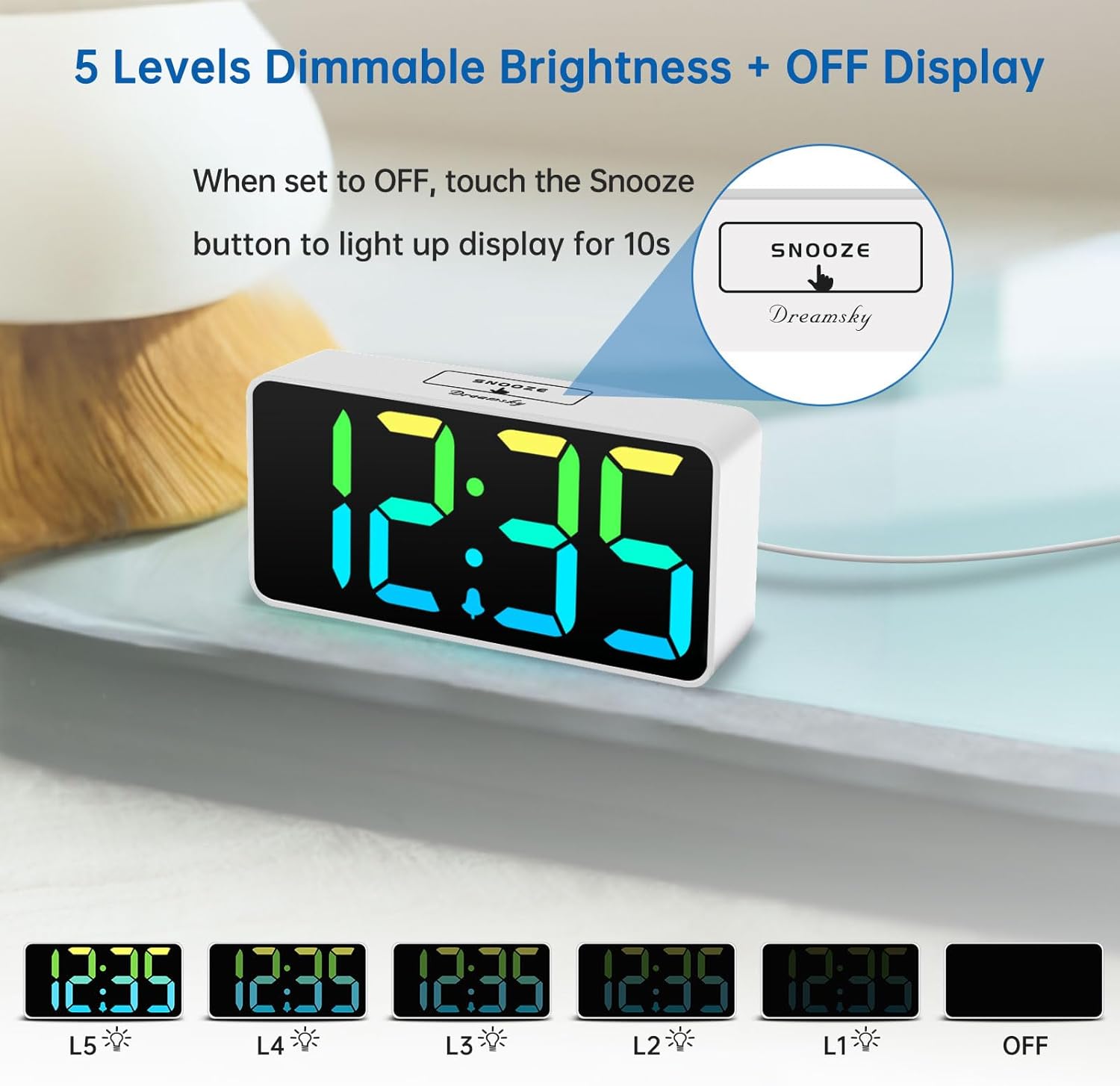
Image showing the DreamSky DS312 RGB Digital Alarm Clock with its dimensions (5.3 inches wide, 2.6 inches high, 1.4 inches deep). Also pictured are the included user manual and the USB-C power adapter.
Operating Instructions
- Time Setting:
- Press and hold the TIME SET button for 2 seconds to enter time setting mode.
- Use the + and - buttons to adjust the hour.
- Press TIME SET again to move to minute adjustment.
- Use the + and - buttons to adjust the minutes.
- Press TIME SET to confirm and exit.
- 12/24 Hour Format: Press the 12/24HR button to switch between 12-hour and 24-hour time display.
- Alarm Setting:
- Press and hold the ALARM SET button for 2 seconds to enter alarm setting mode.
- Use the + and - buttons to adjust the alarm hour.
- Press ALARM SET again to move to minute adjustment.
- Use the + and - buttons to adjust the alarm minutes.
- Press ALARM SET to confirm.
- To activate/deactivate the alarm, press the ON/OFF button. An alarm icon will appear/disappear on the display.
- Snooze Function: When the alarm sounds, press the large SNOOZE button on top for a 9-minute snooze.

Image illustrating the DreamSky DS312 RGB Digital Alarm Clock's adjustable alarm volume feature. The display shows '10:30' with white digits. Graphics indicate a 2-minute alarm duration and a 9-minute snooze function. A person is shown covering their ears, suggesting the alarm can be loud.
- Adjustable Volume: Press the VOLUME button to cycle through 5 levels of alarm sound (30-90 dB).
- Brightness Dimmer: Press the DIMMER button to cycle through 5 levels of display brightness (L1 to L5) or turn the display OFF. When the display is OFF, touch the SNOOZE button to temporarily light up the display for 10 seconds.

Image demonstrating the 5 levels of dimmable brightness and OFF display feature of the DreamSky DS312 RGB Digital Alarm Clock. The clock shows '12:35' with various brightness levels (L1-L5) and an 'OFF' state. An inset shows the 'SNOOZE' button with an instruction to touch it to light up the display for 10 seconds when set to OFF.
- Multicolor Display: Press the MULTICOLOR button to cycle through 8 vibrant color patterns for the digits.
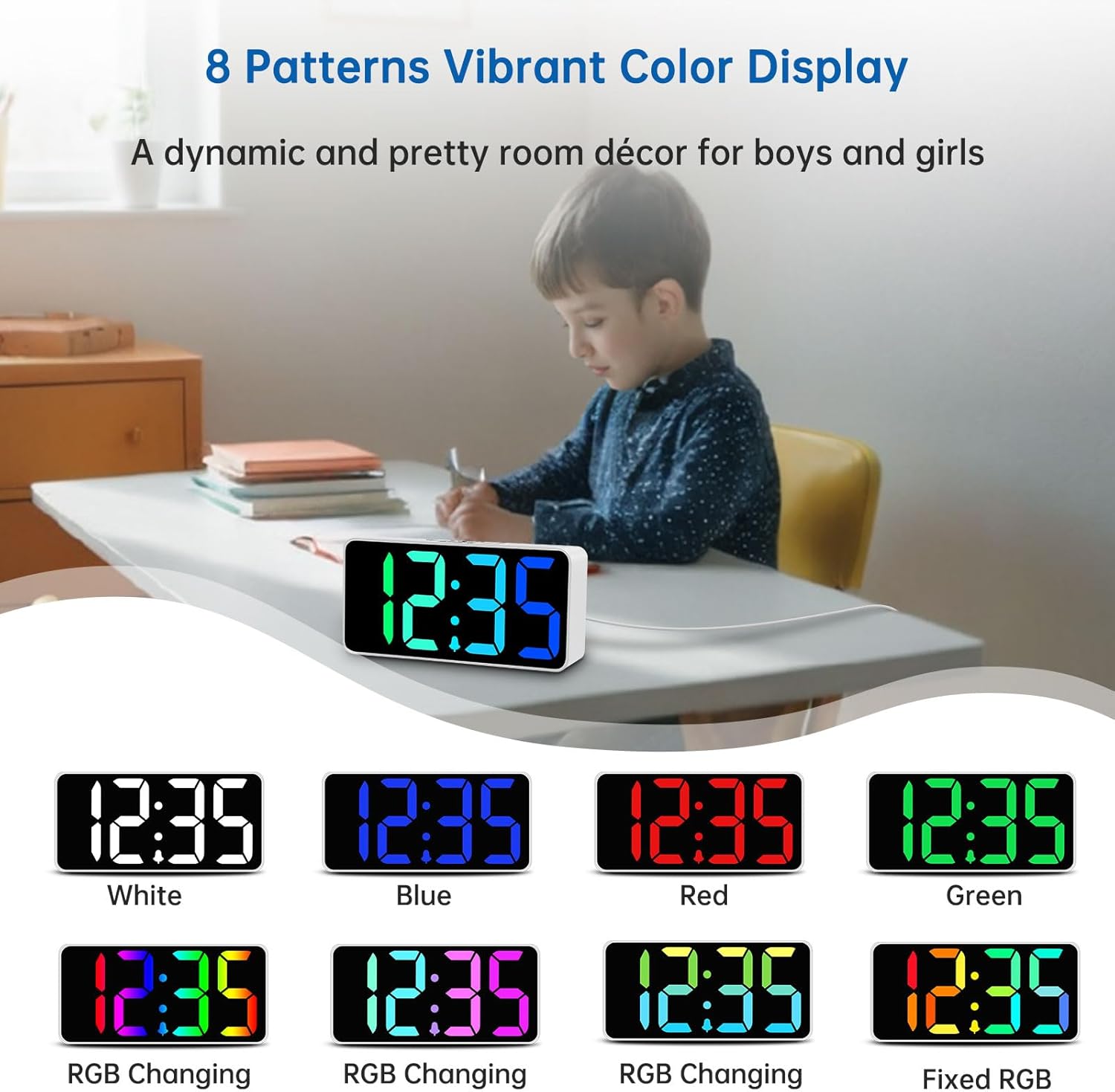
Image showcasing the 8 vibrant color display patterns of the DreamSky DS312 RGB Digital Alarm Clock. The clock displays '12:35' with different color combinations, including White, Blue, Red, Green, RGB Changing, and Fixed RGB. A child is shown in the background, suggesting its use as room decor.
- USB Charging Port: The clock features a convenient USB-A output port (5V) on the back to charge your smartphone or other electronic devices.

Image highlighting the extra USB charging port on the DreamSky DS312 RGB Digital Alarm Clock. The clock displays '12:35' with RGB digits, and a smartphone is shown connected to the USB OUT port on the back of the clock, indicating charging.
Features
- Large 2-inch illuminated LED digits for easy readability.
- Adjustable brightness dimmer with 5 levels and an OFF option.
- Single alarm setting with a 9-minute snooze function.
- Adjustable alarm volume from 30-90 dB.
- One simple ON/OFF button for alarm deactivation.
- Convenient USB charging port (5V output) for external devices.
- Intuitive setting buttons for easy operation.
- Battery backup (2 x AAA, not included) to store settings during power outages.
- Compact and streamlined design.
Troubleshooting
- Display is blank: Ensure the USB-C power adapter is securely plugged into both the clock and a working power outlet. The clock does not operate on battery power alone; batteries only maintain settings during outages.
- Alarm not sounding: Check if the alarm is activated using the "ON/OFF" button. Verify the alarm volume setting.
- Time/Alarm settings lost after power outage: Ensure 2 AAA batteries are installed in the battery compartment. These batteries preserve settings during power interruptions.
- Cannot change display color/brightness: Ensure you are pressing the correct "MULTICOLOR" or "DIMMER" buttons. Refer to the "Operating Instructions" section.
- USB charging not working: Confirm the clock is powered on. Ensure the device being charged is compatible with 5V USB output.
Specifications
| Feature | Detail |
|---|---|
| Brand | DreamSky |
| Model Number | DS312 |
| Color | White Case Rgb Digits |
| Display Type | Digital |
| Style | RGB Digital Clock |
| Product Dimensions | 5.3"W x 2.6"H |
| Power Source | Corded Electric |
| Room Type | Bedroom, Living Room, Kids Room, Office, Guest Room, Kitchen, Hotel, Nursery, Home Office, Dorm, Dining Room |
| Shape | Rectangular |
| Indoor/Outdoor Usage | Indoor |
| Batteries Required | 2 AAA batteries (not included) for memory backup |
| Mounting Type | Tabletop |
| Alarm Clock | Yes |
| Operation Mode | Electrical |
| Connectivity Technology | USB |
| Item Weight | 0.25 Kilograms |
| Screen Size | 2 Inches |
| Material Type | Plastic |
Warranty & Support
Warranty: This DreamSky DS312 RGB Digital Alarm Clock comes with a 1-year replacement warranty.
Customer Support: For any questions, technical assistance, or warranty claims, please contact our customer support team at info@dreamsky4u.com.
