
1. Product Overview
The INFINMIND D970 Wireless Bluetooth Multi-Device Mouse is designed for versatile and efficient use across various devices. It offers seamless connectivity options, precise control, and an ergonomic design for enhanced productivity and comfort.
Key Features:
- Multi-Connectivity: Connects to up to three devices via 2.4G Wireless (USB receiver) and two Bluetooth 5.1 channels.
- 4-Way Hyper-Fast Scrolling: Features a stainless steel roller for rapid vertical and horizontal navigation.
- Adjustable DPI: Four customizable DPI settings (1000/1600/2400/3000) for precise cursor control.
- Silent Click: Reduces click noise by up to 90% for a quiet work environment.
- Long Battery Life: Engineered for extended use with an intelligent auto-sleep function.
- Portable Design: Slim, lightweight, and ergonomic for comfortable use and easy transport.
Package Contents:
- 1 x INFINMIND D970 Wireless Bluetooth Mouse
- 1 x 2.4GHz USB Receiver (stored under the magnetic top cover)
- 1 x AA Battery (pre-installed)
- 1 x Instruction Manual
2. Setup Guide
2.1 Battery Installation
- Gently lift the magnetic top cover of the mouse to reveal the battery compartment.
- Locate the pre-installed AA battery. Remove any protective film or tab if present.
- Ensure the battery is correctly oriented according to the polarity markings (+/-).
- Replace the magnetic top cover, ensuring it snaps securely into place.

Image: The INFINMIND D970 mouse with its magnetic top cover removed, revealing the battery compartment and the stored 2.4GHz USB receiver.
2.2 Connecting Your Mouse
The INFINMIND D970 mouse supports three connection modes: 2.4G Wireless (USB) and two Bluetooth 5.1 channels. You can switch between these modes using the dedicated button on the mouse.

Image: The INFINMIND D970 mouse connected to a laptop via 2.4G wireless, a tablet via Bluetooth 1, and a smartphone via Bluetooth 2, illustrating its multi-device capability.
2.2.1 2.4G Wireless Connection (USB Receiver)
- Open the magnetic top cover of the mouse and carefully remove the 2.4GHz USB receiver from its storage slot.
- Plug the USB receiver into an available USB port on your computer or laptop.
- Turn on the mouse using the ON/OFF switch located on the bottom.
- Press the mode switch button on the top of the mouse until the white LED indicator lights up, indicating 2.4G mode.
- Your computer should automatically detect and connect to the mouse.

Image: A detailed view of the INFINMIND D970 mouse, illustrating the convenient storage of the USB receiver under the magnetic top cover.
2.2.2 Bluetooth Connection (BT1 / BT2)
- Turn on the mouse using the ON/OFF switch on the bottom.
- Press the mode switch button on the top of the mouse to select either Bluetooth Mode 1 (blue LED) or Bluetooth Mode 2 (green LED).
- For first-time pairing, press and hold the mode switch button for 3-5 seconds until the selected Bluetooth LED (blue or green) starts blinking rapidly. This indicates the mouse is in pairing mode.
- On your device (laptop, tablet, smartphone), go to Bluetooth settings and search for new devices.
- Select "BT MOUSE-1" or "BT MOUSE-2" (depending on the mode selected) from the list of available devices to pair.
- Once paired, the LED indicator will stop blinking and remain solid.

Image: A close-up of the INFINMIND D970 mouse's top panel, highlighting the mode switch button and the LED indicators for 2.4G, Bluetooth 1, and Bluetooth 2 connections.
2.2.3 Switching Between Connected Devices
Once multiple devices are paired, simply press the mode switch button on the top of the mouse to cycle between the 2.4G Wireless, Bluetooth 1, and Bluetooth 2 connections. The corresponding LED indicator will light up to confirm the active connection.
3. Operating Instructions
3.1 DPI Adjustment
The mouse features four adjustable DPI levels to customize cursor sensitivity and speed. Press the DPI button located below the scroll wheel to cycle through the settings:
- 1000 DPI: Suitable for precise tasks like graphic design.
- 1600 DPI: Ideal for general office work and web browsing.
- 2400 DPI: Good for faster navigation and some gaming.
- 3000 DPI: High sensitivity for quick movements, especially in gaming.

Image: The INFINMIND D970 mouse highlighting the DPI button and illustrating the four adjustable DPI settings (1000, 1600, 2400, 3000) for various tasks.
3.2 4-Way Hyper-Fast Scrolling
The stainless steel scroll wheel provides both vertical and horizontal scrolling capabilities. This allows for efficient navigation through documents, spreadsheets, and web pages.
- Vertical Scrolling: Scroll the wheel up or down for standard page navigation. The hyper-fast feature allows for rapid scrolling through long content.
- Horizontal Scrolling: Tilt the scroll wheel left or right to scroll horizontally, useful for wide documents or timelines.

Image: The INFINMIND D970 mouse in action, demonstrating its 4-way hyper-fast scrolling feature on a computer screen displaying a wide spreadsheet.
3.3 Silent Click Technology
The INFINMIND D970 mouse is designed with noiseless click technology, reducing click sounds by up to 90%. This feature is beneficial for maintaining a quiet environment in offices, libraries, or shared spaces.
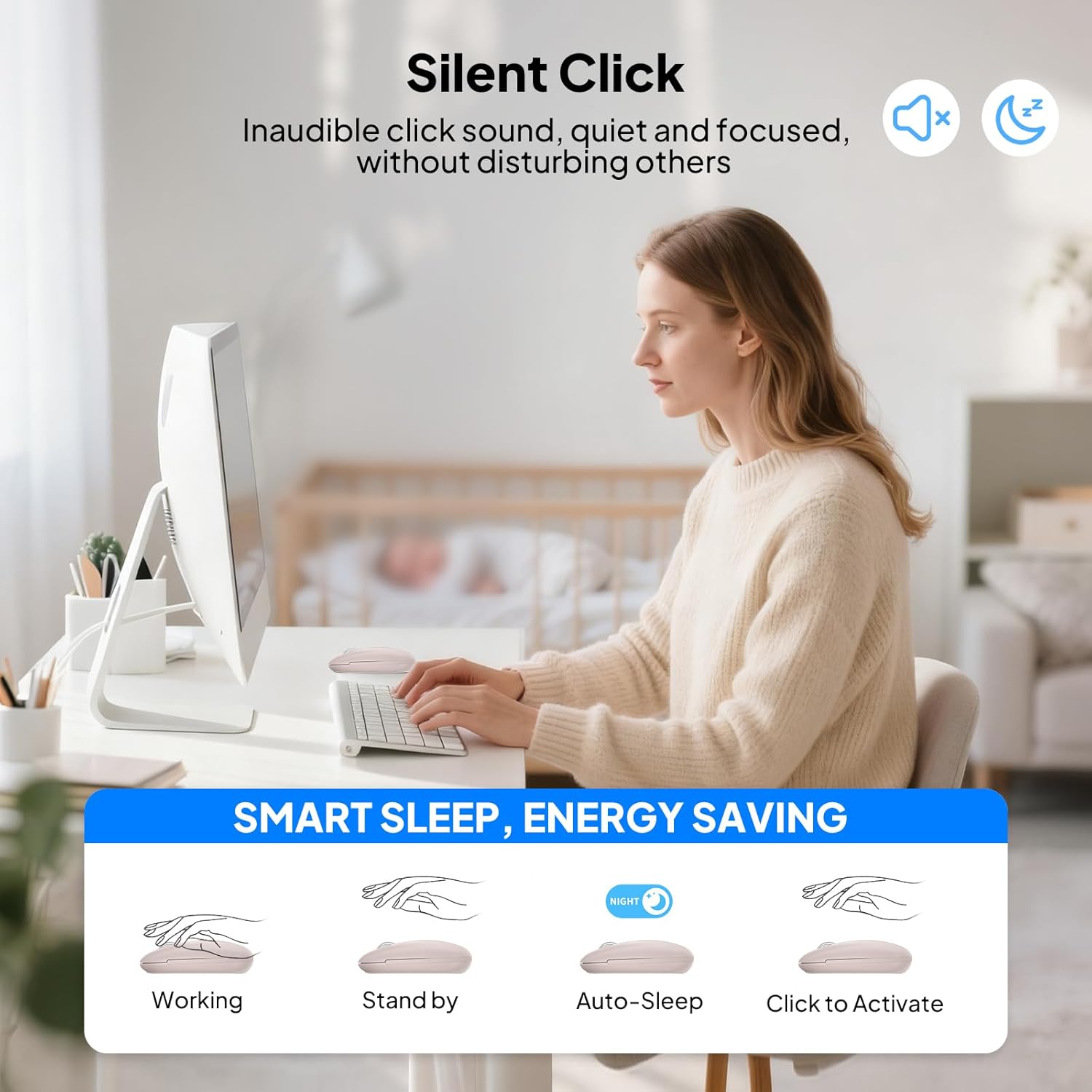
Image: A user operating the INFINMIND D970 mouse in a quiet office setting, emphasizing the silent click feature for an undisturbed work environment.
3.4 Auto Sleep Function and ON/OFF Switch
To conserve battery life, the mouse features an intelligent auto-sleep function and a manual ON/OFF switch.
- Auto Sleep: After 5 minutes of inactivity, the mouse will automatically enter sleep mode. To reactivate, simply click any button or move the mouse.
- ON/OFF Switch: For extended periods of non-use, utilize the ON/OFF switch located on the bottom of the mouse to completely power it down and maximize battery efficiency.
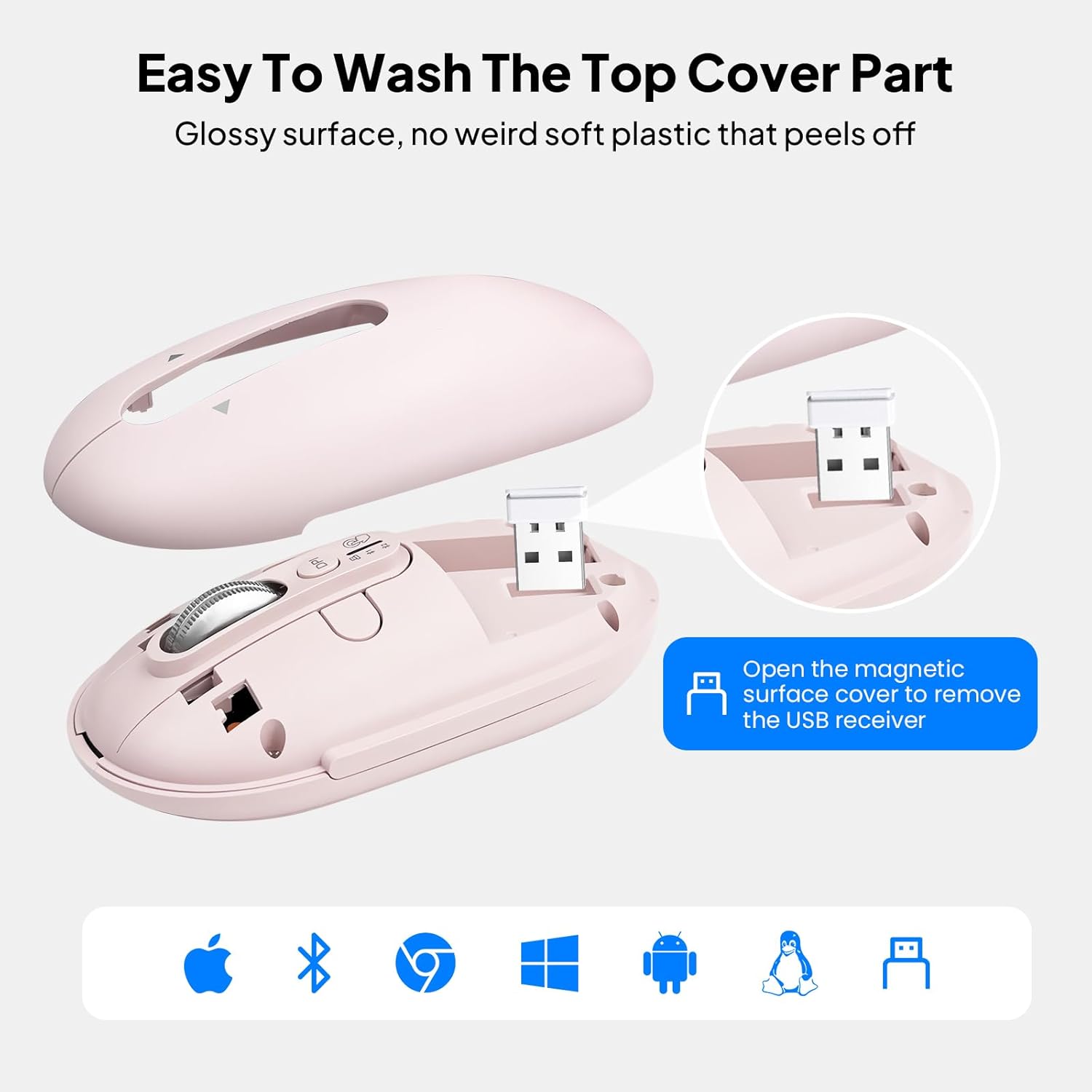
Image: The INFINMIND D970 mouse showcasing its intelligent energy-saving features, including the ON/OFF switch, LED indicator, and auto-sleep function, contributing to a 20-month battery life.
4. Maintenance
4.1 Cleaning the Mouse
The magnetic top cover of the INFINMIND D970 mouse can be easily removed for cleaning.
- Gently lift the magnetic top cover to detach it from the mouse body.
- Wipe the top cover and the mouse body with a soft, damp cloth. Avoid using harsh chemicals or abrasive materials.
- Ensure all parts are completely dry before reattaching the top cover.

Image: The INFINMIND D970 mouse with its magnetic top cover detached, illustrating the ease of cleaning the device.
4.2 Battery Replacement
When the mouse's performance decreases or the LED indicator suggests low power, it's time to replace the AA battery.
- Turn off the mouse using the ON/OFF switch.
- Remove the magnetic top cover.
- Carefully remove the old AA battery from its compartment.
- Insert a new AA battery, ensuring correct polarity.
- Replace the magnetic top cover.
5. Troubleshooting
Common Issues and Solutions:
- Mouse not responding:
- Ensure the mouse is turned on.
- Check battery level and replace if necessary.
- For 2.4G mode, ensure the USB receiver is securely plugged into the device.
- For Bluetooth mode, ensure the mouse is correctly paired and the correct Bluetooth channel (BT1 or BT2) is selected. Try re-pairing if connection is lost.
- Cursor movement is erratic or slow:
- Adjust the DPI setting using the DPI button to find a suitable speed.
- Ensure the mouse sensor is clean and free from obstructions.
- Use the mouse on a clean, non-reflective surface or a mouse pad.
- Cannot switch between devices:
- Ensure all devices are within range and their Bluetooth is enabled.
- Press the mode switch button firmly to cycle through the connections. Observe the LED indicators.
- Bluetooth pairing issues:
- Ensure the mouse is in pairing mode (rapidly blinking LED).
- Remove previous pairings of the mouse from your device's Bluetooth settings and try pairing again.
- Restart your device and the mouse.
6. Specifications
| Feature | Detail |
|---|---|
| Product Dimensions | 2.45 x 4.37 x 0.04 inches |
| Item Weight | 4.6 ounces |
| Batteries | 1 AA battery required (included) |
| Connectivity Technology | 2*Bluetooth 5.0, USB (2.4GHz Wireless) |
| Special Features | 3 Devices Mouse, 4 Way Scrolling, Hyper Fast Scrolling, Ergonomic Design, LED Indicator Lights, Portable, Soundless, Long Battery Life |
| Movement Detection Technology | Optical |
| Manufacturer | INFINMIND |
| Date First Available | May 14, 2024 |
7. Warranty and Customer Support
INFINMIND is committed to providing high-quality products and excellent customer service. Your D970 mouse comes with comprehensive support:
- 24-Hour Reply: Expect a response to your inquiries within 24 hours.
- 365-Day Replacement: Enjoy a full year of replacement coverage for any product defects.
- Lifetime Care: Dedicated support for the lifespan of your product.
How to Contact Customer Service:
For any questions, issues, or support needs, please contact INFINMIND customer service through your Amazon order details:
- Go to "Your Account" on Amazon.
- Navigate to "Your Orders" and find your INFINMIND D970 mouse order.
- Click on "Get product support" or "Contact Seller" to reach our support team.
8. Product Videos
INFINMIND D970 Flying Scroll Mouse Overview
Video: This video provides a concise overview of the INFINMIND D970 mouse, highlighting its slim design, hyper-fast 4-way scrolling, adjustable DPI, quiet click, long battery life, and multi-device connectivity.
Slim Wireless Bluetooth Mouse for Computer, Laptop, Tablet
Video: This video demonstrates the ease of use and portability of the INFINMIND D970 mouse, showcasing its compatibility with various devices like computers, laptops, and tablets.