1. Important Safety Instructions
Please read and understand all safety instructions before using the Voomy Power S100 power strip. Failure to follow these instructions may result in electric shock, fire, or serious injury.
- Indoor Use Only: This power strip is designed for indoor use in dry locations. Do not use it outdoors or in wet conditions.
- Avoid Overloading: Do not exceed the maximum power rating of 4000W (16A, 250V). Overloading can cause overheating and fire.
- Proper Grounding: Ensure the power strip is plugged into a properly grounded outlet.
- Keep Away from Water: Do not immerse the power strip or its cable in water or any other liquid.
- Do Not Disassemble: Do not attempt to open, modify, or repair the power strip. Refer all servicing to qualified personnel.
- Children and Pets: Keep the power strip out of reach of children and pets.
- Unplug When Not in Use: Disconnect the power strip from the wall outlet when not in use for extended periods.
- Avoid Covering: Do not cover the power strip with clothing, blankets, or other materials, as this can lead to overheating.
2. Product Overview
The Voomy Power S100 is a versatile power strip designed to provide multiple charging and power options for your electronic devices. It features a compact design, multiple AC outlets, and high-power USB ports.
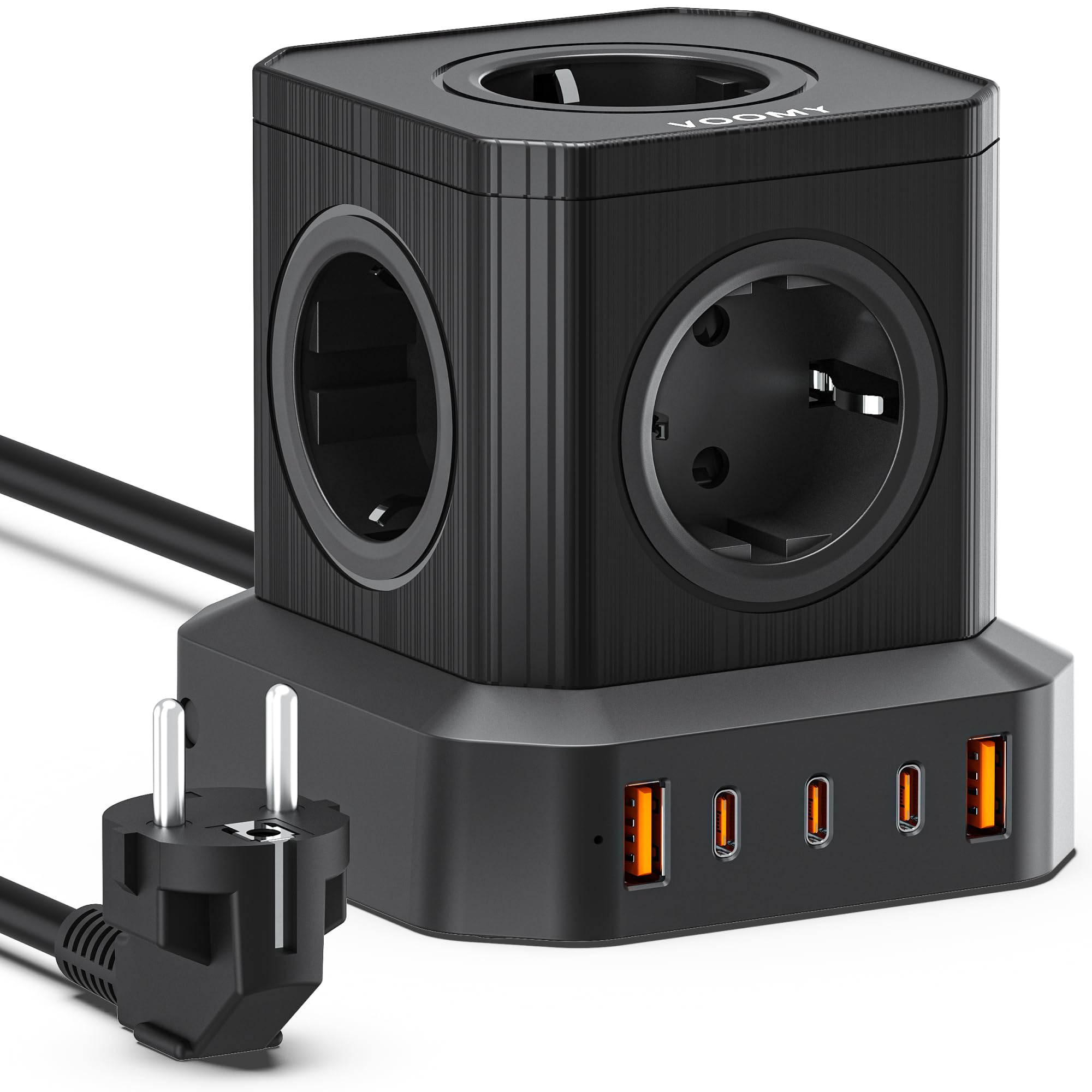
Image: Voomy Power S100 100W Power Strip. This image displays the compact, cube-shaped power strip with its various ports and the power cable extending from one side. The top surface shows the AC outlets and USB ports.
Key Features:
- 5 Standard AC Power Outlets: For connecting various electrical appliances (220-250V).
- 3 USB-C Ports: Two ports with up to 100W output (C1/C2) and one port with up to 30W output (C3) for fast charging compatible devices like laptops, tablets, and smartphones.
- 2 USB-A Ports: Each with 18W Quick Charge capability for smartphones and other USB-A devices.
- Integrated On/Off Switch: For convenient power control and energy saving.
- 2-Meter Pure Copper Cable: Provides ample reach and durability.
- Advanced Safety Features: Built-in voltage protection and flame-retardant ABS + PC material for enhanced safety.
3. Setup
- Unpack the Device: Carefully remove the Voomy Power S100 from its packaging. Retain the packaging for future storage or transport.
- Choose a Location: Place the power strip on a stable, flat surface, away from direct sunlight, heat sources, and moisture. Ensure there is adequate ventilation around the unit.
- Connect to Power: Plug the power strip's 2-meter cable into a standard, properly grounded 220-250V wall outlet.
- Power On: Press the integrated On/Off switch to turn on the power strip. An indicator light (if present) will illuminate to confirm it is powered on.
4. Operating Instructions
Using AC Outlets:
- Plug your electrical appliances directly into the 5 available AC outlets.
- Ensure the total power consumption of all connected devices does not exceed 4000W.
Using USB-C Ports:
- Connect your USB-C compatible devices (laptops, tablets, smartphones) to the USB-C ports using appropriate USB-C cables.
- Ports C1 and C2 provide up to 100W of power, suitable for charging most laptops.
- Port C3 provides up to 30W of power, ideal for tablets and smartphones.
- The power strip intelligently distributes power, but simultaneous high-power charging may affect individual port output.
Using USB-A Ports:
- Connect your USB-A compatible devices to the USB-A ports.
- These ports support 18W Quick Charge for faster charging of compatible smartphones and other devices.
Powering Off:
- To turn off all connected devices and the power strip, press the integrated On/Off switch.
- For complete disconnection, unplug the power strip from the wall outlet.
5. Maintenance
- Cleaning: Disconnect the power strip from the wall outlet before cleaning. Use a soft, dry cloth to wipe the surface. Do not use liquid cleaners or aerosols.
- Storage: When not in use, store the power strip in a cool, dry place, away from direct sunlight and extreme temperatures.
- Cable Care: Avoid bending or kinking the power cable excessively. Do not place heavy objects on the cable.
6. Troubleshooting
No Power to Devices:
- Ensure the power strip's On/Off switch is in the 'On' position.
- Check if the power strip is securely plugged into a working wall outlet.
- Verify that the wall outlet itself is functioning by plugging in another device.
- Check if the circuit breaker in your home has tripped.
Devices Not Charging via USB:
- Ensure the USB cable is properly connected to both the power strip and your device.
- Try a different USB cable or port to rule out a faulty cable or port.
- Confirm your device is compatible with the USB charging specifications (e.g., USB-C PD for 100W charging).
Power Strip Overheating or Tripping:
- This indicates an overload. Immediately unplug some devices to reduce the total power draw.
- Ensure the total wattage of all connected devices does not exceed 4000W.
- Allow the power strip to cool down before reconnecting devices.
7. Specifications
| Feature | Detail |
|---|---|
| Brand | Voomy |
| Model | Power S100 |
| Item Model Number | NM-FFAW-C467 |
| Color | Black |
| AC Power Outlets | 5 (220-250V) |
| USB Ports | 3 USB-C, 2 USB-A |
| USB-C Output | C1/C2: 100W, C3: 30W |
| USB-A Output | 18W |
| Max Power Rating | 4000W (Max. 16A 250V) |
| Cable Length | 2 meters (pure copper) |
| Material | ABS + PC (Flame-retardant) |
| Dimensions | 100 x 100 x 104 mm |
| Certifications | CE, ROHS |
8. Warranty and Support
The Voomy Power S100 power strip comes with a 3-year warranty from the date of purchase. This warranty covers manufacturing defects and ensures reliable performance under normal use.
For warranty claims, technical support, or any questions regarding your Voomy Power S100, please contact Voomy customer service. Refer to the product packaging or the official Voomy website for the most current contact information.
Please have your proof of purchase and the product model number (Power S100) ready when contacting support.


