
Introduction
Thank you for purchasing the Mistral 43" DC Tower Fan MFD4308DR. This manual provides important information regarding the safe operation, installation, maintenance, and troubleshooting of your new fan. Please read this manual thoroughly before use and retain it for future reference.
Important Safety Information
- Read all instructions before using this appliance.
- Ensure the voltage indicated on the rating label corresponds to your mains supply.
- Do not operate any fan with a damaged cord or plug.
- Keep the fan away from water or other liquids.
- Unplug the fan from the outlet when not in use, when moving it from one location to another, and before cleaning.
- Do not insert fingers or any other objects through the grille when the fan is operating.
- This appliance is not intended for use by persons (including children) with reduced physical, sensory or mental capabilities, or lack of experience and knowledge, unless they have been given supervision or instruction concerning use of the appliance by a person responsible for their safety.
- Children should be supervised to ensure that they do not play with the appliance.
Product Overview
The Mistral MFD4308DR is a 43-inch DC Tower Fan designed for efficient air circulation. It features a brushless DC motor, 12 speed settings, a 1-12 hour timer, and three operating modes (Normal, Natural, Sleep). The fan also includes auto left-right oscillation and an aroma tray for enhanced comfort. It comes with a remote control for convenient operation.
Components
- Main Fan Unit
- Base
- Remote Control
- Power Cord
Control Panel and Remote Control
The fan can be operated using the touch control panel located on the top of the unit or via the included remote control.
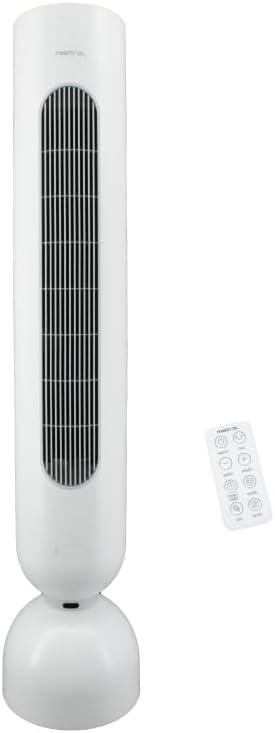
Image: Front view of the Mistral 43-inch DC Tower Fan and its remote control. The fan is white with a tall, slender design and a round base. The remote control is small and white with several buttons.

Image: Angled view of the Mistral 43-inch DC Tower Fan, showing the front grille and the sleek white casing.

Image: Close-up view of the top control panel of the Mistral 43-inch DC Tower Fan, showing touch buttons for power, speed adjustment, and mode selection.
Setup and Assembly
Assembly is required for this product. Please follow these steps carefully:
- Unpack: Carefully remove all components from the packaging. Retain packaging for future storage or transport.
- Attach Base: Place the main fan unit upside down. Align the base with the bottom of the fan unit. Secure the base using the provided screws. Ensure it is firmly attached.
- Position Fan: Place the assembled fan on a firm, level surface. Ensure there is adequate space around the fan for optimal air circulation and oscillation.
- Connect Power: Insert the power plug into a suitable electrical outlet.
The fan is now ready for operation.
Operating Instructions
The fan can be controlled via the touch panel on the unit or the remote control.
Remote Control Functions
The remote control allows for convenient operation from a distance. Ensure batteries are inserted correctly (batteries not included, typically 2x AAA).
- Power Button (⏻): Turns the fan ON or OFF.
- Speed Button (+ / -): Adjusts the fan speed from 1 to 12.
- Mode Button (☼): Cycles through Normal, Natural, and Sleep modes.
- Normal Mode: Constant airflow at selected speed.
- Natural Mode: Simulates natural breeze by varying fan speed.
- Sleep Mode: Gradually decreases fan speed over time for quiet operation.
- Oscillation Button (↻): Activates or deactivates the automatic left-right oscillation.
- Timer Button (⏲): Sets the operating timer from 1 to 12 hours. The fan will automatically turn off after the set time.
Aroma Tray Usage
The fan includes an aroma tray for diffusing scents. Locate the aroma tray compartment (usually at the back or side of the fan). Open the tray, place a few drops of essential oil onto a cotton pad (not included), and insert the pad into the tray. Close the tray. The fan's airflow will gently diffuse the scent.
Maintenance and Cleaning
Regular cleaning helps maintain the fan's performance and extends its lifespan. Always unplug the fan before cleaning.
- Exterior Cleaning: Wipe the exterior surfaces of the fan with a soft, damp cloth. Do not use abrasive cleaners or solvents.
- Grille Cleaning: Use a vacuum cleaner with a brush attachment to remove dust from the air inlet and outlet grilles. For deeper cleaning, the fan blade is fully detachable. Refer to the assembly section in reverse for detaching the grille and blade, then clean with a soft cloth. Ensure all parts are dry before reassembly.
- Storage: If storing the fan for an extended period, clean it thoroughly and store it in its original packaging in a dry, cool place.
Troubleshooting
| Problem | Possible Cause | Solution |
|---|---|---|
| Fan does not turn on. | No power supply. Power cord not properly connected. | Check if the power plug is securely inserted into the outlet. Check the household circuit breaker. |
| Weak airflow. | Air inlets/outlets are blocked. Fan speed is too low. | Clean the grilles to remove dust or obstructions. Increase the fan speed setting. |
| Fan makes unusual noise. | Foreign object inside. Fan not on a level surface. | Unplug the fan and inspect for any foreign objects. Ensure the fan is placed on a stable, flat surface. |
| Remote control not working. | Batteries are dead or incorrectly inserted. Obstruction between remote and fan. | Replace batteries and ensure correct polarity. Remove any obstructions and ensure the remote is pointed at the fan's receiver. |
Specifications
| Brand | MISTRAL |
| Model | MFD4308DR |
| Type | DC Tower Fan |
| Motor Type | Brushless DC motor |
| Speeds | 12 |
| Timer | 1-12 Hours |
| Modes | Normal, Natural, Sleep |
| Oscillation | Auto Left-Right |
| Control | Remote Control, Touch Panel |
| Special Features | Ionizer, Aroma Tray, Fully Detachable Fan Blade |
| Product Dimensions (LxWxH) | 18D x 23.3W x 110H centimetres |
| Item Weight | 7.3 Kilograms |
| Assembly Required | Yes |
| Power Source | Corded Electric |
Warranty and Support
This Mistral product is covered by a manufacturer's warranty. Please refer to the warranty card included with your purchase for specific terms and conditions. For technical support, service, or spare parts, please contact Mistral customer service or visit the official Mistral website.
You can find more information and contact details on the MISTRAL Store on Amazon.sg.

