
Mibro Z3
Mibro Smartwatch Z3 User Manual
Model: Z3
Introduction
The Mibro Smartwatch Z3 is designed as a companion for children, offering a blend of safety features, educational applications, and interactive games. This manual provides comprehensive instructions for setting up, operating, and maintaining your Mibro Z3 Smartwatch to ensure a safe and engaging experience for your child.
What's in the Box
- Mibro Smartwatch Z3
- Charging Cable
Please check all contents upon unboxing. If any items are missing or damaged, contact customer support.
Setup Guide
1. Charging the Smartwatch
Before first use, fully charge the smartwatch. Connect the provided charging cable to the charging port on the back of the watch and plug the other end into a USB power adapter (not included) or a computer's USB port.
- A full charge typically takes approximately 2 hours.
- The screen will display a charging indicator.
2. SIM Card Installation
The Mibro Z3 supports a SIM card for cellular connectivity, enabling features like GPS tracking and emergency calls. Ensure the watch is powered off before inserting the SIM card.
- Locate the SIM card slot on the side of the smartwatch.
- Carefully open the SIM card slot cover.
- Insert a nano-SIM card into the slot with the gold contacts facing down and the notched corner aligned correctly.
- Gently push the SIM card until it clicks into place.
- Close the SIM card slot cover securely to ensure water resistance.

Image: Side view of the Mibro Z3 Smartwatch, highlighting the location of the SIM card slot and side button.
3. App Installation and Pairing
To fully utilize the smartwatch's features, parents need to download and install the dedicated Mibro app on their smartphone.
- Search for "Mibro Kids" or "Mibro Z3" in your smartphone's app store (Google Play Store for Android, Apple App Store for iOS).
- Download and install the official Mibro application.
- Open the app and follow the on-screen instructions to create an account or log in.
- Within the app, select the option to "Add Device" or "Pair Smartwatch."
- The app will guide you through scanning a QR code displayed on the smartwatch screen or entering a device ID to complete the pairing process.
- Once paired, you can configure settings, contacts, and safety features from the app.
Operating Instructions
Basic Navigation
- Power On/Off: Press and hold the side button to power the watch on or off.
- Screen Wake/Sleep: Press the side button briefly to wake the screen or put it to sleep.
- Touchscreen: Swipe left/right to navigate between different screens (e.g., clock face, app menu). Swipe up/down for notifications or quick settings.
- Select: Tap an icon or option on the screen to select it.

Image: The Mibro Z3 Smartwatch displaying a digital clock (20:11) and four colorful, abstract app icons on its main screen.

Image: The Mibro Z3 Smartwatch displaying an analog clock face with hour, minute, and second hands, and a small date display.
Key Features
- GPS Tracking: Parents can monitor the child's location in real-time through the paired smartphone app. This feature provides peace of mind by showing the child's whereabouts.
- Emergency Calls (SOS): The smartwatch has a dedicated SOS function. In an emergency, the child can press and hold a designated button (usually the side button for a longer duration) to automatically dial pre-set emergency contacts.
- Two-Way Communication: Once a SIM card is installed and contacts are set up via the app, the child can make and receive calls from approved numbers. Parents can also send voice messages to the watch.
- Educational Apps & Games: The watch includes pre-installed educational applications and interactive games designed to promote learning and entertainment. Navigate to the "Apps" menu to access these.
- Time Display: The watch displays time in both digital and analog formats, configurable through settings.

Image: The Mibro Z3 Smartwatch displaying a colorful, segmented circle graphic, possibly indicating a menu, activity tracker, or a game interface.
Maintenance
Cleaning
- Wipe the watch screen and body with a soft, lint-free cloth.
- For stubborn marks, slightly dampen the cloth with water. Avoid using harsh chemicals or abrasive materials.
- Ensure the charging port and SIM card slot are free of dust and debris.
Battery Care
- Avoid fully discharging the battery frequently.
- Charge the watch regularly, even if not in daily use, to maintain battery health.
- Do not expose the watch to extreme temperatures, as this can degrade battery performance.
General Care
- While the watch is designed to be durable, avoid dropping it or subjecting it to strong impacts.
- Ensure the SIM card slot cover is always securely closed to maintain water resistance.
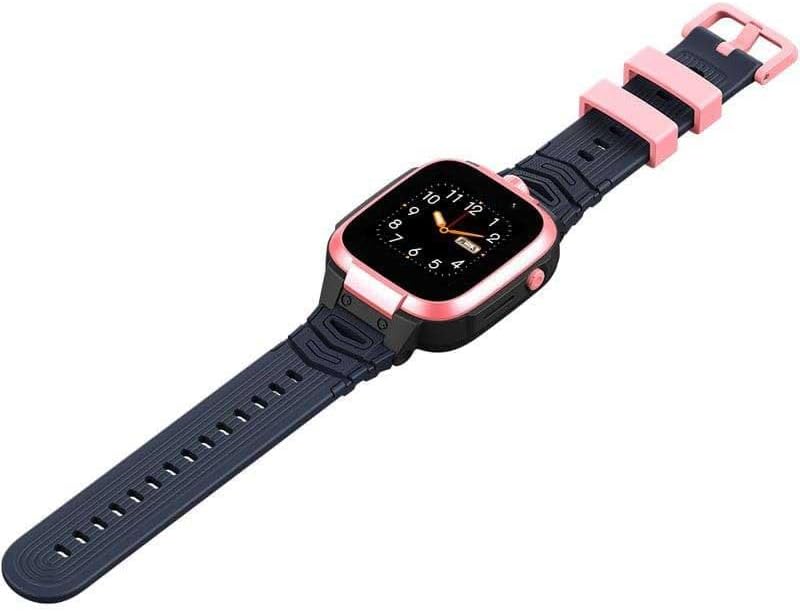
Image: The Mibro Z3 Smartwatch shown from a slightly elevated angle, displaying its full strap length and overall design.
Troubleshooting
| Problem | Possible Cause / Solution |
|---|---|
| Watch does not power on or respond after update. |
|
| Cannot make/receive calls or use GPS. |
|
| Poor call quality (e.g., child cannot hear parent). |
|
| Watch not pairing with the app. |
|
Specifications
| Feature | Detail |
|---|---|
| Model Name | Z3 |
| Brand | Mibro |
| Display Size | 4.1 cm (2 inches) |
| Connectivity Technology | Bluetooth |
| Wireless Communication Standard | Bluetooth |
| GPS | Integrated GPS |
| Battery Composition | Lithium-Polymer |
| Special Features | Time Display, GPS |
| Color | Pink |
| Form Factor | Round |
| Product Dimensions | 10.9 x 10.5 x 5.6 cm; 190 Grams (Packaging) |
Warranty and Support
For warranty information and technical support, please refer to the official Mibro website or contact your local retailer. Keep your purchase receipt as proof of purchase for warranty claims.
For further assistance, you may visit the Mibro Store on Amazon.
Related documentsZ3


Ask a question about this manual
Ask about setup, troubleshooting, compatibility, parts, safety, or missing instructions. Manuals+ will review the question and use this page’s manual context to help answer it.