
1. Introduction
Thank you for choosing the TRIUMPHKEY Electric Standing Desk. This manual provides essential information for the safe assembly, operation, and maintenance of your new height-adjustable desk. Please read this manual thoroughly before use and keep it for future reference.

Image 1.1: Overhead view of the TRIUMPHKEY Electric Standing Desk. This image shows the desk surface with a laptop, mouse, and a small potted plant, illustrating a typical workspace setup.
2. Safety Information
To ensure safe operation and prevent injury or damage, please observe the following safety precautions:
- Keep children and pets away from the desk during operation.
- Ensure there are no obstacles in the desk's path when adjusting height.
- Do not sit or stand on the desk.
- Do not place more than the maximum recommended weight (60 kg) on the desk.
- Keep all electrical components away from liquids.
- Do not open or attempt to repair the motor or control box. Contact customer support for assistance.
- Ensure the power cord is not pinched or damaged.
3. Package Contents
Before beginning assembly, please check that all components listed below are present and undamaged. If any parts are missing or damaged, please contact customer support.
- Tabletop sections (multiple pieces)
- Desk legs (2)
- Crossbar/Frame components
- Control panel with buttons
- Motor and power adapter
- Headphone hook (1)
- Cable grommet/cover for cable hole (1)
- Assembly hardware (screws, Allen keys, etc.)
- Instruction Manual

Image 3.1: Product Information Diagram. This image highlights key features such as the headphone hook, cable management hole, T-shaped leg structure, anti-slip foot pads, and rounded tabletop corners.
4. Assembly Instructions
Assembly typically requires two people. All necessary tools and hardware are included. Follow the detailed instructions provided in the separate assembly guide or the included diagrams.
- Unpack Components: Carefully remove all parts from the packaging and lay them out on a clean, soft surface to prevent scratches.
- Assemble Desk Frame: Attach the crossbar components to the desk legs according to the provided diagrams. Ensure all screws are tightened securely.
- Install Motor and Control Box: Mount the motor and control box to the designated areas on the frame. Connect the motor cables to the control box.
- Attach Tabletop: Place the tabletop sections onto the assembled frame. Align the pre-drilled holes and secure the tabletop to the frame using the provided screws.
- Install Control Panel: Mount the control panel to the underside of the tabletop in an easily accessible position. Connect its cable to the control box.
- Attach Accessories: Install the headphone hook and cable grommet into their respective positions.
- Connect Power: Plug the power adapter into the control box and then into a wall outlet.

Image 4.1: Desk Dimensions and Weight Capacity. This diagram illustrates the overall dimensions of the desk (120cm x 60cm), its adjustable height range (71cm to 119cm), and its maximum weight capacity of 60 kg.
5. Operating Instructions
5.1 Adjusting Desk Height
Your TRIUMPHKEY Electric Standing Desk features an easy-to-use control panel for height adjustment.
- To Raise: Press and hold the Up (▲) button. The desk will move upwards. Release the button at your desired height.
- To Lower: Press and hold the Down (▼) button. The desk will move downwards. Release the button at your desired height.
5.2 Using Memory Presets
The desk features two memory preset buttons (1 and 2) to store and recall your preferred sitting and standing heights.
- Set a Memory Position: Adjust the desk to your desired height using the Up/Down buttons.
- Save Position: Press and hold one of the memory buttons (1 or 2) until you hear a beep or see the display flash. The height is now saved.
- Recall Position: Press the saved memory button (1 or 2). The desk will automatically move to the stored height.

Image 5.1: Multifunction Control Panel. This image provides a detailed view of the control panel, showing the Up and Down arrows for height adjustment, and two numbered buttons (1 and 2) for saving and recalling preferred height settings.
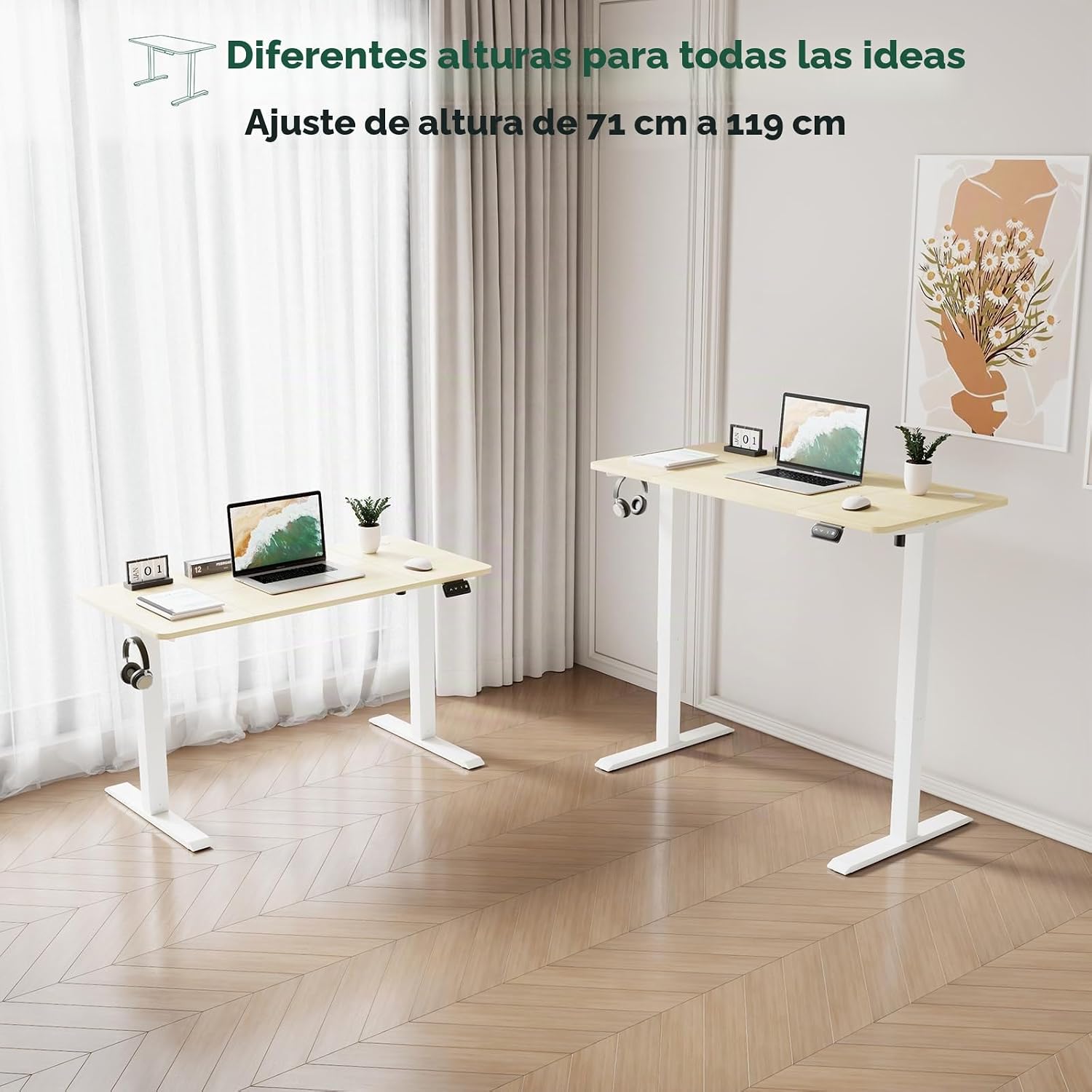
Image 5.2: Height Adjustment Range. This image displays two desks, one at its minimum height of 71cm and another at its maximum height of 119cm, demonstrating the full range of height adjustability.
6. Maintenance
Regular maintenance will help prolong the life and appearance of your desk.
- Cleaning: Wipe the desk surface with a soft, damp cloth. For stubborn stains, use a mild soap solution and dry immediately. Avoid abrasive cleaners or harsh chemicals.
- Inspection: Periodically check all screws and connections to ensure they are tight. Retighten if necessary.
- Cable Management: Ensure power cords and other cables are neatly managed and not interfering with the desk's movement.
7. Troubleshooting
If you encounter any issues with your desk, please refer to the following common problems and solutions:
| Problem | Possible Cause | Solution |
|---|---|---|
| Desk does not move | Power cord disconnected; Motor/control box cable loose; Overload protection activated. | Check power connections; Ensure all cables are securely plugged in; Remove some weight from the desk and try again. |
| Desk moves unevenly | Uneven weight distribution; Loose connections. | Distribute weight evenly on the desk; Check and tighten all frame connections. |
| Desk stops mid-movement | Overload protection; Obstruction. | Reduce weight; Check for obstructions under or around the desk. |
If the problem persists after trying these solutions, please contact TRIUMPHKEY customer support.
8. Specifications
| Feature | Detail |
|---|---|
| Brand | TRIUMPHKEY |
| Model | 120x60cm Beige |
| Desk Design | Standing Desk |
| Dimensions (D x W x H) | 120 x 60 x 119 cm |
| Height Adjustment Range | 71 cm - 119 cm |
| Maximum Weight Capacity | 60 Kilograms |
| Top Material Type | Melamine |
| Base Material | Metal |
| Special Features | Height adjustable, Cable holes, Headphone hook |
| Assembly Required | Yes |
| Recommended Persons for Assembly | 2 |
9. Warranty and Support
9.1 Warranty Information
This TRIUMPHKEY Electric Standing Desk comes with a Lifetime Warranty. Please retain your proof of purchase for warranty claims.
9.2 Customer Support
For any questions, technical assistance, or warranty claims, please contact TRIUMPHKEY customer support through the retailer where you purchased the product or visit the official TRIUMPHKEY website for contact information.