
1. Introduction
This manual provides detailed instructions for the assembly, operation, and maintenance of your Triumphkey Electric Standing Desk. Designed for versatility and comfort, this desk allows you to easily switch between sitting and standing positions, promoting a healthier work environment.
Key Features:
- Adjustable Height: Electrically adjustable height from 71 cm to 119 cm (27.9 to 46.8 inches).
- Memory Presets: Two memory modes to save your preferred sitting and standing heights.
- Cable Management: Integrated cable holes to keep your workspace tidy.
- Thoughtful Design: Anti-slip frame for stability, headphone hook, and rounded corners for safety.
- Sturdy Construction: Supports up to 60 kg (132 lbs) of weight.

Figure 1.1: Overview of the Triumphkey Electric Standing Desk. This image shows the desk in a typical office setup, highlighting its sleek black design and ample workspace.
2. Safety Information
Please read all safety warnings carefully before assembly and use to prevent injury or damage to the product.
- Weight Limit: Do not exceed the maximum weight limit of 60 kg (132 lbs) on the desktop. Overloading can cause instability and damage.
- Wall Anchoring: It is highly recommended to fix the desk to a wall using appropriate anchoring hardware (not included) to ensure maximum stability, especially when the desk is at its highest position or in areas with potential for tipping.
- Clearance: Ensure there are no obstructions above or below the desk when adjusting its height. Keep hands and fingers clear of moving parts.
- Children and Pets: Keep children and pets away from the desk during operation to prevent accidents.
- Power Supply: Use only the provided power adapter. Do not use damaged cords or plugs. Disconnect power before cleaning or maintenance.
- Liquid Spills: Avoid spilling liquids on the control panel or motor components. In case of a spill, immediately disconnect power and allow to dry completely before re-connecting.
3. Package Contents
Before beginning assembly, verify that all components are present and undamaged. If any parts are missing or damaged, please contact customer support.
The package typically includes:
- Desktop Panel
- Desk Legs (2)
- Crossbar/Frame Components
- Motor and Control Box
- Control Panel/Keypad
- Power Adapter and Cable
- Headphone Hook
- Cable Hole Cover
- Assembly Hardware (screws, bolts, Allen keys - often coded for easy identification)
- Instruction Manual
4. Setup and Assembly
Assembly is straightforward and all necessary installation parts are included. Follow the detailed instructions provided in the separate assembly guide (if applicable) or the included manual. Screws are typically coded for easy identification.
- Unpack Components: Carefully remove all parts from the packaging and lay them out on a clean, soft surface to prevent scratches.
- Assemble Frame: Attach the desk legs to the crossbar components according to the diagrams. Ensure all connections are secure.
- Attach Desktop: Carefully place the desktop panel onto the assembled frame. Align the pre-drilled holes and secure the desktop using the provided screws.
- Install Control Box and Motor: Mount the control box and motor to the designated locations on the frame. Connect all necessary cables from the motor to the control box.
- Install Control Panel: Attach the control panel/keypad to the underside of the desktop in an easily accessible location. Connect its cable to the control box.
- Install Accessories: Attach the headphone hook and insert the cable hole cover into the desktop.
- Connect Power: Plug the power adapter into the control box and then into a wall outlet.
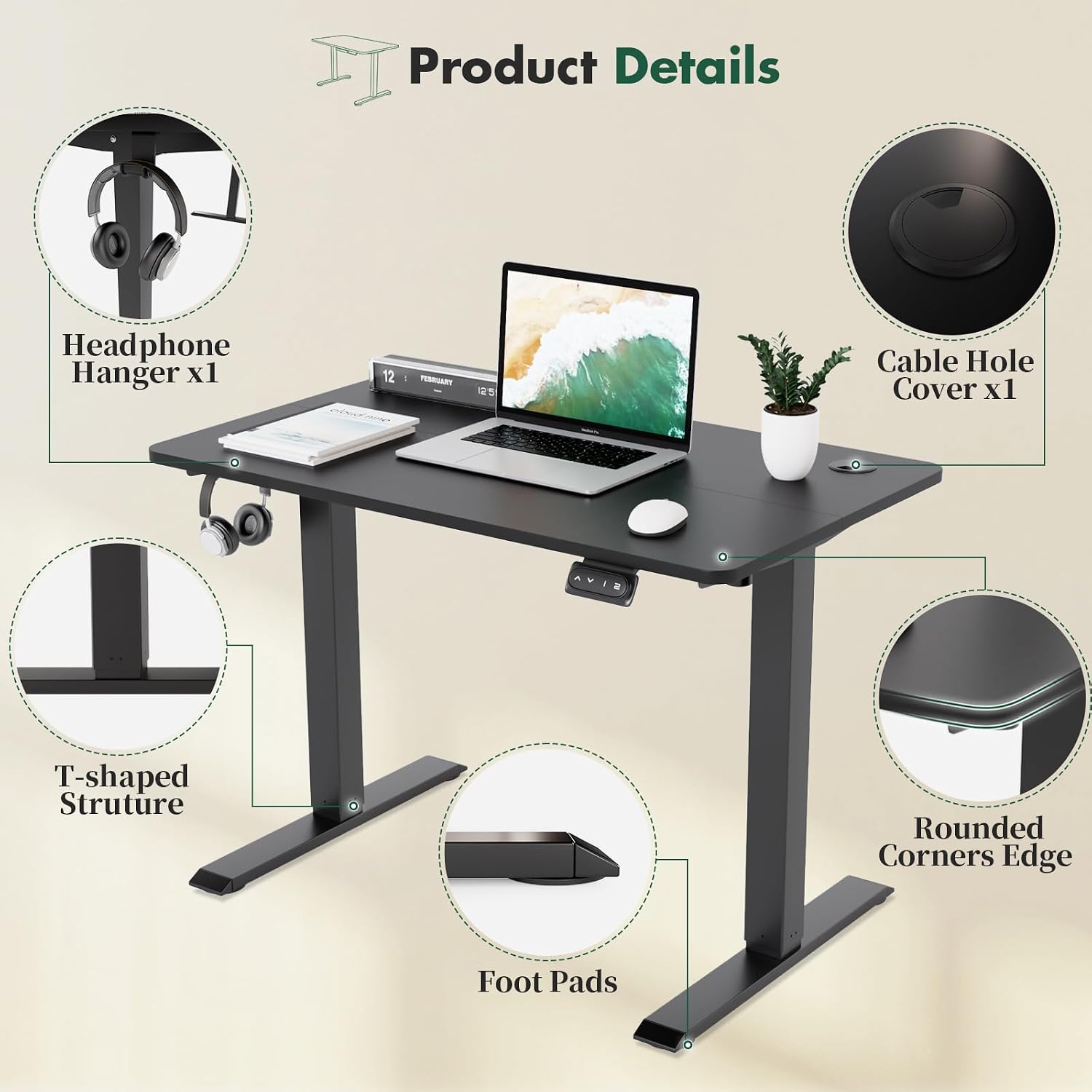
Figure 4.1: Product Details. This image highlights various design elements such as the headphone hanger, cable management hole, sturdy T-shaped structure, anti-slip foot pads, and safety-conscious rounded corners.
5. Operating Instructions
Your Triumphkey Electric Standing Desk features an intuitive control panel for easy height adjustment and memory functions.
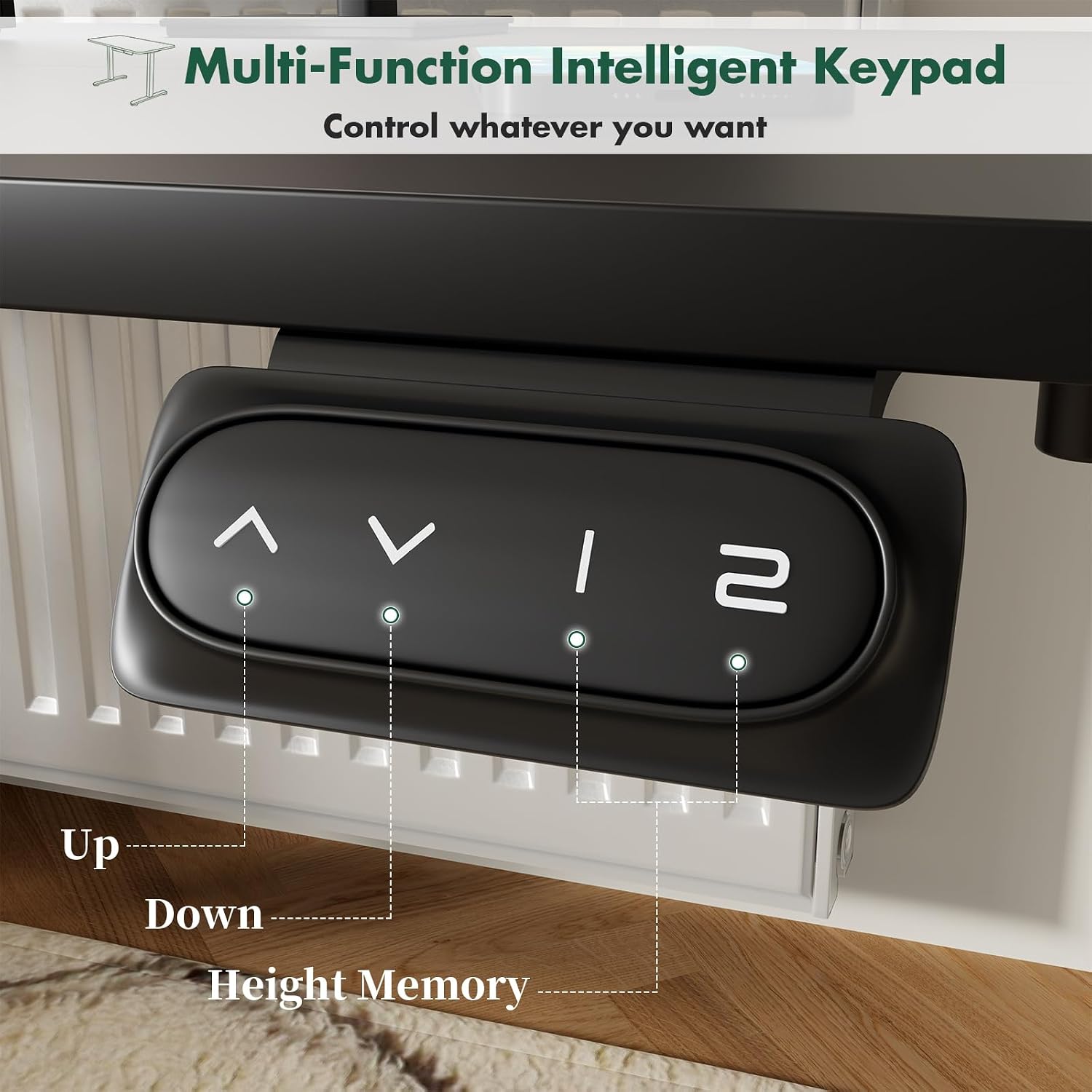
Figure 5.1: Multi-Function Intelligent Keypad. This image shows the control panel with clearly labeled buttons for height adjustment and memory presets.
5.1. Adjusting Height
- To Raise the Desk: Press and hold the ▲ button. The desk will move upwards. Release the button when the desired height is reached.
- To Lower the Desk: Press and hold the ▼ button. The desk will move downwards. Release the button when the desired height is reached.
The desk can be adjusted smoothly between 71 cm (27.9 inches) and 119 cm (46.8 inches).

Figure 5.2: Wide Height Adjustment. This diagram illustrates the desk's adjustable range, accommodating various user heights and preferences for sitting or standing.

Figure 5.3: Different Heights for All Ideas. This image showcases two desks, one set at a lower height for sitting and another at a higher height for standing, emphasizing the desk's adaptability.
5.2. Setting Memory Presets
The desk features two memory buttons ("1" and "2") to store your favorite heights.
- Adjust to Desired Height: Use the Up or Down buttons to move the desk to your preferred sitting or standing height.
- Save Height: Press and hold the desired memory button ("1" or "2") until you hear a beep or see a confirmation on the display (if available). The height is now saved.
5.3. Using Memory Presets
Once a height is saved, simply press the corresponding memory button ("1" or "2") to automatically move the desk to that saved position. This allows for quick and convenient transitions between your preferred sitting and standing heights.
6. Maintenance
Proper maintenance will ensure the longevity and optimal performance of your Triumphkey Electric Standing Desk.
- Cleaning: Wipe the desktop and frame with a soft, damp cloth. Avoid abrasive cleaners or solvents that could damage the finish. Ensure the desk is unplugged before cleaning.
- Cable Management: Regularly check that all cables are neatly routed and not pinched or tangled. Use the integrated cable holes to maintain a tidy workspace.
- Motor and Frame: Periodically inspect the motor and frame for any loose screws or connections. Tighten if necessary. Do not attempt to lubricate or disassemble the motor or control box.
- Weight Distribution: Distribute weight evenly across the desktop to prevent strain on the lifting mechanism.
7. Troubleshooting
If you encounter any issues with your desk, refer to the following common troubleshooting steps:
| Problem | Possible Cause | Solution |
|---|---|---|
| Desk does not move. | No power, loose connection, motor overload. |
|
| Desk moves unevenly or makes unusual noises. | Uneven load, loose screws, obstruction. |
|
| Memory presets not working. | Presets not saved correctly. |
|
If the problem persists after trying these steps, please contact Triumphkey customer support for further assistance.
8. Specifications
| Feature | Detail |
|---|---|
| Brand | TRIUMPHKEY |
| Model (Current) | 100x60cm Black |
| ASIN | B0D42BHWL8 |
| Color | Black |
| Product Dimensions (L x W x H) | 100 x 60 x 119 cm (39.4 x 23.6 x 46.8 inches) |
| Adjustable Height Range | 71 cm - 119 cm (27.9 - 46.8 inches) |
| Item Weight | 18.3 Kilograms (40.3 lbs) |
| Max Weight Capacity | 60 kg (132 lbs) |
| Material (Top) | Wood |
| Base Material | Alloy Steel |
| Special Features | Adjustable Height, Memory Presets, Cable Hole, Headphone Hook, Rounded Corners |
| Country of Origin | China |

Figure 8.1: Dimensions. This diagram provides a clear visual representation of the desk's overall dimensions and its maximum weight capacity.
9. Warranty and Support
Information regarding specific warranty terms and conditions for the Triumphkey Electric Standing Desk is not available in the provided product details. Please refer to the documentation included with your purchase or contact Triumphkey customer support directly for warranty claims and technical assistance.
For support, you may visit the official Triumphkey website or contact their customer service department through the contact information provided on your purchase receipt or product packaging.