
Introduction
This manual provides detailed instructions for the assembly, operation, and maintenance of your TRIUMPHKEY Electric Lift Desk 180x80cm. Please read this manual thoroughly before assembly and use to ensure safe and efficient operation.
The TRIUMPHKEY Electric Lift Desk is designed to provide a versatile workspace, allowing seamless transitions between sitting and standing positions to promote a healthier work environment. It features an electric lifting mechanism, two memory height settings, and a spacious 180x80cm desktop.
Safety Information
- Ensure all components are present and undamaged before assembly.
- Keep children and pets away from the desk during operation.
- Do not overload the desk. Refer to the specifications for maximum weight capacity.
- Ensure the power cord is not pinched or damaged.
- Only use the desk on a level surface.
- Do not place liquids directly on the control panel.
Package Contents
Before beginning assembly, verify that all parts listed below are present. Refer to the detailed installation instructions provided in the package for specific component identification and quantities.
- Desktop (180x80cm)
- Electric Lift Mechanism (Legs and Motor)
- Control Panel with Memory Settings
- Power Adapter and Cable
- Headphone Hanger
- Cable Hole Cover
- Assembly Hardware (screws, tools if included)
- Instruction Manual
Setup and Assembly
The TRIUMPHKEY Electric Lift Desk is designed for straightforward assembly. It is recommended that two people perform the assembly for safety and ease. All necessary installation parts and coded screws are included in the package. Please refer to the detailed installation instructions provided separately with your product for step-by-step guidance.
- Unpack Components: Carefully remove all parts from the packaging and lay them out on a clean, soft surface to prevent scratches.
- Assemble Frame: Follow the provided instructions to assemble the electric lift mechanism (legs and crossbars). Ensure all screws are tightened securely.
- Attach Desktop: Carefully place the desktop onto the assembled frame. Align the pre-drilled holes and secure the desktop with the provided screws.
- Install Control Panel: Mount the control panel to the underside of the desktop in the designated location. Connect the control panel cable to the motor.
- Install Accessories: Attach the headphone hanger to the side of the desk and insert the cable hole cover into the desktop opening.
- Connect Power: Plug the power adapter into the desk's motor unit and then into a wall outlet.
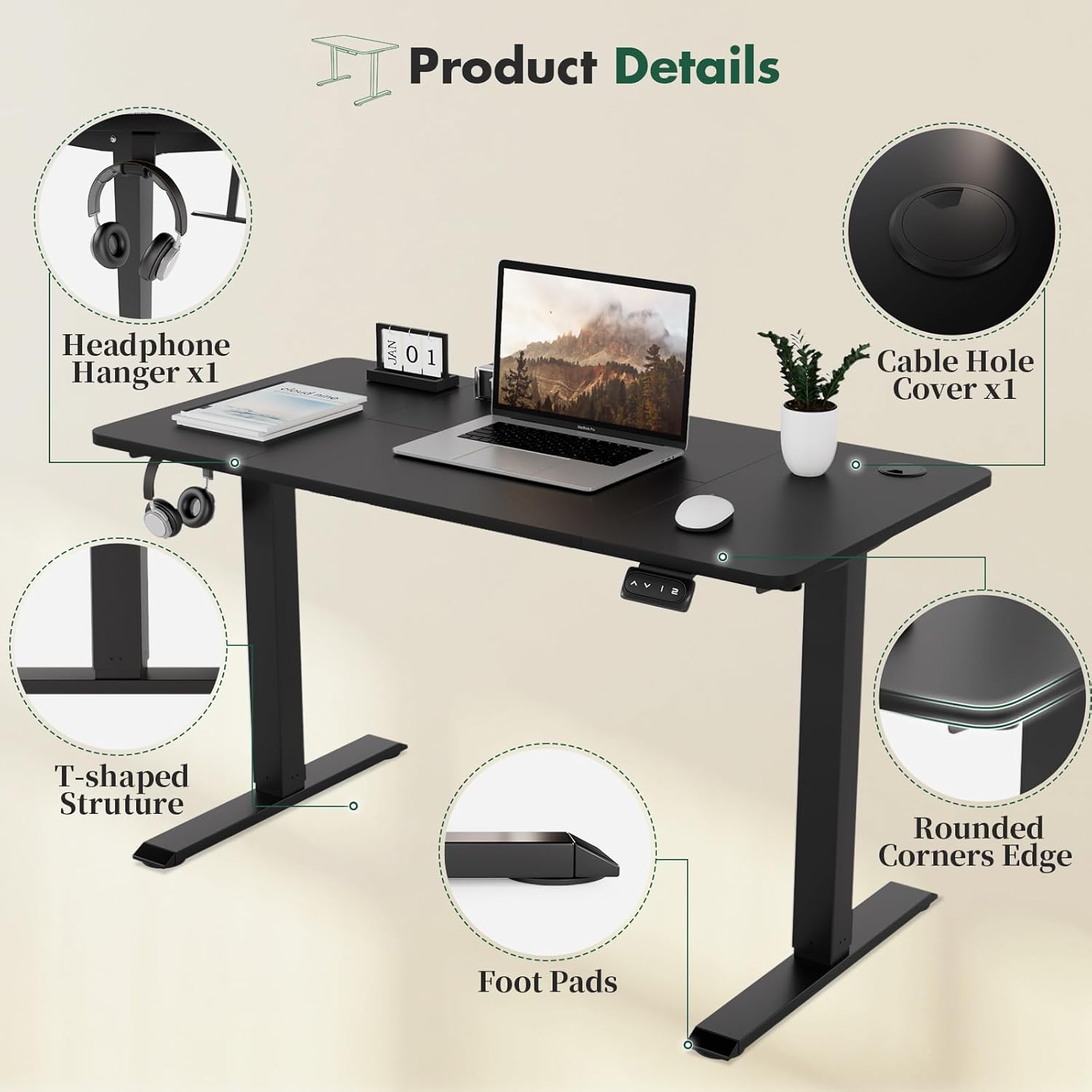
Image: Product details showing the headphone hanger, cable hole cover, rounded corners, T-shaped structure, and foot pads. These features enhance usability and safety.
Operating Instructions
Your TRIUMPHKEY Electric Lift Desk features an intuitive control panel for easy height adjustment and memory settings.
Control Panel Overview

Image: Multi-function intelligent keypad showing the 'Up' and 'Down' arrows for height adjustment, and two numbered buttons '1' and '2' for memory height settings.
- Up Arrow (^): Press and hold to raise the desk.
- Down Arrow (v): Press and hold to lower the desk.
- Memory Button 1 (1): Recalls the first saved height setting.
- Memory Button 2 (2): Recalls the second saved height setting.
Adjusting Desk Height
The desk can be adjusted between 71 cm and 119 cm.
- To raise the desk, press and hold the Up Arrow button until the desired height is reached.
- To lower the desk, press and hold the Down Arrow button until the desired height is reached.

Image: Wide height adjustment range, demonstrating the desk's ability to adjust from 71cm to 119cm, accommodating various user heights and preferences for sitting or standing.
Setting Memory Heights
The desk allows you to save two preferred height settings for quick recall.
- Adjust the desk to your desired height using the Up or Down arrow buttons.
- Press and hold the desired memory button (1 or 2) until you hear a beep or see a confirmation on the display (if available). The height is now saved.
Recalling Memory Heights
To move the desk to a saved height:
- Simply press the corresponding memory button (1 or 2). The desk will automatically move to the saved height.
Maintenance
Regular maintenance ensures the longevity and optimal performance of your electric lift desk.
- Cleaning: Wipe the desktop and frame with a soft, damp cloth. Avoid abrasive cleaners or harsh chemicals.
- Cable Management: Periodically check all cables for wear or damage. Ensure cables are neatly managed to prevent entanglement during height adjustments.
- Motor Inspection: Listen for any unusual noises during operation. If you notice any, discontinue use and consult the troubleshooting section or contact support.
- Tighten Fasteners: Occasionally check and tighten any loose screws or bolts on the frame to maintain stability.
Troubleshooting
If you encounter any issues with your TRIUMPHKEY Electric Lift Desk, please refer to the following common problems and solutions:
| Problem | Possible Cause | Solution |
|---|---|---|
| Desk does not move. | Power cable disconnected, motor error, overload. | Check power connection. Unplug and replug the power cord. Reduce weight on the desk. |
| Desk moves unevenly or makes unusual noise. | Loose fasteners, obstruction, motor issue. | Check and tighten all screws. Ensure no objects are obstructing the legs. Contact customer support if the issue persists. |
| Memory settings not working. | Settings not saved correctly. | Re-save the memory settings by following the "Setting Memory Heights" instructions. |
| Desk stops mid-movement. | Overload protection activated, thermal protection. | Reduce weight on the desk. Allow the motor to cool down for 20-30 minutes before attempting to operate again. |
If the problem persists after attempting these solutions, please contact TRIUMPHKEY customer support.
Specifications
Below are the technical specifications for the TRIUMPHKEY Electric Lift Desk 180x80cm.

Image: Dimensions overview, illustrating the desk's top surface dimensions (180cm x 80cm), height adjustment range (71-119cm), and maximum weight capacity (70kg).
| Feature | Detail |
|---|---|
| Brand | TRIUMPHKEY |
| Model | Electric Lift Desk 180x80cm |
| Product Dimensions (D x W x H) | 70.87"D x 31.5"W x 46.85"H (180cm x 80cm x 119cm max) |
| Height Adjustment Range | 71 cm - 119 cm (27.95" - 46.85") |
| Maximum Weight Recommendation | 150 kg (330 lbs) - Note: Image indicates 70kg, using the higher value from specifications. |
| Lifting Mechanism | Electric |
| Memory Presets | 2 |
| Color Options | Black/White (as per product data, specific model is Black) |
| Recommended Assembly Persons | 2 |
Warranty and Support
For warranty information and customer support, please refer to the warranty card included with your product or visit the official TRIUMPHKEY website. If you have any questions or require assistance with your Electric Lift Desk, please contact our customer service team.
Customer Support: TRIUMPHKEY Brand Page on Amazon