
Introduction
This manual provides essential information for the safe and efficient operation, installation, and maintenance of your BLACK+DECKER 24-inch Built-In Dishwasher, model BDW200MS. Please read all instructions carefully before using the appliance to ensure proper function and to prevent potential hazards. Keep this manual for future reference.
Important Safety Information: Always follow basic safety precautions to reduce the risk of fire, electric shock, or injury. Refer to the full PDF user manual for detailed safety warnings and guidelines.
Setup and Installation
Proper installation is crucial for the performance and longevity of your dishwasher. It is recommended that installation be performed by a qualified professional.
Pre-Installation Checks
- Space Requirements: Ensure the installation area meets the required dimensions for a built-in dishwasher.
- Electrical Supply: Verify that the electrical supply meets the specifications (120 Volts).
- Water Supply: Confirm access to hot water supply and proper drainage.

Figure 1: Dishwasher Dimensions and Installation Space. The diagram illustrates the required minimum dimensions for the cabinet opening: 24 inches (61 cm) width, 25 inches (63.5 cm) depth, and 34 inches (86.4 cm) height.
Installation Materials
Additional parts may be required for installation and are not included with the dishwasher. These include items for electrical connection, water supply, and drainage.

Figure 2: Illustration of materials needed for both replacement and new dishwasher installations, such as electrical cables, shut-off valves, Teflon tape, and various connectors.
Initial Use
After installation, run a rinse cycle without dishes to flush out any manufacturing residues and check for leaks.
Operating Instructions
Your BLACK+DECKER dishwasher features intuitive controls and multiple wash programs for optimal cleaning.
Control Panel

Figure 3: The dishwasher's electronic touch controls and LED display, located on the top edge of the door, provide easy access to settings and program selection.
Loading the Dishwasher
The dishwasher has a 12-place setting capacity with adjustable racks and fold-down tines to accommodate various dishware sizes.
- Upper Rack: Ideal for glasses, cups, and smaller plates. It is adjustable up to 2 inches for taller items below.
- Lower Rack: Suitable for dinner plates, bowls, pots, and pans.
- Cutlery Basket: Place forks, spoons, and knives with handles down for best cleaning.
- Fold-Down Tines: Utilize these for larger or irregularly shaped items like serving bowls and roasters.

Figure 4: The spacious interior of the dishwasher, featuring a tall tub design and adjustable racks for flexible loading of various dishware.
Wash Programs
Select the appropriate wash program based on the soil level of your dishes.
- Heavy: For heavily soiled pots, pans, casseroles, and dinnerware with dried-on or baked-on food.
- Normal: Recommended for a full load of normally soiled dishes or glassware.
- Light: For lightly soiled and pre-rinsed dish loads.
- Eco: An auto-wash cycle that uses smart sensors to determine soil levels and optimize cleaning performance, reducing energy and water consumption.
- Glass: For lightly soiled dishes, sensitive glassware, and crystalware.
- Rinse: Use for pre-rinsing dishes or glasses to prevent food from drying on and reduce odor buildup.

Figure 5: Icons representing the six available wash programs, each designed for specific cleaning needs from heavy-duty to delicate items.
Special Features
- Delay Start: Allows you to set the dishwasher to start at a later time.
- Heated Dry: Enhances drying performance, especially for plastic items.
- Sanitize Mode: Uses high-temperature water to sanitize dishes, reducing bacteria.
- Child Lock: Prevents accidental operation or changes to settings during a cycle.
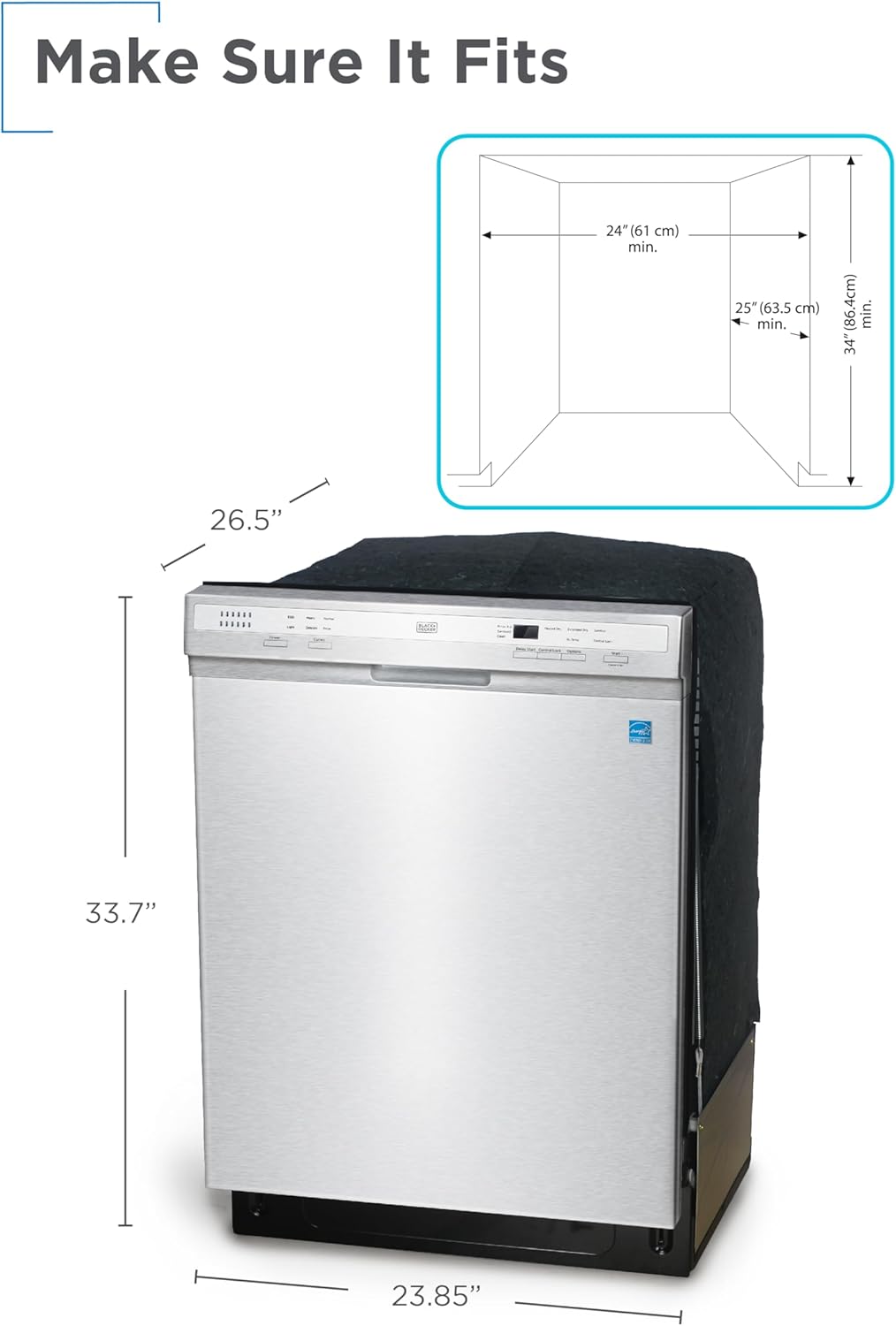
Figure 6: The dishwasher offers advanced features such as Delay Start, Heated Dry, Sanitize mode, and a Child Lock for enhanced convenience and safety.
Maintenance
Regular maintenance ensures optimal performance and extends the life of your dishwasher.
Cleaning the Filters
The dishwasher features a cylinder filtration system. Regularly check and clean the filters to prevent blockages and ensure efficient washing. Refer to the detailed manual for instructions on how to remove and clean the filter components.
Cleaning the Interior and Exterior
- Interior: Wipe down the interior with a damp cloth periodically. For stubborn stains or odors, run an empty cycle with a dishwasher cleaner.
- Exterior: Clean the stainless steel exterior with a soft, damp cloth and a mild detergent. Avoid abrasive cleaners that can scratch the surface.
Detergent and Rinse Aid
- Use only automatic dishwasher detergent. Do not use hand dish soap.
- Fill the rinse aid dispenser regularly to ensure spot-free drying and improved drying performance.
Troubleshooting
If you encounter issues with your dishwasher, consult the following common troubleshooting tips. For more complex problems, refer to the comprehensive user manual or contact customer support.
| Problem | Possible Cause | Solution |
|---|---|---|
| Dishwasher does not start | Power supply issue, door not closed properly, delay start active. | Check power connection, ensure door is latched, cancel delay start. |
| Dishes are not clean | Improper loading, clogged spray arms, insufficient detergent, dirty filters. | Reload dishes correctly, clean spray arm nozzles, use correct detergent amount, clean filters. |
| Water leaks from dishwasher | Improper installation, damaged door seal, excessive suds. | Check hose connections, inspect door seal, use only automatic dishwasher detergent. |
| Dishwasher is noisy | Items hitting spray arms, foreign object in pump, normal operating sounds. | Adjust loading, check for obstructions, some noise is normal (52 dB). |
Specifications
Key technical specifications for the BLACK+DECKER BDW200MS Built-In Dishwasher.
| Feature | Specification |
|---|---|
| Model Number | BDW200MS |
| Form Factor | Built-In |
| Dimensions (D x W x H) | 26.5" x 23.85" x 33.7" |
| Item Weight | 80.2 Pounds |
| Capacity | 12 Place Settings |
| Tub Material | Stainless Steel |
| Wash Programs | 6 (Heavy, Normal, Light, Eco, Glass, Rinse) |
| Noise Level | 52 dB |
| Voltage | 120 Volts |
| Annual Energy Consumption | 240 Kilowatt Hours Per Year |
| Special Features | Delay Start, Heated Dry, LED Interior Light, Sanitize mode |
| Certification | ENERGY STAR, UL |
Warranty and Support
For detailed warranty information, please refer to the warranty card included with your product or the official BLACK+DECKER website. Keep your proof of purchase for warranty claims.
If you require technical assistance, service, or have questions not covered in this manual, please contact BLACK+DECKER customer support. Contact information can typically be found on the manufacturer's website or in the product packaging.
A comprehensive user manual in PDF format is available for download: Download User Manual (PDF)