
1. Introduction
Thank you for choosing the Ausbilew Smart Touchscreen Wireless Bluetooth 5.3 Headset. This manual provides detailed instructions to help you set up, operate, and maintain your new earbuds, ensuring you get the best possible audio experience. Please read this manual thoroughly before use.
2. Product Overview
The Ausbilew Smart Touchscreen Wireless Bluetooth 5.3 Headset features advanced noise-canceling technology, a convenient touchscreen charging case, and robust connectivity for a superior listening experience. It is designed for various activities, including sports, business, and general entertainment.
Key Features:
- Smart OLED Touchscreen on charging case for intuitive control.
- Active Noise Cancellation (ANC) and Environmental Noise Cancellation (ENC) for reduced background noise.
- Bluetooth 5.3 for stable and efficient wireless connection.
- Fast charging with up to 36 hours of total playtime with the charging case.
- IPX56 Water Resistance, suitable for sports and outdoor use.
- 6-microphone setup for high-definition calls.
Package Contents:
- Ausbilew Smart Touchscreen Wireless Earbuds (Left and Right)
- Wireless Charging Case with Touchscreen
- Replacement Ear Caps (S, M, L sizes)
- Charging Cable (Type-C)

Image: The Ausbilew Smart Touchscreen Wireless Headset, showing the earbuds, charging case, and included S, M, L ear caps.
3. Setup
3.1 Charging the Device
Before first use, fully charge the earbuds and the charging case. Connect the provided Type-C charging cable to the charging port on the case and a compatible USB power source. The touchscreen will display the charging status.
- Charging Time: Approximately 1 hour for earbuds and case.
- Earbud Playtime: Up to 4.5 hours on a single charge.
- Total Playtime with Case: Up to 36 hours.

Image: Visual representation of charging times and battery life, highlighting the 500mAh charging compartment and Type-C port.
3.2 Selecting Ear Caps
For optimal sound quality and comfort, choose the ear caps that best fit your ears. The headset comes with S, M, and L sizes. Experiment to find the most secure and comfortable fit.
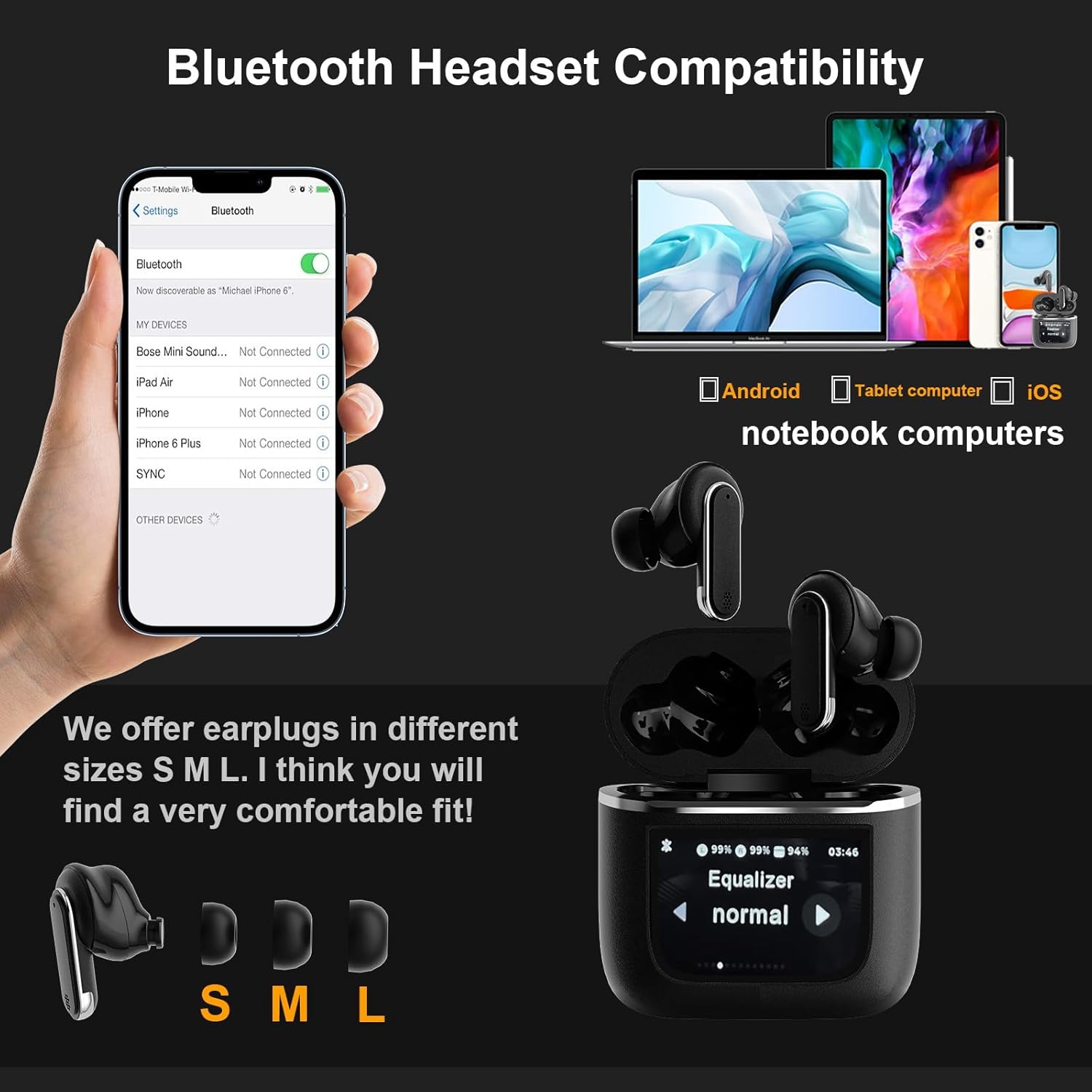
Image: Demonstrates earbud compatibility with iOS/Android phones, tablets, and laptops, along with the S, M, L ear tip sizes for a comfortable fit.
3.3 Bluetooth Pairing
- Ensure the earbuds are in the charging case and the case is open.
- On your device (smartphone, tablet, laptop), enable Bluetooth.
- Search for new Bluetooth devices. The headset will appear as "Ausbilew YX27" or similar.
- Select the headset to pair. A voice prompt will confirm successful connection.
4. Operating Instructions
The Ausbilew headset features intuitive controls via both the charging case touchscreen and touch sensors on the earbuds themselves.
4.1 Touchscreen Controls (Charging Case)
The full-color OLED touchscreen on the charging case allows for comprehensive control without needing your connected device. Swipe left or right to navigate through various functions:
- Music Control: Play/Pause, Next/Previous Track.
- Noise Reduction: Switch between ANC (Active Noise Cancellation), Transparent Mode, and Normal Mode.
- Volume Control: Adjust playback volume.
- Answer/Hang Up Calls: Manage phone calls directly from the case.
- Screen Lock: Lock the touchscreen to prevent accidental touches.
- Find My Earphone: Activate a sound on the earbuds to locate them if misplaced.
- EQ Equalizer: Select different sound profiles (e.g., Normal, Rock, Bass, Jazz, Club, Studio, Custom).
- Flashlight: Utilize the screen as a temporary light source.
- Language Switch: Change the system language.
- Light Level: Adjust screen brightness.
- Customized Alarm Clock: Set alarms.
- Setup Time: Adjust date and time settings.

Image: Displays the various functions accessible via the LED full-color touchscreen on the charging case, including music control, noise reduction, call answering, and settings.
4.2 Earbud Touch Controls
Each earbud features touch-sensitive areas for quick control of essential functions:
| Action | Left Earbud (L) | Right Earbud (R) |
|---|---|---|
| Press and hold for 2 seconds | ANC noise reduction / Transparent mode switch | Call the voice assistant |
| Click 1 time | Answer / Hang up phone call, Pause / Play music | |
| Click 2 times | Refuse phone call, Next song | |
| Click 3 times | Previous song | |
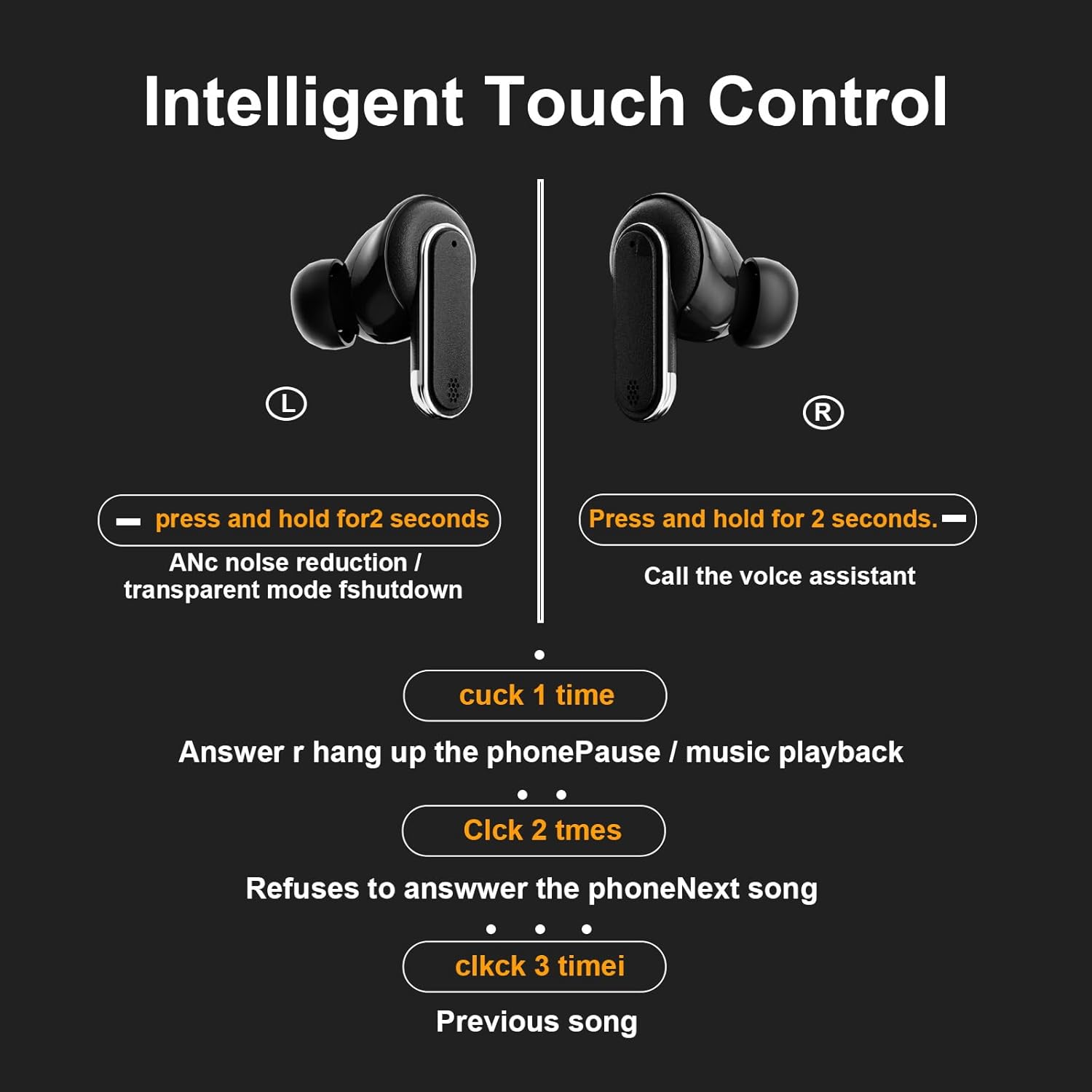
Image: Illustrates the specific touch gestures for controlling various functions on both the left and right earbuds.
4.3 Noise Reduction
The headset features intelligent dual noise reduction with 6 microphones, effectively reducing ambient noise by up to 45 dB. This ensures high-definition calls and an immersive audio experience.

Image: Highlights the four-microphone system for noise reduction, capable of reducing ambient noise by 45dB for clear audio.
5. Maintenance
5.1 Cleaning
Regularly clean your earbuds and charging case to maintain optimal performance and hygiene. Use a soft, dry, lint-free cloth. For stubborn dirt, slightly dampen the cloth with water. Do not use abrasive materials or harsh chemicals.
5.2 Water Resistance
The earbuds are rated IPX56 water resistant, meaning they can withstand splashes and sweat. They are suitable for workouts and light rain. Do not submerge the earbuds in water or expose them to strong jets of water.

Image: Shows the earbuds in a wet environment, illustrating their IPX5 waterproof capability, suitable for exercise.
5.3 Storage
When not in use, store the earbuds in their charging case to protect them and ensure they remain charged. Avoid storing them in extreme temperatures or humid environments.
6. Troubleshooting
Common Issues and Solutions:
- No Sound/Poor Sound Quality:
- Ensure earbuds are properly seated in your ears and ear caps are the correct size.
- Check the volume level on both the earbuds (via touchscreen) and your connected device.
- Ensure earbuds are fully charged.
- Reconnect Bluetooth by turning off and on Bluetooth on your device, or re-pairing the earbuds.
- Earbuds Not Pairing:
- Ensure earbuds are in the charging case with the lid open.
- Make sure Bluetooth is enabled on your device and the earbuds are within range.
- Forget the device from your phone's Bluetooth settings and attempt to re-pair.
- Touchscreen Unresponsive/Blank:
- Ensure the charging case has sufficient battery.
- Try resetting the case: Recharge the case and hold the reset button down for 5 seconds or longer. The screen should reactivate.
- Call Quality Issues:
- Ensure earbuds are clean and microphones are not obstructed.
- Check for strong Bluetooth signal and minimize interference.
7. Specifications
| Feature | Specification |
|---|---|
| Model Name | YX27 |
| Connectivity Technology | Bluetooth 5.3 |
| Noise Control | Active Noise Cancellation (ANC) |
| Water Resistance Level | IPX56 |
| Earbud Battery Life | 4.5 Hours |
| Charging Case Battery Life | 36 Hours |
| Charging Case Battery Capacity | 500 Milliamp Hours |
| Charging Time | 1 Hour |
| Control Method | Touch |
| Frequency Range | 20 Hz - 20,000 Hz |
| Impedance | 12 Ohm |
| Item Weight | 3.52 ounces |
| Product Dimensions | 2.42 x 2.31 x 1.2 inches |

Image: Detailed dimensions of the headset and charging case, including the overall weight.
8. Warranty and Support
Ausbilew provides a professional after-sales team to assist you with any questions or quality problems you may encounter. If you find any quality issues with your product, please contact customer service immediately for assistance.
For further support, please refer to the contact information provided with your product packaging or visit the official Ausbilew website.