
Introduction
Thank you for choosing the De'Longhi Magnifica S ECAM12.121.B Fully Automatic Bean to Cup Coffee Machine. This manual provides essential information for the correct installation, use, and maintenance of your appliance. Please read these instructions carefully before using the machine and keep them for future reference.
1. Setup and First Use
Before operating your coffee machine, ensure all packaging materials are removed and the machine is placed on a stable, level surface. Follow these steps for initial setup:
- Unpacking: Carefully remove the machine and all accessories from the packaging.
- Water Tank: Fill the water tank with fresh, clean water up to the MAX level. Ensure the tank is properly seated.
- Bean Hopper: Open the lid of the bean hopper and add fresh coffee beans. Do not overfill.
- Water Hardness Test: Use the provided water hardness test strip to determine your water hardness. This information is crucial for proper descaling intervals. Refer to the 'Maintenance' section for details on setting the water hardness.
- Power Connection: Plug the machine into a suitable power outlet.
- Initial Rinse Cycle: The machine will perform an automatic rinse cycle upon first power-on or after a period of inactivity. Place a container under the coffee spouts to collect the water.

Image 1: The De'Longhi Magnifica S ECAM12.121.B fully automatic bean to cup coffee machine, showcasing its sleek black design and two espresso cups.
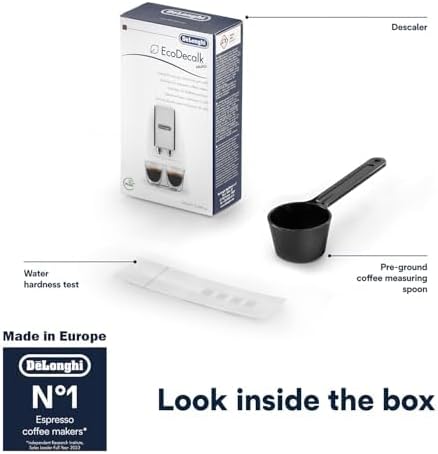
Image 2: Contents of the box, including the descaler solution, a water hardness test strip, and a pre-ground coffee measuring spoon.
2. Operating Instructions
The Magnifica S ECAM12.121.B offers a user-friendly interface for preparing a variety of coffee beverages.
2.1 Control Panel Overview
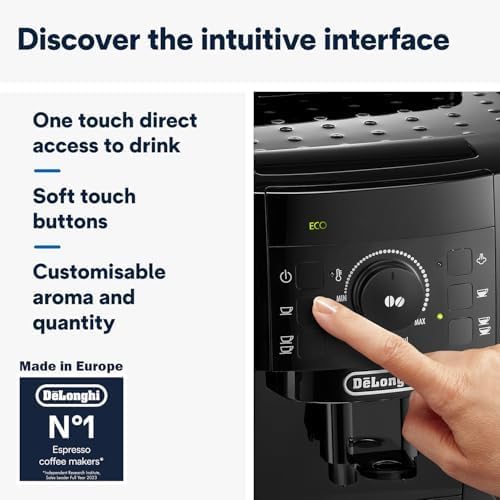
Image 3: Close-up of the intuitive control panel with soft-touch buttons for direct access to drinks and customizable settings.
The control panel features soft-touch buttons for direct access to various functions and customizable settings. You can adjust aroma intensity and coffee quantity to personalize your drink.
2.2 Preparing Coffee
- One-Touch Drinks: Press the desired beverage button (e.g., Espresso, Long Coffee) for quick preparation. The machine will automatically grind the beans and brew your coffee.
- Customizable Grind: The integrated grinder offers 13 adjustable grind settings. Adjust the grind fineness using the dial inside the bean hopper to suit your preference. Finer grinds produce stronger espresso, while coarser grinds are suitable for longer coffees.
- Pre-Ground Coffee Option: For decaffeinated coffee or a different blend, use the pre-ground coffee compartment. Add one scoop of pre-ground coffee using the provided measuring spoon before selecting your drink.

Image 4: The bean hopper with visible coffee beans and the 13-setting adjustable grind dial for customizing coffee aroma.
2.3 Using the Manual Steam Wand (Cappuccino System)
The traditional milk frother allows you to manually steam milk for creamy cappuccinos, lattes, and macchiatos, or dispense hot water for teas and infusions.
- Prepare Milk: Fill a pitcher with cold milk (dairy or non-dairy).
- Activate Steam: Press the steam button on the control panel. Wait for the machine to reach the correct temperature.
- Froth Milk: Immerse the steam wand into the milk and open the steam knob. Move the pitcher up and down to create desired froth.
- Clean Wand: After frothing, close the steam knob and clean the steam wand immediately with a damp cloth to prevent milk residue from drying.
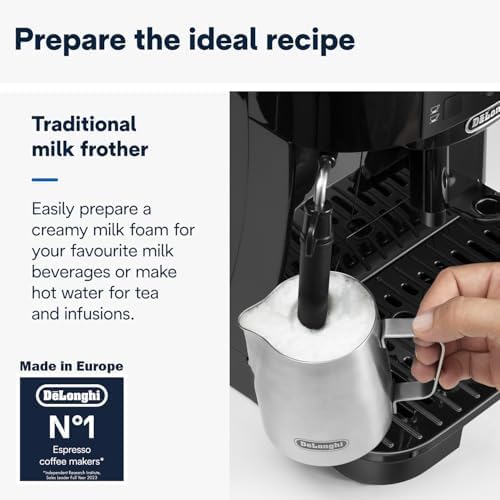
Image 5: A hand using the traditional milk frother to create creamy foam for a coffee beverage.
3. Maintenance and Cleaning
Regular cleaning and maintenance ensure optimal performance and longevity of your De'Longhi coffee machine.
3.1 Daily Cleaning
- Drip Tray and Grounds Container: Empty and clean the drip tray and coffee grounds container daily or when indicated by the machine.
- Water Tank: Rinse the water tank regularly.
- Coffee Spouts: Wipe the coffee spouts with a damp cloth.
3.2 Descaling
The machine will indicate when descaling is required. Use the provided De'Longhi descaler solution and follow the instructions on the descaler packaging and the machine's display. Regular descaling prevents limescale buildup and maintains coffee quality.
3.3 Brew Unit Cleaning
The brew unit should be removed and rinsed under running water at least once a month. Refer to the detailed instructions in the full product manual for safe removal and reinsertion.
4. Troubleshooting
This section addresses common issues you might encounter with your coffee machine. For more detailed troubleshooting, please refer to the complete user manual.
| Problem | Possible Cause | Solution |
|---|---|---|
| Coffee is not hot enough | Cold cups; machine not preheated; low temperature setting. | Preheat cups; allow machine to complete warm-up cycle; adjust temperature setting if available. |
| No coffee dispenses | Water tank empty; brew unit clogged; coffee beans empty. | Fill water tank; clean brew unit; refill bean hopper. |
| Milk not frothing properly | Steam wand clogged; milk too warm; incorrect milk type. | Clean steam wand thoroughly; use cold milk; ensure milk is suitable for frothing. |
| Machine requires descaling | Limescale buildup. | Perform descaling cycle as per instructions in 'Maintenance' section. |
5. Specifications
Key technical specifications for the De'Longhi Magnifica S ECAM12.121.B coffee machine:
| Feature | Detail |
|---|---|
| Brand | De'Longhi |
| Model Number | ECAM12.121.B |
| Color | Black |
| Product Dimensions (D x W x H) | 43 x 23 x 34 cm |
| Capacity (Water Tank) | 1.8 Liters |
| Power / Wattage | 1450 watts |
| Voltage | 220 Volts |
| Item Weight | 8 Kilograms |
| Special Features | Manual Steam Wand, Adjustable Grind Settings |
| Coffee Maker Type | Espresso Machine |
| Recommended Uses | Espresso, Americano, Cappuccino, Latte, Macchiato, Cafe-style beverages |
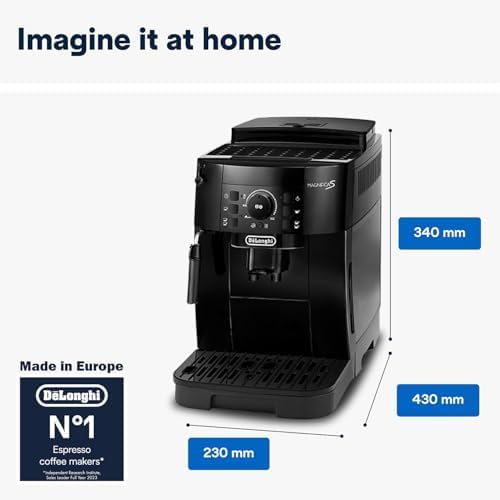
Image 6: Dimensional overview of the De'Longhi Magnifica S coffee machine, showing its height (340mm), width (230mm), and depth (430mm).
6. Warranty and Support
For warranty information, product registration, or technical support, please refer to the official De'Longhi website or contact their customer service. Keep your proof of purchase for warranty claims.


