1. Product Overview
The Deli Electric Pencil Sharpener is a fully automatic, rechargeable device designed for efficient and precise pencil sharpening. It accommodates a wide range of pencil sizes and offers multiple sharpness options to suit various needs, from fine lines to blunt tips for shading.

Figure 1: Deli Electric Pencil Sharpener with auto in/out indicators and examples of 12mm, 9mm, and 7mm pencils.
Key Features:
- Fully Automatic Operation: Features auto-feed and auto-eject functionality for hands-free sharpening.
- Wide Pencil Compatibility: Designed to sharpen pencils with diameters between 6.9mm and 12mm, including various shapes.
- 5 Sharpness Options: Adjustable settings for desired tip sharpness, from very sharp to blunt.
- Rechargeable & Portable: Built-in battery allows for cordless use, with USB-C charging support.
- Durable Blade: Equipped with a high-quality blade designed for over 8,000 sharpening cycles.
- Compact Design: Space-saving vertical design suitable for various desk sizes.
2. Getting Started
Charging the Sharpener:
Before first use, or when the battery is low, charge the sharpener using the provided USB-C cable. Connect the USB-C end to the sharpener's charging port and the USB-A end to a compatible 5V 2A USB power adapter (not included) or a computer USB port.
- The indicator lights will blink blue during charging.
- All three blue lights will be solid when fully charged.
- The sharpener can be used while charging.

Figure 2: Charging port and cable for the sharpener. A full charge provides approximately 600 sharpening cycles.

Figure 3: Indicator light states for working, charging, and low battery/abnormal conditions.
3. Operating Instructions
Sharpening a Pencil:
- Select Sharpness: Rotate the dial on the side of the sharpener to choose your desired tip sharpness. There are 5 settings available, ranging from sharp (for fine lines) to blunt (for shading large areas). For soft core colored pencils, medium or blunt settings are recommended to prevent tip breakage.
- Insert Pencil: Gently insert the pencil into the sharpening hole on top of the unit. The sharpener will automatically pull the pencil in.
- Automatic Sharpening: The sharpener will begin sharpening automatically. Once the pencil reaches the selected sharpness, it will be automatically ejected.

Figure 4: Automatic pencil feeding and ejection mechanism.
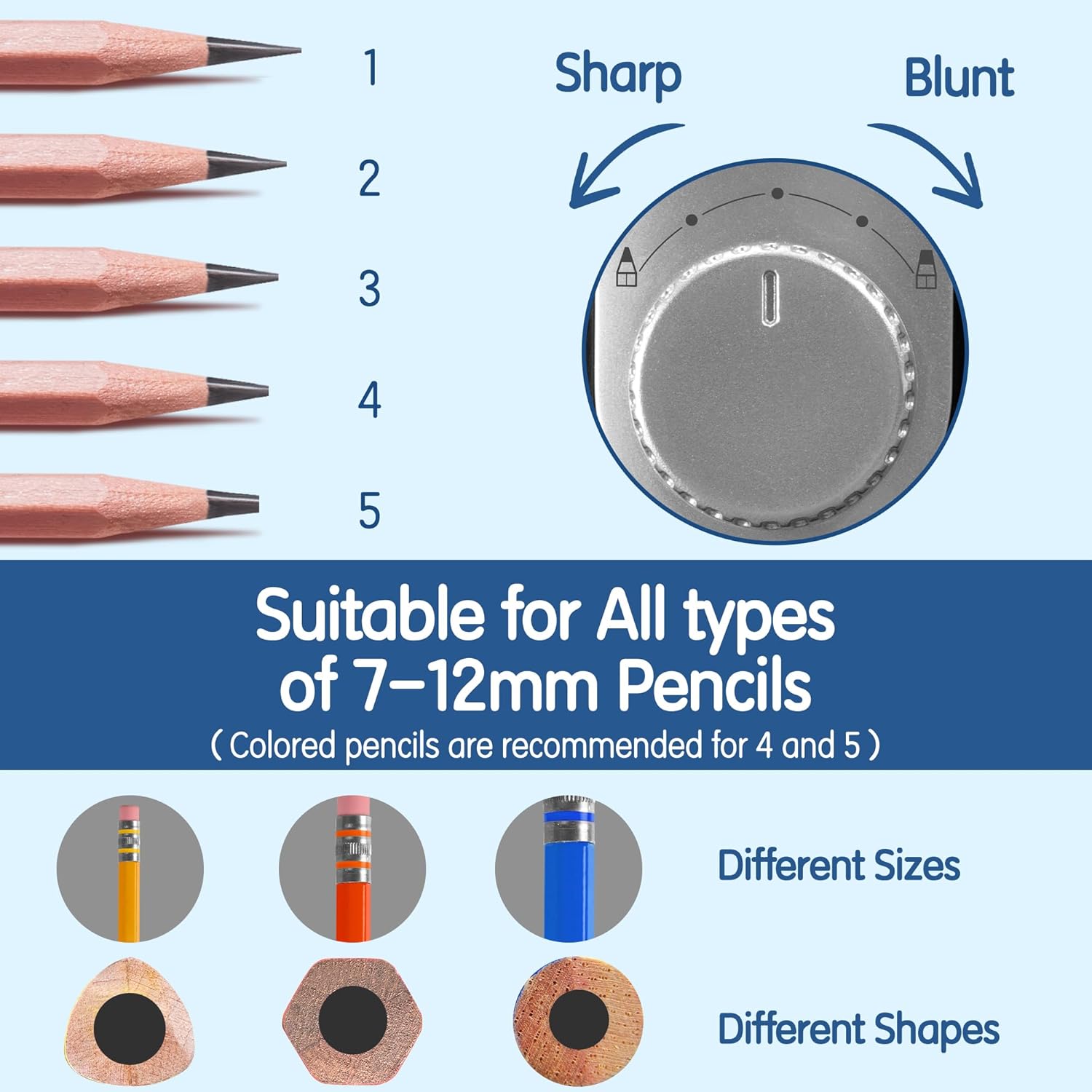
Figure 5: Sharpness adjustment dial with 5 settings for various pencil types and uses.

Figure 6: The clamp design helps reduce lead breakage and ensures even sharpening for 6.9-12mm pencils.
4. Maintenance and Care
Emptying Shavings:
To maintain optimal performance and prevent clogging, regularly empty the pencil shavings box.
- Locate the lock/unlock indicator on the bottom of the sharpener.
- Rotate the bottom cover counter-clockwise to the unlock position.
- Carefully remove the bottom cover and empty the accumulated pencil shavings into a waste bin.
- Align the cover and rotate clockwise to the lock position to secure it before next use.

Figure 7: The sharpener features a large shavings box for easy disposal and a transparent window to monitor fill level.
Cleaning:
Wipe the exterior of the sharpener with a soft, dry cloth. Do not use abrasive cleaners or immerse the unit in water.
5. Safety Information
- Keep fingers and foreign objects away from the sharpening hole during operation.
- The sharpener features a safety design that prevents operation when the lid is removed, ensuring no sharp blades are exposed.
- Avoid sharpening crayons, chalk, or other non-pencil items, as this may damage the blade.
- Do not force pencils into the sharpener.
- If the bottom indicator light turns red, it may indicate machine overheating or overload. Allow the sharpener to cool down before resuming use.

Figure 8: The sharpener is designed with safety in mind, featuring overheat protection.
6. Troubleshooting
| Problem | Possible Cause | Solution |
|---|---|---|
| Sharpener does not turn on. | Low battery; Lid not properly closed. | Charge the sharpener; Ensure the lid is securely locked. |
| Pencil tip is uneven. | Pencil core is off-center; Pencil not inserted straight. | Check pencil quality; Re-insert pencil carefully. |
| Sharpener stops working or red light appears. | Overheating or overload. | Allow the sharpener to cool down before further use. |
| Pencil shavings container is full. | Accumulated shavings. | Empty the shavings container as described in Maintenance. |
7. Product Specifications
- Model: VA10-BK
- Brand: Deli
- Power Source: Battery Powered (Rechargeable via USB-C)
- Compatible Pencil Diameters: 6.9mm - 12mm
- Material: Metal, Plastic (Durable ABS)
- Item Weight: Approximately 1.32 pounds
- Package Dimensions: Approximately 8.23 x 3.66 x 3.54 inches
- Blade Life: Up to 8,000 sharpening times
- Color: Black
8. Warranty and Support
Deli is committed to providing high-quality products and customer satisfaction. For any questions, concerns, or support needs regarding your Deli Electric Pencil Sharpener, please contact our customer service team. We strive to develop products and services that meet and exceed customer expectations worldwide.
Please refer to the product packaging or the official Deli website for the most current warranty information and contact details.