
Introduction
This manual provides comprehensive instructions for the installation, operation, and maintenance of your Aroepurt Hybrid Case and Tempered Glass Screen Protector designed specifically for the NUU Mobile N5004L. Please read this manual carefully to ensure proper use and to maximize the lifespan of your product.
Package Contents
- 1 x Aroepurt Hybrid Phone Case for NUU Mobile N5004L
- 1 x Tempered Glass Screen Protector
Setup
1. Installing the Phone Case
The hybrid case is designed for easy installation and removal. It features a combination of a hard PC back panel and a soft silicone frame for optimal protection.
- Ensure your NUU Mobile N5004L phone is clean and free of dust.
- Align the phone with the soft silicone frame of the case.
- Gently press the phone into the case, starting from one corner and working your way around until the phone is fully seated. Ensure all buttons and ports align correctly with the case cutouts.
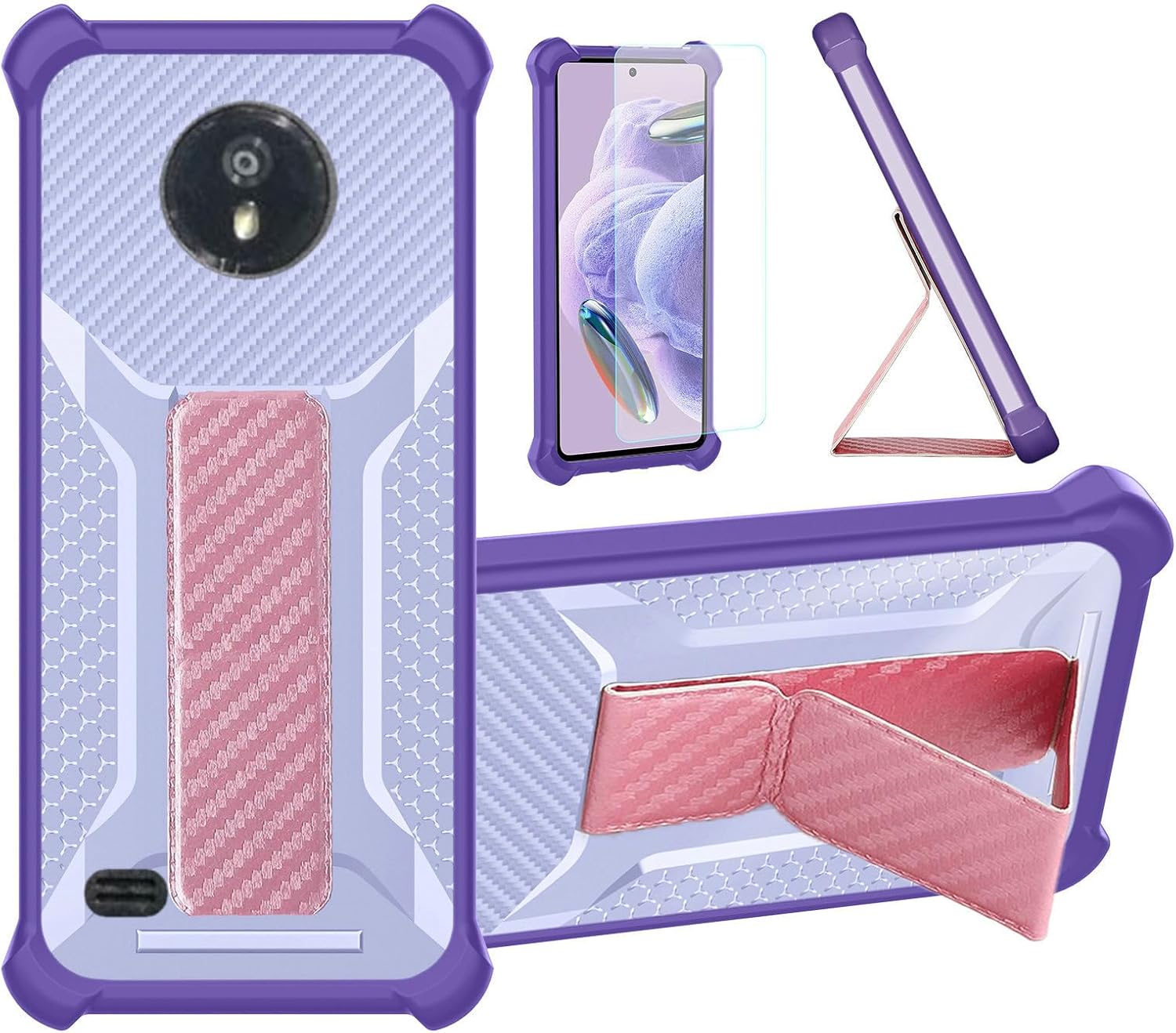
Image: The Aroepurt Hybrid Case for NUU Mobile N5004L, displaying its multi-component design including the main case, integrated kickstand, and the accompanying tempered glass screen protector.
2. Applying the Tempered Glass Screen Protector
The tempered glass screen protector provides an additional layer of defense against scratches and impacts.
- Clean the Screen: Use the provided cleaning wipes (if included) or a microfiber cloth to thoroughly clean your phone's screen. Ensure there are no dust particles, smudges, or fingerprints.
- Align the Protector: Carefully peel off the protective film from the adhesive side of the tempered glass. Align the screen protector with your phone's screen, paying close attention to the edges, camera, and speaker cutouts.
- Apply: Once aligned, gently lower the screen protector onto the screen. It will adhere automatically.
- Remove Bubbles: If any air bubbles appear, gently push them towards the edges of the screen using a soft cloth or a squeegee card.

Image: Features of the tempered glass screen protector, highlighting its 9H hardness, shatterproof design, high transparency, perfect adhesion, case-friendly fit, and anti-fingerprint properties.

Image: A visual representation of the screen protector's scratch-proof quality, showing it resisting damage from a hammer impact.
Operating Instructions
1. Using the Folding Stand
The integrated folding stand allows for hands-free viewing in multiple orientations.
- To activate the stand, gently pull out the kickstand located on the back of the case.
- Adjust the angle to your preferred viewing position.
- To retract, simply push the kickstand back into its slot until it sits flush with the case.

Image: The multi-function stand case in various usage scenarios, including hands-free viewing and secure holding with the integrated wristband.
2. Magnetic Functionality
The case features a built-in magnetic component for compatibility with magnetic car mounts.
- Simply attach the back of the case to a compatible magnetic car mount. The strong magnet ensures a secure hold.
- Ensure the magnetic mount is securely installed in your vehicle before attaching the phone.
3. Wristband/Hand Strap Usage
The integrated wristband provides a secure grip and aids in one-hand operation, reducing the risk of accidental drops.
- Slide your fingers through the wristband on the back of the case for a firm and comfortable grip.
- This feature is particularly useful for one-handed phone usage, allowing you to reach more areas of the screen.

Image: Demonstrations of the wristband for enhanced one-hand operation and the magnetic back for secure attachment to car mounts.
4. Drop Protection Features
The case is engineered with thickened anti-drop corners and four-corner shock airbags to absorb impact from accidental drops.
- The raised edges around the camera and screen provide additional protection when the phone is placed on flat surfaces.
- The hybrid design (PC hard back + soft silicone frame) offers robust defense against daily wear and tear and impacts.

Image: A diagram highlighting the case's drop protection capabilities, including reinforced corners and internal shock-absorbing structures.
5. Frosted Anti-Fingerprint Surface
The frosted surface of the case is designed to resist fingerprints and smudges, maintaining a clean appearance.
- This surface also provides a comfortable tactile feel and enhances grip.
Maintenance
To keep your case and screen protector in optimal condition, follow these maintenance guidelines:
- Cleaning the Case: Wipe the case regularly with a soft, damp cloth. For stubborn dirt, a mild soap solution can be used, followed by rinsing and thorough drying. Avoid harsh chemicals or abrasive materials.
- Cleaning the Screen Protector: Use a microfiber cloth to gently wipe the screen protector. For smudges, a screen cleaner spray designed for electronics can be applied to the cloth (not directly to the screen) and then wiped.
- Avoid Extreme Conditions: Do not expose the case or screen protector to extreme temperatures or direct sunlight for prolonged periods, as this may affect material integrity.
Troubleshooting
- Case Fit Issues: If the case does not fit perfectly, ensure you have the correct model (NUU Mobile N5004L). Double-check that the phone is fully seated within the case and not obstructed by any foreign objects.
- Screen Protector Bubbles: Small bubbles after installation can often be pushed out to the edges with a soft cloth. If large bubbles persist, it may indicate dust particles trapped underneath. In such cases, carefully lift a corner of the protector, remove the dust with a dust-absorber sticker, and reapply.
- Magnetic Mount Not Holding: Ensure your car mount is indeed magnetic and strong enough to hold your device. The case's magnet is designed for standard magnetic mounts.
Specifications
| Product Dimensions | 0.39 x 0.39 x 0.39 inches |
| Item Weight | 2.46 ounces |
| Material | Polyurethane (PC hard back + soft silicone frame) |
| Color | Purple |
| Compatible Phone Models | NUU MOBILE N5004L |
| Special Features | Fingerprint-resistant frosted surface, Folding support, Magnetic fastening, Thickened anti-drop + Card Function (implied by folding support) |
Warranty and Support
For specific warranty information or technical support, please refer to the product packaging or contact Aroepurt customer service directly. Keep your purchase receipt as proof of purchase.