
1. Introduction
This manual provides detailed instructions for the installation, operation, and maintenance of your Aroepurt Hybrid Case and Tempered Glass Screen Protector designed specifically for the NUU Mobile N5004L smartphone. This product offers robust protection and enhanced functionality for your device.
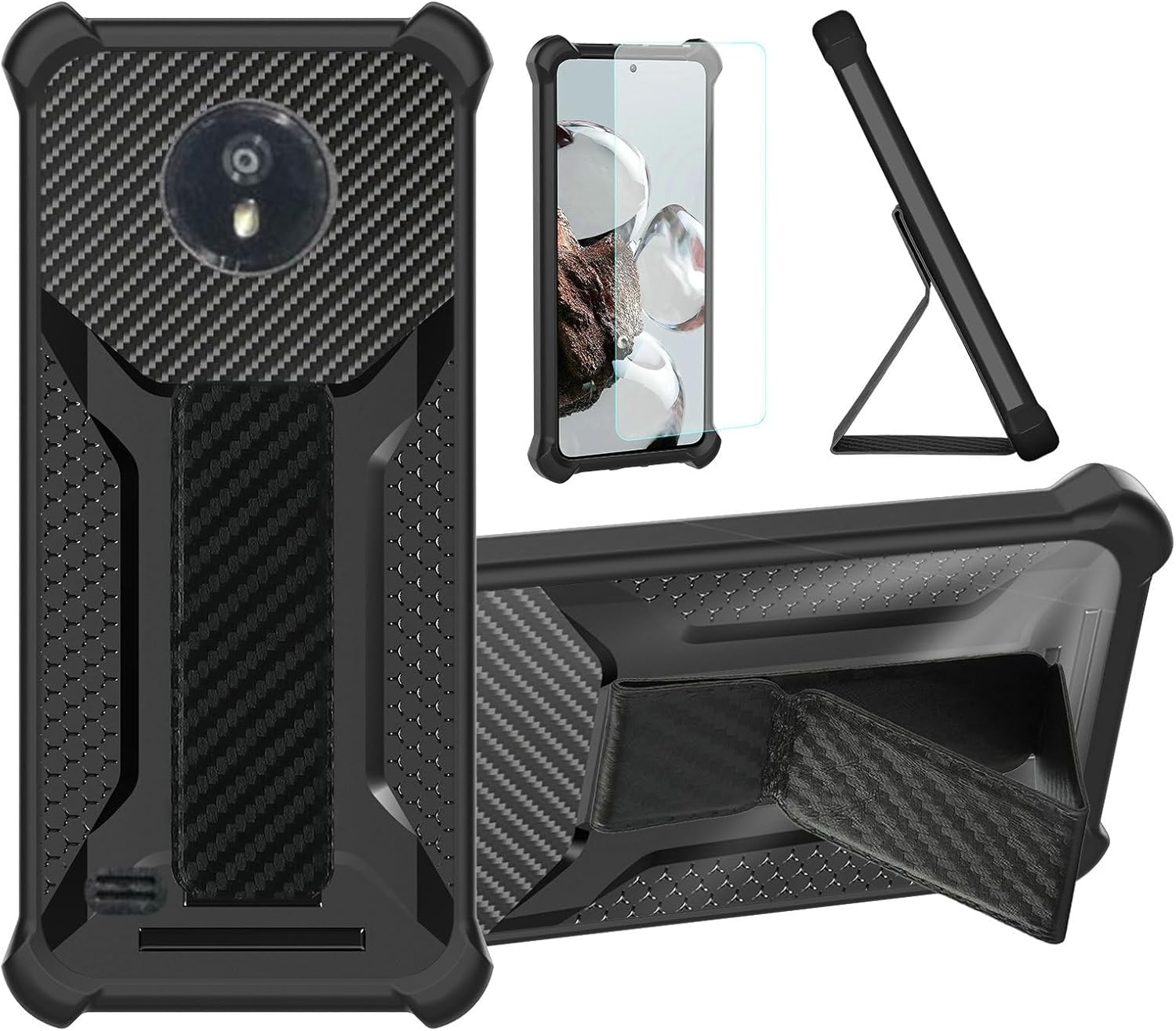
Image 1.1: Overview of the Aroepurt Hybrid Case and Tempered Glass Screen Protector.
This image displays the black hybrid phone case from multiple angles, highlighting its rugged design, integrated kickstand, and the included tempered glass screen protector. The case features a carbon fiber texture on the back and reinforced corners.
2. What's Included
Please verify that all items are present in the package:
- 1 x Aroepurt Hybrid Phone Case (Black)
- 1 x Tempered Glass Screen Protector
3. Key Features
The Aroepurt Hybrid Case and Tempered Glass Screen Protector offer the following features:
- Hybrid Protection: Constructed with a PC hard back panel and a soft silicone frame, combined with four-corner shock airbags for enhanced drop protection.
- Integrated Folding Stand: Allows for multi-angle viewing, adjustable to suit various usage scenarios.
- Magnetic Fastening: Compatible with magnetic car mounts for secure in-vehicle placement.
- Frosted Anti-Fingerprint Surface: The frosted finish effectively resists fingerprints, maintaining a clean appearance. Features a stylish carbon fiber texture.
- Camera and Screen Protection: The case design ensures that it is higher than both the camera lens and the screen, providing flat surface protection.
- Card Function: Integrated slot for carrying a card.
- Tempered Glass Screen Protector: Provides 9H hardness, shatterproof, perfect adhesion, 99.9% super transparency, and anti-fingerprint properties.

Image 3.1: Illustration of the case's drop protection.
This image highlights the reinforced corners and internal shock-absorbing structure of the hybrid case, demonstrating how it protects the phone from impacts during drops.

Image 3.2: Key features of the tempered glass screen protector.
This graphic illustrates the benefits of the tempered glass screen protector, including 9H high hardness, shatterproof design, perfect adhesion, 99.9% super transparency, case-friendly fit, and anti-fingerprint coating.
4. Setup and Installation
4.1. Installing the Tempered Glass Screen Protector
- Clean the Screen: Use the provided alcohol wipe to thoroughly clean your phone's screen. Ensure all dust, smudges, and fingerprints are removed.
- Dry the Screen: Use the microfiber cloth to dry the screen completely. Ensure no lint or dust particles remain.
- Remove Protective Film: Carefully peel off the protective film from the adhesive side of the tempered glass screen protector. Avoid touching the adhesive surface.
- Align and Apply: Align the screen protector with your phone's screen, ensuring the cutouts for the camera and sensors match perfectly. Gently lower the protector onto the screen.
- Press to Adhere: Once aligned, lightly press the center of the screen protector. It will automatically begin to adhere to the screen. Use the microfiber cloth to gently push out any remaining air bubbles towards the edges.

Image 4.1: Demonstration of screen protector scratch resistance.
This image visually represents the scratch-proof capability of the tempered glass screen protector, showing it resisting damage from sharp objects like a hammer.
4.2. Installing the Hybrid Phone Case
- Insert Phone: Gently place your NUU Mobile N5004L into the soft silicone frame of the case, starting with one side.
- Secure Corners: Press the remaining corners of your phone into the case, ensuring a snug fit around all edges.
- Verify Fit: Confirm that all buttons, ports, and camera cutouts are properly aligned and accessible.
5. Operating Instructions
5.1. Using the Folding Stand
To use the integrated folding stand, locate the kickstand on the back of the case. Gently pull it outwards until it locks into position. You can adjust the angle by repositioning the stand to achieve optimal viewing for videos, video calls, or hands-free use.

Image 5.1: Various uses of the multi-function stand.
This image demonstrates the versatility of the case's stand, showing a person holding the phone with the wristband, the phone propped up on a desk, and the phone used in a horizontal stand position for hands-free viewing.
5.2. Magnetic Mounting
The case features a built-in magnetic component, allowing it to securely attach to compatible magnetic car mounts. Simply place the back of your cased phone onto a magnetic car mount for hands-free navigation or media viewing while driving.
5.3. Wristband for One-Hand Operation
The integrated wristband on the back of the case provides a secure grip for one-hand operation, reducing the risk of accidental drops. Slide your fingers through the wristband for added stability.

Image 5.2: Wristband and magnetic mount functionality.
This image illustrates the wristband feature for secure one-hand phone use and the magnetic back of the case attaching to a car magnetic mount.
5.4. Card Function
The case includes a discreet slot designed to hold a single card, such as an ID or credit card, for convenient access.
6. Care and Maintenance
- Cleaning the Case: To clean the phone case, remove your phone from the case. Use a soft, damp cloth with mild soap and water to wipe down the case. Avoid harsh chemicals or abrasive cleaners. Allow the case to air dry completely before reinserting your phone.
- Cleaning the Screen Protector: Use a microfiber cloth to gently wipe the screen protector. For stubborn smudges, a screen cleaner spray designed for electronics can be used.
- Avoid Extreme Temperatures: Do not expose the case or screen protector to extreme heat or cold, as this may affect their material integrity.
7. Troubleshooting
- Screen Protector Bubbles: If small bubbles appear after installation, gently push them towards the nearest edge using a microfiber cloth or a credit card wrapped in cloth. For persistent bubbles, lift the nearest edge slightly and re-apply, ensuring no dust is trapped underneath.
- Case Fit Issues: Ensure your phone model is indeed the NUU Mobile N5004L. If the case does not fit properly, double-check that the phone is fully seated within the silicone frame and that all corners are securely in place. If issues persist, contact customer support.
- Magnetic Function Weakness: Ensure the magnetic car mount is clean and free of debris. The strength of the magnetic hold can vary depending on the car mount used.
8. Product Specifications
| Brand | Aroepurt |
| Compatible Phone Models | NUU Mobile N5004L |
| Material | Polyurethane (PU), PC, Silicone |
| Color | Black |
| Form Factor | Hybrid Case |
| Special Features | Fingerprint-resistant frosted surface, Folding support, Magnetic fastening, Thickened anti-drop, Card Function |
| Item Weight | 2.46 ounces |
| Product Dimensions | 0.39 x 0.39 x 0.39 inches (Case dimensions, approximate) |
9. Warranty and Support
For warranty information or technical support, please refer to the retailer's return policy or contact Aroepurt customer service directly through the platform where the product was purchased. Please retain your proof of purchase for any warranty claims.