
RK ROYAL KLUDGE N80
RK ROYAL KLUDGE N80 Low Profile Mechanical Keyboard User Manual
Model: N80
Brand: RK ROYAL KLUDGE
1. Product Overview
The RK ROYAL KLUDGE N80 is a versatile 75% layout low-profile mechanical keyboard designed for both gaming and office use. It features a smart display screen and a multi-functional knob, offering intuitive control and customization. The keyboard supports tri-mode connectivity, including 2.4GHz wireless, Bluetooth 5.0, and USB-C wired connections, ensuring broad compatibility and flexibility.
Key features include low-profile tactile brown switches for faster actuation and a comfortable typing experience, a top-mounted design for enhanced stability, and a heavy-duty base to prevent wobbling. The keyboard also incorporates a triple sound-absorbing layer to minimize hollow sounds and noise, providing a smooth and quiet operation.
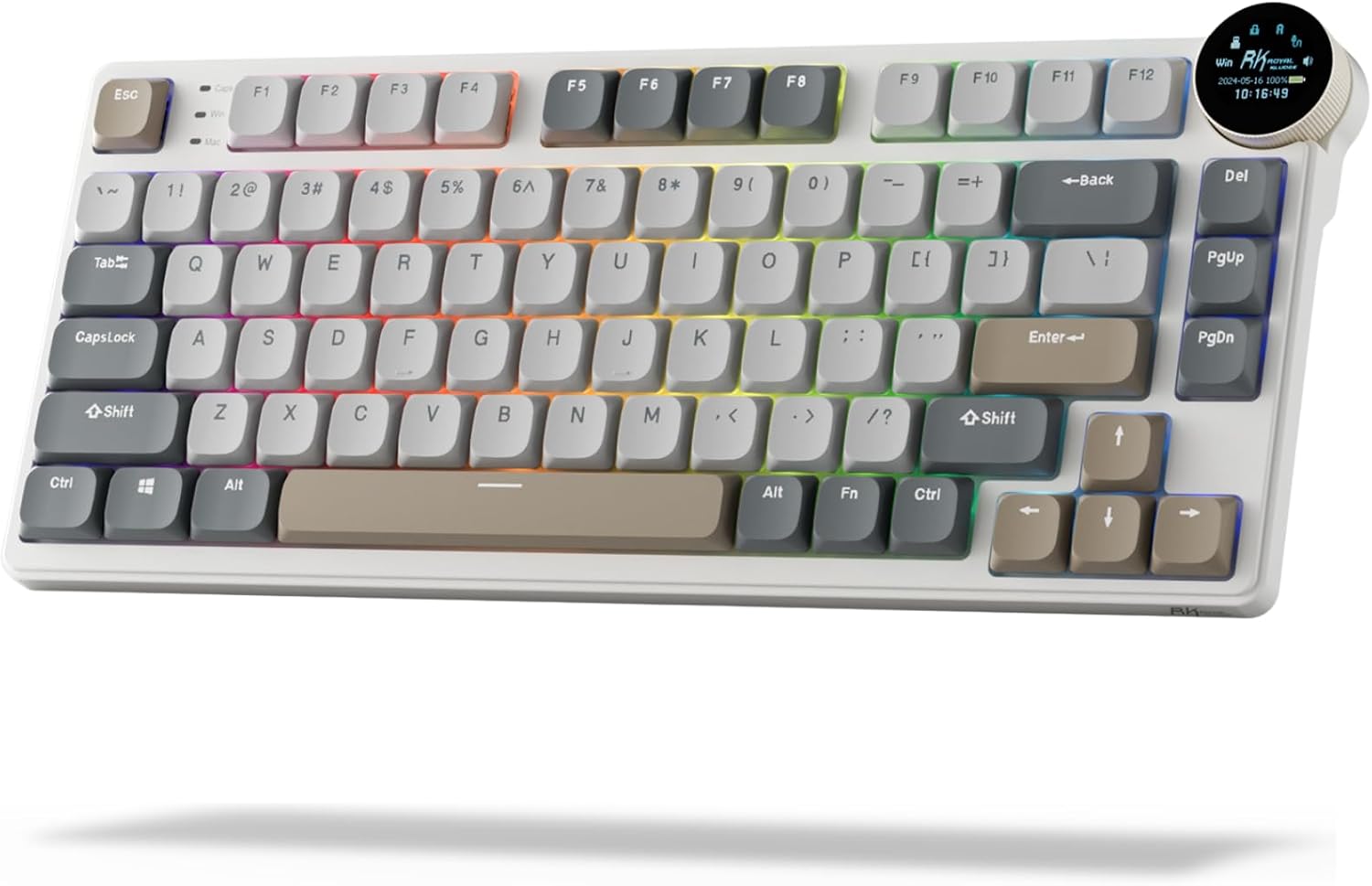
Image: The RK ROYAL KLUDGE N80 keyboard, showcasing its compact 75% layout, smart display screen, and multi-color keycaps.
2. What's in the Box
Upon unboxing your RK ROYAL KLUDGE N80 keyboard, please verify that all the following items are included:
- 1x RK N80 Keyboard
- 1x 2-in-1 USB-C Cable
- 1x 2-in-1 Keycap & Switch Puller
- 4x Backup Switches
- 1x Disassembling Tool
- 1x Dust Cover
- 1x User Manual (Printed)

Image: A visual representation of the RK N80 keyboard and its included accessories: USB-C cable, keycap/switch puller, backup switches, disassembling tool, dust cover, and user manual.
3. Setup Guide
3.1 Charging the Keyboard
Before initial use, it is recommended to fully charge the keyboard. Connect the provided USB-C cable to the keyboard's Type-C charging port and the other end to a USB power source (e.g., computer USB port, wall adapter). The smart display screen will indicate the charging status.
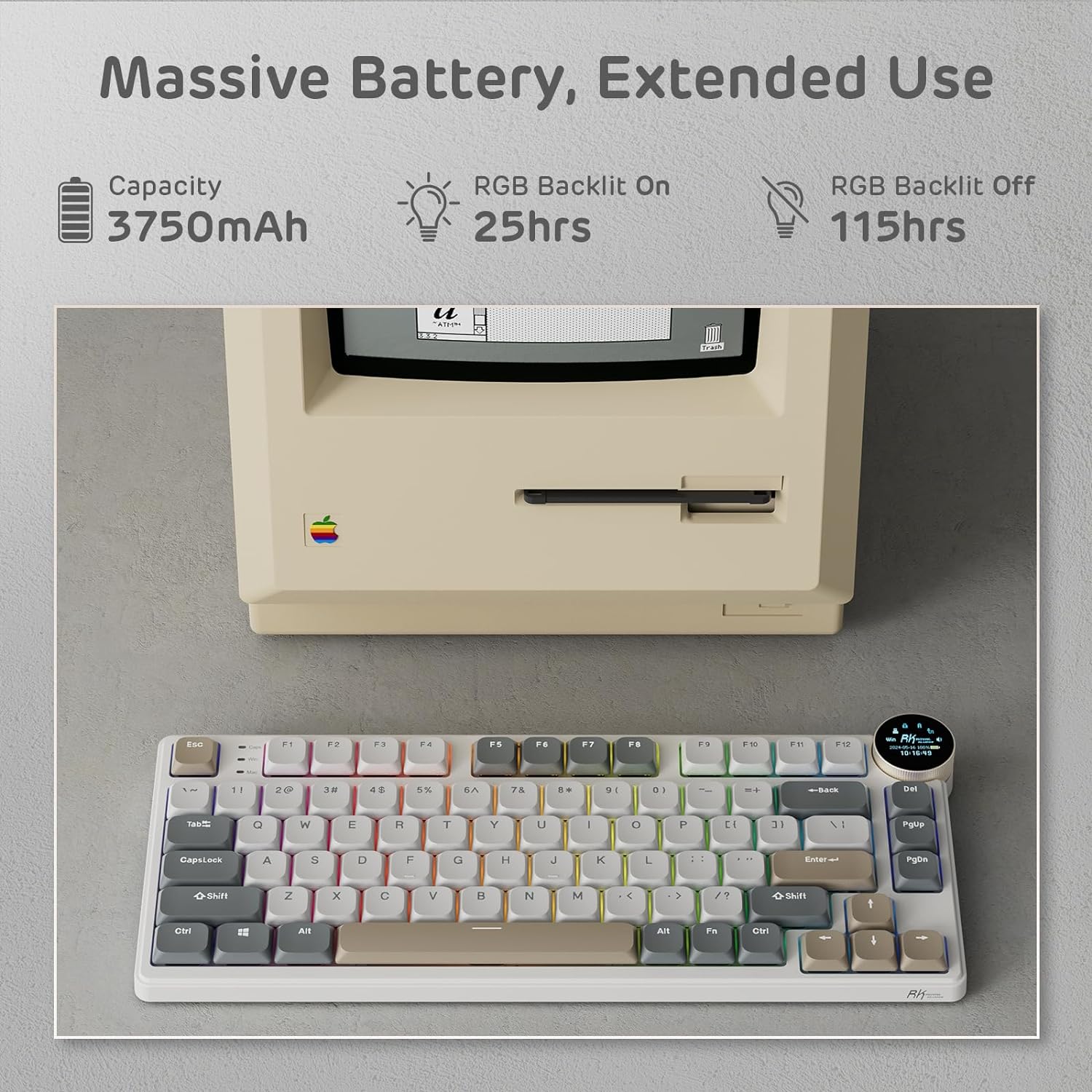
Image: The RK N80 keyboard positioned next to an older computer, illustrating its 3750mAh battery capacity and estimated usage times (25 hours with RGB on, 115 hours with RGB off).
3.2 Connectivity Modes
The RK N80 keyboard offers three connectivity options:
- 2.4GHz Wireless Mode:
Insert the 2.4GHz USB dongle into an available USB port on your device. The keyboard will automatically connect. This mode provides a stable and low-latency connection.
- Bluetooth 5.0 Mode:
Turn on the keyboard's Bluetooth mode. On your device, search for Bluetooth devices and select "RK N80" to pair. The keyboard supports stable Bluetooth 5.0 for seamless wireless operation.
- USB-C Wired Mode:
Connect the keyboard directly to your device using the provided USB-C cable. This mode offers a direct, reliable connection and simultaneously charges the keyboard.

Image: A visual representation of the keyboard's tri-mode connectivity options: 2.4GHz wireless, Bluetooth 5.0, and USB-C wired, shown with a laptop and tablet.

Image: Close-up view of the keyboard's side, highlighting the Type-C charging port, Type-C hub, 2.4G dongle socket with magnetic attachment, and adjustable 2-level feet.
4. Operating Instructions
4.1 Smart Display Screen & Knob Control
The RK N80 features a smart display screen and a multi-functional knob for enhanced control:
- Display Information: The screen can show custom GIFs, current date and time, active connection mode (2.4G, BT1, BT2, BT3, USB), WIN/MAC layout status, and battery level.
- Knob Functionality:
- Press Knob: Enters the screen control mode, allowing navigation through various display options (Home, Clock, GIF Image Display, Connection Mode, Light Control, Layout, Volume).
- Rotate Knob: Adjusts volume by default. In screen control mode, it navigates through options or adjusts selected settings like backlight brightness/speed and RGB modes/colors.
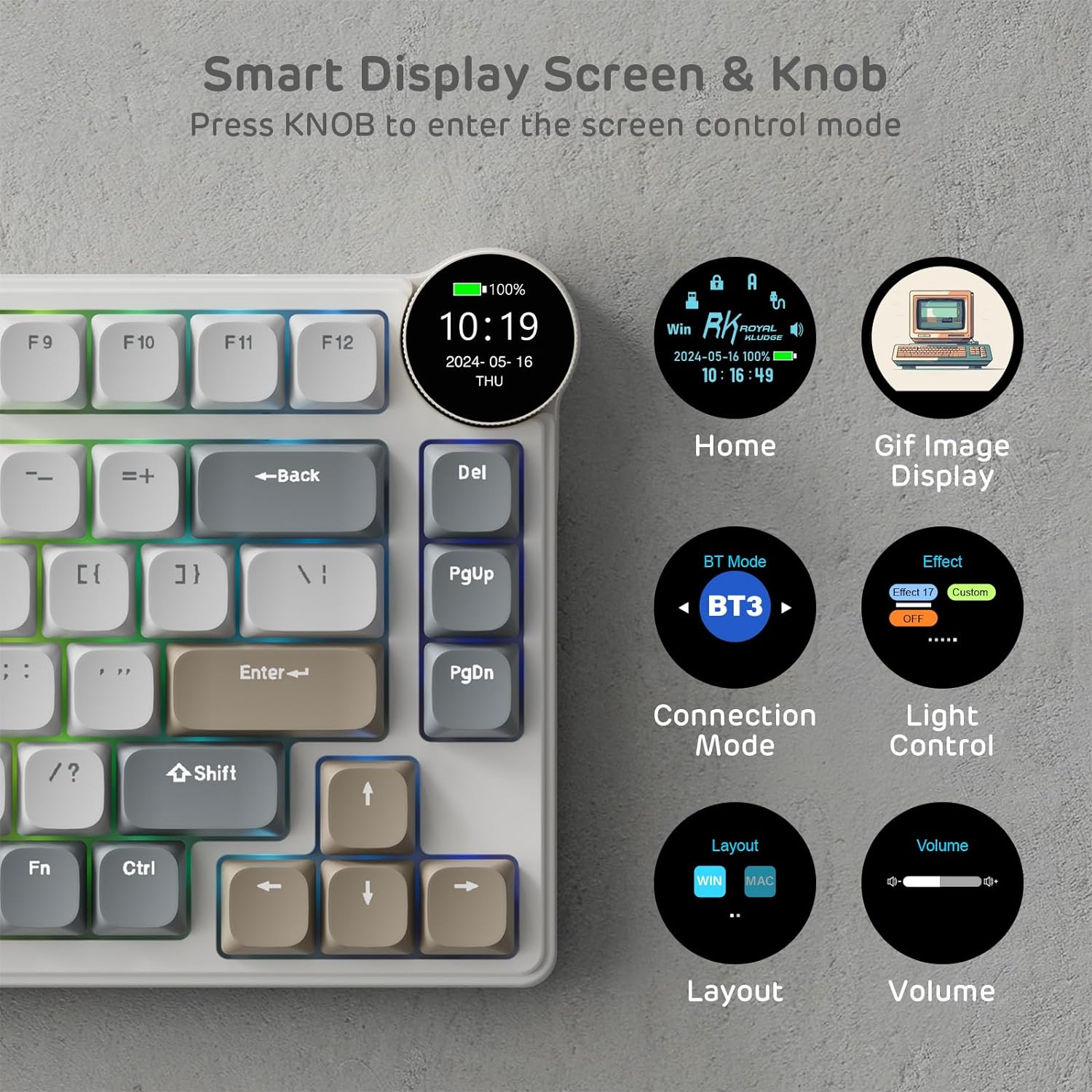
Image: A detailed view of the smart display screen and knob, illustrating the various functions accessible by pressing the knob, including home screen, GIF display, connection modes, light control, layout, and volume.
4.2 RGB Backlight Control
The keyboard's RGB backlighting can be controlled using function key combinations or via the knob:
- Fn + \|: Switch Backlight Mode
- Fn + <: Switch Backlight Color
- Fn + ↑ / ↓: Adjust Backlight Brightness
- Fn + ← / →: Adjust Breathing Speed
Note: Backlight settings can also be adjusted through the knob in screen control mode.

Image: The keyboard with RGB lighting, showing the key combinations for backlight mode, color, brightness, and breathing speed adjustments.
4.3 Software Support
For advanced customization, the RK N80 supports dedicated software. This software allows you to:
- Redefine Keys: Customize key assignments and create macros.
- GIF Image Display Setting: Upload and manage custom GIFs for the smart display screen.
- Edit Macro: Create and edit complex macro sequences for enhanced productivity or gaming.
Please refer to the official RK ROYAL KLUDGE website for software download and detailed instructions.

Image: Screenshots of the keyboard's software interface, demonstrating options for key redefinition, GIF image display settings, and macro editing.
5. Maintenance
Proper maintenance ensures the longevity and optimal performance of your RK ROYAL KLUDGE N80 keyboard:
- Cleaning: Use a soft, dry cloth to wipe the keyboard surface. For deeper cleaning, use a can of compressed air to remove dust and debris from between keycaps. For stubborn stains, a slightly damp cloth with mild soap can be used, ensuring no liquid enters the keyboard.
- Keycap and Switch Replacement: Use the provided 2-in-1 keycap & switch puller to safely remove keycaps and switches. When replacing switches, ensure proper alignment before gently pressing them into place.
- Storage: When not in use, store the keyboard in a cool, dry place. Use the provided dust cover to protect it from dust accumulation.
- Avoid Liquids: Keep liquids away from the keyboard to prevent damage to internal components.
6. Troubleshooting
If you encounter issues with your RK ROYAL KLUDGE N80 keyboard, refer to the following common solutions:
| Issue | Possible Cause | Solution |
|---|---|---|
| Keyboard not connecting wirelessly (2.4GHz/Bluetooth) | Low battery, incorrect mode, interference, pairing issue. | Ensure keyboard is charged. Switch to the correct wireless mode (2.4G or BT). Re-pair Bluetooth connection. Move closer to the receiver/device. |
| Keys not responding or double-typing | Dust/debris under keycap/switch, faulty switch. | Clean under keycaps with compressed air. If a switch is faulty, replace it using the provided backup switches and puller. |
| Smart display screen not working | Software glitch, power issue. | Restart the keyboard. Ensure sufficient battery. Check software settings for display options. |
| RGB backlighting not functioning | Backlight turned off, low battery, software setting. | Press Fn + \| to cycle modes or Fn + ↑ to increase brightness. Charge the keyboard. Check software settings. |
| Keyboard wobbles during typing | Uneven surface, issue with keyboard base. | Ensure the surface is flat. The keyboard is designed with a heavy-duty base to minimize wobbling. If persistent, check the adjustable feet. |
7. Specifications
| Feature | Detail |
|---|---|
| Model Number | N80 |
| Dimensions (L x W x H) | 12.68 x 5.31 x 0.99 inches (32.2 x 13.5 x 2.5 cm) |
| Item Weight | 2.31 pounds (1.05 kg) |
| Connectivity Technology | Bluetooth 5.0, 2.4GHz RF Wireless, USB-C Wired |
| Keyboard Type | Mechanical Keyboard with Low Profile Switches |
| Switch Type | Low Profile Brown Tactile Switches |
| Switch Operating Force | 45 ± 10gf |
| Switch Pre Travel | 1.5 ± 0.4mm |
| Switch Total Travel | 3.2 ± 0.4mm |
| Switch Click Lifespan | 50 Million |
| Battery Type | Lithium Polymer |
| Battery Capacity | 3750mAh |
| Backlighting | RGB |
| Compatible Devices | Laptop, PC |
| Special Features | Low-Profile Key, Portable, Programmable Keys, Rechargeable, Volume Roller, Smart Display Screen |
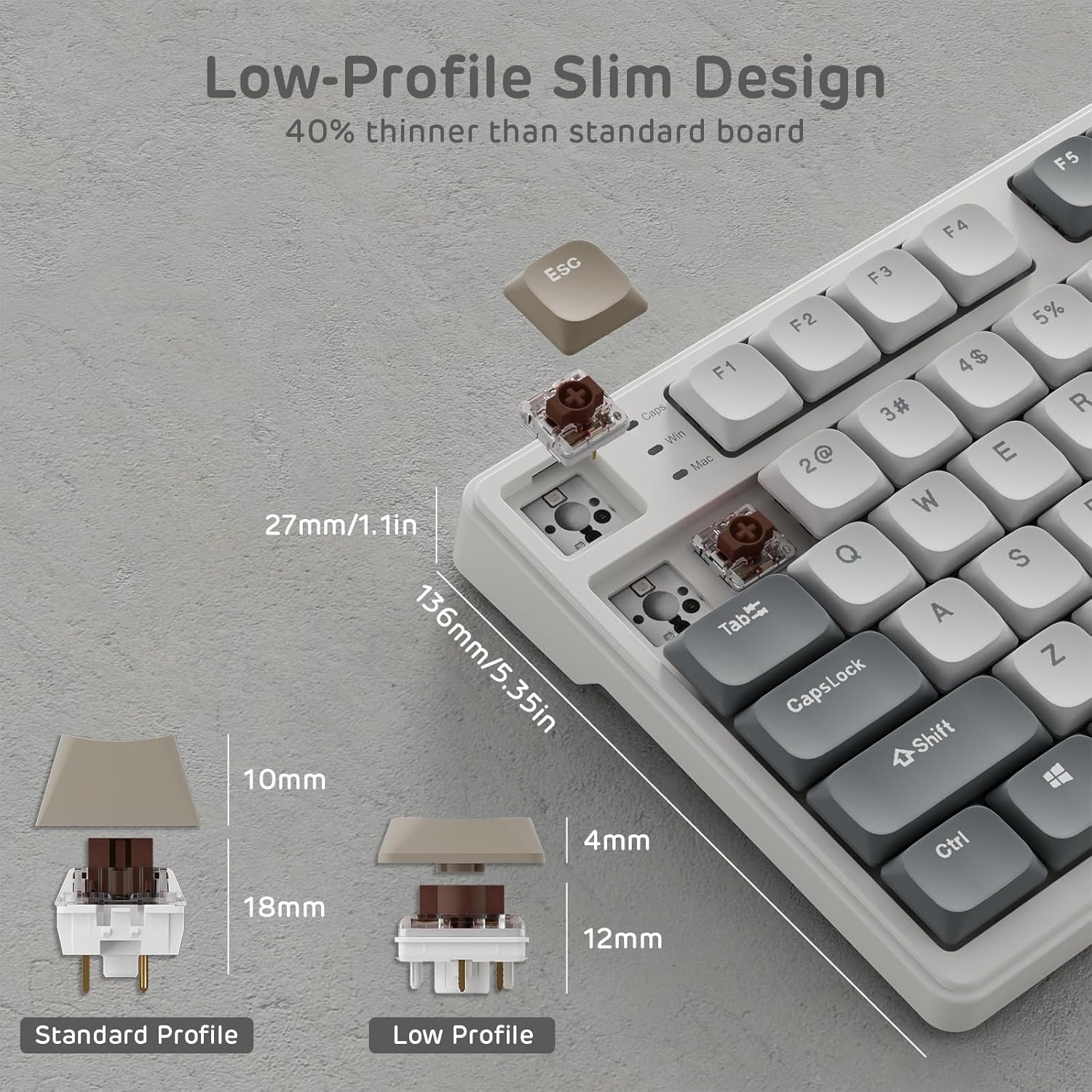
Image: A diagram illustrating the slim profile of the RK N80 keyboard, comparing the height of low-profile switches (12mm) to standard profile switches (18mm), and showing the overall keyboard thickness (27mm/1.1in).
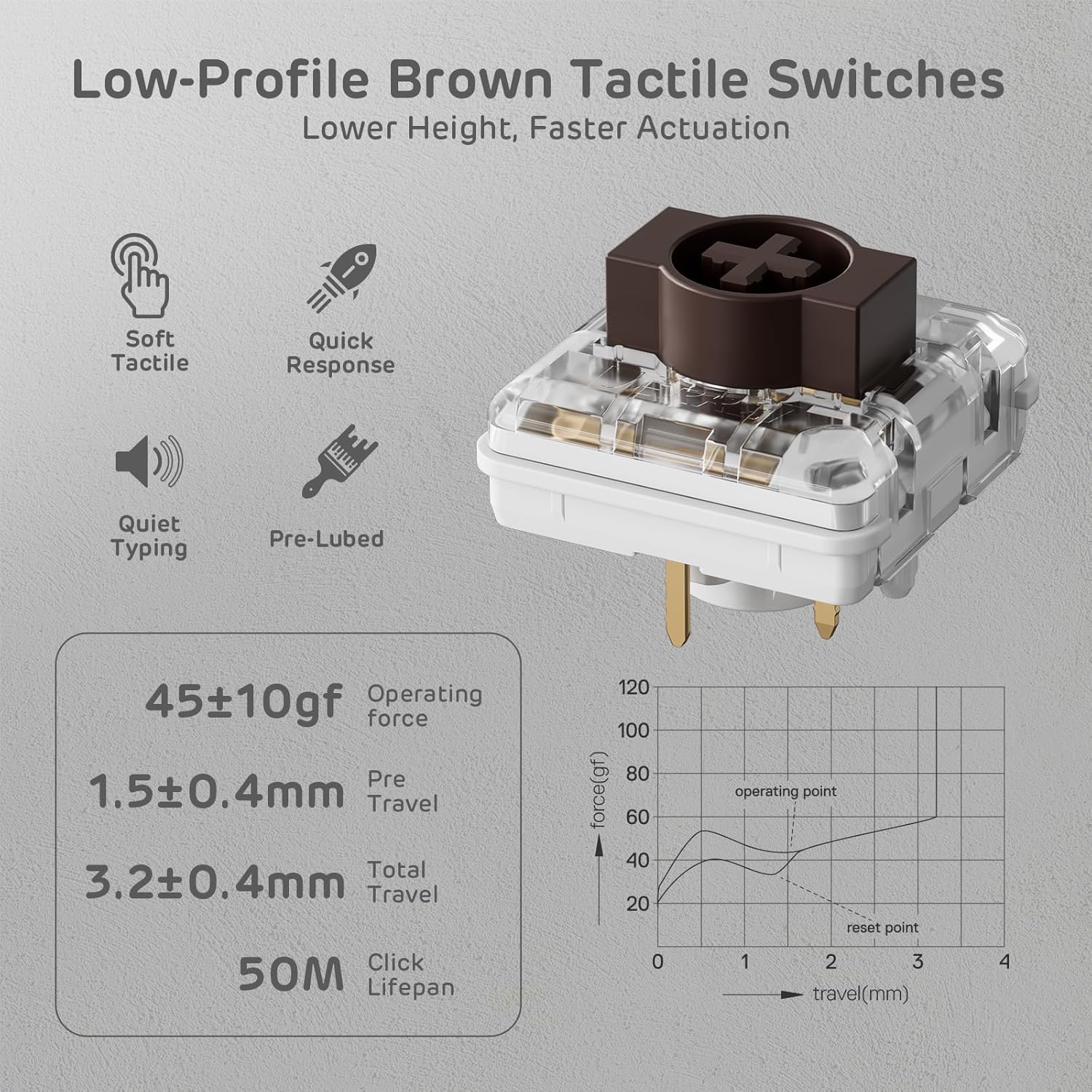
Image: A close-up view of the low-profile brown tactile switch, detailing its characteristics such as soft tactile feel, quick response, quiet typing, pre-lubed status, and key specifications like operating force, pre-travel, total travel, and click lifespan.
8. Warranty and Support
For detailed warranty information and customer support, please refer to the official RK ROYAL KLUDGE resources:
- User Manual (PDF): For a comprehensive guide, you can download the official PDF user manual from here.
- Brand Store: Visit the official RK ROYAL KLUDGE store on Amazon for product information, FAQs, and additional support: RK ROYAL KLUDGE Store.
For technical assistance or warranty claims, please contact RK ROYAL KLUDGE customer service through their official channels.
Related Documents - N80
 |
N80 Mini PC User Manual User manual for the N80 Mini PC, covering setup, language management, product details, package contents, and FCC statement. |
 |
RK ROYAL KLUDGE L75 Mechanical Keyboard User Manual Comprehensive user guide for the RK ROYAL KLUDGE L75 75% mechanical keyboard, covering wired and wireless setup, key functions, RGB customization, software features, and troubleshooting tips. |
 |
RK ROYAL KLUDGE M75 Wireless Mechanical Keyboard: User Manual & Specifications Comprehensive user manual and technical specifications for the RK ROYAL KLUDGE M75 Wireless Mechanical Keyboard. Learn about its 75% layout, 81 keys, gasket mount, OLED display, RGB backlighting, and connectivity options (2.4Ghz, Bluetooth 5.1, USB-C). |
 |
RK ROYAL KLUDGE R87 Pro 75% Mechanical Keyboard User Guide | Hot-swappable, QMK/VIA, RGB Comprehensive user guide for the RK ROYAL KLUDGE R87 Pro wired mechanical keyboard. Learn about its 75% TKL layout, hot-swappable switches, gasket mount, RGB backlighting, QMK/VIA customization, and MDA profile keycaps. |
 |
RK ROYAL KLUDGE Mechanical Wireless Keyboard User Manual Comprehensive user manual for the RK ROYAL KLUDGE Mechanical Wireless Keyboard (Model 166-75001-06), covering wired, 2.4GHz, and Bluetooth connectivity, backlight controls, special function keys, multimedia shortcuts for Windows and Mac, battery status, and system requirements. |
 |
RK ROYAL KLUDGE RK96 Mechanical Wireless Keyboard User Manual User manual for the RK ROYAL KLUDGE RK96 mechanical wireless keyboard, detailing features like Bluetooth, 2.4GHz, and USB-C connectivity, customizable backlighting, multimedia controls, and system requirements. |
Ask a question about this manual
Ask about setup, troubleshooting, compatibility, parts, safety, or missing instructions. Manuals+ will review the question and use this page’s manual context to help answer it.