
HuBDIC FE-5848
HuBDIC HubiCare Heat and Cool Massage Gun User Manual
Model: FE-5848
Introduction
Thank you for choosing the HuBDIC HubiCare Heat and Cool Massage Gun. This manual provides essential information for the safe and effective use of your device. Please read it thoroughly before operation and retain it for future reference.

Image: The HuBDIC HubiCare Heat and Cool Massage Gun, showing the main unit, detachable extension handle, carrying case, and five interchangeable massage heads.
Safety Information
Important Safety Instructions:
- Always read and follow the instructions provided.
- Charge the device fully before first use.
- Avoid using the device for more than 15 minutes at a time to prevent injury.
- Use gentle circular motions and do not apply excessive pressure.
- Keep the device away from water to prevent electrical shock.
- Consult a healthcare professional before use if you have any medical conditions or are pregnant.
- Do not disassemble or attempt to repair the device yourself.
- Keep out of reach of children.
Product Components
The HuBDIC HubiCare Massage Gun includes the following components:
- Main Massage Gun Unit
- Detachable Extension Handle
- U-shaped Head
- Conical Head
- Ball Head
- Wolf Tooth Head
- Cooling and Heating Head (Special Head)
- USB A-C Charging Cable (for main unit)
- Carrying Case

Image: The main massage gun unit, the detachable extension handle, and the five different massage heads (U-shaped, Conical, Ball, Wolf Tooth, and Cooling/Heating head).
Setup
- Initial Charging: Fully charge the massage gun before its first use. Connect the USB A-C charging cable to the main unit and a suitable USB power adapter (not included). The LED display will indicate charging status.
- Attaching the Extension Handle: To attach the extension handle, align the connector on the handle with the port on the main unit and push firmly until it clicks into place. To detach, press the release button (if present) and pull the handle away.
- Attaching Massage Heads: Select the desired massage head. Insert the stem of the massage head firmly into the opening at the front of the massage gun. Ensure it is securely seated before use. To remove, gently pull the head out.

Image: A visual guide demonstrating the attachment and detachment process of the extension handle to the main massage gun unit.
Operating Instructions
- Power On/Off: Press and hold the power button for 2 seconds to turn the device on or off. The LED screen will illuminate upon activation.
- Adjusting Massage Intensity: Short press the power button to cycle through the 9 available massage intensity levels. The LED display will show the current speed level.
- Using the Heat and Cool Head:
- This special head operates independently. Ensure it is charged via its dedicated Type-C port before use.
- Press the mode switch button on the head to select Heat Mode or Cool Mode.
- In Heat Mode, the red LED on the head will light up. Temperatures range from 99-113°F (37-45°C) across three levels.
- In Cool Mode, the green LED on the head will light up. Temperatures range from 47-61°F (8-16°C) across three levels.
- Adjust the temperature level using the 3-level adjustment button on the head.
- Application: Apply the massage gun to the desired muscle area. Use gentle, circular motions. Do not press excessively hard or remain on one spot for too long.
- Automatic Shut-off: For safety and to prevent overuse, the device will automatically turn off after 15 minutes of continuous operation.

Image: Close-up of the HuBDIC HubiCare Massage Gun's LED display, illustrating the battery level indicator and the current speed setting.
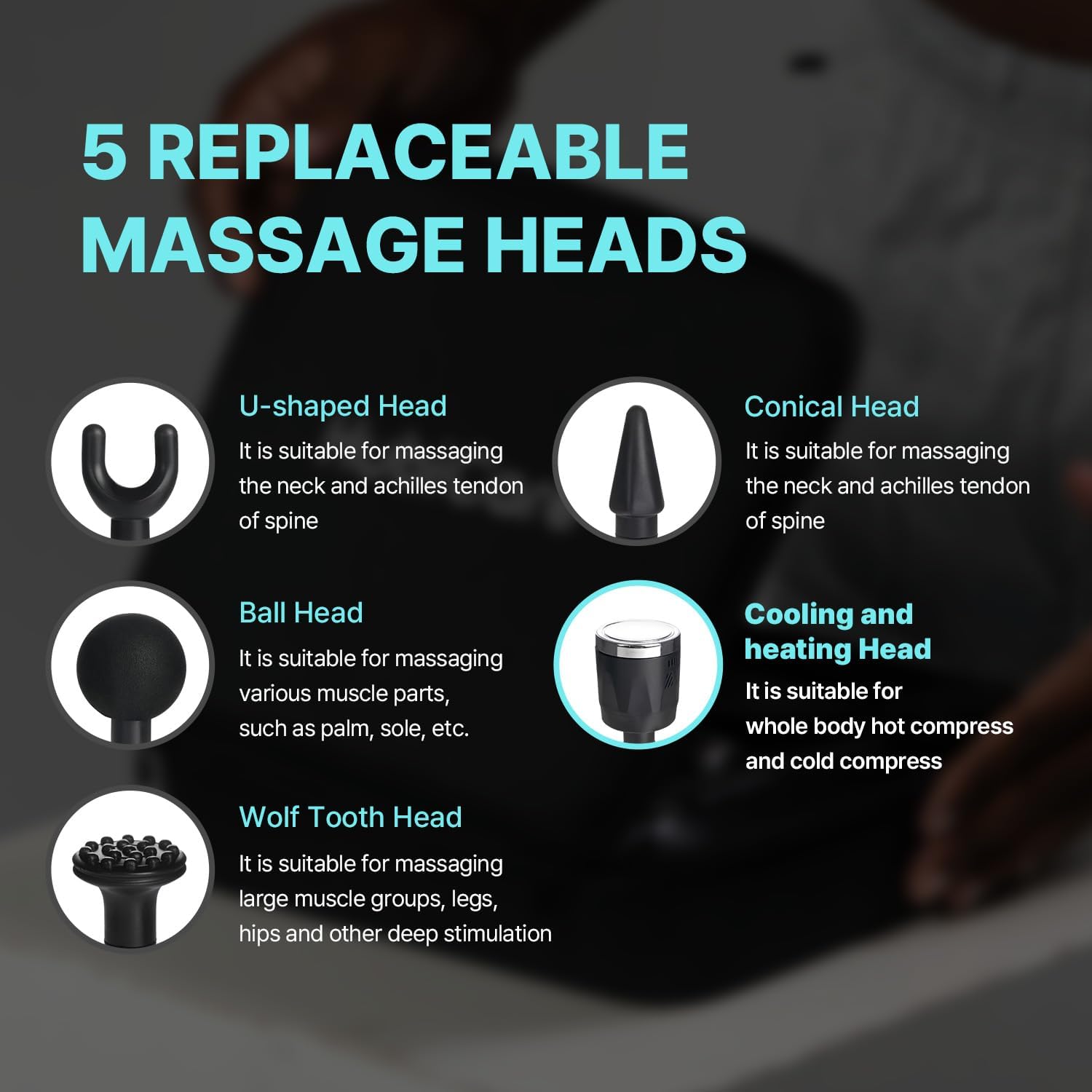
Image: The special heat and cool therapy head of the HuBDIC HubiCare Massage Gun, showing the red light for heat mode and blue light for cool mode.
Maintenance
- Cleaning: After each use, wipe the massage gun and massage heads with a clean, damp cloth. Do not use abrasive cleaners or immerse the device in water.
- Storage: Store the massage gun and its accessories in the provided carrying case in a cool, dry place, away from direct sunlight and extreme temperatures.
- Battery Care: To prolong battery life, avoid fully discharging the battery frequently. Charge the device regularly, even if not in use for extended periods.
Troubleshooting
| Problem | Possible Cause | Solution |
|---|---|---|
| Device does not turn on. | Low battery or not charged. | Charge the device fully using the provided USB A-C cable. |
| Massage head falls off during use. | Head not securely attached. | Ensure the massage head is firmly inserted into the device. |
| Heat/Cool head not working. | Heat/Cool head not charged or not activated. | Charge the Heat/Cool head separately via its Type-C port. Press its mode switch button to activate. |
| Device automatically shuts off too quickly. | 15-minute auto-off safety feature activated. | This is normal operation. Restart the device if further use is desired. |
Specifications
- Model Number: FE-5848
- Product Dimensions: 9.06 x 2.95 x 10.83 inches
- Item Weight: 1.32 Pounds (600 Grams)
- Power Source: Battery Powered (1 Lithium Ion battery included)
- Material: Acrylonitrile Butadiene Styrene
- Massage Intensity Levels: 9 speeds
- Heat Mode Temperature Range: 99-113°F (37-45°C)
- Cool Mode Temperature Range: 47-61°F (8-16°C)
- Auto-off Timer: 15 minutes
Warranty and Support
For warranty information or technical support, please refer to the official HuBDIC website or contact their customer service directly. Keep your purchase receipt as proof of purchase.
Manufacturer: HuBDIC
ASIN: B0D41M8HXJ
Date First Available: May 13, 2024
For additional assistance, you may visit the HuBDIC Store on Amazon.
Ask a question about this manual
Ask about setup, troubleshooting, compatibility, parts, safety, or missing instructions. Manuals+ will review the question and use this page’s manual context to help answer it.