
1. Introduction and Overview
The CARPURIDE W502 Motorcycle GPS CarPlay Screen is a portable, waterproof touchscreen device designed to enhance your riding experience with seamless smartphone integration. It supports wireless Apple CarPlay and Android Auto, allowing access to navigation, calls, music, and messaging directly from your motorcycle's handlebars. Featuring a 5-inch HD IPS touchscreen with high brightness and dual Bluetooth connectivity, the W502 ensures clear visibility and hands-free operation in various conditions.

Figure 1: Wireless CarPlay and Android Auto interfaces on the CARPURIDE W502 screen.
2. Package Contents
Before installation, please verify that all components are included in your package:
- 1x CARPURIDE W502 Motorcycle CarPlay Screen
- 1x Power Line (for direct battery connection)
- 1x USB Boost Cable (for motorcycle USB port connection)
- 1x U-shaped Support (Mounting Bracket)
- 1x 64G TF Card (for local playback, not software updates)
- 1x Extension Rod
- 1x User Manual
- Installation Tools and Accessories (screws, silicone pads, zip ties)

Figure 2: Complete packing list for the CARPURIDE W502.
Video 1: Unboxing and initial overview of a similar Motorcycle CarPlay unit, demonstrating typical package contents.
3. Setup and Installation
3.1 Mounting the Device
The W502 comes with a bracket kit for easy installation on most motorcycle handlebars. Follow these steps:
- Attach the U-shaped support mount to your motorcycle handlebar using a Phillips screwdriver. Ensure appropriate silicone pads are used based on your handlebar diameter (12mm, 22mm, 25.4mm, or 28mm) for a secure fit.
- Clamp the connecting rod to the mount. The mount is 360° adjustable for optimal viewing angle.
- Insert the W502 device onto the bracket and adjust its position as desired. Tighten the adjustment ring to secure the screen.

Figure 3: Step-by-step guide for installing the mounting brackets and connecting the power line.
Video 2: Installation and function introduction for the W712D, which shares similar mounting principles with the W502.
3.2 Power Connection Options
The W502 offers two power connection methods:
- Motorcycle Power Line: Connect the provided power line directly to your motorcycle's battery (ACC +12V and ground). Ensure the output voltage and current are 12V, 1A.
- USB Port with Boost Cable: If your motorcycle's USB port provides 5V and 2.5A or higher, use the USB boost cable to directly connect the W502. If the USB port outputs less than 5V, 2A, it is not recommended to use this method as it may cause automatic shutdown.
The W502 has built-in reverse protection to prevent damage from incorrect cable connections.

Figure 4: Detailed wiring diagram for connecting the power line to the motorcycle battery.

Figure 5: Instructions for using the USB Boost Cable for power via the motorcycle's USB port.
4. Operating Instructions
4.1 Wireless CarPlay and Android Auto
The W502 supports both wireless Apple CarPlay and Android Auto. To connect:
- Ensure Bluetooth and Wi-Fi are enabled on your smartphone.
- On the W502 screen, select either 'CarPlay' or 'Android Auto'.
- On your phone, search for the W502's Bluetooth name (e.g., 'CAR-BT_4DAF') and pair.
- Confirm the pairing code and allow contact/favorite sync if prompted.
- Once connected, your phone's CarPlay or Android Auto interface will appear on the W502 screen.
Figure 6: Wireless CarPlay and Android Auto interfaces shown side-by-side on the W502.

Figure 7: Visual guide for connecting an iPhone to CarPlay on the W502.

Figure 8: Visual guide for connecting an Android phone to Android Auto on the W502.
4.2 Dual Bluetooth Connectivity
The W502 features dual Bluetooth, allowing you to connect your smartphone to the screen and simultaneously pair the screen with your Bluetooth-enabled helmet or headphones for audio output.
- After successfully connecting your smartphone to the W502 via CarPlay or Android Auto, navigate to the 'Audio Output' setting on the W502.
- Select 'Iplay/auto' to route audio from your phone through the W502 to your Bluetooth helmet/headphones.
- Alternatively, use 'BT Trans' mode: Go to 'Audio Output' and enter the BT Trans interface. Select 'BT Trans', turn on your cycling helmet or earphones, and click 'Carpuride Moto BT search' to pair. Ensure your phone is not connected to the BT earphones directly; if it is, disconnect and delete the pairing record from your phone's Bluetooth list.
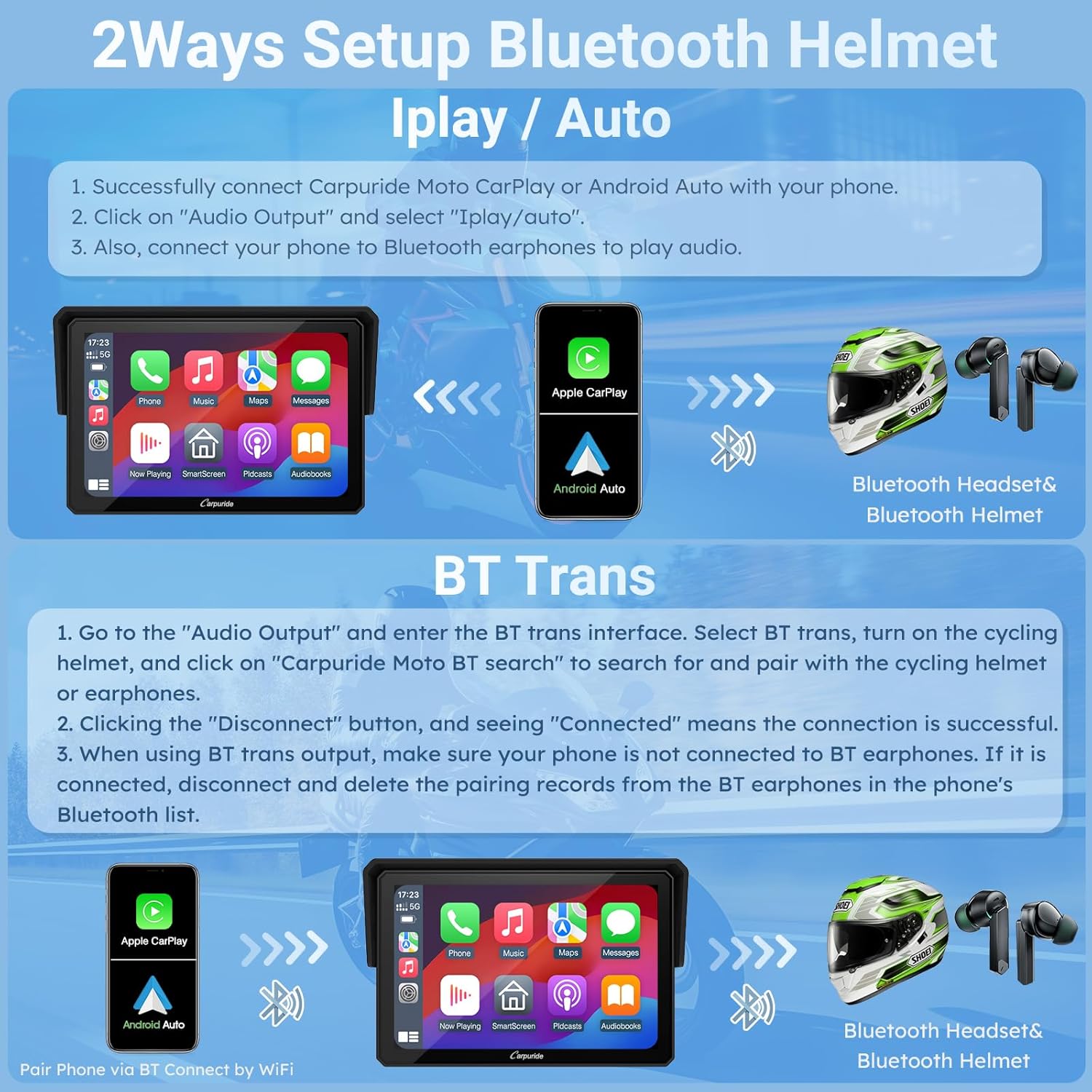
Figure 9: Two methods for connecting your Bluetooth helmet or earphones for audio.
4.3 Voice Control and Navigation
Utilize Siri or Google Assistant for hands-free control of navigation, phone calls, music playback, and text messaging. This allows you to focus on the road while riding.
- Access map navigation apps like Google Maps, Apple Maps, Waze, HERE maps, or Sygic directly from the screen.
- Make and receive calls, listen to music, and send messages using voice commands.

Figure 10: Examples of hands-free phone features available through the W502.

Figure 11: Popular navigation applications compatible with the W502.
4.4 Local Audio Playback and EQ
The included 64G TF card supports storing music and videos for local playback. The W502 also features a built-in preset EQ and a user-customized 16-band HD EQ with 12 adjustable frequency sections. When playing music via SD or Bluetooth, you can adjust bass effects and choose sound effect modes (rock, classical, jazz, etc.).

Figure 12: The W502 supports local playback of music and videos from the 64G TF card.
4.5 Digital Wired Controller
The digital wired controller allows for convenient operation without touching the screen. Functions typically include cycling through options, taking photos, and returning to the home screen.
Video 3: Installation and function introduction for the W702/502 BS Pro, demonstrating how to use the digital wired controller and enter NAV mode.
5. Maintenance
The CARPURIDE W502 is designed for durability and performance in various weather conditions:
- IP67 Waterproof: The device is IP67 rated, ensuring it can withstand rain and other wet conditions.
- Temperature Resistance: Operates flawlessly in a temperature range of -20°C to 70°C.
- Anti-Theft Design: Features a detachable bracket for enhanced security and convenience.
- Screen Visibility: The 5-inch HD IPS touchscreen with 800x480 resolution and up to 1000nit peak brightness provides clear viewing even under bright outdoor sunlight.

Figure 13: The W502's robust design ensures performance in diverse environmental conditions.
6. Troubleshooting
- Insufficient Power: If the device automatically shuts down when using the USB boost cable, ensure your motorcycle's USB port outputs at least 5V, 2.5A. Otherwise, use the direct motorcycle power line connection.
- Software Updates: The accessory 64G TF card is for local playback only and does not support software upgrades. For software updates, use a smaller capacity TF card (32GB, 16GB, 8GB, or 4GB).
- Phone Compatibility: The device is not perfectly compatible with Samsung Note and S series phones. Before purchasing, ensure your phone supports wireless CarPlay or wireless Android Auto.
- Bluetooth Connection Issues: If experiencing issues with Bluetooth audio, ensure your phone is not directly connected to your helmet/earphones when using 'BT Trans' mode. Delete previous pairing records if necessary.

Figure 14: Important notes on phone compatibility for optimal performance.

Figure 15: Clarification on TF card usage for software updates versus local media storage.
7. Specifications
| Feature | Specification |
|---|---|
| Brand | CARPURIDE |
| Model | W502 |
| Screen Size | 5 Inches |
| Display Type | LCD |
| Scanner Resolution | 800 x 480 |
| Peak Brightness | Up to 1000nit |
| Operating System | Android (for internal functions) |
| Connectivity Technology | Bluetooth |
| Special Features | Android Auto, Apple CarPlay, GPS Navigation, Touchscreen, Voice Control |
| Waterproof Rating | IP67 |
| Operating Temperature | -20°C to 70°C |
| Memory Storage Capacity | 64 GB (TF card included) |
| Mounting Type | Handlebar Mount |
| Product Dimensions | 2.75 x 13.42 x 8.89 cm; 850 g |
8. Warranty and Support
For warranty information, technical support, or any inquiries regarding your CARPURIDE W502, please refer to the contact details provided in the product packaging or visit the official CARPURIDE website. Keep your purchase receipt for warranty claims.


