Introduction
This manual provides instructions for the Allimity N2QAYB001101 replacement remote control. This remote is designed to function as a direct replacement for original Panasonic remote controls, compatible with various CD Stereo System models including SB-PMX70, SC-PMX82, SC-PMX80, SA-PMX82MEBK, and SC-PMX94EG-K. It offers full access to all original functions without requiring any programming.

Figure 1: Replacement Remote vs. Original Remote.
Setup
Battery Installation
The Allimity N2QAYB001101 remote control requires two (2) 1.5V AAA alkaline batteries (not included). Follow these steps to install the batteries:
- Locate the battery compartment on the back of the remote control.
- Slide the battery compartment cover downwards to open it.
- Insert two AAA batteries, ensuring the positive (+) and negative (-) terminals align correctly with the markings inside the compartment.
- Slide the battery compartment cover back into place until it clicks securely.

Figure 2: Battery Compartment. Ensure correct battery polarity during installation.
Initial Use
No programming or setup is required for this remote control. Once batteries are installed, it is ready for immediate use with compatible Panasonic CD Stereo Systems.
Operating Instructions
This remote control provides full functionality for your compatible Panasonic CD Stereo System. The layout and function of the buttons are designed to mirror the original remote control.
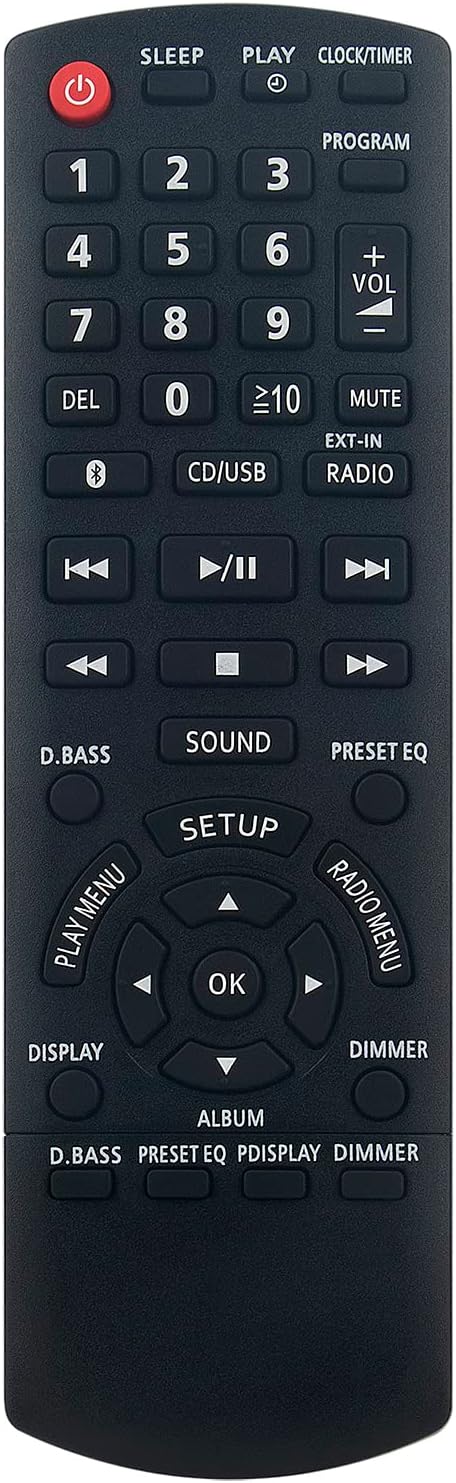
Figure 3: Front View of the Remote Control.
Key Functions Overview
- Power Button (●): Turns the stereo system on or off.
- Numeric Keypad (0-9): Used for direct track selection or inputting numbers for programming.
- Volume Control (VOL +/-): Adjusts the audio output level.
- Mute: Silences the audio output.
- CD/USB: Selects the CD or USB input source.
- EXT-IN: Selects the external input source.
- RADIO: Switches to radio mode.
- Playback Controls (Play/Pause, Stop, Skip Forward/Backward): Standard controls for media playback.
- D.BASS: Activates or deactivates dynamic bass boost.
- SOUND: Accesses sound settings.
- PRESET EQ: Cycles through preset equalizer modes.
- SETUP: Enters the system setup menu.
- Navigation Buttons (Up, Down, Left, Right, OK): Used for menu navigation and selection.
- DISPLAY: Changes display information.
- DIMMER: Adjusts the brightness of the stereo system's display.
- PLAY MENU: Accesses playback options.
- RADIO MENU: Accesses radio specific options.
Maintenance
Cleaning the Remote Control
To maintain the remote control's appearance and functionality, clean it regularly:
- Wipe the surface with a soft, dry cloth.
- For stubborn dirt, slightly dampen the cloth with water or a mild, non-abrasive cleaner. Do not spray cleaner directly onto the remote.
- Avoid using harsh chemicals, solvents, or abrasive cleaning pads, as these can damage the remote's finish or internal components.
Battery Replacement
Replace batteries when the remote control's response becomes sluggish or stops functioning. Always replace both batteries at the same time with new 1.5V AAA alkaline batteries. Do not mix old and new batteries or different types of batteries.
Storage
Store the remote control in a cool, dry place away from direct sunlight and extreme temperatures when not in use for extended periods. Remove batteries if storing for more than a month to prevent leakage.
Troubleshooting
| Problem | Possible Cause | Solution |
|---|---|---|
| Remote control not responding. | Dead or incorrectly installed batteries. | Replace batteries with new 1.5V AAA alkaline batteries, ensuring correct polarity. |
| Remote control range is reduced. | Weak batteries; Obstruction between remote and stereo system; Infrared sensor on stereo system is blocked. | Replace batteries. Ensure a clear line of sight between the remote and the stereo system. Clean any dust or debris from the stereo system's IR sensor. |
| Specific buttons not working. | Dirt or debris under the button; Internal malfunction. | Clean the remote control. If the issue persists, the remote may be faulty and require replacement. |
Specifications
- Model: N2QAYB001101
- Brand: ALLIMITY
- Compatible Devices: Panasonic SB-PMX70, SC-PMX82, SC-PMX80, SA-PMX82MEBK, SC-PMX94EG-K CD Stereo Systems, and other listed models.
- Connectivity Technology: Infrared
- Special Feature: No Programming Required
- Maximum Range: Approximately 10 meters (33 feet)
- Power Source: 2 x 1.5V AAA Alkaline Batteries (not included)
- Product Dimensions: 17 x 5 x 2.5 cm (6.7 x 2 x 1 inches)
- Product Weight: 80 grams (2.8 ounces)
Warranty and Support
For warranty information and customer support, please refer to the seller's policy on the platform where the product was purchased. As a replacement remote, specific warranty terms may vary. For general inquiries or assistance, please contact the seller directly through the purchase platform.
This product is designed to be a direct replacement and should function immediately upon battery installation. If you encounter any issues not covered in the troubleshooting section, please reach out to the seller for further assistance.