
1. Introduction
This manual provides essential information for the safe and effective operation, maintenance, and care of your Rubicon DX14 Electric Wheelchair. Please read this manual thoroughly before using the wheelchair to ensure proper understanding of its features and functions. Retain this manual for future reference.

Image: The Rubicon DX14 Electric Wheelchair, showcasing its compact design and control features.
2. Setup and Assembly
The Rubicon DX14 Electric Wheelchair is designed for minimal assembly. It arrives largely pre-assembled. Follow these steps for initial setup:
- Unfolding the Wheelchair: Carefully remove the wheelchair from its packaging. Place it on a flat, stable surface. Lift the backrest and unfold the frame until it locks securely into place. Ensure all locking mechanisms are engaged.
- Attaching the Joystick Controller: The joystick controller can be mounted on either the left or right armrest. Slide the controller onto the desired armrest and secure it. Connect the controller cable to the corresponding port on the wheelchair.
- Footrest Adjustment: Adjust the footrest to a comfortable position.
- Initial Battery Charge: Before first use, fully charge the lithium batteries. Connect the charger to a standard electrical outlet and then to the battery charging port. The battery can be charged while installed on the wheelchair or removed.
Video: Demonstrates the folding and unfolding process of the DX14 Electric Wheelchair.
3. Operating Instructions
3.1. Joystick Control
The 360-degree intelligent joystick provides precise control over the wheelchair's movement and speed.
- Power On/Off: Press the power button on the joystick to turn the wheelchair on or off.
- Speed Adjustment: Use the '+' and '-' buttons to increase or decrease the speed settings. The speed display indicates the current speed level.
- Directional Movement: Gently push the joystick in the desired direction (forward, backward, left, right) to move the wheelchair. Releasing the joystick will activate the electromagnetic brakes, bringing the wheelchair to a smooth stop.
- Horn: Press the horn button to alert others.
- Battery Indicator: The battery display on the joystick shows the current charge level.

Image: Detailed view of the joystick controller with power, speed, and horn buttons.
3.2. Electric and Manual Modes
The DX14 offers versatile operation in both electric and manual modes:
- Electric Mode: For powered operation, ensure the red levers on the motors are in the engaged position (typically pushed inwards).
- Manual Mode: To operate the wheelchair manually (like a traditional wheelchair), disengage the red levers on the motors (typically pulled outwards). This allows a caregiver to push the wheelchair.
3.3. Remote Control Operation
The wheelchair can also be operated remotely using the included Bluetooth remote controller, allowing a caregiver to drive or adjust the wheelchair from a distance.
Video: Shows the Rubicon DX14 in operation, highlighting its remote control capabilities and smooth movement.
3.4. Reclining Function
The backrest features a reclining function, allowing adjustment from 90 degrees to 160 degrees for enhanced user comfort. Adjust the backrest to your preferred angle by using the appropriate lever or mechanism.
4. Features and Benefits
- Longest-Range Battery: Equipped with high-quality Lithium-Ion cells, the DX14 provides an extended range of up to 30 miles on a single charge. An off-vehicle charging cable allows for convenient battery charging without removal.
- Powerful Motors: Features premium 300 Watt x 2 dual motors (600W total) with exceptional torque and power, capable of tackling steep slopes and diverse terrains. Posi-traction capabilities ensure stability.
- Electromagnetic Brake: Equipped with an electromagnetic brake system for instant stopping power and enhanced safety.
- Lightweight Yet Heavy-Duty: This portable electric wheelchair folds in just 3 seconds, combining heavy-duty performance with a super light and compact design. When folded, it is only 13 inches high, fitting easily into compact car trunks. It supports a weight capacity of 330 lbs and weighs only 64 lbs. Crafted from high-strength aircraft-grade aluminum alloy with a weatherproof coating.
- Small Turning Radius: With a turning radius of just 32 inches, the DX14 navigates tight spaces effortlessly, making it suitable for indoor use and fitting through standard doorways.
- All-Terrain Performance: Excels on various terrains including grass, ramps, sand, mud, snow, and bumpy roads.

Image: Visual representation of the DX14's extended battery range.
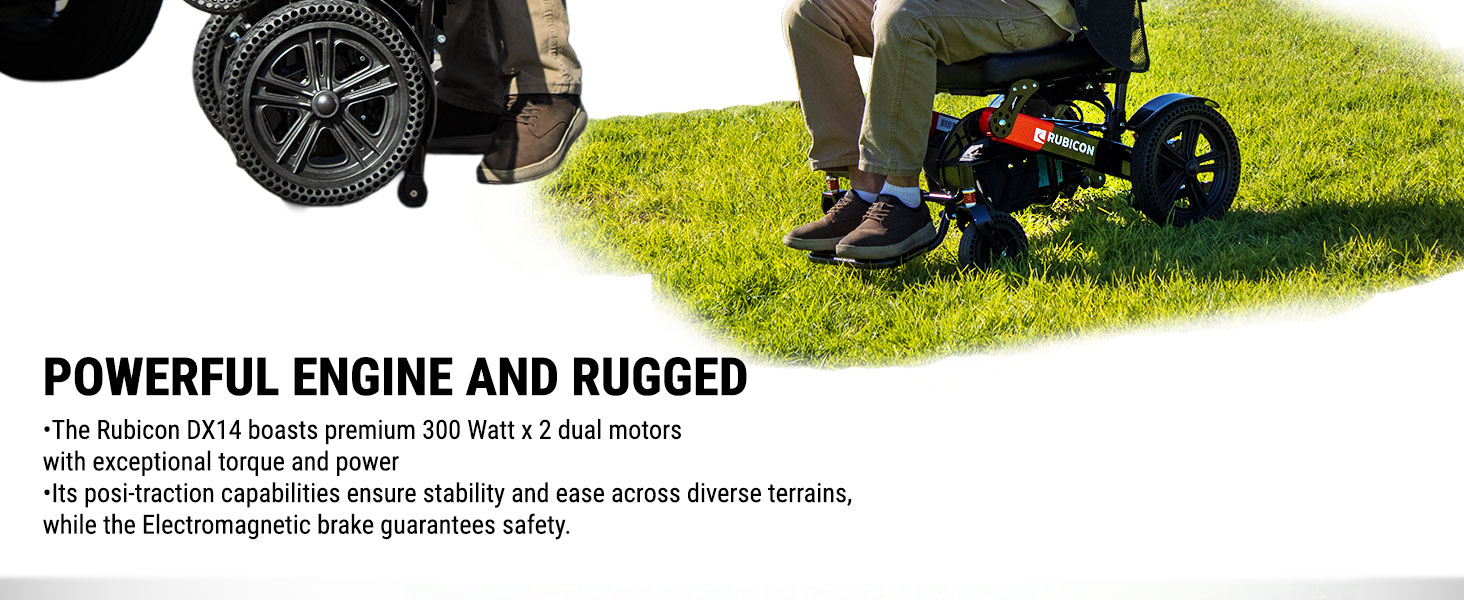
Image: Focus on the powerful dual motors of the DX14.

Image: The DX14 wheelchair in its folded state, ready for transport.

Image: The DX14 demonstrating its all-terrain capabilities.
Video: Showcases the DX14's maneuverability and performance on different surfaces.
5. Maintenance
Regular maintenance ensures the longevity and optimal performance of your Rubicon DX14 Electric Wheelchair.
- Cleaning: Wipe down the frame and seat with a damp cloth. Avoid using abrasive cleaners. The high-density single-cell foam seat is breathable and removable for easy cleaning.
- Battery Care: Always fully charge the batteries after each use. Store the wheelchair in a cool, dry place if not in use for extended periods, ensuring the batteries are charged periodically.
- Tire Inspection: Regularly check the solid rubber tires for any signs of wear or damage.
- General Inspection: Periodically check all nuts, bolts, and connections to ensure they are secure.
6. Troubleshooting
If you encounter any issues with your Rubicon DX14, refer to the following common troubleshooting tips:
- Wheelchair Not Powering On: Check if the battery is properly connected and fully charged. Ensure the power button on the joystick is pressed.
- Wheelchair Not Moving: Verify that the motors are engaged (red levers pushed inwards). Check joystick connections. Ensure the battery has sufficient charge.
- Erratic Movement/Control: Ensure the joystick is securely attached and its cable is not damaged. If issues persist, contact customer support.
- Reduced Range: This may indicate a low battery charge or aging batteries. Ensure batteries are fully charged before use.
For persistent issues or concerns not covered here, please contact Rubicon Customer Support.
7. Specifications
| Feature | Specification |
|---|---|
| Product Dimensions | 40"D x 21"W x 35"H |
| Item Weight | 64 Pounds |
| Weight Capacity | 330 lbs |
| Motor Power | 2x300W (600W total) |
| Battery Type | Dual 12AH Lithium Batteries |
| Max Range | Up to 30 Miles |
| Turning Radius | 32 inches |
| Material | Aircraft-grade Aluminum Alloy |
8. Warranty and Support
Rubicon is a US-based company headquartered in California, providing Gold Standard Customer Support.
- Frame: 1 Year Warranty
- Motor and Joystick Controller: 1 Year Warranty
- Battery: 6 Months Warranty
For warranty claims or technical assistance, please contact Rubicon Customer Support.