
WESHLGD KH888
Contents
WESHLGD Combination Gas & Carbon Monoxide Detector User Manual
Model: KH888 | Brand: WESHLGD
Introduction
This manual provides important information regarding the installation, operation, and maintenance of your WESHLGD Combination Gas & Carbon Monoxide Detector. Please read this manual thoroughly before using the device and retain it for future reference.
The WESHLGD Combination Gas & Carbon Monoxide Detector is designed to provide early warning of both combustible gas leaks (such as LNG, LPG, propane, methane) and dangerous levels of carbon monoxide (CO). It features a high-precision electrochemical sensor for CO detection and a catalytic combustion sensor for combustible gases, ensuring high sensitivity and reliable protection.
Safety Information
- This device is intended for indoor use only.
- Do not install in areas with high humidity, excessive dust, or direct sunlight.
- Do not paint the detector. Paint can clog the sensor openings and interfere with the unit's ability to detect gas or CO.
- Regularly test the detector as instructed in this manual to ensure proper function.
- This detector is not a substitute for proper maintenance of fuel-burning appliances, including appropriate ventilation and exhaust systems.
- In case of an alarm, follow emergency procedures immediately.
Product Overview
Familiarize yourself with the components and indicators of your detector:
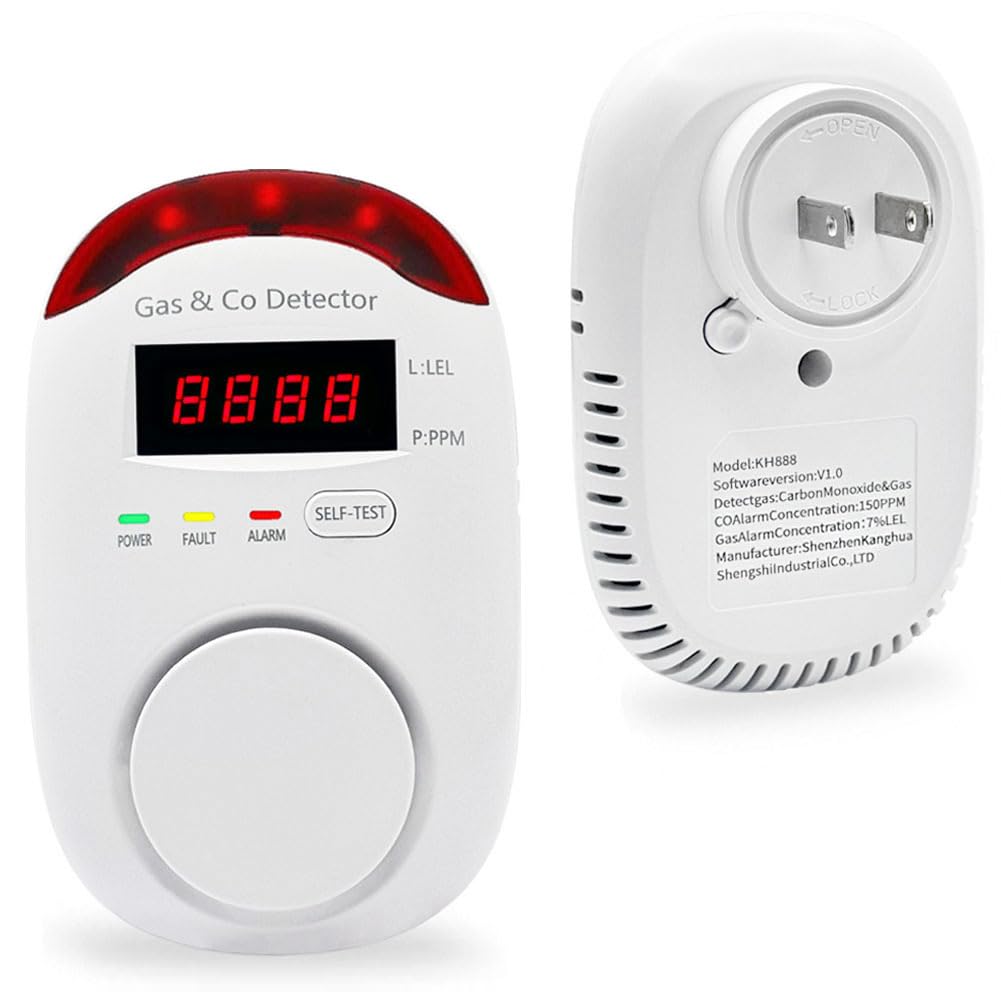
Figure 1: Front and back view of the detector with labeled components including Light Alarm, LED Display, Alarm Light, Test Button, Fault Light, Power Light, Air Inlet, and the rotatable plug.
- Light Alarm: Visual indicator for alarms.
- LED Display: Shows gas/CO concentration levels and preheating countdown.
- Alarm Light: Flashes during an alarm condition.
- Test Button: Used to manually test the detector's functionality.
- Fault Light: Indicates a malfunction or error in the device.
- Power Light: Indicates the device is powered on and operating normally (green light).
- Air Inlet: Where air samples are drawn for detection.
- Rotatable Plug: Allows for flexible installation in various outlet orientations.
Setup and Installation
The WESHLGD Combination Gas & Carbon Monoxide Detector is designed for simple plug-and-play installation.
- Choose a Location: Select an appropriate location for installation.
- For gas detection, install near gas-burning appliances (e.g., kitchen, utility room).
- For carbon monoxide detection, install in sleeping areas and on every level of your home.
- Avoid installing near windows, doors, or ventilation openings that could affect sensor readings.
- Avoid areas with high humidity or excessive dust.
- Plug In: Insert the detector directly into a standard electrical outlet. The plug can rotate to accommodate horizontal or vertical outlets.
- Preheating: Upon plugging in, the device will initiate a 180-second preheating sequence. The LED screen will display a countdown. During this time, the device is calibrating its sensors.
- Ready for Use: Once preheating is complete, the green power light will illuminate, indicating the detector is working normally and ready to monitor.

Figure 2: Recommended home installation locations for various types of alarms, including combination smoke/CO alarms.
Operating Instructions
Normal Operation
During normal operation, the green power light will be steadily illuminated. The LED display may show "0" or remain blank, indicating no detectable levels of gas or CO.
Alarm Conditions
When flammable gas or carbon monoxide levels exceed the preset safety standards, the detector will activate an alarm:
- Voice Warning: The detector will emit a loud voice warning (>85dB).
- Light Alarm: The red light alarm will flash.
- LED Display: The LED screen will show the detected concentration level (e.g., "CO" for carbon monoxide, "GAS" for combustible gas, followed by the concentration in PPM or %LEL).

Figure 3: Detector indicating gas and CO detection thresholds. CO Alarm Concentration: ≥150PPM. Gas Alarm Concentration: ≥7%LEL.
Action in Case of Alarm:
- Immediately move to fresh air outdoors or open all doors and windows to ventilate the area.
- Do not re-enter the premises until the alarm has stopped and the area has been thoroughly ventilated.
- If the alarm persists, evacuate the premises and call emergency services or your gas provider.
Testing the Detector
It is recommended to test the detector monthly to ensure it is functioning correctly.
- Press and hold the SELF-TEST button.
- The detector will emit a series of beeps and flashes, and the LED display will cycle through test indications.
- Release the button. If the test is successful, the detector will return to normal monitoring mode. If there is a fault, the fault light may illuminate.
To test the gas detection function with actual gas:

Figure 4: Testing methods for Carbon Monoxide and Combustible Gas. For CO, use a lit cigarette gas alignment device. For combustible gas, blow out a lighter and release gas near the air inlet.
- Carbon Monoxide Test: Use a lit cigarette gas alignment device near the air inlet. The display should show "CO" when the concentration exceeds the standard.
- Combustible Gas Test: Blow out a lighter without letting go, and release gas at the air inlet to test the gas detector. The display should show "GAS" when the concentration exceeds the standard.
Caution: Perform these tests carefully and in a well-ventilated area. Do not expose the detector to excessive amounts of gas or CO.
Maintenance
Proper maintenance ensures the longevity and accuracy of your detector.
- Regular Cleaning: Dust can accumulate on the detector and interfere with its sensors. Gently vacuum or wipe the exterior of the detector with a soft, damp cloth at least once a month. Do not use cleaning solvents or chemicals.
- Monthly Testing: Perform the self-test function monthly as described in the "Testing the Detector" section.
- Avoid Obstructions: Ensure the air inlet is not blocked by furniture, curtains, or other objects.
Troubleshooting
| Problem | Possible Cause | Solution |
|---|---|---|
| Detector does not power on. | No power from outlet. | Check if the outlet is functional by plugging in another device. Check circuit breaker. |
| Fault light is illuminated. | Internal malfunction or sensor error. | Unplug the device for 30 seconds and plug it back in. If the fault persists after preheating, the unit may be defective. Contact customer support. |
| False alarm. | Strong odors, aerosols, or cleaning products near the detector. | Ventilate the area. Relocate the detector if false alarms are frequent due to environmental factors. |
| Alarm sounds without visible gas or CO source. | Actual gas/CO leak, or detector malfunction. | Treat all alarms as real. Evacuate and contact emergency services. Do not assume it's a false alarm without verification. |
Specifications
| Feature | Detail |
|---|---|
| Brand | WESHLGD |
| Model Number | KH888 |
| Power Source | Plug-in (AC) |
| Sensor Type | Electrochemical (CO), Catalytic (Combustible Gas) |
| Alarm Type | Voice and Light Alarm (>85dB) |
| Product Dimensions | 2.68"D x 2.95"W x 4.17"H |
| Item Weight | 3.68 ounces |
| Operating Humidity | 95 percent (maximum) |
| Material | ABS |
| Detected Gases | Carbon Monoxide (CO), Combustible Gases (LNG, LPG, propane, methane, etc.) |
Warranty and Support
WESHLGD offers a 90-day return or exchange policy for this product. If you encounter any issues or have questions regarding your detector, please contact WESHLGD customer support via email. We are committed to assisting you with any problems you may experience.
For the most up-to-date support information, please refer to the official WESHLGD website or contact details provided with your purchase.
Documents and downloads
Ask a question about this manual
Ask about setup, troubleshooting, compatibility, parts, safety, or missing instructions. Manuals+ will review the question and use this page’s manual context to help answer it.