
1. Introduction
Thank you for choosing the Casaottima 51 Inch L-Shaped Gaming Desk. This manual provides detailed instructions for assembly, operation, maintenance, and troubleshooting to ensure you get the most out of your new workstation. This desk is designed to offer a spacious and sturdy surface for gaming, working, or studying, fitting efficiently into corner spaces.

Figure 1: Casaottima 51 Inch L-Shaped Gaming Desk in a typical setup.
2. Safety Information
Please read all safety warnings before assembly and use.
- Do not use if any parts are missing or damaged. Contact support immediately for replacements.
- Ensure all parts are securely fastened before use. Regularly check fasteners for tightness.
- Do not exceed the recommended weight limit for the desktop. Refer to the 'Specifications' section for details.
- Ensure the desk is stable and will not tip over. Place on a level surface.
- Keep hands and fingers away from moving parts during assembly to prevent injury.
3. Package Contents
Before beginning assembly, please verify that all components are present and undamaged. All necessary parts, hardware, and tools (including an Allen wrench) are included in the package.
If any parts are missing or damaged, please contact Casaottima customer support for assistance.
4. Setup and Assembly Instructions
The Casaottima L-Shaped Gaming Desk is designed for quick and easy assembly, typically completed within 30 minutes by one person using the included Allen wrench. Follow the visual instructions and labeled parts carefully.
- Unpack and Identify Parts: Lay out all components and hardware. Match them against the parts list in your included manual.
- Assemble Frame Sections: Connect the steel leg frames according to the diagrams, ensuring all screws are finger-tightened initially.
- Attach Desktop Panels: Secure the desktop panels to the assembled frame. The L-shape is reversible, allowing you to configure it to your room's layout.
- Tighten All Fasteners: Once all parts are in place, fully tighten all screws and bolts with the provided Allen wrench. Do not overtighten.
- Adjust Leveling Feet: Adjust the leveling feet on the bottom of the legs to ensure the desk is stable and wobble-free on uneven floors.
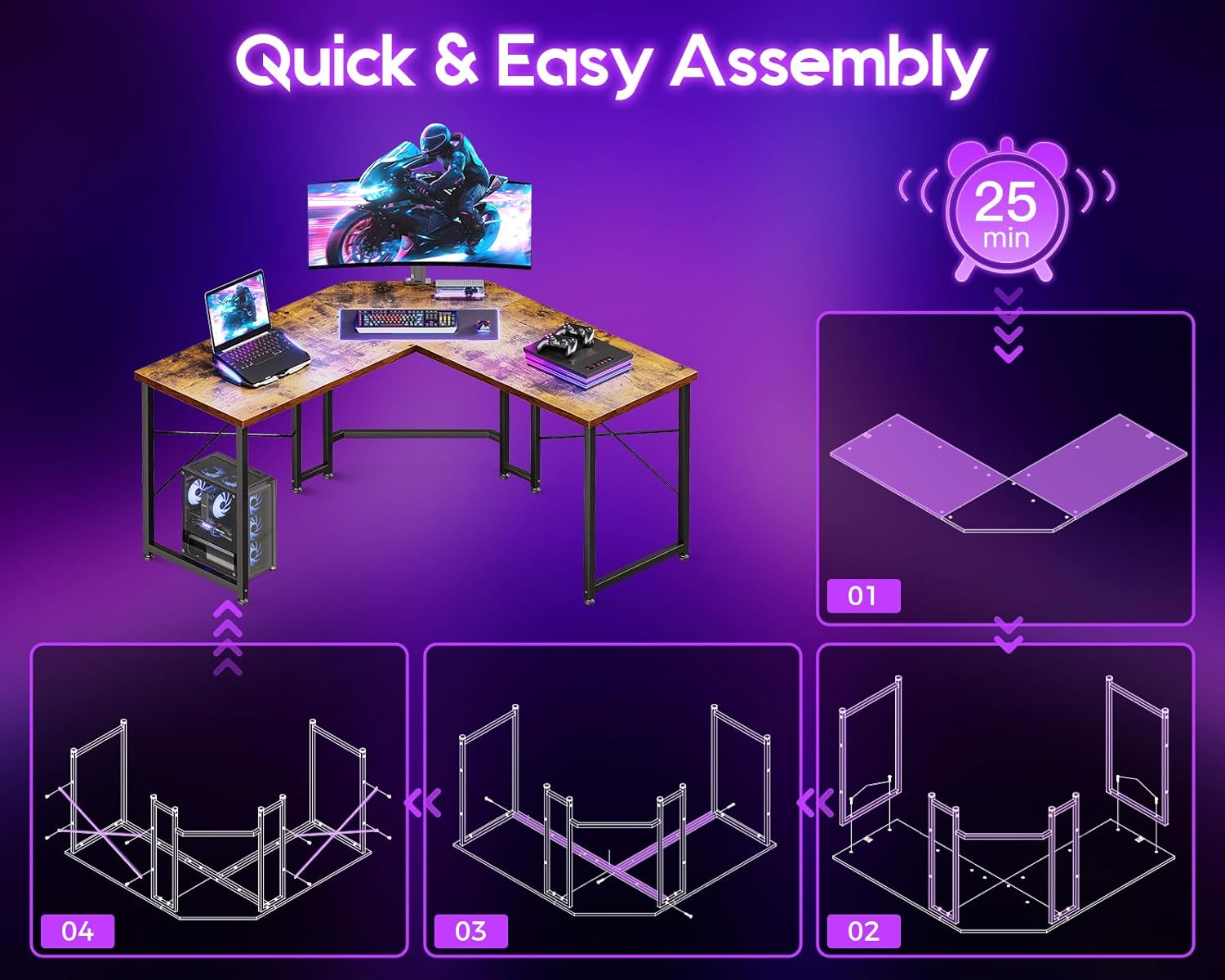
Figure 2: Quick and easy assembly steps.
Video 1: Official Casaottima video demonstrating the L-shaped gaming desk, including assembly and features like ample legroom.
5. Operating Instructions (Usage)
The Casaottima L-Shaped Gaming Desk provides a versatile and spacious workspace. Its design allows for optimal use of corner areas, making it suitable for various room types including offices, dormitories, bedrooms, and living rooms.
- Space Utilization: The L-shaped design (51"W x 19"D) fits perfectly into room corners, maximizing your available space while providing a large surface area.
- Ample Workspace: The generous surface accommodates multiple monitors, keyboards, gaming gear, and other accessories comfortably.
- Legroom: The design ensures a larger under-desk space, keeping your feet and legs free and comfortable during extended use.
- Cable Management: Utilize cable management cutouts (if present, refer to product images) to maintain a clean and organized setup.
- Reversible Configuration: The desk can be assembled with the longer section on either the left or right side, adapting to your specific room layout.

Figure 3: Demonstrating the large legroom provided by the desk design.
6. Maintenance
Proper care will extend the life and appearance of your Casaottima L-Shaped Gaming Desk.
- Cleaning: Clean the desktop and frame with a damp or dry cloth as needed. Avoid harsh chemicals or abrasive cleaners that may damage the finish.
- Spill Management: The desktop resists scratches and spills. Wipe up any spills promptly to prevent staining.
- Fastener Check: Periodically check all screws and bolts to ensure they remain tight. Retighten if necessary.
- Leveling Feet: Re-adjust leveling feet if the desk becomes wobbly over time.

Figure 4: Detail of the premium desktop and adjustable foot pads.
7. Troubleshooting
If you encounter any issues with your Casaottima L-Shaped Gaming Desk, please refer to the following common solutions:
- Wobbling Desk: Ensure the desk is placed on a level surface. Adjust the leveling feet on each leg until the desk is stable. Check that all assembly screws are securely tightened.
- Missing or Damaged Parts: If you find any parts missing or damaged upon opening the package, do not proceed with assembly. Contact Casaottima customer support immediately for replacement parts.
- Difficulty Assembling: Review the assembly instructions carefully, paying attention to the labeled parts and diagrams. Ensure you are using the correct hardware for each step. If issues persist, contact customer support.
8. Specifications

Figure 5: Product Dimensions.
| Feature | Detail |
|---|---|
| Brand | Casaottima |
| Model Name | L Shaped Gaming Desk |
| Model Number | B02030901012USAN0511BC68YZJ |
| UPC | 850062867901 |
| Shape | L-Shaped (Rectangular sections) |
| Product Dimensions (Overall) | 18.9"D x 37.7"W x 29.9"H (each main section) |
| Size | 51 inch (diagonal working surface length 54.41 inches) |
| Color | Rustic Brown |
| Top Material Type | Engineered Wood |
| Base Material | Metal (Steel) |
| Finish Type | Lacquered |
| Special Feature | Reversible configuration, Adjustable Leveling Feet |
| Item Weight | 31.5 Pounds |
| Recommended Uses | Gaming, Home Office, Writing |
| Required Assembly | Yes |
| Recommended People for Assembly | 1 |
| Includes All Assembly Tools | Yes (Allen wrench) |
9. Warranty and Support
The Casaottima L-Shaped Gaming Desk comes with a Limited Warranty. Please refer to the warranty card included in your package for specific terms and conditions.
For any questions, concerns, damaged/missing components, or support needs, please contact Casaottima customer service via Amazon Messages. Our support team aims to resolve your problem within 24 hours.
For more information, visit the official Casaottima Store on Amazon.