1. Introduction
Welcome to the user manual for your SANOTO AI Translator Earbuds Y30. This guide provides essential information on how to set up, operate, maintain, and troubleshoot your earbuds. Please read this manual thoroughly to ensure proper use and to maximize the performance of your device.
2. Package Contents
Please verify that all items are present in your package:
- SANOTO AI Translator Earbuds (Left and Right)
- Charging Case
- USB-C Charging Cable

Image: The SANOTO AI Translator Earbuds Y30, consisting of two open-ear earbuds and their compact black charging case.
3. Product Overview
The SANOTO Y30 earbuds feature an open-ear design for comfort and situational awareness, along with intuitive touch controls and dual microphones for clear audio.
Key Features:
- Open-Ear Design: Allows you to hear your surroundings while enjoying audio.
- Dual-Mic Noise Cancelling: Enhances call clarity by reducing ambient noise.
- Touch Control: Manage playback, calls, and voice assistant with simple taps.
- Ergonomic Earhook: Provides a secure and comfortable fit.

Image: A person wearing the SANOTO Y30 earbuds, illustrating the open-ear design, dual-mic noise cancelling feature, ergonomic earhook, and touch control area on the earbud.
4. Setup
4.1 Charging the Earbuds and Case
- Place both earbuds into the charging case. Ensure they are correctly seated; the indicator lights on the earbuds should illuminate.
- Connect the USB-C charging cable to the charging port on the case and the other end to a power source (e.g., USB wall adapter, computer USB port).
- The indicator lights on the charging case will show the charging status. A full charge for the case takes approximately 1.5 hours.
The earbuds provide up to 6 hours of playback on a single charge, and the charging case extends the total listening time to approximately 30 hours.

Image: The SANOTO Y30 charging case open with earbuds inside, illustrating the 1.5-hour charging time, 6-hour earbud battery capacity, and 30-hour total battery life with the charging case.
4.2 Bluetooth Pairing
- Ensure the earbuds are charged and placed inside the charging case.
- Open the charging case. The earbuds will automatically enter pairing mode, indicated by flashing lights (if applicable).
- On your smartphone or Bluetooth-enabled device, go to the Bluetooth settings.
- Search for available devices and select "SANOTO Y30" from the list.
- Once connected, you will hear an audio prompt, and the earbud indicator lights will turn off or show a steady light.
5. Operating Instructions
5.1 Basic Touch Controls
The SANOTO Y30 earbuds feature touch-sensitive areas for easy control. The following actions can be performed on either earbud unless specified:
| Action | Gesture |
|---|---|
| Power On | Tap 3 times (either side) |
| Shutdown | Tap 5 times (either side) |
| Play/Pause Music | Tap 1 time (either side) |
| Previous Song | Tap 2 times (left ear) |
| Next Song | Tap 2 times (right ear) |
| Volume + | Tap 3 times (left ear) |
| Volume - | Tap 3 times (right ear) |
| Answer/Hang Up Call | Tap 1 time (either side) |
| Reject Call | Tap 2 times (either side) |
| Activate Voice Assistant | Tap 2 times (either side) |
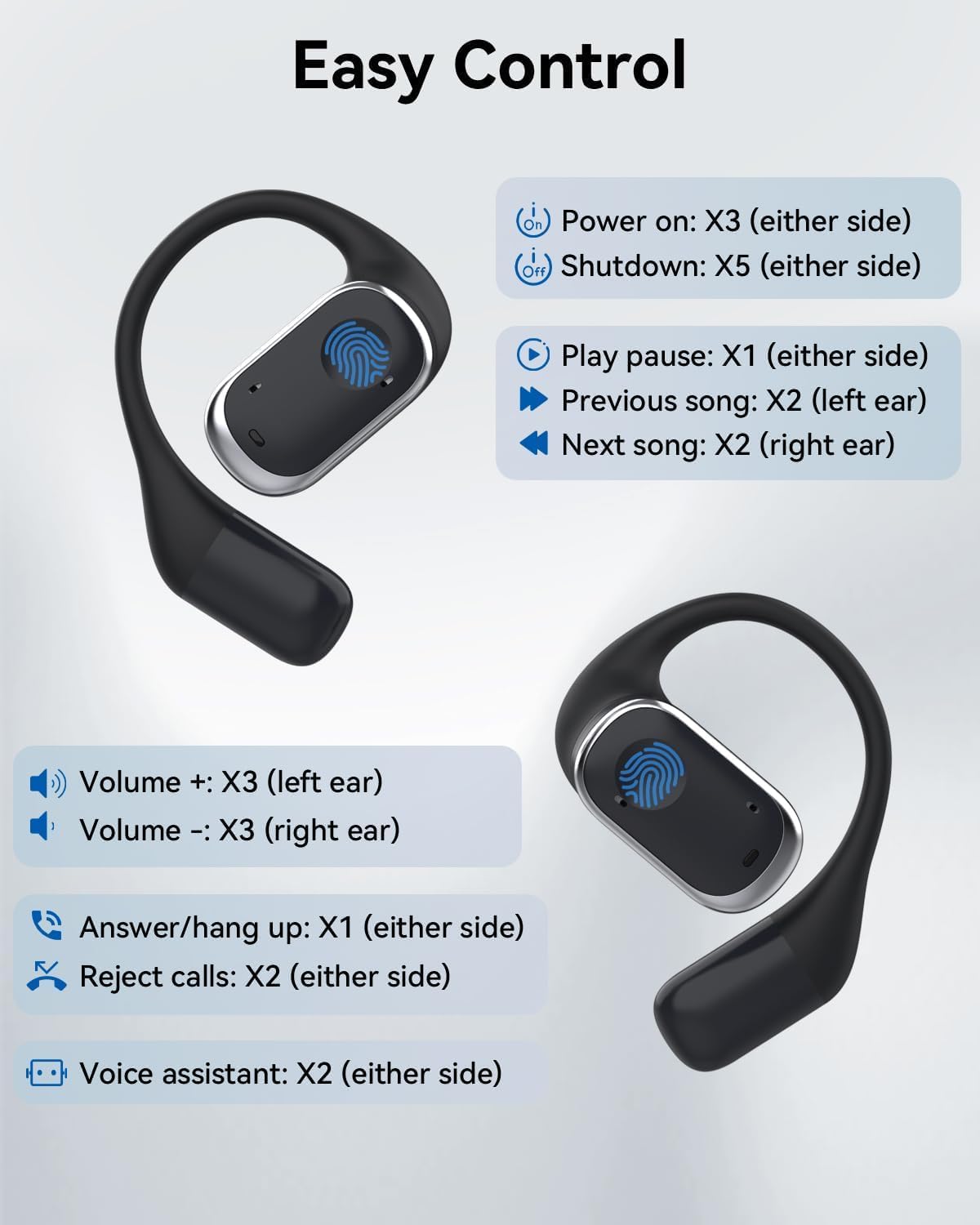
Image: A visual guide detailing the touch control gestures for power, music playback, volume, call management, and voice assistant functions on the SANOTO Y30 earbuds.
5.2 AI Translation Function
The SANOTO Y30 earbuds are designed to facilitate real-time language translation through a dedicated smartphone application. The earbuds act as an audio interface for the translation app, allowing you to hear translated speech and for your speech to be captured for translation.
- Download the App: Search for the official SANOTO translation app on your device's app store (iOS App Store or Google Play Store).
- Connect Earbuds: Ensure your Y30 earbuds are connected to your smartphone via Bluetooth.
- Launch App: Open the translation application.
- Select Languages: Within the app, select the source and target languages for translation. The earbuds support translation for up to 134 languages.
- Initiate Translation: Follow the in-app instructions to begin real-time dialogue, video call translation, or instant text translation. The earbuds will transmit audio to the app and play translated audio back to you.

Image: A smartphone displaying the translation app interface, showing text being translated from English to Spanish, with the SANOTO Y30 earbud in the foreground, indicating its role in overcoming language barriers.

Image: A smartphone screen illustrating the AI real-time dialogue feature within the translation app, showing a conversation with an AI assistant and synchronous recording of chat content.

Image: A smartphone screen depicting a video call with real-time translation from German to English, demonstrating the earbuds' capability to facilitate communication during video conferences.

Image: A conceptual image showing people interacting with speech bubbles indicating accurate and instant translation, with a SANOTO Y30 earbud and a robot icon symbolizing the AI translation technology.

Image: The SANOTO Y30 earbuds and charging case surrounded by the word 'Hello' written in various languages, symbolizing the earbuds' capability to translate 134 languages.
6. Maintenance
6.1 Cleaning
- Gently wipe the earbuds and charging case with a soft, dry, lint-free cloth.
- Do not use abrasive cleaners, solvents, or aerosol sprays.
- Avoid getting moisture into any openings.
6.2 Storage
- Always store the earbuds in their charging case when not in use to protect them and keep them charged.
- Store the device in a cool, dry place, away from direct sunlight and extreme temperatures.
7. Troubleshooting
- Earbuds not pairing:
- Ensure both earbuds are charged.
- Make sure Bluetooth is enabled on your device.
- Place the earbuds back in the case, close it, wait a few seconds, then open it again to re-enter pairing mode.
- Try forgetting "SANOTO Y30" from your device's Bluetooth list and re-pairing.
- No sound from earbuds:
- Check the volume level on both your earbuds and your connected device.
- Ensure the earbuds are properly connected to your device.
- Reboot your connected device.
- Translation function not working:
- Verify that the official SANOTO translation app is installed and up-to-date on your smartphone.
- Confirm that the earbuds are successfully connected to your phone via Bluetooth and recognized by the app.
- Check the app's settings to ensure correct source and target languages are selected.
- Ensure your phone has an active internet connection, as translation often requires cloud processing.
- Refer to the specific help section within the translation app for further guidance.
- Earbuds not charging:
- Ensure the charging cable is securely connected to both the case and the power source.
- Try using a different USB-C cable or power adapter.
- Make sure the charging contacts on the earbuds and inside the case are clean and free of debris.
8. Specifications
| Feature | Specification |
|---|---|
| Model | Y30 |
| Connectivity Technology | Wireless (Bluetooth) |
| Form Factor | Open-Ear (Air Conduction) |
| Control Type | Touch Control |
| Microphone | Dual-Mic Noise Cancelling |
| Earbud Battery Life | Up to 6 hours |
| Total Battery Life (with Case) | Up to 30 hours |
| Charging Time (Case) | Approximately 1.5 hours |
| Translation Languages | Supports 134 languages (via app) |
| Recommended Uses | Running, exercising, travel, business, attending to ambient noise for safety |
| Included Components | Earbuds, Charging Case, USB-C Charging Cable |
| Parcel Dimensions | 9.2 x 9.1 x 4.4 cm |
| Parcel Weight | 140 g |
9. Warranty and Support
For warranty information and customer support, please refer to the documentation included with your purchase or visit the official SANOTO website. If you encounter any issues not covered in this manual, please contact SANOTO customer service for assistance.


