
1. Overview
The Fujifilm X-T50 is a compact mirrorless digital camera designed for image makers seeking advanced features and portability. It incorporates a 40.2-megapixel X-Trans CMOS 5 HR sensor, offering high-resolution imaging. A dedicated Film Simulation dial provides quick access to Fujifilm's unique color profiles, including the new REALA ACE mode. The camera supports video recording up to 6.2K/30P and features up to 7.0 stops of in-body image stabilization for steady shots. Its advanced autofocus system utilizes Deep Learning AI for subject tracking, ensuring sharp results across various subjects. The X-T50 also includes native Frame.io Camera to Cloud connectivity for efficient workflow integration.
Key Features:
- Dedicated Film Simulation dial for quick access to 20 Film Simulations (including REALA ACE mode).
- 40.2-megapixel X-Trans CMOS 5 HR sensor for high-resolution images.
- Compatibility with all X Series lenses, featuring 1.4x and 2x Digital Teleconverter options.
- Video recording capabilities: 6.2K/30P, 4K/60P, FHD/240P, 4:2:2 10-Bit.
- Native Frame.io Camera to Cloud integration for seamless content sharing.
- Up to 7.0 stops of in-body image stabilization.
2. Setup
2.1. Inserting the Battery and Memory Card
Locate the battery and memory card compartment on the bottom of the camera. Open the cover, insert the battery with the correct orientation, and then insert a compatible SD card. Close the compartment cover securely.
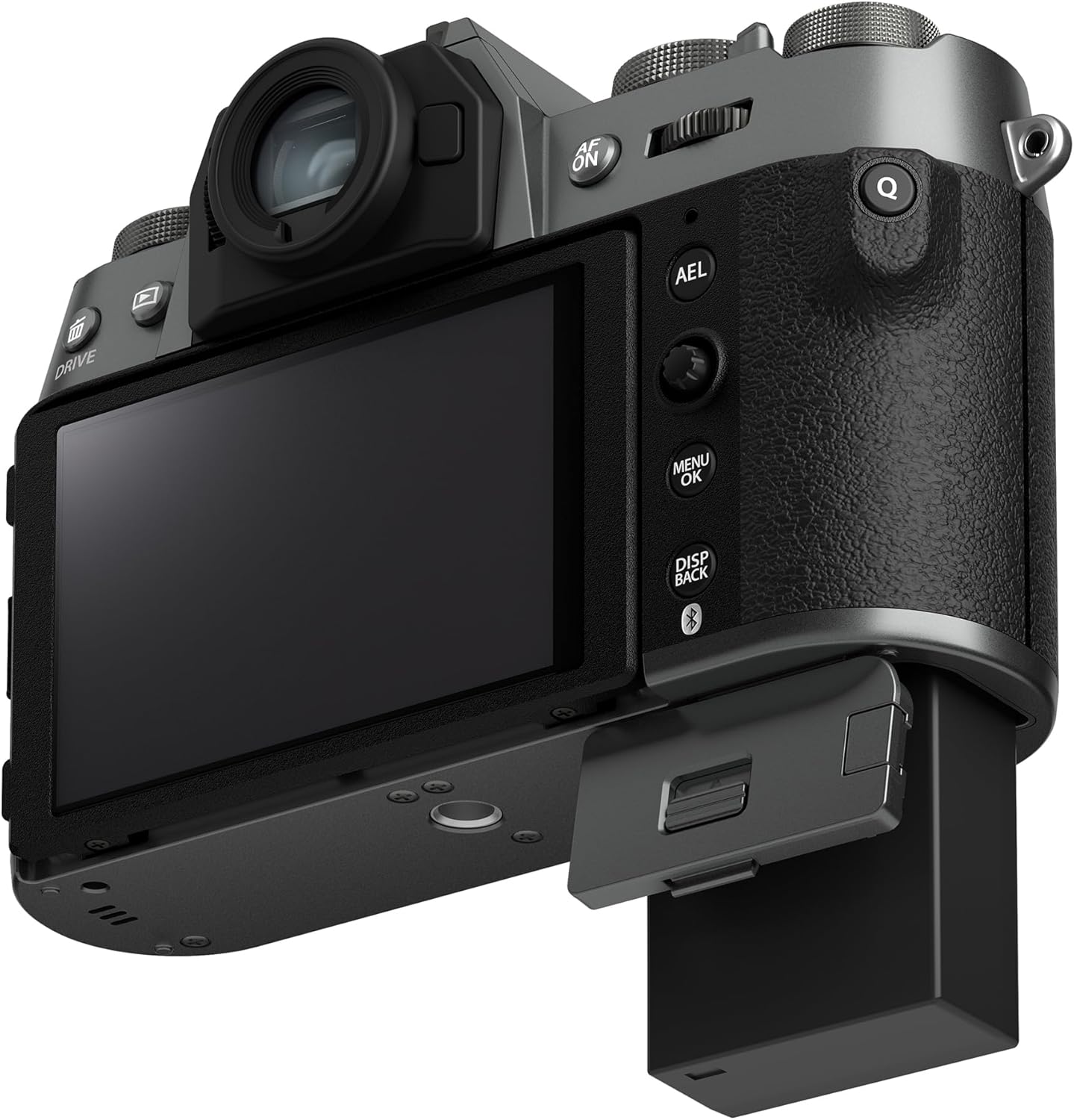
Image: Bottom view of the Fujifilm X-T50 camera with the battery and memory card compartment open, showing the battery slot and SD card slot.
2.2. Attaching a Lens
Align the red dot on the lens with the red dot on the camera body's lens mount. Gently twist the lens clockwise until it clicks into place. Ensure the lens is securely attached before use.

Image: Front view of the Fujifilm X-T50 camera body, showcasing the lens mount without a lens attached.
2.3. Initial Charging
Connect the camera to a power source using the provided USB-C cable for initial battery charging. The charging indicator will show the charging status.
3. Operating the Camera
3.1. Power On/Off
To power on the camera, rotate the ON/OFF switch located on the top plate. To power off, rotate it back to the OFF position.

Image: Top view of the Fujifilm X-T50, highlighting the ON/OFF switch, shutter speed dial, exposure compensation dial, and Film Simulation dial.
3.2. Adjusting Settings with Dials
The camera features several physical dials for quick adjustments:
- Shutter Speed Dial: Adjusts the shutter speed.
- Exposure Compensation Dial: Modifies exposure levels.
- Film Simulation Dial: Selects from various film simulation modes (e.g., Standard, Vivid, Soft, Custom).
3.3. Using the Viewfinder and LCD Screen
The X-T50 is equipped with an electronic viewfinder (EVF) and a tilting LCD touchscreen monitor. The EVF provides a clear view of your scene, while the LCD screen can be tilted for easier viewing from different angles, useful for low-angle or high-angle shots.

Image: Rear view of the Fujifilm X-T50, displaying the LCD screen, electronic viewfinder, and control buttons.
3.4. Focus Mode Selector
The focus mode selector is located on the front of the camera, allowing you to switch between Manual (M), Continuous (C), and Single (S) autofocus modes.
3.5. Built-in Flash
To activate the built-in flash, press the lever located near the hot shoe. The flash will pop up, ready for use. Refer to the camera's menu for flash mode settings (Auto, On, Off, High-Speed Sync).
4. Maintenance
4.1. Cleaning the Camera
Use a soft, lint-free cloth to clean the camera body. For the lens and sensor, use specialized cleaning tools and solutions to avoid damage. Never use harsh chemicals or abrasive materials.
4.2. Battery Care
To prolong battery life, avoid exposing it to extreme temperatures. Store the battery in a cool, dry place when not in use. Fully charge the battery before extended periods of storage.
5. Troubleshooting
5.1. Camera Not Powering On
Ensure the battery is fully charged and correctly inserted. Check if the ON/OFF switch is in the 'ON' position. If the issue persists, try using a different charged battery.
5.2. Image Quality Issues
Check lens cleanliness and ensure it is properly attached. Verify exposure settings (shutter speed, aperture, ISO) are appropriate for the lighting conditions. For blurry images, ensure image stabilization is active if shooting handheld.
5.3. Memory Card Errors
Ensure the memory card is correctly inserted and not locked. Try formatting the card (this will erase all data, so back up first). If errors persist, try a different compatible memory card.
6. Specifications
| Feature | Detail |
|---|---|
| Model Name | X-T50 |
| Sensor Type | 40.2 MP X-Trans CMOS 5 HR |
| Image Stabilization | Sensor-shift (up to 7.0 stops) |
| Video Resolution | Up to 6.2K/30P, 4K/60P, FHD/240P |
| Display Type | Tilting LCD Touchscreen |
| Viewfinder | Electronic |
| Compatible Mountings | Fujifilm X |
| Connectivity | Bluetooth, Wi-Fi, USB-C, HDMI |
| Item Weight | 438 Grams |
| Color | Charcoal Silver |
7. What's in the Box
- Fujifilm X-T50 Camera Body
- Battery
- USB-C Cable
- Shoulder Strap
8. Warranty and Support
8.1. Manufacturer's Warranty
The Fujifilm X-T50 Mirrorless Digital Camera comes with a 1-year manufacturer's warranty. Please retain your proof of purchase for warranty claims.
8.2. Customer Support
For technical assistance, troubleshooting, or service inquiries, please visit the official Fujifilm support website or contact their customer service department. Contact information can typically be found on the Fujifilm website or in the packaging materials.