
1. Introduction
This manual provides essential information for the safe and efficient operation of your Denon DCD-1700NE CD/SACD Player. Please read these instructions thoroughly before using the unit and retain them for future reference. The DCD-1700NE is designed to deliver high-fidelity audio playback from CDs and Super Audio CDs, featuring advanced digital processing and a vibration-resistant design.
2. Package Contents
Verify that all items listed below are included in your package:
- Denon DCD-1700NE CD/SACD Player
- Power Cord
- Audio Cable (RCA stereo)
- Remote Control
- 2 AAA Batteries (for remote control)
- Documentation (User Manual, Safety Instructions)
3. Product Overview
3.1 Front Panel Controls and Display
The front panel provides access to essential playback controls and displays disc information.

Image 3.1: Front view of the Denon DCD-1700NE CD/SACD Player. Visible controls include the power button, disc tray, display screen, disc layer button, Pure Direct button, and playback control buttons (play, pause, stop, skip forward/backward).
- Power Button: Turns the unit on or off.
- Disc Tray: For loading CDs and SACDs.
- Display: Shows track number, time, and other playback information.
- Disc Layer Button: Selects the CD or SACD layer on hybrid discs.
- Pure Direct Button: Engages Pure Direct mode for enhanced audio quality by bypassing non-essential circuits.
- Playback Controls: Buttons for Play/Pause, Stop, Skip Forward, and Skip Backward.
3.2 Rear Panel Connections
The rear panel houses all input and output terminals for connecting the player to other audio components.
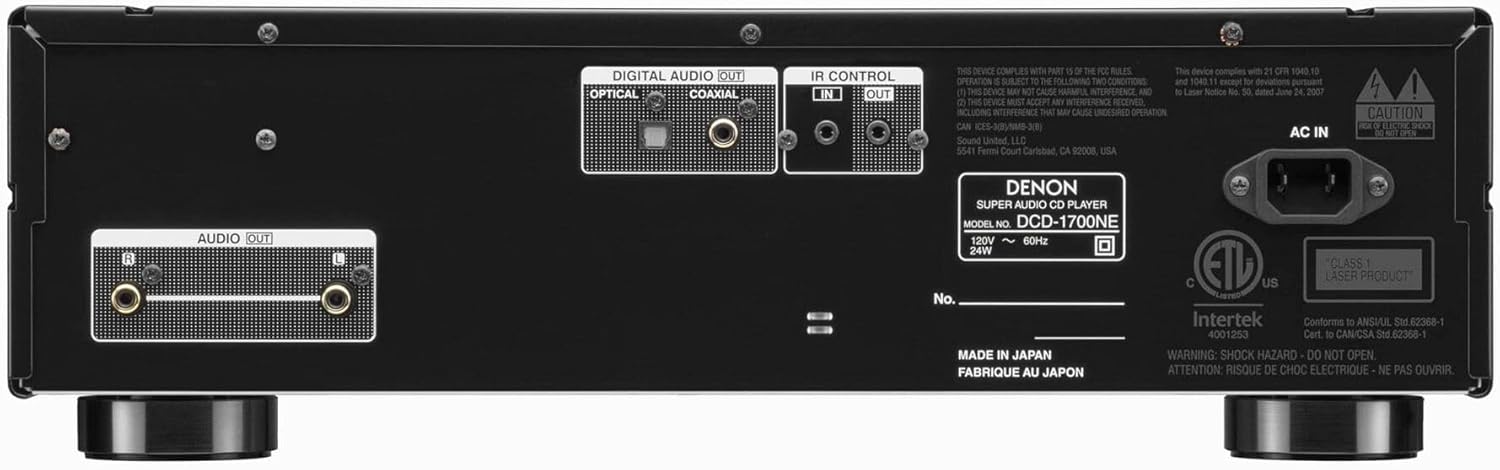
Image 3.2: Rear view of the Denon DCD-1700NE CD/SACD Player. Key connections include Optical and Coaxial Digital Audio Outputs, IR Control In/Out, Analog Audio Outputs (RCA L/R), and the AC power inlet.
- DIGITAL AUDIO OUT (OPTICAL/COAXIAL): For connecting to an external DAC or amplifier with digital inputs.
- IR CONTROL (IN/OUT): For integrating with other Denon components or custom control systems.
- AUDIO OUT (L/R): Analog RCA outputs for connecting to an amplifier or receiver.
- AC IN: Power cord connection.
3.3 Internal Components
The DCD-1700NE features advanced internal architecture for high-quality audio reproduction.

Image 3.3: Internal view of the Denon DCD-1700NE CD/SACD Player, highlighting the robust chassis, shielded power transformers (Digital and Audio), and meticulously laid out circuit boards designed to minimize interference and vibration.
Key internal features include:
- Ultra-Precision 192 kHz/32 Bit D/A Converter: Ensures accurate and detailed audio conversion.
- Vibration-Resistant Design: Minimizes mechanical interference for stable disc playback.
- Advanced AL32 Processing Plus: Denon's proprietary analog waveform reproduction technology.
4. Setup
4.1 Placement
Place the DCD-1700NE on a stable, level surface away from direct sunlight, heat sources, and excessive vibration. Ensure adequate ventilation around the unit.
4.2 Connecting to an Amplifier (Analog Audio Out)
- Ensure both the DCD-1700NE and your amplifier are powered off.
- Connect the supplied RCA audio cable from the AUDIO OUT (L/R) terminals on the DCD-1700NE to the corresponding analog audio input terminals (e.g., CD, AUX) on your amplifier. Match the red plug to the R (right) terminal and the white plug to the L (left) terminal.
4.3 Connecting to a Digital Audio Converter or Amplifier (Digital Audio Out)
If your amplifier or DAC has digital inputs, you can use either the optical or coaxial digital output for a digital connection.
- Ensure both units are powered off.
- Connect a digital optical cable from the DIGITAL AUDIO OUT (OPTICAL) terminal on the DCD-1700NE to an optical digital input on your amplifier/DAC.
- Alternatively, connect a digital coaxial cable from the DIGITAL AUDIO OUT (COAXIAL) terminal on the DCD-1700NE to a coaxial digital input on your amplifier/DAC.
4.4 Power Connection
- Connect the supplied power cord to the AC IN terminal on the rear of the DCD-1700NE.
- Plug the other end of the power cord into a suitable AC wall outlet.
5. Basic Operation
5.1 Powering On/Off
Press the Power button on the front panel or the remote control to turn the unit on or off.
5.2 Loading and Playing Discs

Image 5.2: A hand carefully placing a disc into the open disc tray of the Denon DCD-1700NE CD/SACD Player, ready for playback.
- Press the Open/Close button (usually indicated by an eject symbol) on the front panel or remote control to open the disc tray.
- Place a CD or SACD onto the disc tray with the label side facing up.
- Press the Open/Close button again to close the disc tray. The player will read the disc.
- Press the Play button to begin playback.
5.3 Playback Controls
- Play (►): Starts or resumes playback.
- Pause (∥∥): Temporarily stops playback. Press again to resume.
- Stop (■): Stops playback and resets the disc to the beginning.
- Skip Forward (►►|): Skips to the next track.
- Skip Backward (|◀◀): Skips to the beginning of the current track or the previous track.
5.4 Pure Direct Mode
Press the Pure Direct button on the front panel or remote control to activate this mode. Pure Direct mode turns off the digital audio output and the display to minimize noise interference, resulting in a cleaner analog audio signal. Press the button again to deactivate.
5.5 Supported Disc Types and File Formats
The DCD-1700NE supports:
- Audio CDs (CD-DA)
- Super Audio CDs (SACD)
- Data discs (CD-R/RW, DVD-R/RW) containing DSD, FLAC, and WAV files.
6. Maintenance and Care
6.1 Cleaning the Unit
- Wipe the exterior surfaces with a soft, dry cloth.
- For stubborn dirt, lightly dampen the cloth with water or a mild, non-abrasive cleaner. Do not use harsh chemicals or solvents.
- Never spray cleaning solutions directly onto the unit.
6.2 Disc Handling
- Always hold discs by their edges. Avoid touching the shiny surface.
- Keep discs clean and free from scratches. Use a soft, lint-free cloth to wipe discs from the center outwards if necessary.
- Store discs in their cases when not in use to prevent damage.
7. Troubleshooting
If you experience problems with your DCD-1700NE, refer to the following table for common issues and solutions.
| Problem | Possible Cause | Solution |
|---|---|---|
| Unit does not power on. | Power cord not connected securely. | Check that the power cord is firmly plugged into both the unit and the wall outlet. |
| No sound output. | Audio cables not connected correctly; incorrect input selected on amplifier. | Verify all audio cables are securely connected. Ensure your amplifier is set to the correct input source. |
| Disc does not play or is skipped. | Disc is dirty, scratched, or inserted incorrectly; unsupported disc format. | Clean the disc. Check for scratches. Ensure the disc is inserted label-side up. Verify the disc type is supported. |
| Remote control not working. | Batteries are depleted or inserted incorrectly; obstruction between remote and unit. | Replace batteries with new ones, ensuring correct polarity. Remove any obstructions. Ensure remote is pointed at the unit's IR sensor. |
8. Specifications
| Model Name | DCD-1700NE |
| Brand | Denon |
| Product Dimensions (W x D x H) | 17.1 x 15.1 x 5.3 inches (approximately) |
| Connectivity Technology | Auxiliary (Analog RCA), Optical Digital, Coaxial Digital |
| Special Feature | Anti-Skip Protection, Pure Direct Mode, Advanced AL32 Processing Plus |
| D/A Converter | 192 kHz/32 Bit Ultra-Precision |
| Supported Disc Formats | CD, SACD, CD-R/RW, DVD-R/RW (data discs) |
| Supported File Formats | DSD, FLAC, WAV |
9. Warranty and Support
For warranty information, technical support, or service inquiries, please refer to the warranty card included with your product or visit the official Denon website. Keep your proof of purchase for warranty claims.
Denon Official Website: www.denon.com


