
1. Introduction
Thank you for choosing the MASTOGO Wireless TENS EMS Muscle Stimulator. This device is designed to provide effective pain relief and muscle stimulation through Transcutaneous Electrical Nerve Stimulation (TENS) and Electrical Muscle Stimulation (EMS) technologies. Featuring a wireless, app-controlled design and dual-channel capability, it offers a convenient and versatile solution for managing discomfort and enhancing muscle wellness.
This manual provides essential information for the safe and effective use, setup, operation, and maintenance of your device. Please read it thoroughly before first use and keep it for future reference.
2. Important Safety Information
WARNING: Consult your physician before using this device if you have any medical conditions, including but not limited to:
- Pacemaker or other implanted electronic devices.
- Heart disease or cardiac arrhythmias.
- Epilepsy.
- Pregnancy.
- Cancer.
- Skin conditions or open wounds in the treatment area.
Do not use this device while driving, operating heavy machinery, or during any activity where involuntary muscle contractions could put you at risk.
Keep out of reach of children.
Ensure skin is clean and dry before applying electrode pads to ensure proper adhesion and conductivity.
3. Package Contents
Your MASTOGO Wireless TENS EMS Muscle Stimulator package includes:
- 2 x Wireless TENS EMS Units
- 4 x Large Electrode Pads
- 2 x Small Electrode Pads
- 1 x Dual USB Charging Cable
- 1 x Instruction Manual

Image: All components included in the MASTOGO Wireless TENS EMS Muscle Stimulator package.
4. Setup Guide
4.1 Charging the Units
Before first use, fully charge both wireless TENS EMS units. Connect the dual USB charging cable to the charging ports on each unit and plug the USB end into a compatible power source. The indicator light will show charging status (e.g., red for charging, blue for fully charged). A full charge typically takes about two hours.

Image: The two wireless TENS EMS units connected to the dual USB charging cable.
4.2 Attaching Electrode Pads
Peel off the protective film from the electrode pads. Align the snap connectors on the wireless TENS EMS unit with the corresponding snaps on the electrode pad and press firmly to secure. Ensure the pads are clean and free of lotions or oils for optimal adhesion.
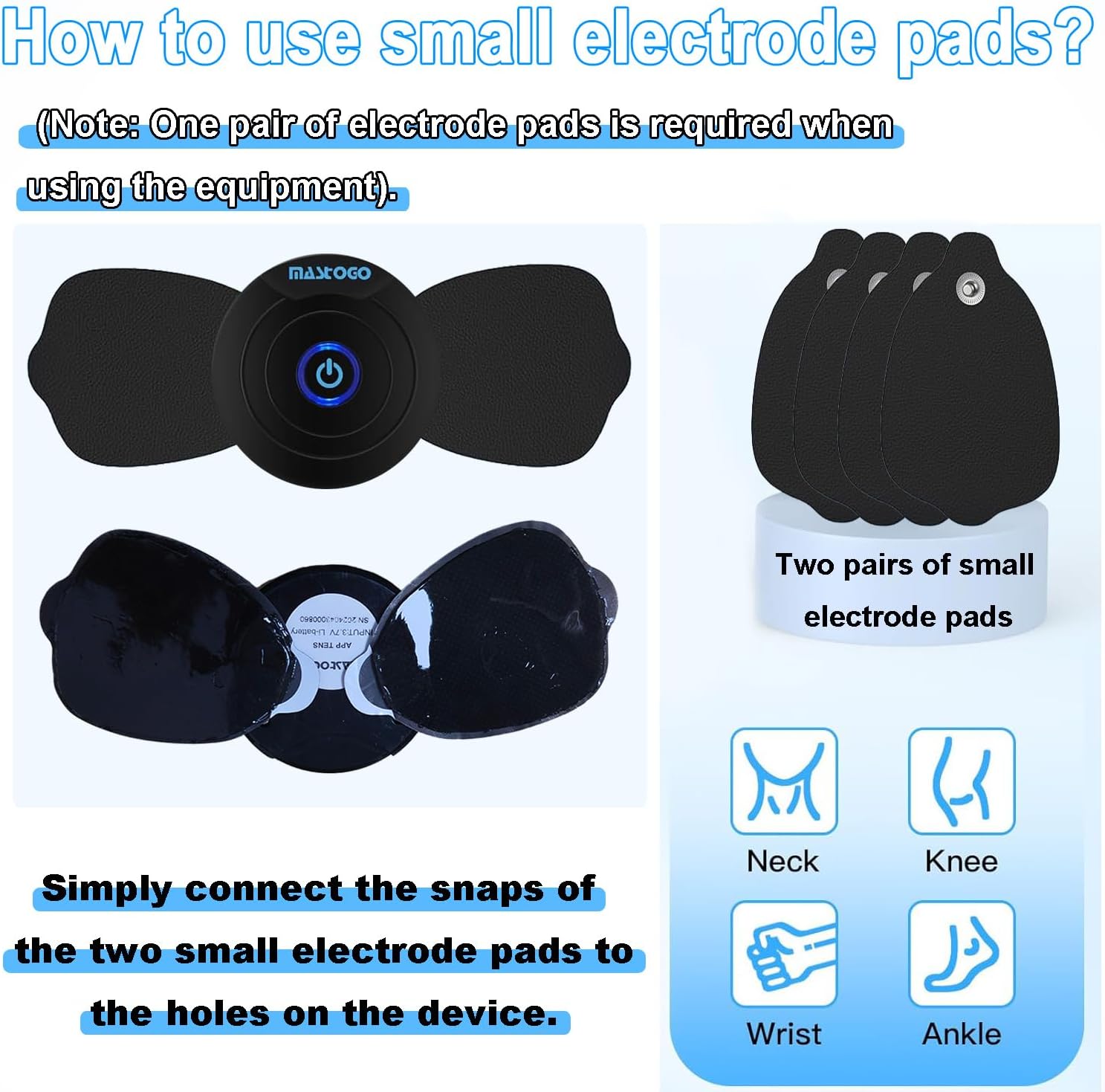
Image: Demonstrates how to connect the small electrode pads to the device.
4.3 Downloading and Pairing the App
- Scan the QR code provided in the instruction manual or on the packaging to download the "DOMAS" app from the App Store (iOS) or Google Play Store (Android).
- Enable Bluetooth on your smartphone.
- Long-press the power button on each TENS EMS unit until the indicator light blinks blue, indicating it's powered on and ready for pairing.
- Open the "DOMAS" app and tap "Scan Devices Nearby." The app will automatically search for and connect to your device(s).
Video: Official MASTOGO video demonstrating the app control and pairing process for the wireless TENS unit.
5. Operating Instructions
5.1 Applying to Skin
Once the electrode pads are attached to the units and paired with the app, apply the pads firmly to the desired area of your body. Ensure good skin contact for effective stimulation.

Image: Demonstrates dual-channel usage on different body parts.
5.2 Using the DOMAS App
The DOMAS app provides full control over your TENS EMS units:
- Mode Selection: Choose between 6 TENS modes (for pain relief) and 6 EMS modes (for muscle tightening and wellness). Modes include kneading, squeezing, tapping, and more.
- Body Part Selection: The app allows you to select specific body parts (e.g., neck, knee, back, shoulder) to optimize the treatment program.
- Intensity Adjustment: Adjust the intensity level from 1 to 20 to suit your comfort and therapeutic needs. Start with a low intensity and gradually increase.
- Timer Setting: Set the treatment duration from 1 to 60 minutes.
- Multi-Host Connection: Connect and control both units simultaneously for treatment on different body parts.

Image: The DOMAS app interface for controlling the TENS EMS units.
6. Maintenance
6.1 Cleaning Electrode Pads
After each use, gently rinse the adhesive side of the electrode pads with water. Allow them to air dry completely before reattaching the protective film. Proper cleaning extends the lifespan and adhesive quality of the pads.
6.2 Storage
Store the wireless TENS EMS units and electrode pads in their original packaging or a clean, dry place. Ensure the protective film is reattached to the pads to prevent them from drying out or losing adhesion.

Image: The professional case for storing the TENS EMS units and accessories.
7. Troubleshooting
- Device not connecting to app: Ensure Bluetooth is enabled on your phone and the TENS EMS units are powered on (blue blinking light). Try restarting the app or your phone.
- Electrode pads not sticking: Clean your skin thoroughly before application. If pads are old or dirty, clean them with water and air dry. If adhesion is still poor, consider replacing the pads.
- No sensation or weak stimulation: Check the battery level of the units. Increase the intensity level in the app. Ensure the electrode pads have full contact with your skin and are placed correctly on the muscle area.
8. Specifications
- Product Dimensions: 7.48 x 2.91 x 0.7 inches
- Weight: 1.04 Pounds
- Batteries: 1 Lithium Ion battery required (included) per unit
- Charging: USB Rechargeable (approx. 2 hours for full charge)
- Modes: 12 (6 TENS, 6 EMS)
- Intensity Levels: 1-20
- Timer: 1-60 minutes adjustable
- Connectivity: Bluetooth (via "DOMAS" app)
- Manufacturer: Hongqiangxing
- Model (ASIN): B0D3WRSCDF
9. Warranty & Support
For any questions or concerns regarding your MASTOGO Wireless TENS EMS Muscle Stimulator, please feel free to contact our customer support team. We are happy to help!
Email: muhuatingus@163.com