Product Overview
The ROCKBROS Smart Bike Tail Light is designed to enhance cycling safety with its intelligent features, including brake sensing, ambient light detection, and vibration sensing. It offers 12 distinct lighting modes and is built with IPX6 waterproof rating for reliable performance in various conditions.

Image: The ROCKBROS Smart Bike Tail Light, a compact black unit with a bright red LED display, designed for rear visibility on bicycles.

Image: A banner highlighting key features of the ROCKBROS Break Sensing Bike Light, including LED beads, 50h battery life, break sensing, intelligent operation, 12 lighting modes, and IPX6 waterproof rating.
Setup
Charging the Device
Before first use, fully charge the tail light. The device features a 600mAh battery and charges via USB Type-C.
- Locate the USB Type-C charging port on the device.
- Connect the provided USB Type-C cable to the light and to a standard USB power source (e.g., computer, wall adapter).
- A full charge typically takes approximately 2 hours. The battery level display will indicate charging progress.

Image: The ROCKBROS bike light connected to a USB Type-C cable for charging, with an overlay showing the 600mAh battery capacity, 2-hour charging time, and a four-segment battery level display indicating 100%, 75%, 45%, and 25% charge.

Image: A detailed view of the battery display showing charge levels (100%, 75%, 45%, 25%) and instructions for selecting brightness (low, medium, highlight) by pressing and holding the button when the taillights are off.
Mounting the Tail Light
The tail light offers two primary mounting options: under the bike saddle or on the seat post.
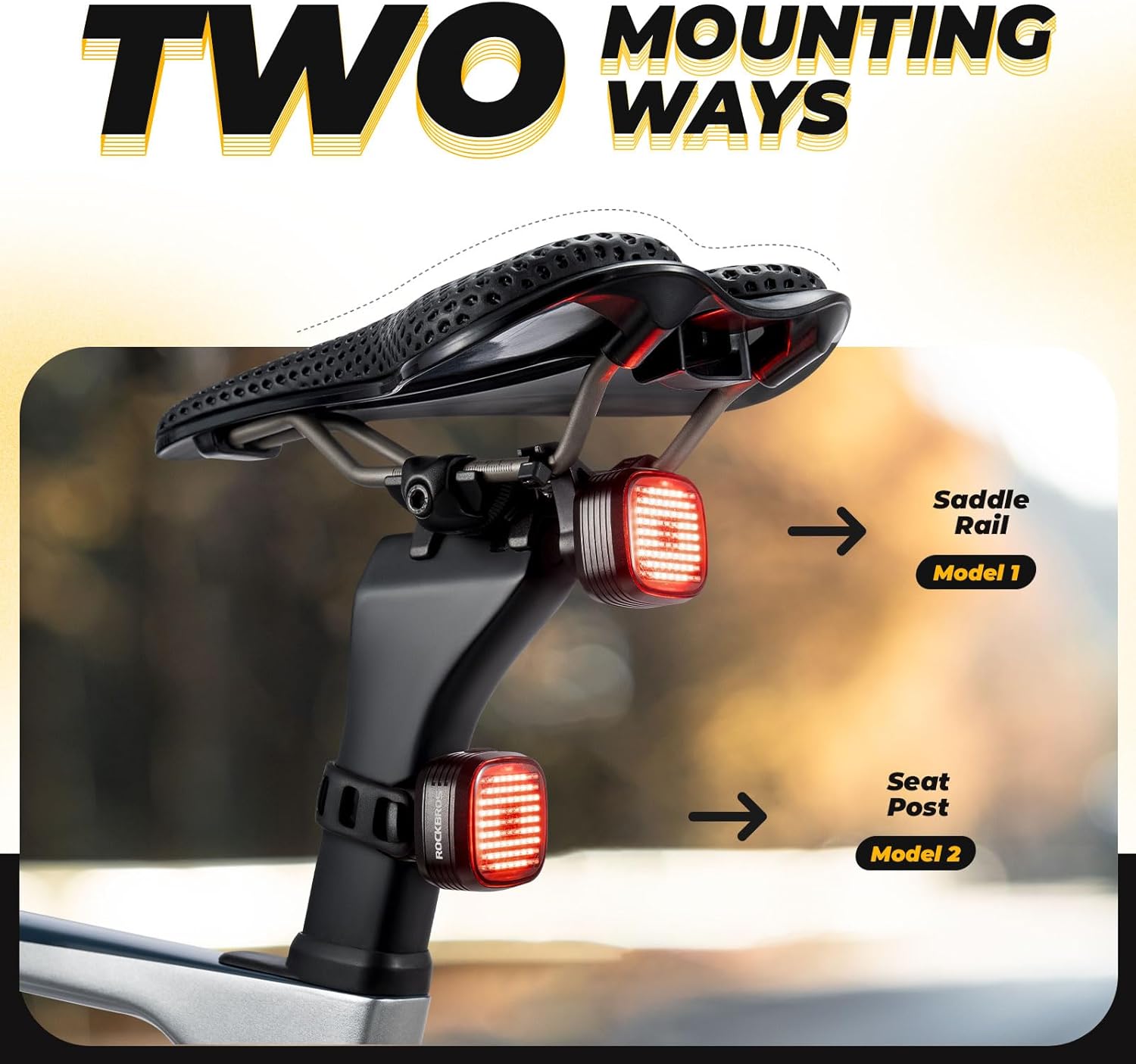
Image: An illustration demonstrating the two mounting methods for the ROCKBROS bike light: directly under the saddle rails (Model 1) and around the seat post (Model 2).
Option 1: Under Bike Saddle Installation
- Attach the saddle rail bracket to the underside of your bike saddle rails using the provided hardware.
- Ensure the bracket is securely fastened and stable.
- Slide the tail light onto the bracket until it clicks into place.

Image: A four-panel sequence illustrating the steps to install the ROCKBROS bike light under the bike saddle, showing the bracket attachment and light sliding into place.
Option 2: Bike Seat Post Installation
- Secure the seat post strap mount around your bike's seat post.
- Adjust the strap for a snug fit, ensuring the mount does not rotate.
- Slide the tail light onto the seat post mount until it locks securely.

Image: A four-panel sequence illustrating the steps to install the ROCKBROS bike light on the bike seat post, showing the strap mount attachment and light sliding into place.
Operating Instructions
Power On/Off and Mode Selection
- Power On: Press and hold the power button for a few seconds until the light illuminates.
- Mode Cycle: Short press the power button to cycle through the 12 available lighting modes.
- Power Off: Press and hold the power button again for a few seconds until the light turns off.
- Brightness Adjustment: When the taillight is off, press and hold the button to select between low, medium, and highlight brightness settings.
Intelligent Features
- Brake Sensing: The light is equipped with a smart sensor that detects deceleration. Upon braking, the light will illuminate steadily for approximately 3 seconds to signal stopping or slowing down. During regular cycling, the light will flicker according to the selected mode.

Image: A diagram illustrating the intelligent brake sensing function of the ROCKBROS bike light. It shows the light remaining steady for 3 seconds during braking and flickering during normal cycling.
- Ambient Light Sensing: The light automatically adjusts its brightness based on ambient light conditions. It will brighten when surroundings darken and dim or turn off in bright environments to conserve battery.
- Vibration Sensing: The light features a vibration sensor for automatic power management. It will automatically turn off after 30 seconds of resting (no vibration detected) and automatically turn on when vibration is sensed (e.g., when you start riding).

Image: A four-panel illustration demonstrating the light sensing and vibration sensing features. It shows auto OFF in bright environments, auto ON in dark environments, auto OFF after 30 seconds of resting, and auto ON when sensing vibration.
Maintenance
- Cleaning: Wipe the light with a soft, damp cloth to remove dirt and debris. Avoid using harsh chemicals or abrasive materials.
- Water Resistance: The light is IPX6 waterproof, meaning it is protected against high-pressure water jets. However, it is not suitable for prolonged submersion in water.
- Battery Care: To prolong battery life, recharge the device regularly, especially if it has not been used for an extended period. Avoid fully depleting the battery frequently.
- Storage: Store the light in a cool, dry place when not in use.
Troubleshooting
- Light not turning on:
- Ensure the battery is charged.
- Press and hold the power button for the required duration to power on.
- Light not charging:
- Check the USB cable and power source for proper connection and functionality.
- Ensure the charging port is clean and free of debris.
- Brake sensing not working:
- Ensure the light is mounted securely and oriented correctly.
- Test the brake sensing by simulating a sudden stop.
- Auto On/Off (Vibration/Light Sensing) issues:
- Verify that the light is in an intelligent mode that supports these features.
- Ensure the light is not obstructed from ambient light.
- Check for sufficient vibration to trigger the auto-on function.
Specifications
| Feature | Specification |
|---|---|
| Brand | ROCKBROS |
| Material | Plastic |
| Water Resistance Level | IPX6 (Waterproof) |
| Item Weight | 0.23 Pounds |
| Mounting Type | Seat Mount (Saddle Rail, Seat Post) |
| Number of Lighting Modes | 12 |
| Auto Part Position | Rear |
| Battery Capacity | 600mAh |
| Charging Time | Approx. 2 hours |
| Endurance | Approx. 50 hours (depending on mode) |
Warranty and Support
Specific warranty details for this product are not provided within this manual. Please refer to the product packaging, the official ROCKBROS website, or contact your retailer for warranty information.
For technical support, product inquiries, or assistance with troubleshooting, please contact ROCKBROS customer service through their official channels or the retailer from whom you purchased the product.


