
TOOLIOM TL-195S
TOOLIOM 195A Stick Welder User Manual
Model: TL-195S
Product Overview
The TOOLIOM 195A Stick Welder is a versatile and powerful welding machine designed for both stick (SMAW) and Lift TIG (GTAW) welding processes. Featuring an intuitive LCD display and adjustable controls, it offers excellent performance for various welding tasks, supporting a range of electrode types and dual voltage input.
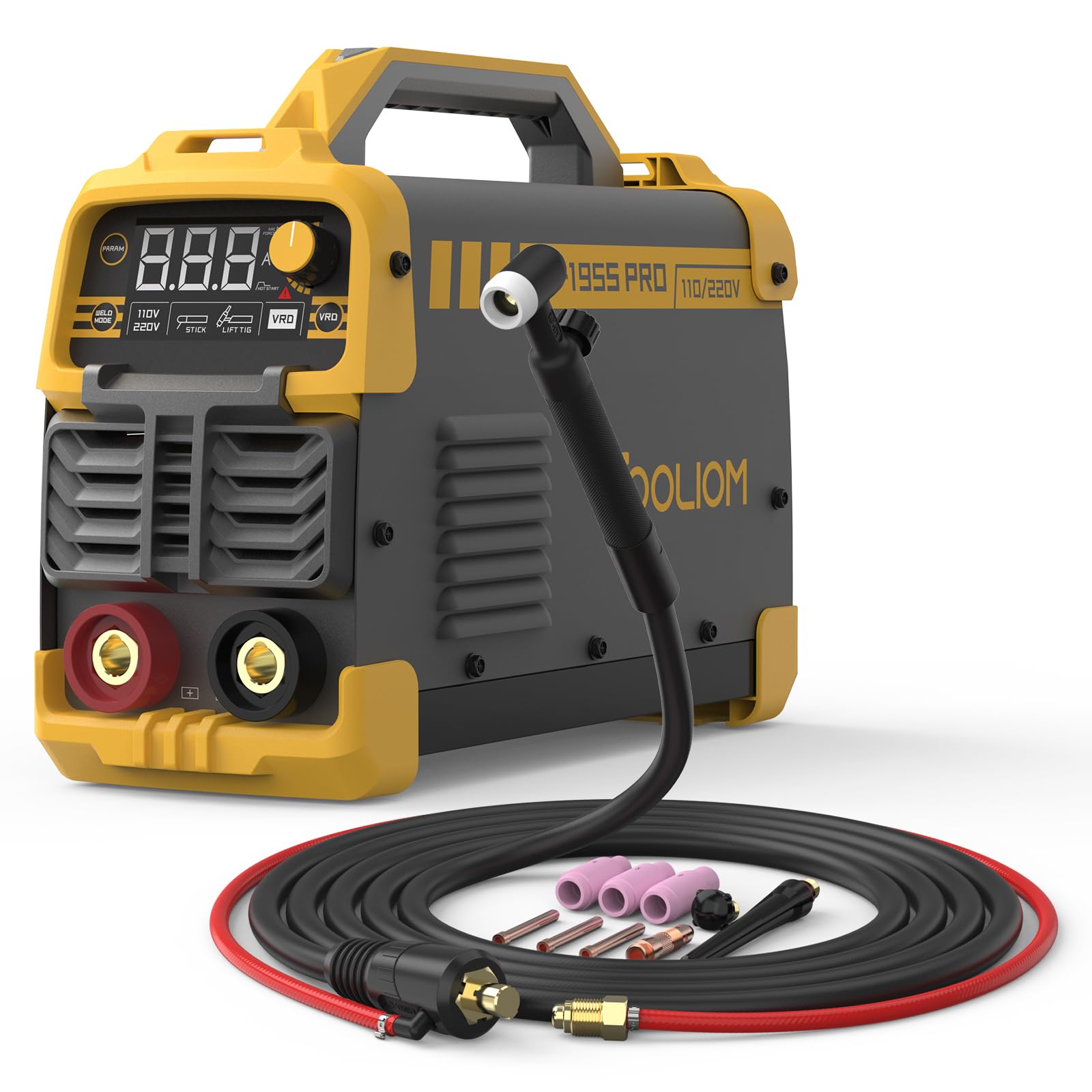
Image Description: A yellow and black TOOLIOM 195A Stick Welder unit is shown from the front-left angle. The welder features a prominent LCD display showing "8.8.8" and indicators for "WELD MODE", "110V/220V", "STICK", "LIFT TIG", and "VRD". A large rotary knob for "HOT START" and "ARC FORCE" is visible. The front panel also has ventilation grilles and two large terminals (red for positive, black for negative). An air-cooled welding gun with a black hose and a TIG torch head is connected to the unit. Various welding accessories, including ceramic nozzles and collets, are laid out in front of the machine, alongside a coiled red and black cable.
Key Features
- High Performance: Capable of up to 195A output, handling max. 5/32 inch (4.0mm) welding rods, with good performance on E6010, E6013, and E7018 electrodes.
- Dual Functionality: 2-in-1 welder supporting both Stick (SMAW) and Lift TIG (GTAW) welding processes. (Note: Lift TIG torch is not included and must be purchased separately, model TL-WP-17V-35-50 from TOOLIOM).
- Intelligent LCD Panel: Clear and easy-to-read display for monitoring parameters, simplifying operation for beginners.
- Adjustable Welding Parameters: Features adjustable Hot Start and Arc Force for easier arc striking and smoother welding.
- Automatic Anti-Stick: Prevents the electrode from sticking in the weld puddle, improving welding efficiency.
- VRD (Voltage Reduction Device) Optional: Enhances safety by reducing open-circuit voltage. Can be toggled ON for anti-electric shock protection or OFF for easier arc initiation with excellent welding results.
Setup Guide
- Unpacking: Carefully remove the welder and all accessories from the packaging. Inspect for any shipping damage.
- Power Connection: Ensure the welder is connected to an appropriate power supply (110V or 220V) as indicated on the unit. The machine automatically detects the input voltage. Use a dedicated circuit with adequate amperage.
- Ground Clamp Connection: Connect the ground clamp cable to the negative (-) terminal on the front panel of the welder. Securely attach the ground clamp to the workpiece or welding table, ensuring good electrical contact.
- Electrode Holder Connection (Stick Welding): Connect the electrode holder cable to the positive (+) terminal on the front panel. Insert the desired electrode into the electrode holder.
- TIG Torch Connection (Lift TIG Welding - Optional): If performing Lift TIG welding, connect the TIG torch (sold separately) according to its specific instructions, typically to the negative (-) terminal for DCEN (Direct Current Electrode Negative) setup.
- Ventilation: Ensure the welding area is well-ventilated to dissipate fumes and heat. Maintain clear space around the welder for proper airflow.
Operating Instructions
Control Panel Overview
The front panel of the TOOLIOM 195A Stick Welder features an intuitive LCD display and control knobs for precise parameter adjustment.
- LCD Display: Shows current welding parameters such as amperage, voltage, and selected mode.
- WELD MODE Button: Toggles between "STICK" (SMAW) and "LIFT TIG" (GTAW) welding modes.
- PARAM Knob: Adjusts the welding current (amperage). Rotate clockwise to increase, counter-clockwise to decrease.
- HOT START Knob: Adjusts the initial current boost for easier arc striking. Higher settings provide a stronger initial current.
- ARC FORCE Knob: Controls the arc stability and penetration. Higher settings help prevent the electrode from sticking and maintain a stable arc, especially during short arc welding.
- VRD Button: Toggles the Voltage Reduction Device ON or OFF. When ON, it reduces the open-circuit voltage for increased safety. When OFF, it may facilitate easier arc initiation.
- 110V/220V Indicator: Displays the detected input voltage.
Stick Welding (SMAW)
- Select Mode: Press the "WELD MODE" button until "STICK" is indicated on the LCD.
- Set Amperage: Use the "PARAM" knob to set the desired welding amperage based on the electrode type and thickness of the material. The welder supports up to 195A for 5/32 inch (4.0mm) electrodes.
- Adjust Hot Start & Arc Force: Fine-tune "HOT START" and "ARC FORCE" knobs for optimal arc initiation and stability.
- VRD Setting: Decide whether to enable VRD for safety or disable it for easier arc striking.
- Begin Welding: Strike the arc by lightly scratching the electrode on the workpiece. Maintain a consistent arc length and travel speed.
Lift TIG Welding (GTAW)
This welder supports Lift TIG functionality. A separate Lift TIG torch (TOOLIOM TL-WP-17V-35-50 recommended) is required.
- Select Mode: Press the "WELD MODE" button until "LIFT TIG" is indicated on the LCD.
- Connect TIG Torch: Ensure the TIG torch is correctly connected, typically to the negative (-) terminal.
- Set Amperage: Adjust the "PARAM" knob for the desired TIG welding current.
- Initiate Arc: Gently touch the tungsten electrode to the workpiece and then lift it slightly to initiate the arc.
- Begin Welding: Proceed with TIG welding, maintaining proper arc length and torch angle.
Maintenance
- Regular Cleaning: Periodically clean the exterior of the welder with a dry, soft cloth. Ensure ventilation openings are free from dust and debris.
- Internal Cleaning: For internal cleaning, it is recommended to have the unit serviced by qualified personnel to blow out dust and metal particles, especially from the fan and heat sinks.
- Cable Inspection: Regularly inspect all welding cables, connections, and the electrode holder/TIG torch for damage, fraying, or loose connections. Replace damaged components immediately.
- Storage: Store the welder in a dry, clean environment, away from excessive dust, moisture, and extreme temperatures.
Troubleshooting
| Problem | Possible Cause | Solution |
|---|---|---|
| No power/Welder does not turn on | No power supply; tripped circuit breaker; loose power cable. | Check power outlet and circuit breaker. Ensure power cable is securely connected. |
| Electrode sticks frequently | Amperage too low; Arc Force setting too low; improper electrode angle; damp electrodes. | Increase amperage. Increase Arc Force. Adjust electrode angle. Use dry electrodes. |
| Arc difficult to strike | Amperage too low; Hot Start setting too low; poor ground connection; VRD enabled. | Increase amperage. Increase Hot Start. Check ground clamp connection. Try disabling VRD (if safe to do so). |
| Poor weld quality | Incorrect amperage; improper travel speed; wrong electrode type; dirty workpiece. | Adjust amperage. Maintain consistent travel speed. Use correct electrode for material. Clean workpiece thoroughly. |
| Overheat protection activated | Exceeded duty cycle; insufficient ventilation. | Allow welder to cool down. Ensure proper ventilation around the unit. Reduce welding time. |
Specifications
- Model: TL-195S
- Style: 195A Stick Welder LCD Display + Welding Gun for TL-195S
- Max Amperage: 195A
- Electrode Compatibility: Up to 5/32 inch (4.0mm) rods (E6010, E6013, E7018)
- Welding Processes: Stick (SMAW), Lift TIG (GTAW)
- ASIN: B0D3WLBJYG
- Date First Available: May 11, 2024
Warranty and Support
For warranty information, technical support, or service inquiries regarding your TOOLIOM 195A Stick Welder, please refer to the warranty card included with your product or visit the official TOOLIOM website. You may also contact TOOLIOM customer service directly for assistance.
Contact Information: Please refer to the manufacturer's official website or product packaging for the most current contact details.
Related documentsTL-195S


Ask a question about this manual
Ask about setup, troubleshooting, compatibility, parts, safety, or missing instructions. Manuals+ will review the question and use this page’s manual context to help answer it.