
Introduction
This manual provides detailed instructions for the safe and efficient operation of your ALEOPIX 2500 Watt Pure Sine Wave Power Inverter. This device converts 12V DC battery power to 110V/120V AC household power, suitable for various applications including home use, RVs, and off-grid solar systems. Please read this manual thoroughly before installation and use to ensure proper function and safety.

Image: The ALEOPIX 2500W Pure Sine Wave Power Inverter, showcasing the main unit, remote control, and included battery cables.
Safety Information
Always observe the following safety precautions to prevent injury or damage to the inverter and connected devices:
- Ensure proper ventilation around the inverter. Do not block cooling vents.
- Connect the inverter only to a 12V DC power source.
- Do not expose the inverter to water, rain, or excessive moisture.
- Avoid operating the inverter in direct sunlight or near heat sources.
- Ensure all connections are secure and properly insulated to prevent short circuits.
- Do not open the inverter casing; there are no user-serviceable parts inside.
- Keep children away from the inverter and its connections.
- Always disconnect the inverter from the battery before performing any maintenance or cleaning.

Image: Diagram illustrating the multiple protection features of the inverter, including low voltage, high temperature, high voltage, earth wire, overcurrent, overload, and short-circuit protection.
Product Overview
The ALEOPIX 2500W Pure Sine Wave Power Inverter is designed for high efficiency and reliability, providing clean power for sensitive electronics. It features a robust design and multiple output options.
Key Features:
- Pure Sine Wave Output: Delivers true 2500W continuous power and 5000W peak power, ensuring compatibility with sensitive electronics.
- High Efficiency: Conversion efficiency greater than 90% with low no-load losses (0.6A).
- Multiple Output Ports: Two 110V/120V AC outlets, one 5V/3.1A USB port, and one 30W Type-C port.
- Remote Control with LCD Screen: Provides real-time operational status, troubleshooting information, and allows for easy adjustment of settings.
- Adjustable Input Voltage: User-selectable low voltage shutdown settings (9.5V-11V) for compatibility with various battery types, including lithium batteries.
- Smart Cooling Fans: Integrated fans for efficient heat dissipation.

Image: Detailed view of the inverter's front and back panels, labeling the power switch, remote port, USB and Type-C ports, AC outlets, earth wire, AC terminal blocks, positive and negative terminals, and cooling fans.

Image: The inverter in an outdoor setting, demonstrating its ability to power multiple devices like a blender, water dispenser, and other electronics, highlighting its universal applicability and pure sine wave output.
Setup and Installation
Follow these steps for safe and correct installation:
- Mounting: Choose a dry, well-ventilated location for the inverter, away from direct sunlight, heat, and flammable materials. Ensure sufficient space for airflow around the cooling fans.
- Battery Connection: Connect the included battery cables to the inverter's positive (red) and negative (black) terminals. Ensure a tight and secure connection. Then, connect the other ends of the cables to your 12V DC battery, observing polarity (red to positive, black to negative). Use appropriate cable gauges for your power requirements.
- Grounding: Connect the inverter's earth wire terminal to a proper ground point.
- Remote Control Connection: Plug the remote control cable into the designated remote port on the inverter.
- AC Output Connection: Once the inverter is powered on, you can plug your AC devices into the 110V/120V AC outlets.
Video: An overview of the ALEOPIX 2500W Pure Sine Wave Inverter, demonstrating its features and connection points. This video provides a visual guide to the product's design and basic setup.
Operating Instructions
The inverter can be operated using the ON/OFF switch on the unit or via the remote control.
Using the Remote Control:
The remote control with its LCD screen provides convenient monitoring and control from a distance (cable length approximately 14.76 ft / 4.5m).
- Power Button: Press to turn the inverter ON or OFF.
- LCD Display: Shows real-time information such as battery voltage, output voltage, load wattage, and battery capacity percentage.
- Wakeup Screen Switch: Press to activate the screen and view current data.
- Settings Button: Used for adjusting specific parameters, such as the adjustable input voltage (see next section).

Image: The remote control's LCD screen, illustrating its display of input voltage, battery capacity, output voltage, load wattage, and indicators for high-voltage, low-voltage, short-circuit/overload, and overheat conditions.
Adjustable Input Voltage
The ALEOPIX 2500W inverter features an adjustable input voltage setting (9.5V-11V) to enhance compatibility with various battery types, particularly lithium batteries. This feature helps reduce battery consumption and extends battery life.
Important: You must adjust the voltage setting when the inverter is OFF.
Setting Low Voltage Shutdown:
Refer to the table below and the switches on the inverter to set the desired low voltage shutdown threshold:
| Switch 1 | Switch 2 | Low Voltage Shutdown |
|---|---|---|
| OFF | OFF | 9.5V |
| OFF | ON | 10V |
| ON | OFF | 10.5V |
| ON | ON | 11V |
The inverter is compatible with various battery types including GEL, SLA, LI (Lithium), FLD, AGM, and CLA. The 'USER' setting allows for custom configuration.

Image: The inverter displaying its selectable input voltage switches and a table detailing the low voltage shutdown settings for different battery types (GEL, SLA, LI, FLD, AGM, CLA, USER).
Specifications
| Specification | Detail |
|---|---|
| Model Name | ALEOPIX 2500 Watt Pure Sine Wave Power Inverter |
| Continuous Power | 2500W |
| Peak Power | 5000W |
| Input Voltage | 12V DC |
| Output Voltage | 110V/120V AC (±3%) |
| Output Waveform | Pure Sine Wave |
| USB Output | 5V/3.1A |
| Type-C Output | 30W |
| No-Load Current | 0.6A |
| Product Dimensions | 14.1"L x 7.9"W x 3.9"H (36cm x 20cm x 10cm) |
| Item Weight | 10.32 pounds |
| Power Source | Battery Powered |
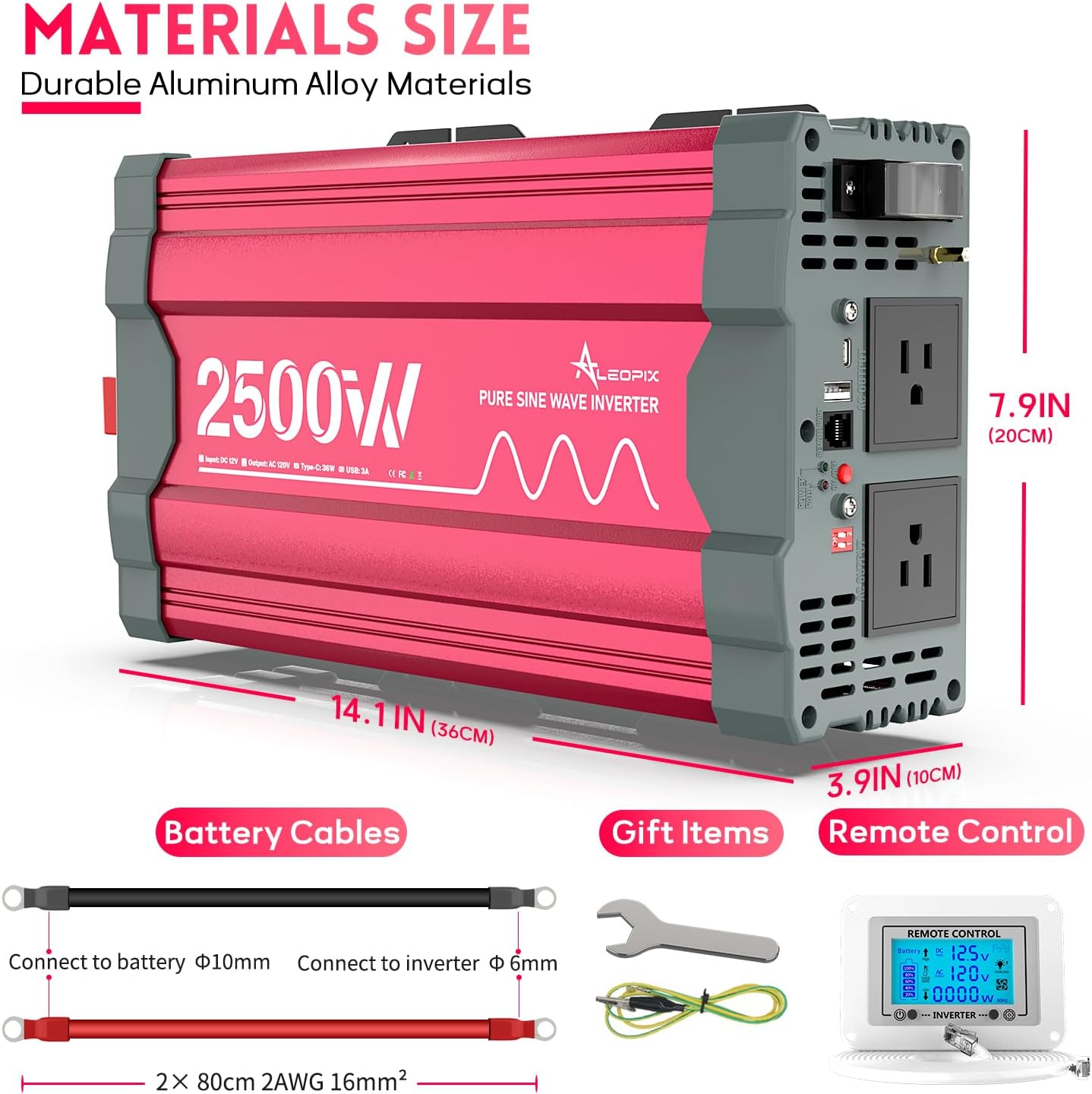
Image: The ALEOPIX 2500W inverter with its dimensions clearly marked, alongside the included battery cables (2x 80cm 2AWG 16mm²) and remote control.
Troubleshooting
The remote control's LCD display provides diagnostic information through flashing symbols to indicate potential issues. Common indicators include:
- Low-voltage: Indicates the input battery voltage is too low. Recharge or replace the battery.
- High-voltage: Indicates the input battery voltage is too high. Check the battery and charging system.
- Overheat: The inverter is overheating. Ensure adequate ventilation and reduce the load.
- Short-circuit / Overload: An excessive load or a short circuit is detected. Disconnect devices, check for faults, and reduce the load.
If the inverter is not functioning as expected, first check all cable connections for tightness and correct polarity. Ensure the battery is adequately charged and the total wattage of connected devices does not exceed the inverter's continuous power rating.
Maintenance
To ensure the longevity and optimal performance of your ALEOPIX power inverter, follow these maintenance guidelines:
- Cleaning: Periodically clean the exterior of the inverter with a dry, soft cloth. Ensure the cooling vents are free from dust and debris. Do not use liquid cleaners.
- Connection Check: Regularly inspect all electrical connections, especially the battery cables, to ensure they are secure and free from corrosion.
- Storage: If storing the inverter for an extended period, disconnect it from the battery and store it in a cool, dry place.
Warranty and Support
Your ALEOPIX 2500W Pure Sine Wave Inverter comes with an aftermarket warranty. The package includes the inverter, battery cables, and this user manual. If you encounter any questions or issues, please contact ALEOPIX customer support via email for assistance.